Utangulizi
This user manual provides comprehensive instructions for the operation, setup, maintenance, and troubleshooting of your PeakTech P 9020 Digital DVB Measurement Device. Please read this manual carefully before using the device to ensure proper functionality and safety.
The PeakTech P 9020 is a versatile digital DVB measurement device designed for signal searches in cable, satellite, and terrestrial television systems. It features a TFT color display, a graphical user interface for easy navigation, and supports various DVB standards including DVB-C, DVB-S, S2, DVB-T, and T2 with H.265 codec support.
Yaliyomo kwenye Kifurushi
Baada ya kufungua, tafadhali thibitisha kuwa vitu vyote vilivyoorodheshwa hapa chini vipo na viko katika hali nzuri:
- PeakTech P 9020 Digital DVB Measurement Device
- Metal Carrying Case
- Adapta ya Nguvu ya AC
- Integrated Lithium-Ion Battery (pre-installed)
- Adapta ya Gari ya 12V
- Windows Software CD/Download Link (if applicable)
- Udhibiti wa Kijijini
- Cable ya Video
- Kamba ya Mabega

Figure 1: PeakTech P 9020 device shown with its complete set of accessories, including the carrying case, power adapters, remote control, and cables.
Kifaa Kimeishaview
The PeakTech P 9020 features a robust design with a clear TFT color display and intuitive controls. Familiarize yourself with the main components:

Kielelezo 2: Mbele view of the PeakTech P 9020, highlighting the TFT color display, control buttons, and input ports.
Vipengele Muhimu:
- TFT Color Display: 12.5 cm (approx. 5 inches) screen for live TV, audio, and menu navigation.
- Jopo la Kudhibiti: Buttons for menu navigation, function selection (F1, F2), signal search (FIND), exit (EXIT), and OK.
- Ingiza Bandari: Connectors for DVB-S/S2, DVB-C, DVB-T/T2 signals.
- Pato la HDMI: Kwa kuunganisha kwenye onyesho la nje.
- Mlango wa USB: For software updates and data transfer.
- Ingizo la Nguvu: For AC adapter or 12V car adapter.
Sanidi
1. Kuchaji Betri:
Before first use, fully charge the integrated lithium-ion battery. Connect the AC power adapter to the device's power input and plug it into a wall outlet. The charging indicator will illuminate. A full charge typically takes several hours.
2. Kuwasha Awali:
Press and hold the power button (usually red) on the device until the screen illuminates. The device will boot up and display the main menu.
3. Language and Region Settings:
Navigate to the "Settings" menu using the directional buttons and OK button. Select "Language" to choose your preferred language. Then, configure region-specific settings for DVB-T/T2 or DVB-C if prompted.
Maagizo ya Uendeshaji
1. Selecting DVB Mode:
From the main menu, select the desired DVB mode (DVB-S/S2 for satellite, DVB-C for cable, or DVB-T/T2 for terrestrial) using the navigation buttons. Press OK to confirm.
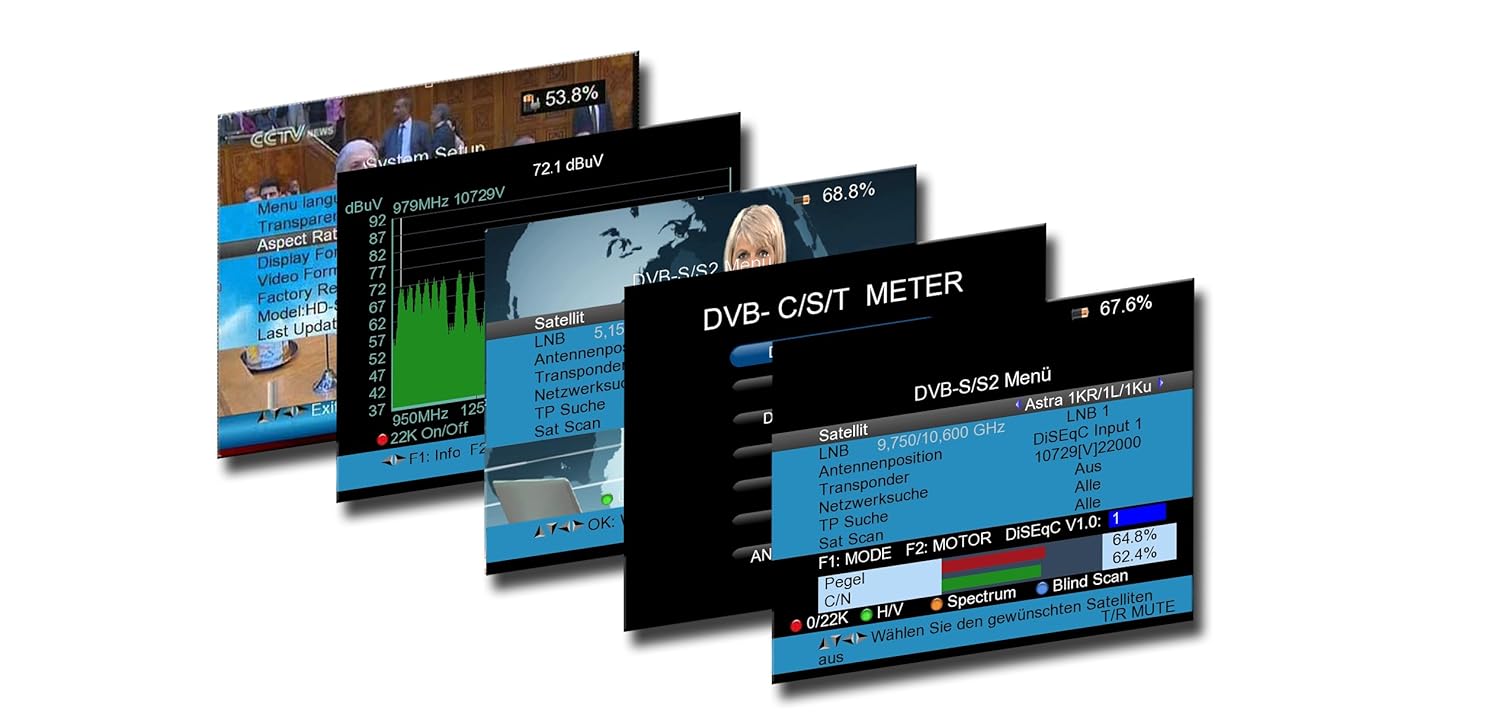
Kielelezo 3: Kutamples of the graphical user interface on the PeakTech P 9020, displaying menu options and signal measurement data.
2. Signal Search (DVB-S/S2):
- Connect the satellite dish LNB cable to the device's satellite input.
- In the DVB-S/S2 menu, configure LNB settings (e.g., LNB type, frequency).
- Select a satellite from the predefined list or manually enter transponder details.
- Press the "FIND" button to initiate a signal search. The device will display signal strength and quality. Adjust the dish alignment until optimal signal levels are achieved.
- Use the spectrum analyzer function to visualize signal characteristics.
3. Signal Search (DVB-T/T2 and DVB-C):
- Connect the terrestrial antenna or cable TV line to the appropriate input.
- In the DVB-T/T2 or DVB-C menu, select the desired channel or frequency range.
- Press "FIND" to scan for available signals. The device will display signal strength, quality, and identify channels.
4. Live TV and Audio:
Once a signal is locked, the device can display live TV channels and play audio directly on its screen, allowing for real-time verification of signal quality and content.
5. Kutumia Kidhibiti cha Mbali:
The included remote control provides convenient access to most functions, including menu navigation, volume control, and channel selection. Ensure the remote's batteries are installed correctly.
Matengenezo
Kusafisha:
Futa kifaa kwa kitambaa laini na kikavu. Kwa uchafu mkaidi, futa kidogoamp cloth can be used. Do not use abrasive cleaners or solvents. Keep the screen clean to ensure clear visibility.
Utunzaji wa Betri:
To prolong battery life, avoid fully discharging the lithium-ion battery frequently. Store the device in a cool, dry place when not in use for extended periods. Recharge the battery periodically if stored for a long time.
Masasisho ya Programu:
Periodically check the PeakTech website for firmware updates. Updates can improve performance, add new features, or fix bugs. Use the provided Windows software and USB cable to perform updates as per the instructions on the PeakTech webtovuti.
Kutatua matatizo
| Tatizo | Sababu inayowezekana | Suluhisho |
|---|---|---|
| Kifaa hakiwashi. | Battery is discharged or power adapter is not connected. | Charge the battery using the AC adapter. Ensure the power button is pressed firmly. |
| Hakuna mawimbi yaliyogunduliwa. | Incorrect DVB mode selected, cable not connected properly, or antenna/dish misalignment. | Verify DVB mode. Check all cable connections. Adjust antenna/dish alignment. Check LNB settings for satellite. |
| Ubora duni wa ishara. | Weak signal, interference, or incorrect settings. | Fine-tune antenna/dish position. Check for obstructions. Ensure correct transponder/channel settings. |
| Udhibiti wa mbali haufanyi kazi. | Dead batteries or line of sight obstruction. | Replace remote control batteries. Ensure no objects are blocking the infrared signal path. |
Vipimo
- Mfano: Uk 9020
- Onyesha: 12.5 cm (5 inch) TFT Color Display
- Supported DVB Standards: DVB-S/S2, DVB-C, DVB-T/T2
- Usimbuaji wa Video: H.265 (HEVC) compatible
- Kichakataji: 450 MHz
- SDRAM: 256 MByte
- Kushusha daraja: 16QAM - 256 QAM, QPSK / 8PSK
- Muunganisho: HDMI, USB
- Betri: Integrated Lithium-Ion Battery
- Ingizo la Nguvu: AC Adapter, 12V Car Adapter
- Vipimo: Sentimita 13 x 20 x 5 (takriban inchi 5.1 x 7.9 x 2)
- Uzito: Gramu 800 (takriban paundi 1.76)
Udhamini na Msaada
PeakTech products are manufactured with high quality standards. For information regarding warranty coverage, technical support, or service, please refer to the official PeakTech webtovuti au wasiliana na huduma kwa wateja wao moja kwa moja. Weka risiti yako ya ununuzi kama dhibitisho la ununuzi kwa madai ya udhamini.
Rasmi Webtovuti: www.peaktech.de
For further assistance, please contact your local distributor or the PeakTech support team.


