1. Utangulizi
This manual provides instructions for the proper use and maintenance of your Paulmann 500.01 Smart Home Bluetooth Remote Control. This remote allows you to control various Paulmann Smart Home Bluetooth lighting products, offering convenient operation without the need for a smartphone or tablet application.
2. Bidhaa Imeishaview
The Paulmann 500.01 remote control is designed for intuitive control of your Paulmann Smart Home lighting. It features dedicated buttons for power, brightness adjustment, color temperature control, and scene selection.

Picha ya 1: Mbele view of the Paulmann 500.01 Smart Home Bluetooth Remote Control. It is a black, rectangular remote with multiple buttons for controlling smart home lighting functions.
2.1. Sifa Muhimu
- Controls all Paulmann Bluetooth Smart Home products.
- Operating range of up to 10 meters in open field conditions.
- Battery-powered for portability (requires AAA batteries).
2.2. Yaliyomo kwenye Kifurushi
- Paulmann 500.01 Smart Home Bluetooth Remote Control
- Mwongozo wa Mtumiaji (hati hii)
- Kumbuka: Betri za AAA hazijajumuishwa na lazima zinunuliwe tofauti.
3. Kuweka
3.1. Ufungaji wa Betri
- Tafuta kifuniko cha sehemu ya betri nyuma ya kidhibiti cha mbali.
- Telezesha au fungua kifuniko kwa upole.
- Ingiza betri mbili (2) za AAA, hakikisha polarity sahihi (+ na -) kama inavyoonyeshwa ndani ya chumba.
- Badilisha kifuniko cha sehemu ya betri hadi ibofye kwa usalama mahali pake.
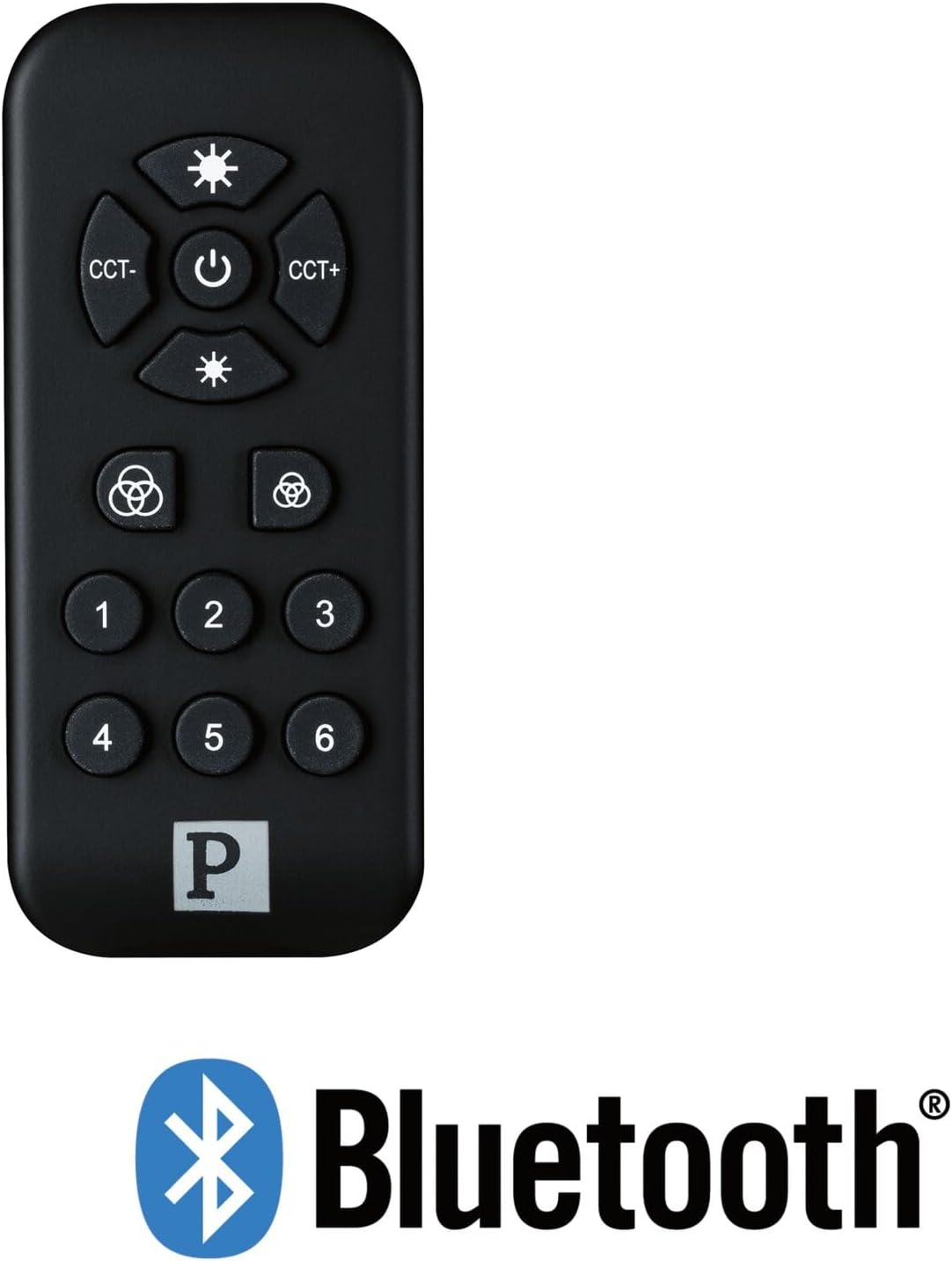
Picha ya 2: The Paulmann 500.01 remote control displayed alongside the Bluetooth logo, indicating its wireless connectivity technology.
3.2. Pairing with Smart Home Devices
To use the remote control, it must be paired with your Paulmann Smart Home Bluetooth lighting products. The specific pairing process may vary slightly depending on the individual lighting product. Generally, the steps involve:
- Ensure your Paulmann Smart Home lighting device is powered on and in pairing mode (refer to the specific device's manual for details on how to activate pairing mode).
- Kwenye kidhibiti cha mbali, bonyeza na ushikilie Nguvu button (or a designated pairing button, if available) for several seconds until an indicator light on the remote or the lighting device confirms pairing initiation.
- Once paired, the lighting device should respond to commands from the remote control.
- If pairing fails, ensure the remote is within range (up to 10 meters) and repeat the process.
For detailed pairing instructions, always consult the user manual of the specific Paulmann Smart Home lighting product you intend to control.
4. Maagizo ya Uendeshaji
The Paulmann 500.01 remote control features several buttons for controlling your Smart Home lighting:
- Kitufe cha Kuwasha (Katikati): Press to turn the connected lighting devices ON or OFF.
- Brightness Up (Top Sun Icon): Increases the brightness of the light.
- Brightness Down (Bottom Sun Icon): Decreases the brightness of the light.
- CCT- (Left CCT Button): Adjusts the color temperature towards warmer white.
- CCT+ (Right CCT Button): Adjusts the color temperature towards cooler white.
- Color Cycle / Scene Buttons (Color Wheel Icons): These buttons typically cycle through predefined color modes or activate specific lighting scenes. Refer to your lighting device's manual for exact functionality.
- Vifungo vyenye Nambari (1-6): These buttons are usually used to select or save specific lighting scenes or groups of devices. Their function can often be customized through the Paulmann Smart Home app or by following specific pairing procedures with your lighting products.
5. Matengenezo
5.1. Kusafisha
To clean the remote control, use a soft, dry cloth. Do not use abrasive cleaners, solvents, or harsh chemicals, as these may damage the surface or internal components.
5.2. Kubadilisha Betri
When the remote control's performance degrades or it stops responding, it is likely time to replace the batteries. Follow the battery installation steps outlined in Section 3.1. Always replace both AAA batteries simultaneously with new ones.
6. Utatuzi wa shida
| Tatizo | Sababu inayowezekana | Suluhisho |
|---|---|---|
| Kidhibiti cha mbali hakijibu. | Betri zilizokufa au zilizosakinishwa vibaya. | Badilisha betri, hakikisha polarity sahihi. |
| Kidhibiti cha mbali hakijibu. | Kati ya masafa. | Move closer to the lighting device (within 10 meters). |
| Kidhibiti cha mbali hakijibu. | Not paired with the device. | Fuata maagizo ya kuoanisha katika Sehemu ya 3.2. |
| Udhibiti wa vipindi. | Kuingilia kati au ishara dhaifu. | Ensure no obstructions between remote and device. Check for other Bluetooth devices causing interference. |
7. Vipimo
- Chapa: Paulman
- Nambari ya Mfano: 50001
- Teknolojia ya Uunganisho: Bluetooth
- Rangi: Nyeusi
- Vifaa Vinavyolingana: Paulmann Smart Home lighting products
- Aina ya Mdhibiti: Udhibiti wa Kitufe
- Masafa ya Juu: mita 10
- Mahitaji ya Betri: Betri 2 x AAA
8. Udhamini na Msaada
For warranty information and technical support, please refer to the official Paulmann website or contact Paulmann customer service directly. Keep your purchase receipt as proof of purchase for any warranty claims.
You can typically find contact information and support resources on the manufacturer's official webtovuti: www.paulmann.com


