UNIC UC46 Mini Projector User Manual
Model: UC46 IDSP-011
1. Utangulizi
This user manual provides detailed instructions for the operation, setup, and maintenance of your UNIC UC46 Mini Projector. Please read this manual thoroughly before using the product to ensure proper and safe operation. Keep this manual for future reference.
Taarifa za Usalama
- Usiangalie moja kwa moja kwenye lenzi ya projekta wakati lamp imewashwa.
- Ensure proper ventilation around the projector to prevent overheating. It is recommended to rest the projector after 4-5 hours of continuous operation.
- Weka projekta mbali na maji au vimiminika vyovyote.
- Tumia tu adapta ya nguvu iliyotolewa na projekta.
- Usijaribu kutenganisha au kutengeneza projekta mwenyewe. Wasiliana na wafanyikazi wa huduma waliohitimu kwa usaidizi.
- This projector is designed for home entertainment and is not suitable for professional teaching, meetings, or business presentations.
2. Bidhaa za Bidhaa
- Muundo Unaobebeka: Compact and lightweight, ideal for home use, camping, and outdoor parties.
- High Mwangaza: 1200 lumens LED lamp for clear and vibrant images.
- Azimio la Asili: 800x480 pixels, supporting up to 1920x1080 (Full HD) via input.
- Ukubwa wa Makadirio Kubwa: Projects images from 34 to 130 inches.
- Chaguzi Nyingi za Muunganisho: HDMI, VGA, USB, AV, SD Card, and IR.
- Uunganisho wa wireless: Supports WiFi, Miracast, and DLNA for seamless smartphone integration (iOS, Android, Windows).
- Maisha marefu ya LED: Lamp maisha ya takriban masaa 20,000.
3. Yaliyomo kwenye Kifurushi
Tafadhali chagua kisanduku kwa vitu vifuatavyo:
- UNIC UC46 Mini Projector
- Cable ya Nguvu
- Cable ya 3-in-1 AV
- Udhibiti wa Kijijini
- Mwongozo wa Mtumiaji (hati hii)
4. Bidhaa Imeishaview
Familiarize yourself with the different parts and controls of your UNIC UC46 Mini Projector.
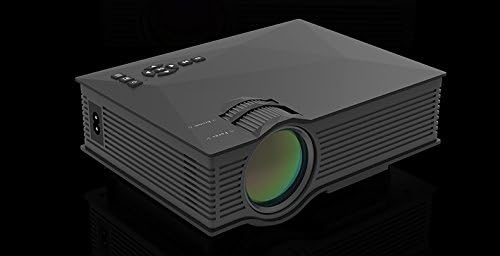
Mchoro 4.1: Mbele na Upande View of the UNIC UC46 Mini Projector. Shows the main lens, focus wheel, and ventilation grilles.

Kielelezo cha 4.2: Nyuma View of the Projector. Displays various input ports including HDMI, USB, AV, SD card slot, and audio output.

Kielelezo 4.3: Juu View of the Projector. Shows the control panel buttons for navigation, power, and input selection.

Figure 4.4: Lens Focus and Keystone Adjustment Diagram. Illustrates the location of the lens focus and keystone correction wheels, along with a diagram of the remote control functions.
5. Kuweka
5.1 Uwekaji
Place the projector on a stable, flat surface. Ensure there is adequate space around the projector for ventilation. The projection distance will determine the screen size. Refer to the specifications for recommended distances.
Uunganisho wa Nguvu 5.2
- Connect the power cable to the projector's AC power input port.
- Plug the other end of the power cable into a standard electrical outlet (100-240V, 50/60Hz).
- Taa ya kiashiria cha nguvu kwenye projekta itaangaza.
5.3 Umeme wa Awali Umewashwa
- Bonyeza kitufe cha Kuwasha/Kuzima kwenye projekta au kidhibiti cha mbali ili kuwasha kifaa.
- The projector will display the startup screen.
5.4 Marekebisho ya Picha
- Kuzingatia: Rotate the focus wheel (located near the lens) until the projected image is clear and sharp.
- Marekebisho ya Jiwe kuu: If the image appears trapezoidal, adjust the keystone correction wheel (usually next to the focus wheel) to square the image.
6. Maagizo ya Uendeshaji
6.1 Vifaa vya Kuunganisha
The UNIC UC46 projector supports various input sources:
- HDMI: Connect a PC, laptop, DVD player, game console (PS3, PS4), or Smart TV box using an HDMI cable. Select "HDMI" as the input source.
- VGA: Connect a PC or laptop using a VGA cable. Select "VGA" as the input source.
- USB: Ingiza kiendeshi cha USB flash ili kucheza vyombo vya habari files (videos, photos, music, text). Select "USB" as the input source and navigate through the files.
- YA: Use the included 3-in-1 AV cable to connect devices with AV output (e.g., older DVD players, VCRs). Select "AV" as the input source.
- Kadi ya SD: Insert an SD card into the slot to play media files. Select "SD" as the input source.
6.2 Wireless Connectivity (WiFi)
The projector supports WiFi connectivity for screen mirroring from smartphones (iOS, Android, Windows) and DLNA.
- Go to the "WiFi" or "Wireless" menu on the projector.
- Select your WiFi network and enter the password to connect the projector to your home network.
- For screen mirroring (Miracast/AirPlay):
- Ensure your smartphone and the projector are connected to the same WiFi network.
- On your smartphone, enable screen mirroring (e.g., "Screen Mirroring," "Smart View," "AirPlay," "Wireless Display").
- Chagua projekta kutoka kwenye orodha ya vifaa vinavyopatikana.
- For DLNA:
- Ensure your smartphone and the projector are connected to the same WiFi network.
- Use a DLNA-compatible app on your smartphone to stream media to the projector.
Pato la Sauti
The projector has a built-in speaker. For enhanced audio, you can connect external speakers or a sound system via the 3.5mm audio output port.
7. Matengenezo
7.1 Kusafisha Lenzi
Tumia kitambaa laini kisicho na pamba kilichoundwa mahususi kwa ajili ya lenzi za macho ili kuifuta kwa upole lenzi ya projekta. Usitumie visafishaji vya abrasive au vimumunyisho.
7.2 Kusafisha Mwili wa Projector
Futa sehemu ya nje ya projekta kwa kitambaa laini na kikavu. Kwa uchafu mkaidi, futa kidogoamp kitambaa kinaweza kutumika, ikifuatiwa na kitambaa kavu.
7.3 Uingizaji hewa
Regularly check that the ventilation grilles are not blocked by dust or debris. Use a soft brush or compressed air to clean them if necessary. Proper airflow is crucial for preventing overheating and extending the projector's lifespan.
7.4 Lamp Maisha
LED lamp has an estimated life of 20,000 hours. To maximize lamp life, avoid frequent on/off cycles and allow the projector to cool down properly after use.
8. Utatuzi wa shida
| Tatizo | Sababu inayowezekana | Suluhisho |
|---|---|---|
| Hakuna picha iliyokadiriwa | Power cable not connected; Projector not turned on; Incorrect input source selected; Input device not connected or powered on. | Check power connection; Press power button; Select correct input source (HDMI, VGA, USB, AV, SD); Ensure input device is connected and powered on. |
| Picha ni ukungu | Lens out of focus; Incorrect projection distance. | Adjust the focus wheel; Adjust the projection distance. |
| Picha ni trapezoidal | Projekta si ya pembeni mwa skrini. | Adjust the keystone correction wheel. |
| Hakuna sauti | Volume too low; Muted; External audio device not connected or powered on; Audio format not supported. | Increase volume; Unmute; Check external audio connection; Ensure audio format is supported. |
| Udhibiti wa mbali haufanyi kazi | Batteries dead or incorrectly inserted; Obstruction between remote and IR receiver. | Badilisha betri; Hakikisha mstari wazi wa kuona kwa kipokezi cha IR cha projekta. |
| Overheating / Shuts down automatically | Uingizaji hewa ulioziba; Matumizi ya muda mrefu. | Ensure ventilation grilles are clear; Allow projector to rest after 4-5 hours of use. |
9. Vipimo

Figure 9.1: Detailed Specifications of the UNIC UC46 Mini Projector.
| Kipengele | Maelezo |
|---|---|
| Mfumo wa Picha | LCD |
| Lamp | LED |
| Azimio la Asili | pikseli 800 x 480 |
| Azimio la Juu Linatumika | pikseli 1920 x 1080 (HD Kamili) |
| Mwangaza | 1200 Lumens |
| Uwiano wa Tofauti | 800:1 |
| Matumizi ya Nguvu | Watts 50-55 |
| Ugavi wa Nguvu | 100-240V, 50/60Hz |
| Kiwango cha Kelele | <25dB |
| Ukubwa wa Makadirio | inchi 34-130 |
| Tupa Umbali | mita 1.07 hadi 3.8 (futi 3.51 hadi 12.47) |
| Uwiano wa kipengele | 4:3 / 16:9 |
| Uzito Net | 1 kg |
| Lenzi | Multi-layer coated glass lens |
| Vituo vya kuingiza data | USB, SD, HDMI, AV, VGA, IR |
| Kituo cha Matokeo | Kichwa cha sauti, Spika |
| Bila waya | WiFi 2.4G |
| Vipimo vya Bidhaa | 201mm x 153mm x 67.5mm |
10. Udhamini na Msaada
For warranty information and technical support, please refer to the product packaging or contact your retailer. Keep your purchase receipt as proof of purchase.