Utangulizi
Thank you for choosing the Monitor Audio Apex AW-12 Subwoofer. This compact, high-performance subwoofer is designed to deliver powerful and precise bass, enhancing your home audio experience. Featuring a 12-inch C-CAM driver, a 500-watt Class D amplifier, and a high-efficiency switched-mode power supply, the Apex AW-12 integrates seamlessly into any compatible A/V system. This manual provides essential information for safe installation, optimal operation, and proper maintenance of your subwoofer.
Taarifa za Usalama
Please read all safety instructions before operating the subwoofer. Keep this manual for future reference.
- Chanzo cha Nguvu: Connect the subwoofer only to an AC power source as indicated on the unit.
- Uingizaji hewa: Hakikisha kuna uingizaji hewa wa kutosha kuzunguka kitengo. Usizuie fursa za uingizaji hewa.
- Maji na Unyevu: Usiweke kifaa kwenye mvua, unyevu, au unyevu kupita kiasi.
- Joto: Weka kifaa mbali na vyanzo vya joto kama vile radiators, rejista za joto, jiko, au vifaa vingine vinavyozalisha joto.
- Kuhudumia: Usijaribu kuhudumia bidhaa hii mwenyewe. Rejelea huduma zote kwa wafanyikazi waliohitimu wa huduma.
- Kusafisha: Kata kutoka kwa umeme kabla ya kusafisha. Tumia kitambaa laini na kikavu.
Bidhaa Imeishaview
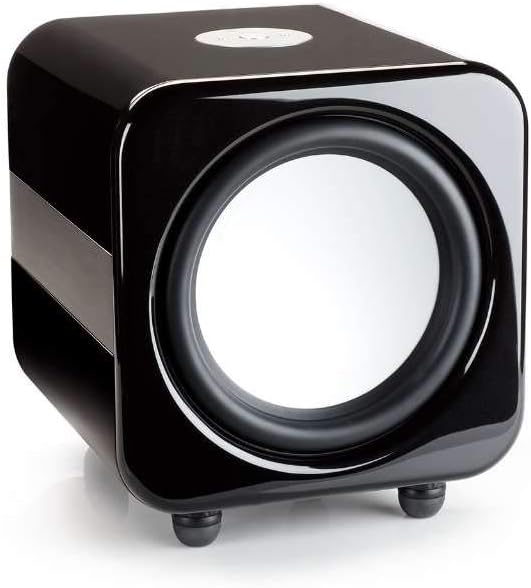
The Monitor Audio Apex AW-12 Subwoofer is designed for robust audio performance and aesthetic integration.


Sanidi
1. uwekaji
The Apex AW-12 is designed as a floor-standing subwoofer. For optimal performance, place the subwoofer on a solid, level surface. Experiment with different positions in your room to find the best bass response, typically in a corner or along a wall.
2. Viunganishi
Ensure all audio equipment is turned off before making connections.
- Ingizo la Sauti: Connect the subwoofer to your A/V receiver or processor's subwoofer output (LFE) using a high-quality RCA cable.
- Ingizo la Kichochezi cha 12V: If your A/V receiver or processor has a 12V trigger output, connect it to the subwoofer's 12V trigger input. This allows for automatic power activation/deactivation with your main system.
- Muunganisho wa Nishati: Once all audio connections are made, connect the supplied AC power cord to the subwoofer's power inlet and then to a suitable wall outlet.
Uendeshaji
Kuwasha/Kuzima
If using the 12V trigger input, the subwoofer will power on automatically when your connected A/V receiver or processor is turned on. Otherwise, locate the power switch on the subwoofer and set it to the 'ON' position.
Volume and EQ Controls
The Apex AW-12 features top-mounted controls for volume and EQ settings. Adjust the volume to blend seamlessly with your main speakers. The EQ settings allow you to fine-tune the bass response to suit your room acoustics and personal preference. Refer to your A/V receiver's manual for initial setup and calibration of subwoofer levels.
Matengenezo
To ensure the longevity and optimal performance of your Monitor Audio Apex AW-12 Subwoofer, follow these maintenance guidelines:
- Kusafisha: Regularly wipe the cabinet with a soft, dry, lint-free cloth. Avoid using abrasive cleaners, waxes, or solvents, as these can damage the finish.
- Vumbi: Use a soft brush or a vacuum cleaner with a brush attachment to gently remove dust from the driver and ventilation areas.
- Mazingira: Keep the subwoofer in a stable environment, away from direct sunlight, extreme temperatures, and high humidity.
- Ukaguzi: Mara kwa mara angalia miunganisho yote ya kebo ili kuhakikisha kuwa iko salama.
Kutatua matatizo
If you experience issues with your Apex AW-12 Subwoofer, consult the following table for common problems and solutions.
| Tatizo | Sababu inayowezekana | Suluhisho |
|---|---|---|
| Hakuna sauti kutoka kwa subwoofer | Nguvu haijaunganishwa au imewashwa Kebo ya sauti imelegea au ina kasoro Receiver/processor settings incorrect | Angalia waya wa umeme na swichi ya umeme Ensure audio cable is securely connected at both ends; try a different cable Verify subwoofer output is enabled and volume is up on your receiver/processor |
| Besi iliyopotoka au dhaifu | Subwoofer volume too high/low Incorrect EQ settings Uwekaji mbaya | Adjust subwoofer volume on the unit and/or receiver Experiment with EQ settings Try repositioning the subwoofer in the room |
| Subwoofer does not turn on with receiver (12V trigger) | 12V trigger cable loose or faulty Receiver's 12V trigger output not active | Check 12V trigger cable connection Consult your receiver's manual to ensure 12V trigger output is enabled |
If the problem persists after trying these solutions, please contact Monitor Audio customer support.
Vipimo
Key technical specifications for the Monitor Audio Apex AW-12 Subwoofer:
| Kipengele | Vipimo |
|---|---|
| Mfano | Apex AW-12-BK |
| Aina ya Spika | Subwoofer |
| Kipenyo cha Subwoofer | Inchi 12 (sentimita 30.48) |
| AmpAina ya lifier | Darasa la D |
| Wattage / Max Output Power | 500 Watts |
| Chanzo cha Nguvu | AC |
| Nyenzo | Metali |
| Rangi | Nyeusi ya Metali |
| Vipimo (D x W x H) | Sentimita 49.5 x 47.5 x 47.2 cm (19.5 in x 18.7 in x 18.6) |
| Aina ya Kuweka | Sakafu imesimama |
Taarifa ya Udhamini
Monitor Audio products are manufactured to the highest quality standards. For detailed warranty terms and conditions, please refer to the warranty card included with your product or visit the official Monitor Audio webtovuti. Weka uthibitisho wako wa ununuzi kwa madai ya udhamini.
Usaidizi wa Wateja
If you require further assistance or have questions not covered in this manual, please contact Monitor Audio customer support or your authorized dealer. Contact information can typically be found on the official Monitor Audio webtovuti au kwenye ufungaji wa bidhaa yako.


