1. Utangulizi
The AULA F2010 Unicorn Backlit Mechanical Gaming Keyboard is designed for an enhanced gaming and typing experience. It features a durable construction, multi-color LED illumination, and responsive mechanical switches. This manual provides detailed instructions for setting up, operating, and maintaining your keyboard.
2. Yaliyomo kwenye Kifurushi
- Kibodi ya Michezo ya Kimitambo ya AULA F2010
- Mwongozo wa Mtumiaji
- Kivutio cha Keycap
3. Mwongozo wa Kuweka
3.1 Mahitaji ya Mfumo
- Operating System: Windows Vista / 7 / 8 / 10 / Mac OS
- Inapatikana USB Port
3.2 Kuunganisha Kibodi
- Tafuta mlango wa USB unaopatikana kwenye kompyuta yako.
- Plug the USB connector of the AULA F2010 keyboard into the USB port.
- The keyboard will automatically install the necessary drivers. This may take a few moments.
- Mara tu usakinishaji utakapokamilika, mwangaza wa kibodi utawaka, ikionyesha kuwa iko tayari kutumika.
4. Maagizo ya Uendeshaji
4.1 Udhibiti wa Mwangaza wa Nyuma
The AULA F2010 features multi-color LED backlighting with adjustable brightness and various lighting effects.
- Kurekebisha Mwangaza: Bonyeza FN + PGUP ili kuongeza mwangaza. Bonyeza FN + PGDN kupunguza mwangaza.
- Kubadilisha Njia za Taa: Bonyeza FN + INS to cycle through different lighting effects (e.g., strobe, glow, pulse).
- Kubinafsisha Mwangaza: Tumia FN + NYUMBANI to enter custom lighting mode. Specific keys can be lit according to user preference.
- Adjusting Effect Speed: Tumia FN + Left Arrow or FN + Right Arrow to adjust the speed of dynamic lighting effects.
4.2 Anti-Ghosting and Key Rollover
The keyboard features 100% Anti-Ghosting with 104 Key Roll-over on USB, ensuring that every key press is registered accurately, even during rapid, simultaneous inputs common in gaming.
4.3 Hali ya Kulala
To conserve energy, the keyboard will enter sleep mode and turn off all LEDs after 10 minutes of inactivity. Press any key to resume the LED backlight and normal operation.
4.4 Vifunguo vya Njia za Mkato za Multimedia
The keyboard includes user-friendly shortcut function keys that can be activated in conjunction with the FN key for quick access to multimedia controls and other functions.
5. Bidhaa za Bidhaa
- Muundo wa Kifahari: Minimalist styled mechanical gaming keyboard with 6-color backlighting.
- Ujenzi wa kudumu: Features a brushed aluminum chassis for rugged, lifelong durability.
- Advanced Keycaps: AULA Armor Technology with highly durable Double-shot injection molding keycaps, suitable for all gaming circumstances.
- Upinzani wa Mazingira: Water resistant, dust-proof, and static-free design.
- Swichi za Mitambo: Equipped with Blue mechanical switches for a tactile and audible typing experience.

Picha: Juu-chini view of the AULA F2010 keyboard, showcasing its full layout and vibrant multi-color backlighting.

Picha: Mwenye pembe view of the AULA F2010 keyboard, displaying the multi-color LED backlighting across the keys.
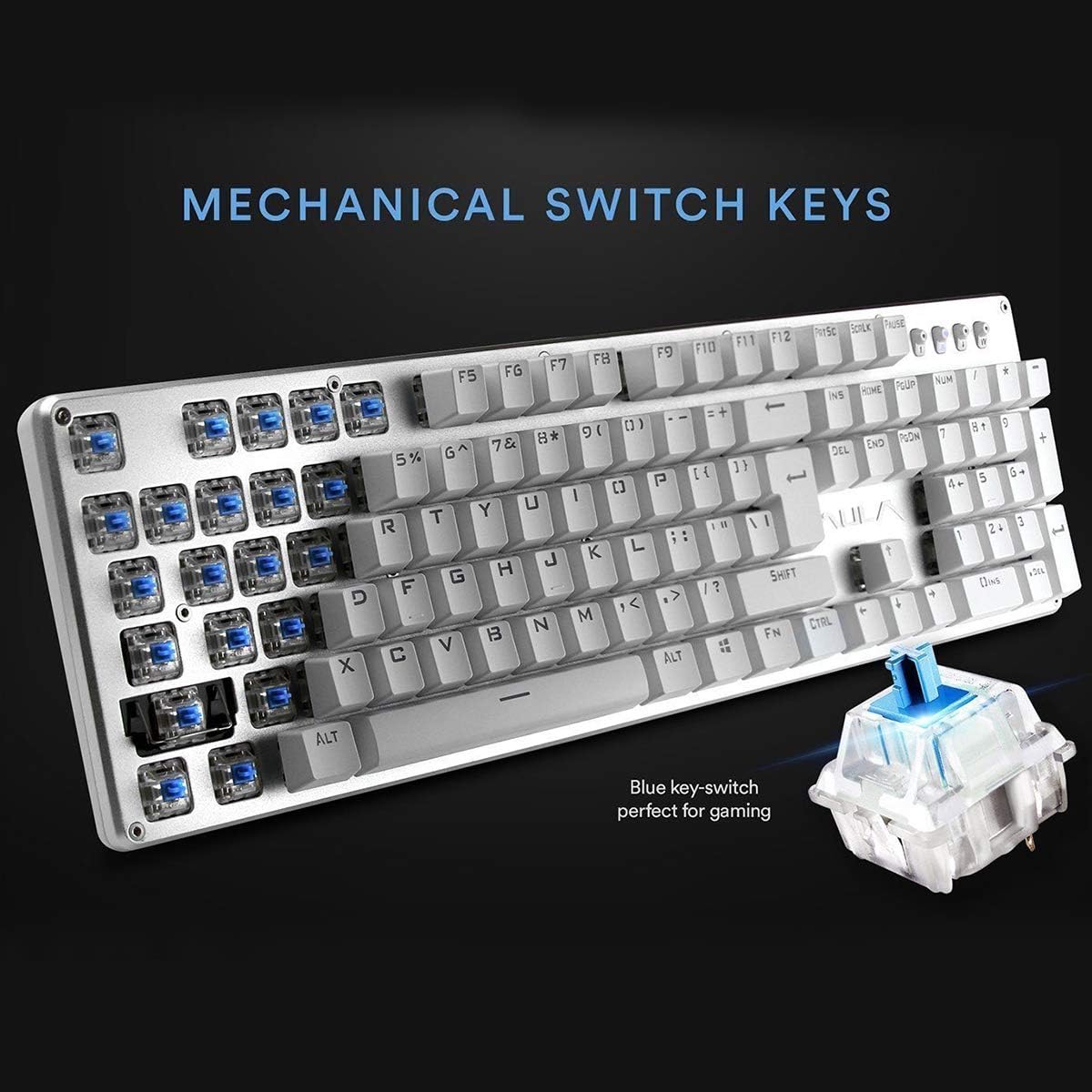
Picha: Karibu view highlighting the mechanical blue switches, which provide tactile feedback and a distinct click sound.
6. Matengenezo na Matunzo
Proper maintenance ensures the longevity and optimal performance of your AULA F2010 keyboard.
- Kusafisha: Regularly clean the keyboard with a soft, dry cloth. For deeper cleaning, use a keycap puller to remove keycaps and clean dust and debris with compressed air or a small brush.
- Umwagikaji wa Kioevu: Due to its water-resistant design, minor spills may not cause damage. However, it is recommended to immediately unplug the keyboard, dry it thoroughly, and allow it to air dry completely before reconnecting.
- Hifadhi: Hifadhi kibodi mahali pa baridi, pakavu mbali na jua moja kwa moja na halijoto kali.
7. Utatuzi wa shida
Ukikumbana na matatizo na kibodi yako, rejelea suluhisho zifuatazo za kawaida:
- Kibodi Haijibu:
- Hakikisha kebo ya USB imechomekwa vizuri kwenye kibodi na kompyuta.
- Jaribu kuchomeka kibodi kwenye mlango tofauti wa USB.
- Anzisha tena kompyuta yako.
- Check if the keyboard is in sleep mode (press any key to wake it).
- Backlighting Not Working:
- Ensure the brightness is not set to the lowest level (use FN + PGUP to increase).
- Verify that the keyboard is not in sleep mode.
- Keys Not Registering or Doubling:
- Clean around and under the affected keycaps for any debris.
- If the issue persists, it may indicate a switch malfunction. Contact customer support if the product is under warranty.
8. Vipimo
| Kipengele | Maelezo |
|---|---|
| Chapa | AULA |
| Nambari ya Mfano | F2010 |
| Teknolojia ya Uunganisho | Waya (USB) |
| Idadi ya Funguo | 104 |
| Aina ya Kubadilisha Muhimu | Mechanical (Blue Switch) |
| Mwangaza nyuma | Multi-color LED (RGB) with adjustable brightness and modes |
| Kupinga Ghosting | 100% Anti-Ghosting with 104 Key Roll-over |
| Nyenzo | Brushed Aluminum Chassis, Double-shot Injection Molding Keycaps |
| Utangamano wa Mfumo wa Uendeshaji | Windows Vista / 7 / 8 / 10 / Mac OS |
| Uzito wa Kipengee | Pauni 2.87 (kilo 1.3) |
| Vipimo vya Bidhaa (L x W x H) | Inchi 17.2 x 5.1 x 0.83 (sentimita 43.7 x 13 x 2.1) |
| Vipengele Maalum | Water Resistant, Dust-proof, Static-free, Sleep Mode |
9. Udhamini na Msaada
For warranty information, technical support, or service inquiries, please refer to the warranty card included with your product or visit the official AULA webtovuti. Weka risiti yako ya ununuzi kama dhibitisho la ununuzi kwa madai ya udhamini.


