1. Utangulizi
This manual provides instructions for the safe and effective use of your Disney Frozen Bluetooth Speaker. This portable wireless speaker allows you to stream audio from Bluetooth-enabled devices or connect via a 3.5mm audio cable. It features a built-in microphone for speakerphone functionality and a rechargeable battery for portability.
2. Yaliyomo kwenye Kifurushi
Tafadhali hakikisha kuwa bidhaa zote zipo kwenye kifurushi:
- Disney Frozen Bluetooth Speaker
- Kebo ya Kuchaji ya USB
- Kebo ya Sauti ya 3.5mm
3. Bidhaa za Bidhaa
- Wireless audio streaming via Bluetooth
- Wired audio connection via 3.5mm headphone port
- Integrated microphone for speakerphone calls
- Betri iliyojengewa ndani inayoweza kuchajiwa tena
- USB chargeable
4. Vidhibiti na Bandari

Picha ya 1: Mbele view of the speaker with control buttons on the top panel.
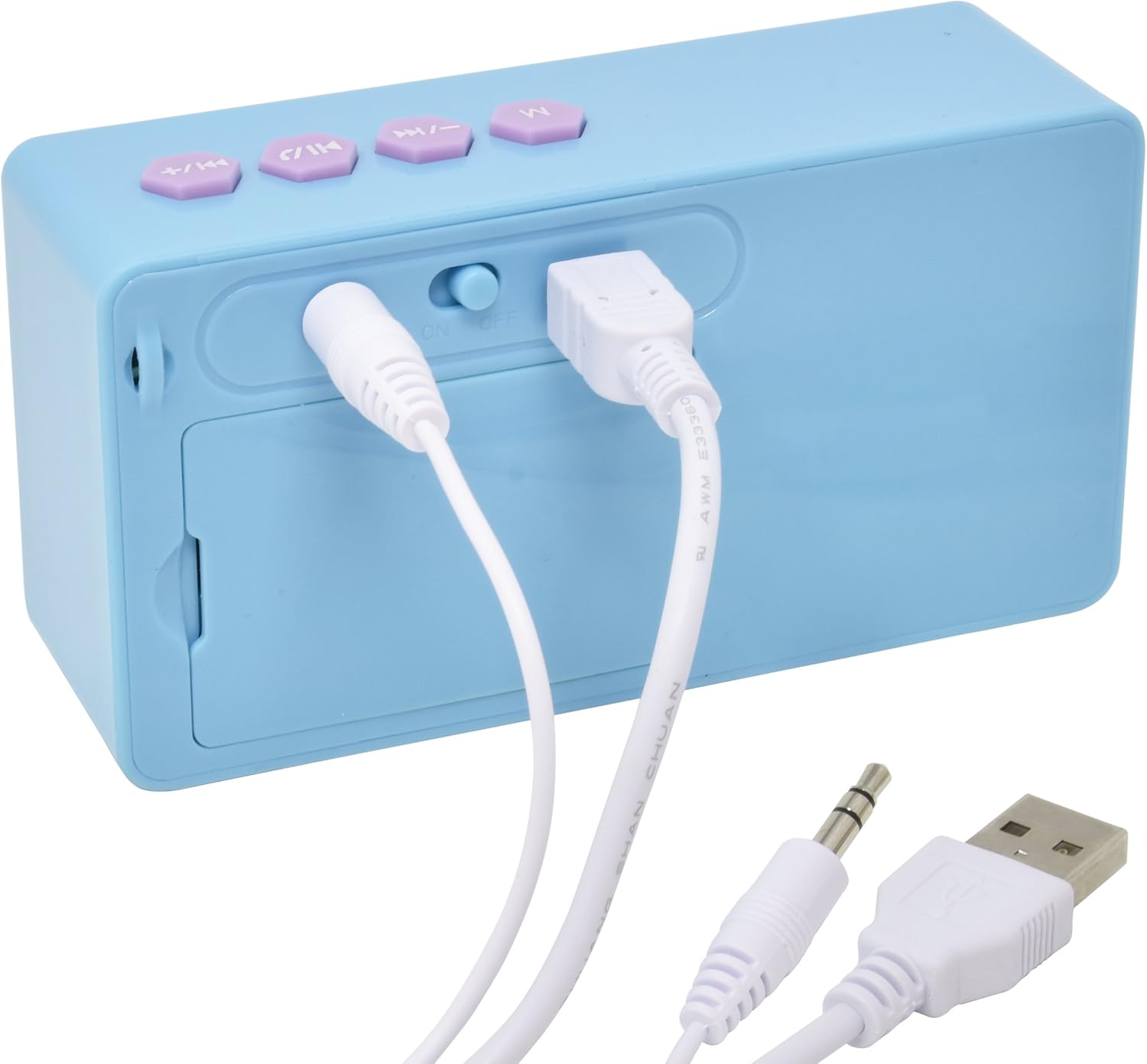
Picha ya 2: Nyuma view of the speaker showing the power switch and connection ports.
Vidhibiti vya Juu vya Paneli:
- Kitufe cha M: Mode selection (Bluetooth/AUX).
- Previous Track / Volume Down Button: Press once for previous track, press and hold to decrease volume.
- Kitufe cha Kucheza/Kusimamisha/Kupiga Simu: Press once to play/pause music, press to answer/end calls.
- Next Track / Volume Up Button: Press once for next track, press and hold to increase volume.
Bandari za Paneli za Nyuma:
- Washa / ZIMA Zima: Huwasha au kuzima kipaza sauti.
- Bandari ya kuchaji USB: Connect the USB cable for charging.
- Ingizo la AUX la mm 3.5: Connect the 3.5mm audio cable for wired playback.
5. Kumtoza Spika
Before first use, fully charge the speaker. The speaker charges quickly when connected to a USB port.
- Locate the USB Charging Port on the rear of the speaker (refer to Image 2).
- Connect the small end of the included USB charging cable to the speaker's USB port.
- Unganisha ncha kubwa zaidi ya kebo ya kuchaji ya USB kwenye mlango wa USB unaotumia nguvu (km, kompyuta, adapta ya ukuta ya USB).
- The charging indicator light will illuminate. Once charging is complete, the light may change color or turn off.
Kumbuka: Do not use damaged cables or chargers. Ensure the charging port is dry before connecting the cable.
6. Uunganisho wa Bluetooth
To connect your speaker wirelessly to a Bluetooth-enabled device:
- Hakikisha spika imechajiwa.
- Telezesha kidole ON/OFF Swichi on the rear of the speaker to the 'ON' position. The speaker will power on and enter Bluetooth pairing mode, indicated by a flashing LED light and an audible prompt.
- Kwenye kifaa chako kinachotumia Bluetooth (simu mahiri, kompyuta kibao, kompyuta), nenda kwenye menyu ya mipangilio ya Bluetooth.
- Tafuta available devices. The speaker will appear as "Disney Frozen Speaker" or a similar name.
- Select the speaker from the list to pair. Once successfully paired, the LED indicator will stop flashing, and you will hear a confirmation tone.
- Sasa unaweza kucheza sauti kutoka kwa kifaa chako kupitia spika.
Kumbuka: If prompted for a password, enter "0000". The speaker will automatically attempt to reconnect to the last paired device when powered on.
7. Muunganisho wa Waya (AUX)
To connect your speaker using the 3.5mm audio cable:
- Hakikisha kuwa spika imewashwa.
- Connect one end of the included 3.5mm audio cable to the Ingizo la AUX la mm 3.5 port on the rear of the speaker (refer to Image 2).
- Connect the other end of the 3.5mm audio cable to the headphone jack or AUX output of your audio device.
- Bonyeza kwa Kitufe cha M on the top panel to switch to AUX mode if the speaker does not automatically detect the wired connection.
- Play audio from your device.
Kumbuka: When using the AUX connection, playback controls (play/pause, track skip) on the speaker may not function, and you will need to control playback directly from your connected device.
8. Using as a Speakerphone
When connected via Bluetooth to a smartphone, the speaker can be used to handle phone calls.
- Kujibu Simu: Simu inapoingia, bonyeza kitufe Play/Pause / Call Button mara moja kujibu.
- Kukata Simu: Wakati wa simu, bonyeza kitufe cha Play/Pause / Call Button once to end the call.
- Kukataa Simu: Bonyeza na ushikilie Play/Pause / Call Button for approximately 2 seconds to reject an incoming call.
Audio will be routed through the speaker, and the built-in microphone will capture your voice.
9. Matengenezo
- Safisha msemaji kwa kitambaa laini na kavu. Usitumie visafishaji vya abrasive au vimumunyisho.
- Weka mzungumzaji mbali na maji, unyevu, na halijoto kali.
- Usijaribu kutenganisha au kutengeneza spika mwenyewe. Hii itabatilisha udhamini.
- Hifadhi kipaza sauti mahali penye baridi, pakavu wakati hakitumiki kwa muda mrefu.
10. Utatuzi wa shida
| Tatizo | Suluhisho linalowezekana |
|---|---|
| Spika haiwashi. | Ensure the speaker is charged. Connect to a power source using the USB cable. Check the ON/OFF switch. |
| Haiwezi kuoanisha kupitia Bluetooth. | Ensure the speaker is in pairing mode (flashing LED). Make sure Bluetooth is enabled on your device. Move the speaker closer to your device. Forget the device from your Bluetooth list and try pairing again. |
| Hakuna sauti au sauti ya chini. | Increase the volume on both the speaker and your connected device. Ensure the correct input mode (Bluetooth or AUX) is selected. Check if the audio cable is fully inserted for wired connections. |
| Bluetooth connection drops frequently. | Ensure there are no obstructions between the speaker and your device. Move closer to the speaker. Avoid interference from other wireless devices. |
| Maikrofoni haifanyi kazi wakati wa simu. | Ensure the speaker is connected via Bluetooth and not AUX. Check your phone's audio output settings during a call to ensure it's routed to the Bluetooth speaker. |
11. Vipimo
| Kipengele | Maelezo |
|---|---|
| Nambari ya Mfano | 057-00-3417 |
| Teknolojia ya Uunganisho | Bluetooth, USB (ya kuchaji) |
| Kipengele Maalum | Portable, Built-in Microphone |
| Chanzo cha Nguvu | Inayotumia Betri (Inaweza Kuchajiwa tena) |
| Kiwango cha Juu cha Pato la Spika | 3 Watts |
| Vipimo vya Bidhaa | Inchi 6.2 x 6.1 x 2.3 |
| Uzito wa Kipengee | 9.1 wakia |
| UPC | 092298925264 |
12. Taarifa za Udhamini
Bidhaa hii inafunikwa na a 1 YEAR FACTORY WARRANTY. Please retain your proof of purchase for warranty claims. For support or warranty inquiries, please refer to the contact information provided with your purchase documentation.


