1. Utangulizi
This user manual provides detailed instructions for the setup, operation, maintenance, and troubleshooting of your Telefunken MC1003N DAB+ Music System. Please read this manual thoroughly before using the device to ensure proper functionality and to maximize your listening experience. Keep this manual for future reference.
2. Maagizo Muhimu ya Usalama
- Chanzo cha Nguvu: Unganisha kifaa kwenye soketi ya umeme ya AC pekee ya vol maalumtage.
- Uingizaji hewa: Hakikisha uingizaji hewa wa kutosha. Usizuie fursa za uingizaji hewa.
- Maji na Unyevu: Usiweke kifaa kwenye mvua, unyevu, au vimiminika vinavyomwagika/kunyunyizia. Usiweke vitu vilivyojaa vimiminika kwenye kifaa.
- Joto: Weka kifaa mbali na vyanzo vya joto kama vile radiators, rejista za joto, jiko, au vifaa vingine (pamoja na amplifiers) zinazotoa joto.
- Kusafisha: Toa kifaa kutoka kwenye soketi ya ukutani kabla ya kusafisha. Tumia kitambaa laini na kikavu. Usitumie visafishaji vya kioevu au visafishaji vya erosoli.
- Kuhudumia: Usijaribu kuhudumia bidhaa hii mwenyewe. Rejelea huduma zote kwa wafanyikazi waliohitimu wa huduma.
3. Yaliyomo kwenye Kifurushi
Thibitisha kuwa bidhaa zote zilizoorodheshwa hapa chini zimejumuishwa kwenye kifurushi chako:
- Telefunken MC1003N Compact Music System
- Udhibiti wa Kijijini
- Adapta ya Nguvu
- Mwongozo wa Mtumiaji (hati hii)
4. Bidhaa Imeishaview
Familiarize yourself with the various parts and controls of your Telefunken MC1003N music system.
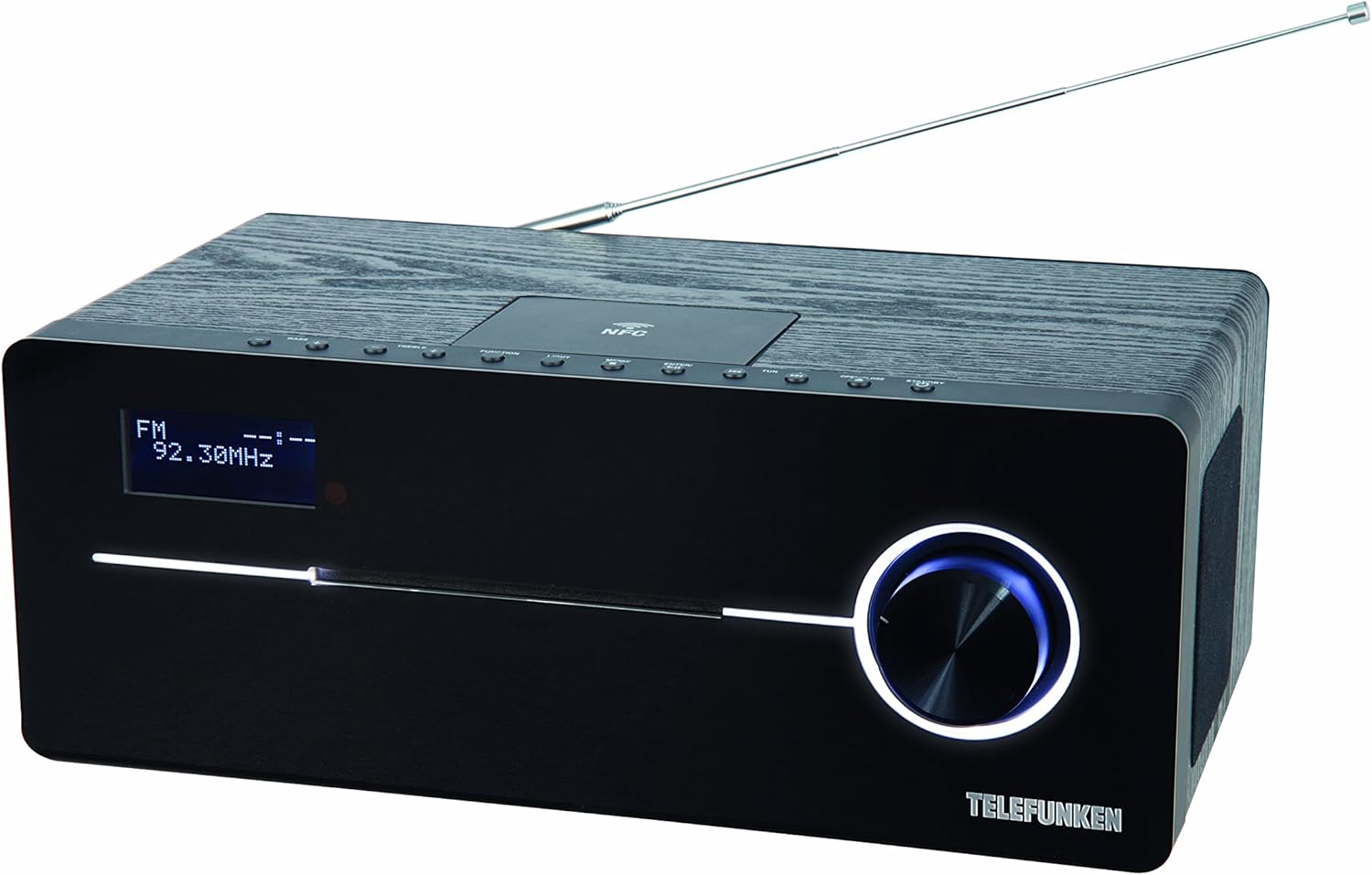
This image displays the Telefunken MC1003N compact music system. The front panel features a digital display showing 'FM 92.30MHz', a large illuminated control knob on the right, and a CD tray slot. The top panel includes several small control buttons and an NFC tag area. A telescopic antenna extends from the rear top of the unit.
4.1 Jopo la mbele
- Kuonyesha kwa Digital: Shows current mode, frequency, track information, and menu options.
- CD Tray Slot: Kwa kuingiza na kutoa CD za sauti.
- Kudhibiti Knob: Multi-functional knob for volume adjustment, menu navigation, and selection.
4.2 Jopo la Juu
- Kitufe cha Kuwasha/Kusubiri: Huwasha au kuzima kitengo.
- Kitufe cha Kutenda kazi: Switches between input modes (DAB+, FM, CD, Bluetooth, USB, AUX-in).
- Kitufe cha Mwanga: Controls display backlight or illumination.
- Kitufe cha Menyu: Hufikia mipangilio na chaguo za mfumo.
- Enter/Pair Button: Confirms selections or initiates Bluetooth pairing.
- TUN+/- Buttons: Tunes radio frequencies or navigates tracks/folders.
- Kitufe cha Fungua/Funga: Opens and closes the CD tray.
- NFC Tag Eneo: For quick pairing with NFC-enabled devices.
4.3 Rear Panel / Side Connections
- Antena ya Telescopic: Kwa ajili ya mapokezi ya redio ya DAB+ na FM.
- Ingizo la Nguvu: Inaunganisha adapta ya nguvu.
- AUX-in (3.5mm): Huunganisha vifaa vya sauti vya nje.
- Mlango wa USB: Huunganisha vifaa vya kuhifadhia vya USB kwa ajili ya uchezaji wa MP3.
- Kipaza sauti cha Jack (3.5mm): Kwa usikilizaji wa faragha.
5. Usanidi wa Awali
5.1 Uwekaji
Place the music system on a stable, flat surface. Ensure there is sufficient space around the unit for proper ventilation. Avoid placing it near strong magnetic fields or direct sunlight.
5.2 Muunganisho wa Antena
Extend the telescopic antenna fully for optimal DAB+ and FM radio reception. Adjust its position to improve signal strength if needed.
Uunganisho wa Nguvu 5.3
Connect the supplied power adapter to the DC IN socket on the rear of the unit, then plug the adapter into a standard wall outlet.
6. Maagizo ya Uendeshaji
6.1 Washa/Zima
- Bonyeza kwa Nguvu/Kusubiri button on the top panel or remote control to turn the unit on or off.
6.2 Uteuzi wa Njia
- Bonyeza kwa Kazi button repeatedly to cycle through available modes: DAB+, FM, CD, Bluetooth, USB, AUX-in.
6.3 Uendeshaji wa Redio ya DAB+
6.3.1 Uchanganuzi wa Kiotomatiki
- Katika hali ya DAB+, bonyeza kitufe Menyu button, then use the control knob or TUN+/- buttons to select 'Full Scan'. Press Ingiza to start scanning for available DAB+ stations.
6.3.2 Urekebishaji wa Mwongozo
- Tumia TUN+/- buttons to manually browse through available DAB+ ensembles.
6.3.3 Storing and Recalling Presets
- To store a station, press and hold the Weka mapema button (if available, or refer to manual for specific preset steps).
- Kukumbuka kituo kilichohifadhiwa, bonyeza kitufe Weka mapema kifungo na matumizi TUN+/- kuchagua nambari inayopangwa tayari.
6.4 Uendeshaji wa Redio ya FM
6.4.1 Uchanganuzi wa Kiotomatiki
- Katika modi ya FM, bonyeza na ushikilie TUN+/- button for a few seconds to automatically scan for the next available station.
6.4.2 Urekebishaji wa Mwongozo
- Bonyeza kwa TUN+/- button briefly to adjust the frequency step by step.
6.4.3 Storing and Recalling Presets
- Similar to DAB+ presets, use the Weka mapema function to store and recall your favorite FM stations. The system supports 30 station memories.
6.5 Uchezaji wa CD
6.5.1 Kupakia CD
- Bonyeza kwa Fungua/Funga kitufe ili kufungua trei ya CD.
- Place a CD (CD/CD-R) with the label side up into the tray.
- Bonyeza kwa Fungua/Funga kitufe tena ili kufunga trei. Uchezaji utaanza kiotomatiki.
6.5.2 Vidhibiti vya Uchezaji
- Use the control knob or remote for Play/Pause, Skip Track, and Fast Forward/Rewind functions.
6.6 Kuoanisha Bluetooth
6.6.1 Activating Bluetooth
- Badilisha kifaa hadi hali ya Bluetooth kwa kutumia Kazi button. The display will show 'BT' or 'Bluetooth' and indicate pairing mode.
6.6.2 Kuoanisha na Kifaa
- Kwenye simu mahiri au kompyuta yako kibao, washa Bluetooth na utafute vifaa vinavyopatikana.
- Select 'Telefunken MC1003N' from the list.
- Once paired, you can stream audio from your device to the music system.
6.7 Kuoanisha NFC
6.7.1 Using NFC
- Ensure NFC is enabled on your compatible smartphone or tablet.
- Tap your device gently on the NFC tag area on the top panel of the music system.
- Thibitisha ombi la kuoanisha kwenye kifaa chako.
6.8 Uchezaji wa USB
6.8.1 Kuunganisha Kifaa cha USB
- Ingiza kifaa cha kuhifadhi cha USB chenye MP3 files kwenye bandari ya USB.
- Switch the unit to USB mode using the Kazi kitufe.
6.8.2 File Urambazaji
- Use the control knob or remote to navigate through folders and select MP3 tracks.
6.9 AUX-in Connection
6.9.1 Connecting External Audio Devices
- Unganisha kifaa cha sauti cha nje (kwa mfano, kicheza MP3) kwenye Kuingia mlango unaotumia kebo ya sauti ya 3.5mm.
- Switch the unit to AUX-in mode using the Kazi kitufe.
- Dhibiti uchezaji kutoka kwa kifaa chako cha nje.
6.10 Mipangilio ya Sauti
6.10.1 Equalizer Presets
- Bonyeza kwa EQ button (if available, or navigate via Menyu) to cycle through sound modes: Flat, Classic, Pop, Rock, Jazz.
7. Matengenezo
7.1 Utunzaji na Usafishaji
- Chomoa kifaa kila wakati kabla ya kusafisha.
- Tumia kitambaa laini, kikavu, kisicho na ute ili kufuta nyuso za nje.
- Usitumie visafishaji vya abrasive, nta, au viyeyusho kwani vinaweza kuharibu umaliziaji.
- Kwa lenzi ya CD, tumia diski maalum ya kusafisha lenzi ya CD.
8. Utatuzi wa shida
If you encounter any issues with your Telefunken MC1003N, refer to the table below for common problems and solutions.
| Tatizo | Suluhisho |
|---|---|
| Hakuna nguvu | Check if the power adapter is securely connected to the unit and the wall outlet. Try a different outlet. |
| Hakuna sauti | Adjust the volume. Check if headphones are connected. Ensure the correct input mode is selected. |
| Mapokezi duni ya redio | Extend and adjust the telescopic antenna. Move the unit to a location with better signal. Perform a full scan for DAB+ stations. |
| Uoanishaji wa Bluetooth umeshindwa | Ensure the unit is in Bluetooth pairing mode. Make sure Bluetooth is enabled on your device and it's within range. Forget previous pairings on your device and try again. |
| CD haichezi | Ensure the CD is clean and inserted correctly (label side up). Check if the CD is scratched or damaged. Try a different CD. |
| USB haitambuliki | Ensure the USB device is formatted correctly (FAT32) and contains supported MP3 files. Jaribu kifaa tofauti cha USB. |
9. Maelezo ya kiufundi
- Mfano: MC1003N
- Chapa: Telefunken
- Nguvu ya Pato: 100 Watts (50 Watts per speaker)
- Muunganisho: Bluetooth 3.0, NFC, USB, AUX-in (3.5mm), Headphone Jack (3.5mm)
- Kitafuta sauti: Digital PLL-tuner (DAB+, FM)
- Vituo vilivyowekwa mapema: 30 (for FM/DAB+)
- Utangamano wa CD: CD, CD-R
- Miundo ya Sauti Inayotumika: MP3, CD-DA, DAB
- Udhibiti wa Sauti: Equalizer presets (Flat, Classic, Pop, Rock, Jazz)
- Chanzo cha Nguvu: Umeme kwa kutumia waya
- Vipimo (L x W x H): 35.1 x 13.6 x 21.4 cm
- Uzito: 3.65 kg
10. Udhamini na Msaada
Your Telefunken MC1003N DAB+ Music System is covered by a manufacturer's warranty. Please refer to the warranty card included in your package for specific terms and conditions. For technical support, service, or warranty claims, please contact your retailer or the authorized Telefunken service center in your region.


