1. Utangulizi
This manual provides comprehensive instructions for the installation, operation, and maintenance of your Lorex LNR1141TC4 4-Channel 1TB Network Video Recorder (NVR) system with four 1080p HD cameras. This system is designed to provide high-definition surveillance for your property, offering real-time recording and remote access capabilities.
Please read this manual thoroughly before setting up and operating your system to ensure proper functionality and to maximize its features.
2. Yaliyomo kwenye Kifurushi
Verify that all components listed below are included in your package. If any items are missing or damaged, please contact Lorex support.
- 1 x NVR with Pre-Installed 1TB HDD
- 1 x Kebo ya HDMI
- Adapta ya Nishati 1 x ya NVR
- 1 x kipanya cha USB
- 1 x Cable ya Ethernet
- Miongozo ya Kuanza Haraka
- 4 x IP Bullet Cameras (1080p HD)
- 4 x Mounting Kits for Cameras
- 4 x 60ft (18m) Cat5e Ethernet Cables
3. Mfumo Umeishaview
The Lorex LNR1141TC4 system consists of a Network Video Recorder (NVR) and four 1080p HD IP cameras. The NVR manages video recording, storage, and network connectivity, while the cameras capture high-definition video footage.
3.1 NVR and Camera Components

Kielelezo cha 3.1: Lorex LNR1141TC4 NVR system with four 1080p HD bullet cameras. This image displays the main components of the surveillance system, including the central NVR unit and the four included bullet-style IP cameras.
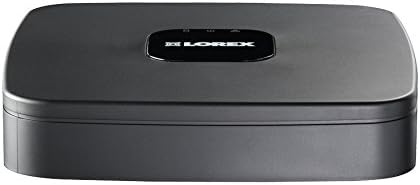
Kielelezo cha 3.2: Juu view of the Lorex LNR1141TC4 NVR. The NVR unit features a sleek black design with the Lorex logo prominently displayed on the top surface.

Kielelezo cha 3.3: Rear panel of the Lorex LNR1141TC4 NVR. This view shows the various input and output ports, including HDMI, VGA, USB, Ethernet, and the four Power over Ethernet (PoE) ports for camera connections.

Kielelezo cha 3.4: Close-up of a Lorex 1080p HD bullet camera lens. This image highlights the camera's lens, infrared LEDs for night vision, and light sensor.
4. Kuweka
Follow these steps to set up your Lorex LNR1141TC4 NVR system.
4.1 Kuunganisha NVR
- Connect a Monitor: Connect the NVR to a monitor using the supplied HDMI cable or a VGA cable (not included).
- Unganisha Panya: Plug the USB mouse into one of the USB ports on the NVR's rear panel.
- Muunganisho wa Mtandao (Si lazima lakini unapendekezwa): Connect the NVR to your router using the supplied Ethernet cable for remote access and system updates.
- Washa: Connect the NVR power adapter to the NVR and then to a power outlet. The NVR will power on automatically.
4.2 Kuunganisha Kamera
The Lorex LNR1141TC4 NVR features Power over Ethernet (PoE) ports, simplifying camera installation.
- Kamera za Kuweka: Securely mount each camera in your desired location using the provided mounting kits. Ensure the camera's field of view covers the area you wish to monitor.
- Unganisha Kebo za Ethaneti: Connect one end of the supplied 60ft Cat5e Ethernet cable to the camera's Ethernet port and the other end to one of the PoE ports on the NVR's rear panel. The NVR will automatically detect and power the cameras.
- Rekebisha Pembe ya Kamera: Once connected, adjust each camera's angle to optimize surveillance coverage.
5. Uendeshaji
This section covers the basic operation of your Lorex NVR system.
5.1 Mchawi wa Kuweka Awali
Upon first power-up, the NVR will guide you through an initial setup wizard to configure basic settings such as language, date/time, network settings, and password creation. Follow the on-screen prompts.
5.2 Kurekodi
- Kuendelea Kurekodi: The NVR is configured for continuous recording by default, utilizing the pre-installed 1TB hard drive.
- Kurekodi Iliyopangwa: You can customize recording schedules for each camera through the NVR's menu. This allows you to set specific times for recording.
- Kurekodi Mwendo: Configure motion detection zones and sensitivity to trigger recording only when movement is detected. This helps conserve storage space.
- High Definition 1080p: The system records in 1080p resolution at 30/25 frames per second (fps) per channel, ensuring clear and detailed footage.
5.3 Uchezaji
Fikia foo iliyorekodiwatage through the NVR's playback menu. You can search by date, time, and event type (e.g., motion detection). The system supports selectable area digital zoom during live view and playback for detailed examination.
5.4 Remote Access (FLIR Cloud)
The FLIR Cloud connectivity solution enables remote viewing of your surveillance system.
- Pakua App: Download the free Lorex FLIR Cloud app on your iOS or Android smartphone or tablet.
- Changanua Nambari ya QR: Use the app to scan the QR code located on your NVR or in the quick start guide.
- Unganisha: Follow the app's instructions to connect to your NVR. This allows you to view live feeds, playback recordings, and receive push notifications for motion events and instant email alerts with snapshot attachments from anywhere with an internet connection.
6. Matengenezo
Matengenezo ya mara kwa mara huhakikisha uimara na utendaji bora wa mfumo wako wa ufuatiliaji.
- Kusafisha: Safisha mara kwa mara lenzi za kamera kwa laini, damp cloth to remove dust and smudges. Ensure the NVR's ventilation openings are clear of obstructions.
- Afya ya Hifadhi ngumu: The NVR's hard drive is crucial for recording. Monitor its health through the NVR's system settings. Consider backing up important footage mara kwa mara.
- Sasisho za Firmware: Angalia Lorex website for any available firmware updates for your NVR to ensure you have the latest features and security enhancements.
7. Utatuzi wa shida
This section addresses common issues you might encounter with your Lorex LNR1141TC4 system.
- Hakuna Toleo la Video kwenye Monitor:
- Ensure the HDMI/VGA cable is securely connected to both the NVR and the monitor.
- Hakikisha kifuatiliaji kimewekwa kwenye chanzo sahihi cha ingizo.
- Jaribu kebo au kifuatiliaji tofauti cha HDMI/VGA.
- Kamera zisizoonyeshwa:
- Check that the Ethernet cables are securely connected to both the cameras and the NVR's PoE ports.
- Hakikisha kuwa NVR imewashwa.
- If a camera is still not detected, try connecting it to a different PoE port on the NVR.
- A power cycle of the NVR (unplug and replug) can sometimes resolve camera detection issues.
- Ufikiaji wa Mbali Haufanyi kazi:
- Verify the NVR is connected to your router and has internet access.
- Hakikisha kuwa simu yako mahiri/kompyuta kibao ina muunganisho thabiti wa intaneti.
- Double-check the QR code scan and account login details in the FLIR Cloud app.
- Masuala ya Kurekodi:
- Angalia hali ya diski kuu katika mipangilio ya mfumo wa NVR.
- Ensure recording schedules are correctly configured.
- Verify that motion detection settings are appropriate if using motion-triggered recording.
8. Vipimo
| Kipengele | Maelezo |
|---|---|
| Nambari ya Mfano | LNR1141TC4 |
| Azimio la Kukamata Video | 1080p HD |
| Idadi ya Vituo | 4 |
| Uwezo wa Kuhifadhi Kumbukumbu | TB 1 (HDD iliyosakinishwa awali) |
| Teknolojia ya Uunganisho | Wired (Ethernet, PoE for cameras) |
| Kipengele Maalum | Motion Sensor, Remote Access (FLIR Cloud) |
| Kiwango cha Fremu | 30/25 fps per channel |
| Hali ya Kurekodi | Continuous, Scheduled, Motion |
| Chanzo cha Nguvu | Umeme wa Cord |
| Vipimo vya NVR (Urefu x Upana x Urefu) | Inchi 8.1 x 8.1 x 1.8 (sentimita 20.6 x 20.6 x 4.6) |
| NVR Item Weight | Pauni 1.1 (kilo 0.5) |
| Vifaa Sambamba | Kamera, Kompyuta Binafsi, Simu Mahiri, Kompyuta Kibao |
9. Udhamini na Msaada
For warranty information and technical support, please refer to the documentation included with your product or visit the official Lorex website. Lorex provides resources and customer service to assist with any questions or issues you may encounter.
Rasilimali za Mtandaoni: www.lorex.com/support


