1. Utangulizi
This manual provides detailed instructions for the installation, operation, and maintenance of your Zmodo ZM-KW1001-O4-1TB HD Camera System. Please read this manual thoroughly before using the product to ensure proper setup and functionality. Keep this manual for future reference.
2. Bidhaa Imeishaview
2.1 Sifa Muhimu
- 720p HD video for clear and sharp images.
- Smartlink wireless configuration for quick setup.
- Motion detection alerts to notify you of activity.
- IP66 rated outdoor cameras for weather resistance.
- Infrared night vision for surveillance in low-light conditions.
- Integrated 1TB hard drive for local video storage.
2.2 Vipengele vya Mfumo
The Zmodo ZM-KW1001-O4-1TB system typically includes the following components:
- Wireless Network Video Recorder (NVR) with 1TB HDD
- HD Wireless Cameras (quantity may vary, typically 4)
- Power Adapters for NVR and Cameras
- Kebo ya Ethernet
- Kuweka Screw na Nanga
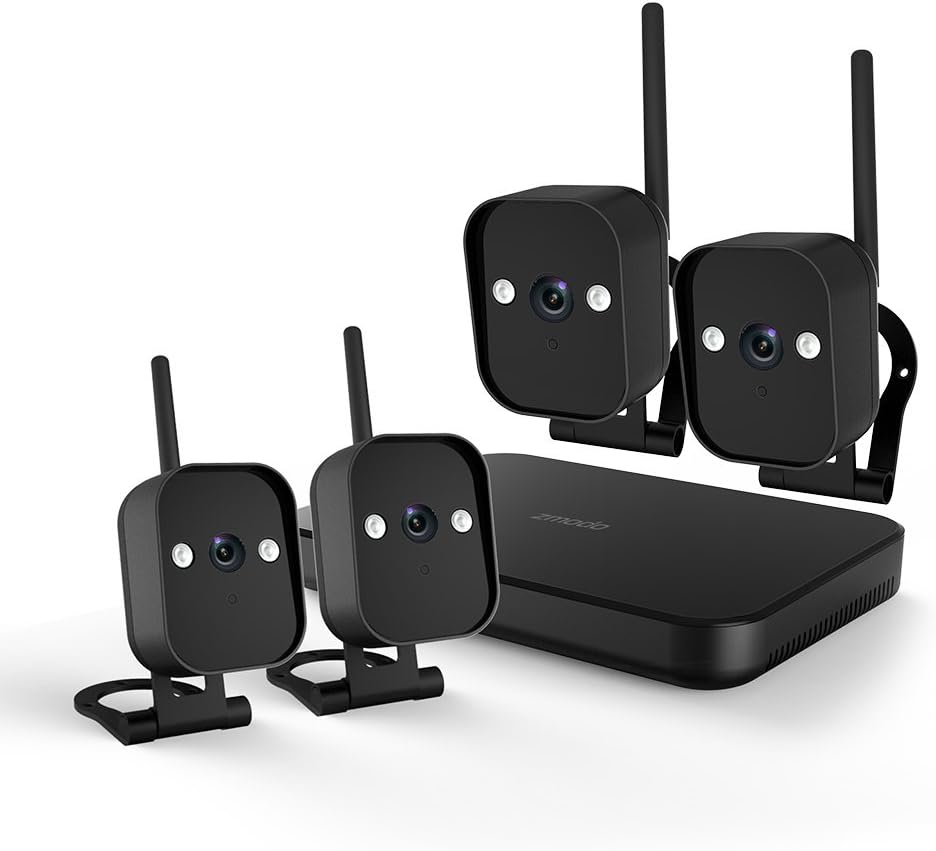
Kielelezo cha 1: Zaidiview of the Zmodo ZM-KW1001-O4-1TB HD Camera System, showing the NVR unit and four wireless cameras.
3. Maagizo ya Kuweka
3.1 Unboxing na Ukaguzi wa Awali
Carefully unpack all components and verify that all items listed in Section 2.2 are present and undamaged. If any items are missing or damaged, contact customer support.
3.2 Muunganisho wa NVR
- Connect the NVR to a power outlet using the provided power adapter.
- For initial setup and optimal performance, connect the NVR to your router using the supplied Ethernet cable.
- Connect the NVR to a monitor via HDMI or VGA cable (not included) if local viewinataka.

Kielelezo cha 2: The Zmodo Network Video Recorder (NVR) unit, which stores recordings and manages camera connections.
3.3 Usakinishaji na Uoanishaji wa Kamera
The cameras are designed for both indoor and outdoor use with an IP66 weather-resistant rating. Ensure cameras are placed within range of the NVR's wireless signal.
- Washa Kamera: Unganisha kila kamera kwenye adapta yake ya umeme na uichomeke kwenye soketi ya umeme.
- Smartlink Pairing: The cameras should automatically attempt to pair with the NVR. Follow the on-screen prompts on the connected monitor or use the Zmodo app for Smartlink setup. If pairing fails, refer to the troubleshooting section.
- Kupachika: Choose suitable locations for your cameras. Use the provided screws and anchors to securely mount the cameras. Ensure a clear line of sight and optimal viewpembe.

Kielelezo cha 3: A Zmodo wireless camera shown with its wall-mounting bracket, suitable for outdoor installation.

Kielelezo cha 4: A Zmodo wireless camera shown with its stand mount, ideal for indoor placement on flat surfaces.
3.4 Mobile App Configuration
- Download the Zmodo app from the App Store (iOS) or Google Play Store (Android).
- Create a new account or log in to an existing one.
- Follow the in-app instructions to add your Zmodo NVR system. This typically involves scanning a QR code on the NVR or manually entering device details.
- Once added, you should be able to view live feeds from your cameras.
4. Maagizo ya Uendeshaji
4.1 Ishi View
Access the Zmodo app or the NVR's local interface to view live video streams from your cameras. You can typically select individual cameras or view multiple feeds simultaneously.
4.2 Utambuzi wa Mwendo na Tahadhari
The system is equipped with motion detection capabilities. When motion is detected, the system can record footage and send alerts to your mobile device.
- Usanidi: In the Zmodo app or NVR settings, navigate to the motion detection section. You can customize detection zones, sensitivity levels, and alert schedules.
- Tahadhari: Ensure push notifications are enabled for the Zmodo app on your mobile device to receive timely alerts.
4.3 Kurekodi na kucheza tena
The NVR includes a 1TB hard drive for continuous or motion-activated recording.
- Mipangilio ya Kurekodi: Configure recording modes (continuous, scheduled, motion-activated) via the NVR's local interface or the Zmodo app.
- Uchezaji: Kufanya upyaview foo iliyorekodiwatage, access the playback feature in the Zmodo app or directly on the NVR. Select the desired date and time to view matukio.
4.4 Maono ya Usiku
The cameras feature infrared night vision, allowing them to capture clear video in low-light or complete darkness. The system automatically switches to night vision mode when ambient light levels are insufficient.
5. Matengenezo
- Kusafisha Kamera: Safisha mara kwa mara lenzi za kamera kwa laini, damp kitambaa ili kuhakikisha ubora wa picha wazi. Epuka cleaners abrasive.
- Sasisho za Firmware: Check the Zmodo app or website regularly for firmware updates. Keeping your system updated ensures optimal performance and security.
- Usimamizi wa Hifadhi Ngumu: Hifadhi kuu ya 1TB itafuta kiotomatiki foo ya zamani zaiditage when full. If you need to preserve specific recordings, back them up to an external device before they are overwritten.
- Ugavi wa Nguvu: Ensure all power adapters are securely connected and free from damage.
6. Utatuzi wa shida
- Hakuna Mlisho wa Video:
- Check if the NVR and cameras are powered on.
- Verify network connectivity for the NVR.
- Ensure cameras are within wireless range of the NVR.
- Re-pair cameras if they have lost connection.
- Arifa za Mwendo Hazijapokelewa:
- Confirm motion detection is enabled in the app settings.
- Angalia maeneo ya kugundua mwendo na unyeti.
- Ensure push notifications are enabled for the Zmodo app on your mobile device.
- Ubora duni wa Picha:
- Safisha lensi ya kamera.
- Hakikisha hakuna vizuizi katika uga wa kamera ya view.
- Check for strong interference if using wireless connection.
- Cameras Not Connecting to Wi-Fi:
- Ensure the NVR's Wi-Fi is enabled and functioning.
- Move cameras closer to the NVR to improve signal strength.
- Reset cameras and attempt Smartlink pairing again.
7. Vipimo
| Kipengele | Vipimo |
|---|---|
| Nambari ya Mfano | ZM-KW1001-O4-1TB |
| Azimio la Video | 720p HD |
| Teknolojia ya Uunganisho | Bila waya |
| Idadi ya Vituo | 4 |
| Uwezo wa Kuhifadhi | 1 TB (Terabyte) |
| Vipengele Maalum | Wireless, Motion Detection, Night Vision, IP66 Weatherproof |
| Utangamano wa Mfumo wa Uendeshaji | Android, iOS |
| Chanzo cha Nguvu | Wireless (Power Adapters for components) |
| Rangi | Nyeusi |
| Vipimo vya Kifurushi | 26.8 x 20 x 16 cm |
| Uzito wa Kipengee | Kilo 1.5 |
8. Udhamini na Msaada
For warranty information and technical support, please refer to the official Zmodo website or contact Zmodo customer service directly. Details regarding warranty periods and service procedures are typically available on the manufacturer's support pages.
Msaada mkondoni: Visit the Zmodo official webtovuti ya Maswali Yanayoulizwa Mara kwa Mara, miongozo ya utatuzi, na maelezo ya mawasiliano.
Wasiliana na Usaidizi: If you require further assistance, please have your product model number (ZM-KW1001-O4-1TB) and purchase details ready when contacting support.


