1. Bidhaa Imeishaview
The LB-link BL-MP01 is a compact and versatile 150 Mbps Wireless N Pocket Travel Router designed for easy internet access and sharing on the go. It supports multiple operating modes and features for convenient wireless connectivity.

Kielelezo 1: Mbele view of the LB-link BL-MP01 Wireless N Router, showing the WPS/RESET button and indicator lights for WiFi, LAN, and Power.
Sifa Muhimu:
- Supports random selection of switching between Router, Client, and AP modes.
- WPS (Wi-Fi Protected Setup) support for one-key encryption, eliminating the need for manual password entry.
- Plug and Play functionality for easy wireless access and internet sharing.
- Built-in device for scanning wireless hotspots, remembering SSID names, and automatically bridging/relaying for convenient use.
- Equipped with RJ45 and USB ports for versatile connectivity.
2. Mwongozo wa Kuweka
2.1 Umeme wa Awali Umewashwa
- Connect the LB-link BL-MP01 to a power source using the provided USB cable.
- Wait for the Power indicator light to turn solid, indicating the device is powered on.
2.2 Kuunganisha kwenye Kipanga njia
- Muunganisho wa Waya: On your computer or mobile device, search for available Wi-Fi networks. Select the network name (SSID) broadcast by the BL-MP01 (e.g., "LB-link_XXXX"). Enter the default password if prompted (refer to the label on the device or packaging for default credentials).
- Muunganisho wa Waya: Connect an Ethernet cable from the RJ45 port of the BL-MP01 to your computer's Ethernet port.
2.3 Basic Configuration (Router Mode)
- Fungua a web kivinjari na ingiza anwani chaguo-msingi ya IP (kwa mfano,
192.168.16.1) kwenye upau wa anwani. - Log in using the default username and password (e.g.,
admin/admin). - Follow the on-screen setup wizard to configure your internet connection type (e.g., PPPoE, Dynamic IP, Static IP).
- Set a new Wi-Fi network name (SSID) and a strong password for your wireless network.
3. Njia za Uendeshaji
The BL-MP01 supports multiple operating modes to suit various networking needs:
- Njia ya Router: Connects to a modem (DSL/Cable) and creates a private wireless network for multiple devices.
- Hali ya Mteja: Allows a wired device (e.g., a desktop computer) to connect to an existing wireless network.
- AP (Pointi ya Kufikia): Transforms a wired network connection into a wireless hotspot, allowing wireless devices to connect.
To switch between modes, access the router's web management interface and navigate to the operating mode settings. Select the desired mode and save the changes. The device may restart to apply the new settings.
4. Utendaji Kazi wa WPS
The Wi-Fi Protected Setup (WPS) feature allows for quick and secure connection to your wireless network without manually entering the password.
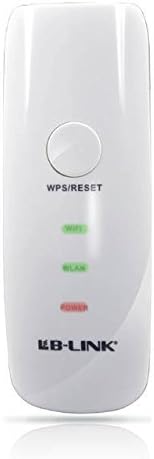
Kielelezo 2: Karibu view of the LB-link BL-MP01 Wireless N Router, highlighting the WPS/RESET button at the top.
Kwa kutumia WPS:
- Bonyeza kwa WPS/WEKA UPYA button on the BL-MP01 for approximately 1-3 seconds. The Wi-Fi indicator light will start blinking.
- Within two minutes, activate the WPS function on your client device (e.g., laptop, smartphone). Refer to your client device's manual for specific instructions on activating WPS.
- The devices will automatically establish a secure connection. The Wi-Fi indicator light on the router will become solid when connected.
5. Wireless Hotspot Scanning and Bridging
The BL-MP01 features a built-in function to scan for available wireless hotspots, remember their SSID names, and automatically bridge or relay the connection. This is particularly useful for extending Wi-Fi coverage or connecting to public hotspots.
Steps for Hotspot Connection:
- Fikia router web kiolesura cha usimamizi.
- Nenda kwenye
Nyaraka Zinazohusiana - BL-MP01

Mwongozo wa Ufungaji wa Njia ya LB-LINK
Mwongozo wa kina wa usakinishaji wa kipanga njia cha LB-LINK, miunganisho ya maunzi inayofunika, usanidi wa intaneti, viashiria vya LED, na maelezo ya kiolesura. Jifunze jinsi ya kuunganisha kifaa chako na kuingia mtandaoni kwa haraka.
BL-M35343XS1 802.11ax 150Mbps WLAN +BLE Combo SDIO Viainisho vya Moduli
Hati hii inatoa maelezo ya LB-LINK BL-M35343XS1, moduli jumuishi ya 2.4GHz WLAN+BLE+SLE Combo. Inaangazia vipengele, vipimo vya umeme na mafuta, utendakazi wa RF, vipimo vya kimitambo, na maelezo ya programu ya moduli hii ya utendakazi wa juu isiyotumia waya.
LB-LINK BL-M8189NS1: 150Mbps Uainishaji wa Moduli ya WLAN SDIO
Ufafanuzi wa kina wa LB-LINK BL-M8189NS1, moduli ya 150Mbps 802.11n WLAN SDIO. Inashughulikia vipengele, ufafanuzi wa pini, vipimo vya umeme na RF, vipimo vya mitambo na saketi za programu.
LB-LINK BL-M8733BS2 802.11n 150Mbps WLAN + BT v5.2 Uainishaji wa Moduli ya Combo SDIO
Hati ya ubainishaji wa kiufundi wa LB-LINK BL-M8733BS2, moduli iliyounganishwa ya Dual-band WLAN + Bluetooth v5.2 Combo SDIO inayosaidia viwango vya 802.11a/b/g/n na hadi 150Mbps kiwango cha PHY, ikijumuisha maelezo ya umeme, RF, mitambo na udhibiti.
LB-LINK BL-R8812AF1 Maelezo ya Bidhaa - Moduli ya WiFi ya IEEE 802.11ac
Maelezo ya kina ya bidhaa kwa ajili ya LB-LINK BL-R8812AF1, Moduli ya WiFi ya WLAN 11ac Dual Band USB 2.0. Inashughulikia RF juuview, utendaji wa mfumo, vipimo vya umeme, na kufuata.