Utangulizi
This manual provides detailed instructions for the setup, operation, maintenance, and troubleshooting of your Sharp HT-SB60 High-Powered Soundbar System. Please read this manual thoroughly before using the product to ensure proper and safe operation.
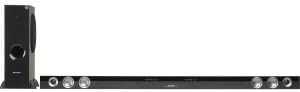
This image displays the Sharp HT-SB60 soundbar and its accompanying wireless subwoofer. The soundbar is a long, slender black unit designed to sit horizontally, featuring speaker grilles and controls on its front. To the left, the tall, black wireless subwoofer stands vertically, indicating its role in providing deep bass.
Sanidi
Kufungua
Ondoa kwa uangalifu vifaa vyote kutoka kwa kifurushi. Hakikisha vitu vyote vilivyoorodheshwa hapa chini vipo:
- Sharp HT-SB60 Soundbar
- Subwoofer isiyo na waya
- Power Cords (for soundbar and subwoofer)
- Kidhibiti cha Mbali (na betri)
- Audio Cables (e.g., Optical, RCA - specific types may vary)
Uwekaji
- Upau wa sauti: Place the soundbar horizontally on a stable surface directly in front of your television, ensuring it does not obstruct the TV's remote sensor.
- Subwoofer isiyo na waya: Weka subwoofer isiyotumia waya kwenye sakafu, ikiwezekana kwenye kona au karibu na ukuta, ili kuboresha mwitikio wa besi. Hakikisha iko ndani ya safu isiyotumia waya ya upau wa sauti.
Viunganishi
- Nguvu: Connect the power cords to the soundbar and subwoofer, then plug them into a wall outlet.
- Ingizo la Sauti: Connect your TV or other audio source to the soundbar using the appropriate audio cable (e.g., Optical, HDMI ARC, RCA). Refer to your TV's manual for compatible audio output ports.
- Uoanishaji wa Subwoofer: The wireless subwoofer should automatically pair with the soundbar upon power-up. If pairing fails, refer to the troubleshooting section.
Maagizo ya Uendeshaji
Operesheni ya Msingi
- Washa/Zima: Bonyeza kitufe cha Kuwasha/Kuzima kwenye upau wa sauti au kidhibiti cha mbali.
- Udhibiti wa Sauti: Tumia vitufe vya Kuongeza/Kupunguza Sauti kwenye kidhibiti cha mbali au upau wa sauti.
- Uteuzi wa Ingizo: Press the Input button on the remote or soundbar to cycle through available audio sources (e.g., Optical, Bluetooth, AUX).
Kuoanisha Bluetooth
- Press the Bluetooth button on the remote or soundbar to enter Bluetooth pairing mode. The indicator light will flash.
- Kwenye kifaa chako cha mkononi, washa Bluetooth na utafute vifaa vinavyopatikana.
- Select "Sharp HT-SB60" from the list of devices.
- Once connected, the indicator light will become solid. You can now play audio from your device through the soundbar.
Njia za Sauti
The HT-SB60 may offer various sound modes to optimize audio for different content types. Refer to your remote control for specific buttons (e.g., Movie, Music, News) to switch between modes.
Matengenezo
Ili kuhakikisha uimara na utendaji bora wa mfumo wako wa sauti, fuata miongozo hii ya matengenezo:
- Kusafisha: Use a soft, dry cloth to wipe the surfaces of the soundbar and subwoofer. Do not use liquid cleaners or abrasive materials.
- Uingizaji hewa: Ensure adequate ventilation around both units to prevent overheating. Do not block any vents.
- Hifadhi: Ikiwa kifaa kitahifadhi kwa muda mrefu, kiondoe kutoka kwa umeme na uihifadhi mahali pa baridi na kavu.
Kutatua matatizo
If you encounter issues with your Sharp HT-SB60 system, refer to the table below for common problems and solutions.
| Tatizo | Sababu inayowezekana | Suluhisho |
|---|---|---|
| Hakuna nguvu | Power cord not connected; outlet not active | Ensure power cords are securely plugged into the soundbar/subwoofer and a working wall outlet. |
| Hakuna sauti | Incorrect input selected; volume too low; audio cable loose/damaged | Chagua chanzo sahihi cha kuingiza sauti. Ongeza sauti. Angalia miunganisho ya kebo ya sauti. |
| Subwoofer haioanishi | Out of range; interference; pairing issue | Ensure subwoofer is within 10 meters of the soundbar. Power cycle both units. Refer to manual for manual pairing steps if available. |
| Muunganisho wa Bluetooth si thabiti | Device too far; interference | Move Bluetooth device closer to the soundbar. Avoid obstacles between devices. |
Vipimo
- Chapa: Mkali
- Mfano: HT-SB60
- Aina ya Spika: Upau wa sauti, Subwoofer
- Usanidi wa Idhaa ya Sauti inayozunguka: 2.1
- Teknolojia ya Uunganisho: Isiyo na waya (Bluetooth)
- Chanzo cha Nguvu: Umeme wa Cord
- Vipimo vya Bidhaa: Inchi 8.34 x 18.37 x 57.2
- Uzito wa Kipengee: Pauni 29.8
- Speaker Size (Soundbar): Designed for 60-Inch & Larger TVs
Udhamini na Msaada
Taarifa ya Udhamini
This Sharp HT-SB60 product is Certified Refurbished, tested, and certified by Sharp to look and function like new. It includes all original accessories and is backed by a 90-day warranty from the date of purchase.
Usaidizi wa Wateja
For further assistance, technical support, or warranty claims, please contact Sharp customer service. Refer to the official Sharp webtovuti au ufungaji wa bidhaa kwa maelezo ya sasa ya mawasiliano.


