1. Utangulizi
This manual provides detailed instructions for the Audiovox APS997E Two-Way Remote Start and Security System. It covers system components, installation considerations, operational procedures, maintenance tips, and troubleshooting guidance. Please read this manual thoroughly to ensure proper use and to maximize the benefits of your security system.
2. Bidhaa Imeishaview
The Audiovox APS997E is a sophisticated two-way remote start and security system designed to provide convenience and protection for your vehicle. Key features include:
- One five-button metal 2-way LCD command confirming transmitter.
- Programmed transmitter notification.
- Glass mount antenna with built-in LED light and valet switch.
- Single or two-user programmable with separate control outputs.
- Selectable run times for remote start.
- 24-hour time start mode.
Vipengele vya Mfumo
The system includes the main control unit, two-way LCD remote, standard remote, wiring harnesses, antenna, and various sensors. Refer to the images below for a visual representation of the system components.

Kielelezo cha 2.1: Packaging and included remote controls for the Audiovox APS997E system. This image displays the main product box, highlighting the "Longer Range" and "Two-Way 5-Button LCD Remote Control" features, along with the two distinct remote fobs.
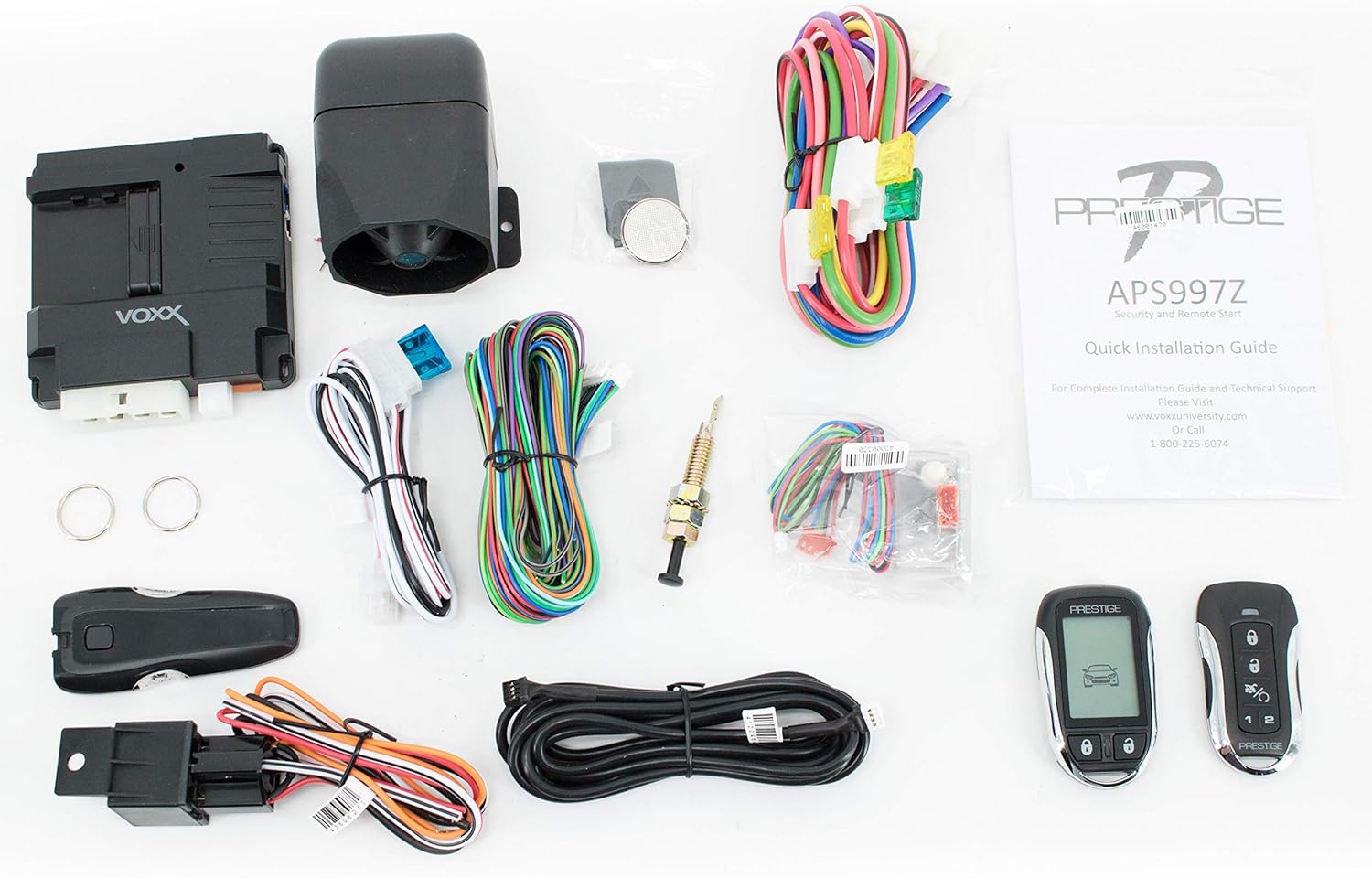
Kielelezo cha 2.2: All components included with the Audiovox APS997E system. This includes the main control module, wiring harnesses, antenna, temperature sensor, siren, and both the two-way LCD remote and the standard remote, along with the quick installation guide.
3. Kuweka na Kuweka
Installation of the Audiovox APS997E system requires technical expertise and should ideally be performed by a qualified professional. Incorrect installation can lead to vehicle damage or system malfunction. The system includes a Quick Installation Guide for reference.
Mawazo ya jumla ya ufungaji:
- Wiring: Proper connection to vehicle's electrical system, including ignition, power, ground, and accessory circuits.
- Uwekaji wa Antena: The glass-mount antenna should be positioned for optimal signal reception.
- Uwekaji wa moduli: Securely mount the main control module in a discreet and protected location within the vehicle.
- Viunganisho vya Sensor: Connect all security sensors, such as shock sensors and door triggers, according to the detailed installation manual.
- Kupanga: After physical installation, the system and remotes must be programmed to the vehicle.
Warning: Attempting self-installation without proper knowledge and tools may void your warranty and cause damage to your vehicle.
4. Maagizo ya Uendeshaji
The Audiovox APS997E system utilizes a five-button remote control for various functions. The two-way LCD remote provides visual and audible confirmation of commands.
Kazi za Kidhibiti cha Mbali:
- Mkono/Kufuli: Press the lock button once to arm the security system and lock the vehicle doors. The LCD remote will confirm the command.
- Ondoa silaha/Fungua: Press the unlock button once to disarm the security system and unlock the vehicle doors. The LCD remote will confirm the command.
- Mwanzo wa Mbali: Press and hold the remote start button (often indicated by a circular arrow or "Start" icon) for approximately 3 seconds to remotely start your vehicle. The LCD remote will display engine status and countdown the run time.
- Kutolewa kwa Shina: Press and hold the trunk release button (often indicated by a trunk icon) for approximately 3 seconds to open the vehicle's trunk or hatch.
- Panic/Car Finder: Press the panic button (often indicated by a bell or horn icon) to activate the siren and flash the lights, useful for emergencies or locating your vehicle in a crowded parking lot.
- Kazi za Msaidizi: Additional buttons or button combinations may control programmable auxiliary outputs, such as power windows or other accessories. Refer to the full installation manual for specific programming.
Mawasiliano ya Njia Mbili:
The LCD remote provides real-time feedback on your vehicle's status, including:
- Confirmation of commands (lock, unlock, start).
- Security system alerts (e.g., door open, shock sensor triggered).
- Vehicle status (e.g., door locked/unlocked, engine running).
Vipengele vya Juu:
- Selectable Run Times: The remote start duration can be customized. Consult the full manual for programming details.
- 24-Hour Time Start Mode: Allows scheduling the vehicle to start at a specific time within a 24-hour period.
- Hali ya Valet: Temporarily disables the security system features, allowing vehicle servicing without triggering the alarm. Activated via the valet switch on the antenna.
5. Matengenezo
To ensure the longevity and optimal performance of your Audiovox APS997E system, follow these maintenance guidelines:
- Uingizwaji wa Battery ya Mbali: The two-way LCD remote requires 1 AAA battery. Replace the battery when the low battery indicator appears on the LCD screen or when remote range decreases significantly.
- Utunzaji wa Mbali: Avoid exposing remotes to extreme temperatures, moisture, or direct impact. Clean with a soft, dry cloth.
- Ukaguzi wa Mfumo: Periodically check the wiring and connections of the main control unit and sensors for any signs of wear or damage. This should be done by a professional.
6. Utatuzi wa shida
If you experience issues with your Audiovox APS997E system, refer to the following common troubleshooting steps. For complex issues, professional assistance is recommended.
| Tatizo | Sababu inayowezekana | Suluhisho |
|---|---|---|
| Kidhibiti cha mbali hakijibu. | Low or dead remote battery. Out of range. Interference. | Replace remote battery. Move closer to the vehicle. Avoid areas with high radio frequency interference. |
| Vehicle does not remote start. | Hood pin switch open. Vehicle not in park. Low fuel. System in Valet Mode. | Ensure hood is closed. Confirm vehicle is in park. Check fuel level. Exit Valet Mode. |
| Kengele huamsha bila kutarajia. | Sensitivity of shock sensor too high. Faulty sensor. | Adjust shock sensor sensitivity (refer to installation manual). Inspect sensors for damage. |
| Milango haifungi/haifungui. | Wiring issue. Vehicle's door lock system malfunction. | Check wiring connections (professional assistance recommended). Verify vehicle's door lock system functionality. |
If these steps do not resolve the issue, please contact Audiovox customer support or a certified installer.
7. Vipimo
| Kipengele | Maelezo |
|---|---|
| Nambari ya Mfano | APS997E |
| Vipimo vya Bidhaa | Inchi 4 x 4 x 4 |
| Uzito wa Kipengee | Pauni 2.18 |
| Betri ya mbali | Betri 1 ya AAA inahitajika |
| Kiwango cha Kelele | 65 dB (Siren) |
| Udhibiti wa Mbali umejumuishwa | Ndiyo |
| Vifaa Sambamba | Magari |
8. Udhamini na Msaada
For warranty information, please refer to the documentation included with your purchase or contact your authorized Audiovox dealer. Audiovox provides technical support for its products.
For complete installation guides and technical support, you may visit the manufacturer's website or contact their support line:
- Webtovuti: www.voxxintl.com
- Simu ya Usaidizi: 1-800-225-6074
Note: Product specifications and features are subject to change without notice. Always refer to the latest documentation provided by the manufacturer.


