1. Utangulizi
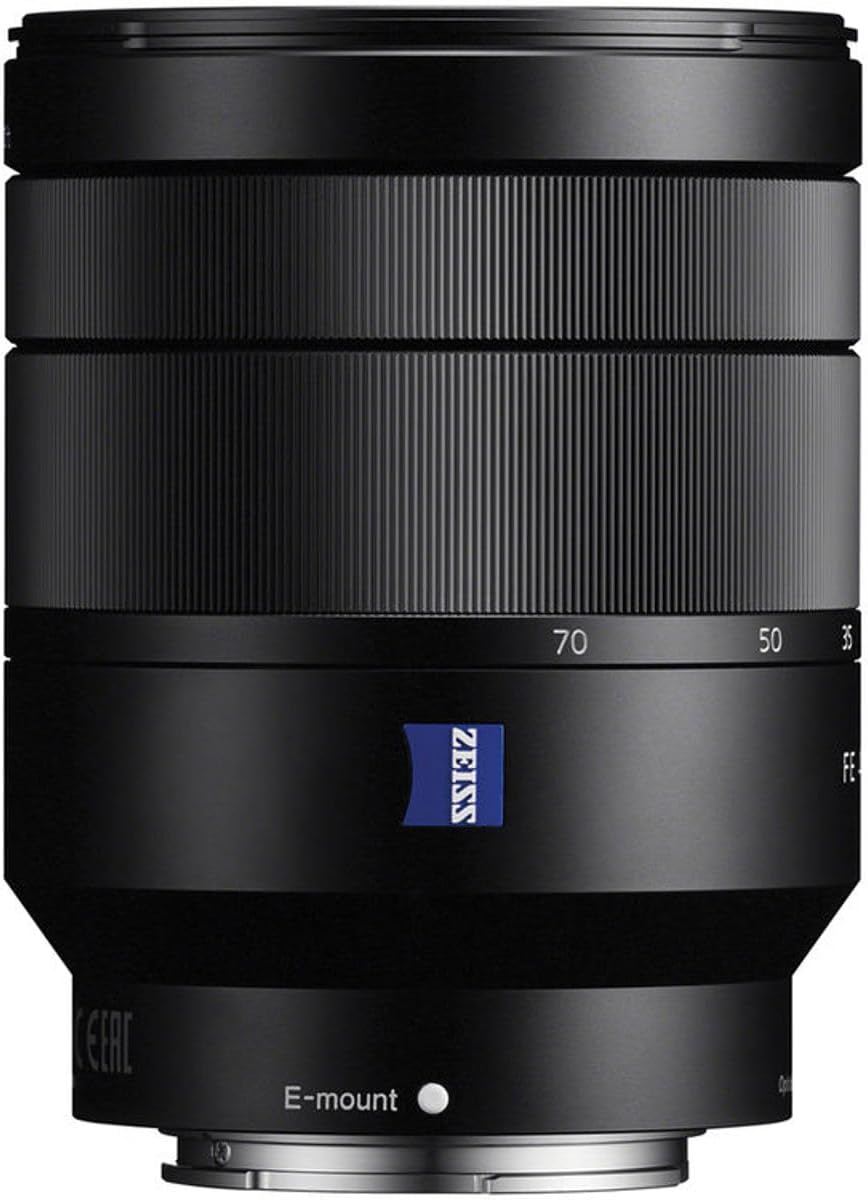
This manual provides essential information for the safe and effective use of your Sony FE 24-70mm f/4 Vario-Tessar T* OSS Zoom Lens. This compact full-frame Carl Zeiss mid-range zoom lens offers a versatile 24mm to 70mm focal length range with a constant maximum aperture of F4, ensuring consistent exposure. It is designed for use with full-frame and APS-C E-mount cameras and features dust and moisture resistance for reliable performance.
2. Taarifa za Usalama
- Do not expose the lens to direct sunlight for extended periods, as this may damage the camera's image sensor.
- Epuka kuangusha au kuathiri lenzi kwa nguvu.
- Keep the lens away from water and moisture to prevent malfunction.
- Usijaribu kutenganisha au kurekebisha lenzi. Matengenezo yanapaswa kufanywa tu na wafanyakazi wa huduma walioidhinishwa.
- Store the lens in a cool, dry place away from extreme temperatures.
3. Yaliyomo kwenye Kifurushi
- Lenzi
- Lens hood (ALC-SH130: petal shape, bayonet type)
- Kofia ya mbele ya lenzi
- Kofia ya nyuma ya lenzi
- Kesi
4. Utambulisho wa Sehemu
Familiarize yourself with the key components of your lens.

- Gonga la Kuzingatia: Inatumika kwa kuzingatia kwa mikono.
- Pete ya Kuza: Adjusts the focal length between 24mm and 70mm.
- E-mount Index: Align with the camera's mount index for attachment.
- Lens Hood Attachment Mark: For attaching the lens hood.
- Optical SteadyShot Switch: Activates or deactivates image stabilization.
- Kichujio cha Thread: For attaching filters (67mm diameter).
5. Kuweka
Kuunganisha Lenzi
- Ondoa kofia ya nyuma ya lenzi na kifuniko cha mwili cha kamera.
- Align the white index mark on the lens with the white index mark on your camera body.
- Weka lenzi kwa kuigeuza kuelekea saa hadi itakapobofya mahali pake.
- Attach the lens hood by aligning its mark with the lens hood attachment mark on the lens, then turn it clockwise until it locks.
Kuondoa Lenzi
- Unapobonyeza kitufe cha kutoa lenzi kwenye mwili wa kamera, geuza lenzi kinyume cha saa hadi itakaposimama.
- Ondoa lensi.
- Attach the lens caps to protect the lens and camera sensor.
6. Uendeshaji wa Lenzi
Kukuza
Rotate the zoom ring to adjust the focal length from 24mm (wide-angle) to 70mm (telephoto).
Kuzingatia
- Fokasi otomatiki (AF): Weka kamera yako kwenye hali ya AF. Lenzi itazingatia kiotomatiki mada yako.
- Mkazo wa Mwongozo (MF): Set your camera to MF mode. Rotate the focus ring to achieve desired focus.
Optical SteadyShot (Image Stabilization)
This lens features built-in Optical SteadyShot image stabilization. Activate it via the switch on the lens or through your camera's menu for sharper images, especially in low light or when shooting handheld.
Udhibiti wa Kitundu
The lens maintains a constant maximum aperture of f/4 across the entire zoom range. Adjust the aperture through your camera's settings to control depth of field and exposure.
Video Usage
The lens's quiet linear motors and image stabilization are beneficial for video recording, minimizing operational noise and camera shake.
7. Matengenezo na Matunzo
- Kusafisha Uso wa Lenzi: Use a lens blower to remove dust, then gently wipe with a soft, clean lens cloth. Do not use organic solvents.
- Kusafisha Mwili wa Lensi: Futa kwa kitambaa laini, kavu.
- Hifadhi: When not in use, attach both front and rear lens caps. Store in a dry, well-ventilated area, away from direct sunlight and chemicals.
- Upinzani wa Vumbi na Unyevu: While resistant, avoid exposing the lens to heavy rain or dust storms.
8. Utatuzi wa shida
Lens not attaching properly
- Ensure the index marks on the lens and camera body are aligned.
- Check for any obstructions on the lens mount or camera mount.
Kuzingatia kiotomatiki ni polepole au si sahihi
- Check camera's focus mode settings.
- Ensure there is sufficient light on the subject.
- Clean the lens contacts on both the lens and camera body.
Image stabilization not working
- Verify the Optical SteadyShot switch on the lens is set to ON.
- Check camera menu settings for image stabilization.
9. Vipimo
| Kipengele | Maelezo |
|---|---|
| Urefu wa Kuzingatia | 24-70mm |
| Kipenyo cha juu zaidi | f/4 |
| Kiwango cha chini | F22 |
| Angle ya View (35mm) | 84°-34° |
| Kiwango cha chini cha Kuzingatia | futi 1.32 (m 0.4) |
| Kiwango cha juu cha Ukuzaji | 0.20x |
| Blade za Aperture | 7 (circular) |
| Filter Thread Diameter | 67 mm |
| Aina ya Lenzi | Kuza Kawaida |
| Vipandikizi Vinavyolingana | Sony E |
| Vipimo | Inchi 3.74 x 2.87 x 2.87 |
| Uzito wa Kipengee | 15 wakia |
| Vipengele Maalum | Carl Zeiss T* coating, ED glass, Aspherical elements, Optical SteadyShot |
10. Udhamini na Msaada
Kwa taarifa za udhamini na huduma kwa wateja, tafadhali rejelea Sony rasmi website or contact your local Sony service center. Keep your proof of purchase for warranty claims.
Online resources and FAQs may also be available on the Sony support portal.
This product is covered by Sony's standard warranty. Additional protection plans may be available for purchase.