1. Utangulizi
Thank you for choosing the Antec HCG-850M 850W Power Supply. This manual provides essential information for the safe and efficient installation, operation, and maintenance of your power supply unit. Please read this manual thoroughly before installation and retain it for future reference.
2. Taarifa za Usalama
Daima fuata tahadhari za usalama zifuatazo ili kuzuia majeraha au uharibifu wa mfumo wako:
- Usifanye open the power supply casing. Kiwango cha juutagVipo ndani, hata wakati kifaa hakijachomwa.
- Usifanye insert any objects into the power supply's ventilation openings.
- Ensure the power supply is installed in a well-ventilated area.
- Use only the modular cables provided with this power supply. Using incompatible cables can cause damage.
- Disconnect the AC power cord from the wall outlet before installing or removing the power supply.
- This product is designed for use in personal computers only.
3. Yaliyomo kwenye Kifurushi
Thibitisha kuwa vipengee vyote vipo kwenye kifurushi chako:
- Antec HCG-850M 850W Power Supply
- Modular Cable Set (PCI-E, SATA, Peripheral, CPU)
- Kamba ya Nguvu ya AC
- Kuweka Screws
- Mwongozo wa Mtumiaji (hati hii)
4. Bidhaa Imeishaview
The Antec HCG-850M is an 850-watt, 80 PLUS Bronze certified, semi-modular power supply designed for high-performance personal computers. It features a quiet 135mm fan for efficient cooling and robust protection circuits to ensure stable power delivery.
4.1 Sifa Muhimu
- 850 Watts Continuous Power
- 80 PLUS Bronze Certified Efficiency
- Semi-Modular Cable Management
- Shabiki Kimya wa mm 135
- Kipengele cha Fomu ya ATX
- Multiple Protection Circuits (OCP, OVP, UVP, SCP, OPP, OTP)
4.2 Kitengo cha Ugavi wa Umeme
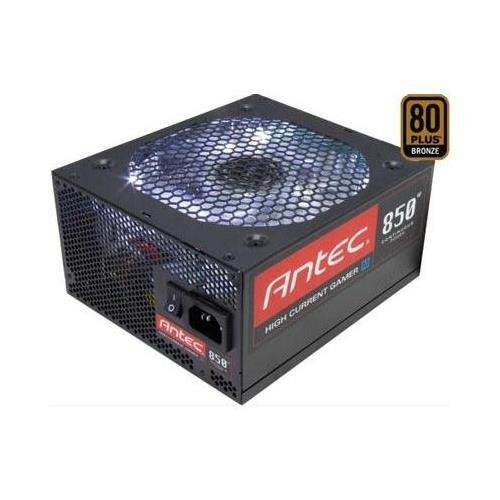
Picha 1: Mbele view of the Antec HCG-850M 850W Power Supply, showing the fan grille and modular cable connectors. This unit provides stable power to your computer components.
5. Kuweka na Kuweka
Follow these steps to install your Antec HCG-850M power supply:
- Tayarisha Mfumo Wako: Hakikisha kompyuta yako imezimwa kabisa na haijachomekwa kutoka kwa plagi ya ukutani. Fungua kipochi chako cha kompyuta.
- Ondoa PSU ya Zamani (ikiwa inafaa): Disconnect all cables from your old power supply. Unscrew and remove the old PSU from the case.
- Weka PSU Mpya: Carefully place the Antec HCG-850M into the power supply bay of your computer case. Secure it with the provided mounting screws. Ensure the fan is oriented correctly for optimal airflow (typically facing down if there's a bottom vent, or up if not).
- Unganisha Kebo Muhimu:
- Connect the 24-pin ATX motherboard power cable.
- Connect the 4+4-pin or 8-pin EPS/CPU power cable to your motherboard.
- Unganisha Kebo za Kawaida: Attach the necessary modular cables for your components (e.g., PCI-E for graphics cards, SATA for hard drives/SSDs, Peripheral for fans/accessories). Connect them securely to both the power supply and the respective components.
- Usimamizi wa Cable: Pitisha nyaya vizuri ili kuboresha mtiririko wa hewa na uzuri.
- Funga Kipochi na Uwashe: Close your computer case. Connect the AC power cord to the power supply and then to a wall outlet. Flip the power switch on the PSU to the 'ON' position. Power on your computer.
6. Maagizo ya Uendeshaji
Once installed, the Antec HCG-850M operates automatically. Here are some general operating guidelines:
- Washa/Zima: Use your computer's power button to turn the system on or off. The switch on the power supply itself should generally remain in the 'ON' position during normal operation.
- Uthabiti wa Mfumo: Ensure your system is stable. If you experience unexpected shutdowns or reboots, refer to the troubleshooting section.
- Uingizaji hewa: Maintain good airflow around your computer case to prevent overheating of components, including the power supply.
7. Matengenezo
Utunzaji sahihi unaweza kupanua maisha ya usambazaji wako wa nishati:
- Kusafisha vumbi: Periodically clean dust from the power supply's fan grille and the interior of your computer case using compressed air. Daima tenganisha waya wa umeme wa AC kabla ya kusafisha.
- Ukaguzi wa Cable: Occasionally check that all power cables are securely connected to the power supply and components.
- Mazingira: Operate the power supply in a clean, dry environment with stable temperatures.
8. Utatuzi wa shida
If you encounter issues with your power supply, try the following steps:
8.1 No Power to System
- Hakikisha kwamba kebo ya umeme ya AC imechomekwa kwa usalama kwenye plagi ya ukuta na sehemu ya umeme.
- Check that the power supply's ON/OFF switch is in the 'ON' position.
- Verify all internal power cables (24-pin ATX, CPU, PCI-E) are correctly and firmly connected.
- Jaribu sehemu ya ukuta kwa kifaa kingine ili kuhakikisha kuwa ina nguvu.
- If possible, test the power supply in another known working system or with a PSU tester.
8.2 System Instability or Random Shutdowns
- Hakikisha mahitaji ya nguvu ya mfumo wako hayazidi uwezo wa 850W wa PSU.
- Check for overheating components. Ensure proper case ventilation and clean any dust buildup.
- Verify all power connections are secure. Loose connections can cause intermittent power delivery.
- If the issue persists, it may indicate a fault with the power supply or another component. Consider professional diagnosis.
9. Vipimo
| Kipengele | Maelezo |
|---|---|
| Nambari ya Mfano | HCG-850M |
| Pato Wattage | 850 Watts |
| Udhibitisho wa Ufanisi | 80 PLUS Shaba |
| Kipengele cha Fomu | ATX |
| Mbinu ya Kupoeza | Hewa (Feni ya 135mm) |
| Aina ya Modular | Semi-Modular |
| Vifaa Sambamba | Kompyuta ya kibinafsi |
| Uzito wa Kipengee | Pauni 9 (takriban kilo 4.08) |
| ASIN | B00ESAI3M0 |
10. Udhamini na Msaada
Antec products are backed by a manufacturer's warranty. For specific warranty terms and conditions, please refer to the warranty card included with your product or visit the official Antec website. For technical support or customer service, please contact Antec directly through their official support channels.
Antec Rasmi Webtovuti: www.antec.com


