1. Utangulizi
This manual provides essential instructions for the safe and efficient use of your Kyocera EBVK-2650 Engine Blower Vacuum. Please read this manual thoroughly before operating the machine and keep it for future reference. The EBVK-2650 is designed for blowing and vacuuming leaves and light debris in outdoor environments.
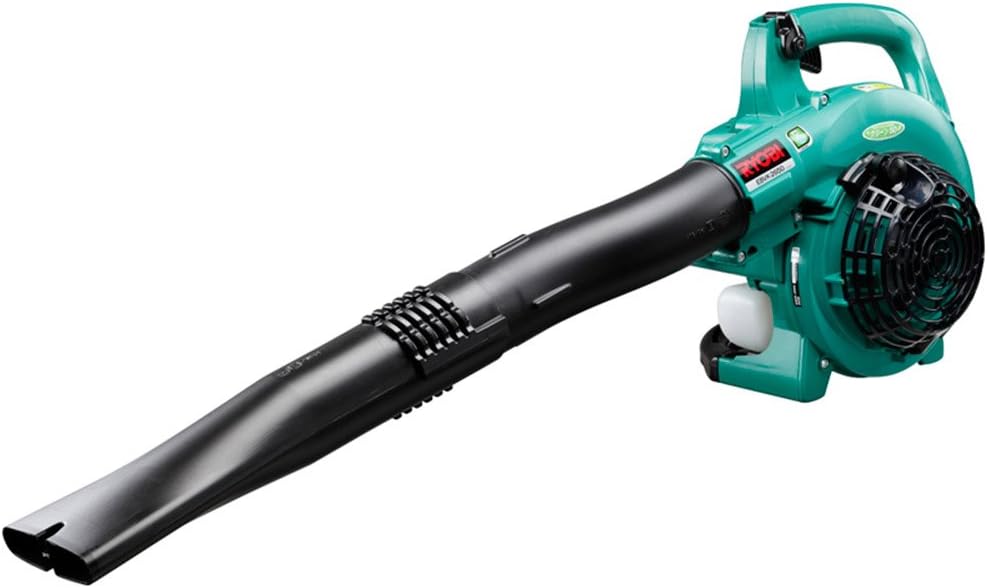
Image 1.1: The Kyocera EBVK-2650 Engine Blower Vacuum in its primary blower configuration. This image shows the main unit with the straight nozzle attached, ready for blowing leaves and debris.
2. Taarifa za Usalama
Kila mara weka kipaumbele usalama unapotumia zana za nguvu. Kukosa kufuata maagizo haya kunaweza kusababisha majeraha makubwa au uharibifu wa mali.
2.1 Kanuni za Usalama za Jumla
- Soma na uelewe maagizo yote kabla ya kuendesha mashine.
- Wear appropriate personal protective equipment (PPE), including eye protection, hearing protection, gloves, and sturdy footwear.
- Usitumie mashine katika hali ya unyevunyevu au mbele ya vimiminika au gesi zinazoweza kuwaka.
- Keep children, bystanders, and pets at a safe distance (at least 15 meters / 50 feet) from the operating area.
- Inspect the machine for loose parts, damage, or wear before each use. Do not operate a damaged machine.
- Ensure proper ventilation when operating the engine, as exhaust fumes contain carbon monoxide.
- Kamwe usielekeze pua ya kupuliza kwa watu au wanyama.
- Turn off the engine and allow it to cool before refueling, cleaning, or performing maintenance.
- Hifadhi mashine mahali pakavu na salama, mbali na watoto.
2.2 Usalama wa Mafuta
- Use only the recommended fuel mixture: unleaded gasoline and 2-cycle engine oil at a 50:1 ratio.
- Changanya mafuta katika eneo lenye hewa ya kutosha, mbali na cheche au miali ya moto iliyo wazi.
- Do not smoke while mixing or refueling.
- Futa mafuta yoyote yaliyomwagika mara moja.
- Hifadhi mafuta kwenye chombo kilichoidhinishwa mahali penye baridi na kavu.
3. Yaliyomo kwenye Kifurushi na Vipengele
Thibitisha kwamba vipengele vyote vipo na havijaharibika wakati wa kufungua.
3.1 Vifaa vilivyojumuishwa
- Main Unit (Engine Blower Vacuum)
- Pua moja kwa moja
- Nozzle Iliyopinda
- Bomba la kunyonya
- Pua ya shabiki
- Mfuko wa Vumbi
- Socket Wrench (13x19mm)
- Mwongozo wa Maagizo
3.2 Vipengele Muhimu Zaidiview
Familiarize yourself with the main parts of the EBVK-2650.

Image 3.1: The Kyocera EBVK-2650 configured for vacuuming. This view shows the suction pipe and the dust bag attached, ready to collect leaves and debris.
- Kitengo cha Injini: The core power source.
- Tangi la Mafuta: For mixed fuel.
- Kishikio cha Kuanzisha: For manual engine start.
- Kifaa cha Kusukuma Kaunta: Inadhibiti kasi ya injini.
- Acha Kubadilisha: To turn off the engine.
- Kifuniko cha Kichujio cha Hewa: Hulinda kichujio cha hewa.
- BRADLEY SXNUMXPDCZ For ignition.
- Blower/Vacuum Port: Where nozzles or suction pipe attach.
- Dust Bag Connection: For attaching the collection bag in vacuum mode.
4. Kuweka na Kukusanya
4.1 Assembling for Blower Mode
- Hakikisha injini imezimwa na baridi.
- Attach the desired nozzle (straight or curved) to the blower port. Twist until securely locked.
- Confirm all connections are tight before use.

Picha 4.1: Kukaribiana view of the Kyocera EBVK-2650 in operation, demonstrating the blower function. The user is holding the unit, directing the airflow.
4.2 Assembling for Vacuum/Mulching Mode
- Hakikisha injini imezimwa na baridi.
- Remove any blower nozzles from the blower port.
- Attach the suction pipe to the intake port. Secure it firmly.
- Connect the dust bag to the exhaust port. Ensure the bag is properly sealed to prevent debris leakage.
- Confirm all connections are tight before use.

Image 4.2: The Kyocera EBVK-2650 being used in vacuum mode. The suction pipe is directed towards leaves, and the dust bag is visible, collecting the mulched debris.
4.3 Fuel Preparation and Filling
The EBVK-2650 uses a 2-cycle engine. It requires a specific mixture of unleaded gasoline and 2-cycle engine oil.
- Fuel Ratio: Unleaded Gasoline : 2-Cycle Engine Oil = 50:1
- Use high-quality 2-cycle engine oil specifically designed for air-cooled engines.
- Mix the fuel in a separate, approved fuel container. Shake well before filling.
- Open the fuel tank cap slowly to release pressure.
- Fill the fuel tank (capacity 0.47 L) carefully, avoiding overfilling.
- Funga kifuniko cha tank ya mafuta kwa usalama.
5. Maagizo ya Uendeshaji
5.1 Kuanzisha Injini
- Weka mashine kwenye uso wa gorofa, imara.
- Hakikisha swichi ya kusimamisha iko katika nafasi ya "WASHA".
- Shirikisha lever ya choke (ikiwa baridi huanza).
- Bonyeza balbu ya primer mara kadhaa hadi mafuta yaonekane.
- Pull the starter handle firmly and smoothly until the engine starts. Do not pull the rope to its full extension.
- Mara baada ya injini kuanza, hatua kwa hatua uondoe choko.
- Ruhusu injini ipate joto kwa muda mfupi kabla ya kutumia throttle kamili.

Image 5.1: A user demonstrating the engine starting procedure for the Kyocera EBVK-2650. The starter handle is being pulled to ignite the engine.
5.2 Uendeshaji wa Kipuli
- Hold the machine firmly with both hands.
- Direct the nozzle towards the debris you wish to move.
- Gradually increase the throttle to achieve the desired airflow.
- Tumia mwendo wa kufagia ili kukusanya majani na uchafu kwenye marundo.

Image 5.2: A user operating the Kyocera EBVK-2650 in blower mode, clearing leaves from a path. The machine is held comfortably, directing the airflow.
5.3 Vacuum/Mulching Operation
- Ensure the machine is correctly assembled for vacuum mode with the dust bag attached.
- Hold the machine firmly, guiding the suction pipe over the leaves.
- Move slowly and steadily to allow the machine to pick up and mulch debris.
- Monitor the dust bag and empty it when it becomes full to maintain optimal performance.
- Note: Mulching performance varies based on leaf type, size, and moisture content. Avoid vacuuming wet leaves or large, hard objects.

Image 5.3: A user operating the Kyocera EBVK-2650 in vacuum mode, actively collecting leaves from a paved area. The dust bag is visible, indicating collection.
5.4 Kusimamisha Injini
- Release the throttle lever to allow the engine to idle.
- Sogeza swichi ya kusimamisha hadi kwenye nafasi ya "ZIMA".
- Allow the machine to cool down before storage or maintenance.
6. Matengenezo
Regular maintenance ensures optimal performance and extends the lifespan of your EBVK-2650. Always ensure the engine is off and cool before performing any maintenance.
6.1 Kusafisha Kichujio cha Hewa
- Ondoa kifuniko cha chujio cha hewa.
- Ondoa kwa uangalifu kipengele cha kichujio cha hewa.
- Clean the filter by tapping it gently or using compressed air. If heavily soiled, wash with warm, soapy water, rinse thoroughly, and allow to dry completely before reinstallation.
- Badilisha kifuniko cha chujio cha hewa.
6.2 Ukaguzi na Ubadilishaji wa Plagi ya Cheche
- Ondoa kofia ya kuziba.
- Use the provided socket wrench to remove the spark plug (NGK BPM8Y).
- Inspect the spark plug for wear, carbon buildup, or damage. Clean if necessary.
- Check the electrode gap and adjust if needed.
- Replace with a new spark plug of the recommended type if worn or damaged.
- Reinstall the spark plug and cap securely.
6.3 Kichujio cha Mafuta
The fuel filter is located inside the fuel tank. Inspect it periodically for debris. If clogged, replace it. This procedure may require professional assistance.
6.4 Marekebisho ya Kabureta
Carburetor adjustments should ideally be performed by a qualified service technician. Incorrect adjustments can lead to engine damage or poor performance.
6.5 Hifadhi
- For long-term storage, drain all fuel from the tank and run the engine until it stops to clear the carburetor.
- Safisha sehemu ya nje ya mashine.
- Store in a dry, dust-free location, away from direct sunlight and extreme temperatures.
7. Utatuzi wa shida
Sehemu hii inashughulikia masuala ya kawaida ambayo unaweza kukutana nayo. Kwa matatizo ambayo hayajaorodheshwa hapa, wasiliana na usaidizi kwa wateja.
| Tatizo | Sababu inayowezekana | Suluhisho |
|---|---|---|
| Injini haina kuanza |
|
|
| Injini inafanya kazi, lakini haina nguvu |
|
|
| Mtetemo mwingi |
|
|
8. Vipimo
| Kipengele | Maelezo |
|---|---|
| Chapa | Kyocera |
| Nambari ya Mfano | EBVK-2650 |
| Aina ya Injini | Air-cooled 2-cycle single cylinder gasoline engine |
| Uhamisho | 25.4 ml |
| Average Air Volume | 8.7 m³/dak |
| Kiwango cha Juu cha Kiasi cha Hewa | 67.5 m³/dak |
| Njia ya kuwasha | Electronic ignition (Flywheel magnet) |
| Spark Plug | NGK BPM8Y |
| Aina ya Carburetor | Aina ya diaphragm |
| Mafuta | Mixed fuel (Unleaded gasoline: 2-cycle engine oil = 50:1) |
| Uwezo wa Tangi ya Mafuta | 0.47 L |
| Dimensions (L x W x H, excluding nozzle) | 330 x 270 x 345 mm |
| Weight (excluding nozzle, fuel) | 4.2 kg |
| Vifaa Pamoja | Straight nozzle, Curved nozzle, Suction pipe, Fan nozzle, Dust bag, Socket wrench (13x19mm) |
| Matumizi Iliyopendekezwa | Dust cleaning, Leaf cleaning |
Note: Product specifications are subject to change without notice for improvement. The listed weight of 8.1 kg in some product descriptions likely includes packaging and all accessories, while 4.2 kg refers to the bare unit.
9. Udhamini na Msaada
For warranty information, service, or technical support, please refer to the warranty card included with your product or visit the official Kyocera webtovuti. Weka uthibitisho wako wa ununuzi kwa madai ya udhamini.
Kyocera Customer Support: Please visit the official Kyocera website or contact your local dealer for assistance.


