1. Utangulizi
1.1. Zaidiview
The Hager WITTY charging station is designed for charging electric vehicles in accordance with Mode 3 (IEC 61851-1) and Mode 2 standards. It supports both Type 3 and standard socket connections, offering flexible charging solutions for various electric vehicles. This device operates on a 3-phase + Neutral, 32A electrical supply, delivering power from 4 kW to 22 kW.
1.2. Maagizo ya Usalama
- Installation must be performed by a qualified electrician in accordance with local and national electrical codes.
- Do not attempt to open or repair the charging station yourself. Contact qualified service personnel.
- Ensure the charging station is properly grounded.
- Do not use the charging station if it is damaged or shows signs of malfunction.
- Keep children and unauthorized persons away from the charging station during operation.
- Avoid exposing the charging station to extreme temperatures, direct sunlight for prolonged periods, or corrosive substances.
2. Maelezo ya Bidhaa
2.1. Vipengele
- Compatible with Mode 3 (Type 3) and Mode 2 charging.
- Free access operation.
- Power output: 4 kW to 22 kW.
- Input: 3-phase + Neutral, 32A.
- Integrated status indicator light.
2.2. Vipengele
The Hager WITTY charging station typically includes:
- Charging station unit
- Vifaa vya kuweka (screws, nanga)
- Mwongozo wa mtumiaji (hati hii)

Kielelezo cha 1: Mbele view of the Hager WITTY charging station with a green operational light, mounted on a textured wall.
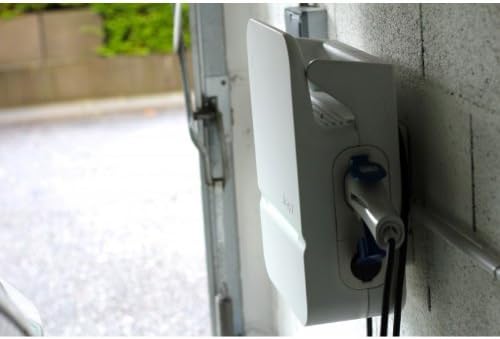
Kielelezo cha 2: Upande view of the Hager WITTY charging station, illustrating the cable connection point and the unit's profile.
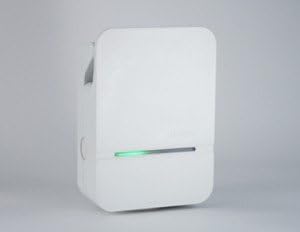
Kielelezo cha 3: Mbele ya kina view of the Hager WITTY charging station, emphasizing the integrated green status light.
3. Kuweka
3.1. Mahali pa Kuweka
Choose a suitable location that is protected from direct impact, excessive moisture, and extreme temperatures. Ensure adequate ventilation and accessibility for maintenance.
3.2. Kuweka
- Mark the drilling points on the wall using the provided template (if applicable) or by measuring the mounting holes on the unit.
- Toboa mashimo na uweke nanga zinazofaa za ukutani.
- Secure the charging station to the wall using the provided screws.
3.3. Uunganisho wa Umeme
ONYO: Ufungaji wa umeme lazima ufanyike na fundi umeme aliyehitimu.
- Ensure the main power supply is disconnected before beginning any electrical work.
- Connect the 3-phase + Neutral (3Ph+N) 32A power supply to the designated terminals inside the charging station.
- Hakikisha msingi sahihi umeanzishwa.
- Verify all connections are secure and correctly wired according to the wiring diagram provided with the unit (refer to the separate installation guide for detailed diagrams).
- Close the charging station cover securely.
4. Kufanya kazi
4.1. Starting a Charge
- Ensure the charging station is powered on and the status indicator light is green (ready).
- Connect the charging cable to your electric vehicle's charging port.
- Connect the other end of the charging cable to the charging station's outlet (Type 3 or Mode 2 socket).
- The charging station will automatically initiate the charging process. The status indicator light may change to blue or flashing green, depending on the charging status.
4.2. Kusimamisha Malipo
- Disconnect the charging cable from your electric vehicle first.
- Disconnect the charging cable from the charging station.
- The charging station will return to a ready state (green indicator light).
4.3. Viashiria vya Hali
- Mwanga wa Kijani: Ready for charging.
- Blue Light (or flashing green): Uchaji unaendelea.
- Red Light (or flashing red): Error or fault detected. Refer to the Troubleshooting section.
- Hakuna Mwanga: Power off or system fault.
5. Matengenezo
5.1. Kusafisha
Clean the exterior of the charging station with a soft, damp kitambaa. Usitumie visafishaji vya kukwaruza, miyeyusho, au kemikali kali. Hakikisha kifaa kimezimwa kabla ya kusafisha.
5.2. Ukaguzi
Periodically inspect the charging station for any signs of damage, wear, or loose connections. Check the charging cable for fraying or damage. If any damage is found, discontinue use and contact a qualified technician.
6. Utatuzi wa shida
| Tatizo | Sababu inayowezekana | Suluhisho |
|---|---|---|
| No power/No light | Power supply disconnected; Circuit breaker tripped. | Check power supply; Reset circuit breaker. If problem persists, contact a qualified electrician. |
| Nuru ya kiashiria nyekundu | Internal fault; Overcurrent; Ground fault. | Disconnect and reconnect the vehicle. If the error persists, power cycle the unit. If still red, contact service. |
| Inachaji haijaanza | Cable not properly connected; Vehicle not ready to charge; Charging station fault. | Ensure cable is securely connected to both vehicle and station. Check vehicle's charging status. Power cycle the charging station. |
7. Vipimo
| Kipengele | Maelezo |
|---|---|
| Mfano | XEV103 |
| Hali ya Kuchaji | Mode 3 (IEC 61851-1), Mode 2 |
| Aina ya kiunganishi | Type 3 / Standard Socket |
| Uingizaji Voltage | 3-phase + Neutral |
| Max Ya Sasa | 32A |
| Pato la Nguvu | 4 kW hadi 22 kW |
| Ufikiaji | Ufikiaji Bila Malipo |
| ASIN | B00CSJUVKA |
8. Udhamini na Msaada
For warranty information and technical support, please refer to the official Hager website or contact your local Hager distributor. Keep your purchase receipt for warranty claims.
Spare parts availability: Information not available.


