Utangulizi
This manual provides comprehensive instructions for the safe and efficient use of your Marmitek BoomBoom 560 Bluetooth Over-Ear Headphones. These headphones offer excellent digital sound quality with clear mid-tones and deep bass, along with passive noise reduction for an immersive audio experience. Please read this manual thoroughly before operating the device.

Image: Marmitek BoomBoom 560 Bluetooth Over-Ear Headphones, black, shown from a slight angle.
Yaliyomo kwenye Kifurushi
Please check that all items listed below are present in your package:
- 1x Marmitek BoomBoom 560 Bluetooth Over-Ear Headphones
- 1x Micro USB to USB charging cable
- 1x 3.5mm Mini-jack audio cable (160 cm)
- 1x User manual (this document)

Image: Visual representation of the Marmitek BoomBoom 560 package contents, including the headphones, charging cable, audio cable, and user manual.
Bidhaa ImeishaviewVidhibiti na Milango
Familiarize yourself with the controls and ports on your BoomBoom 560 headphones:
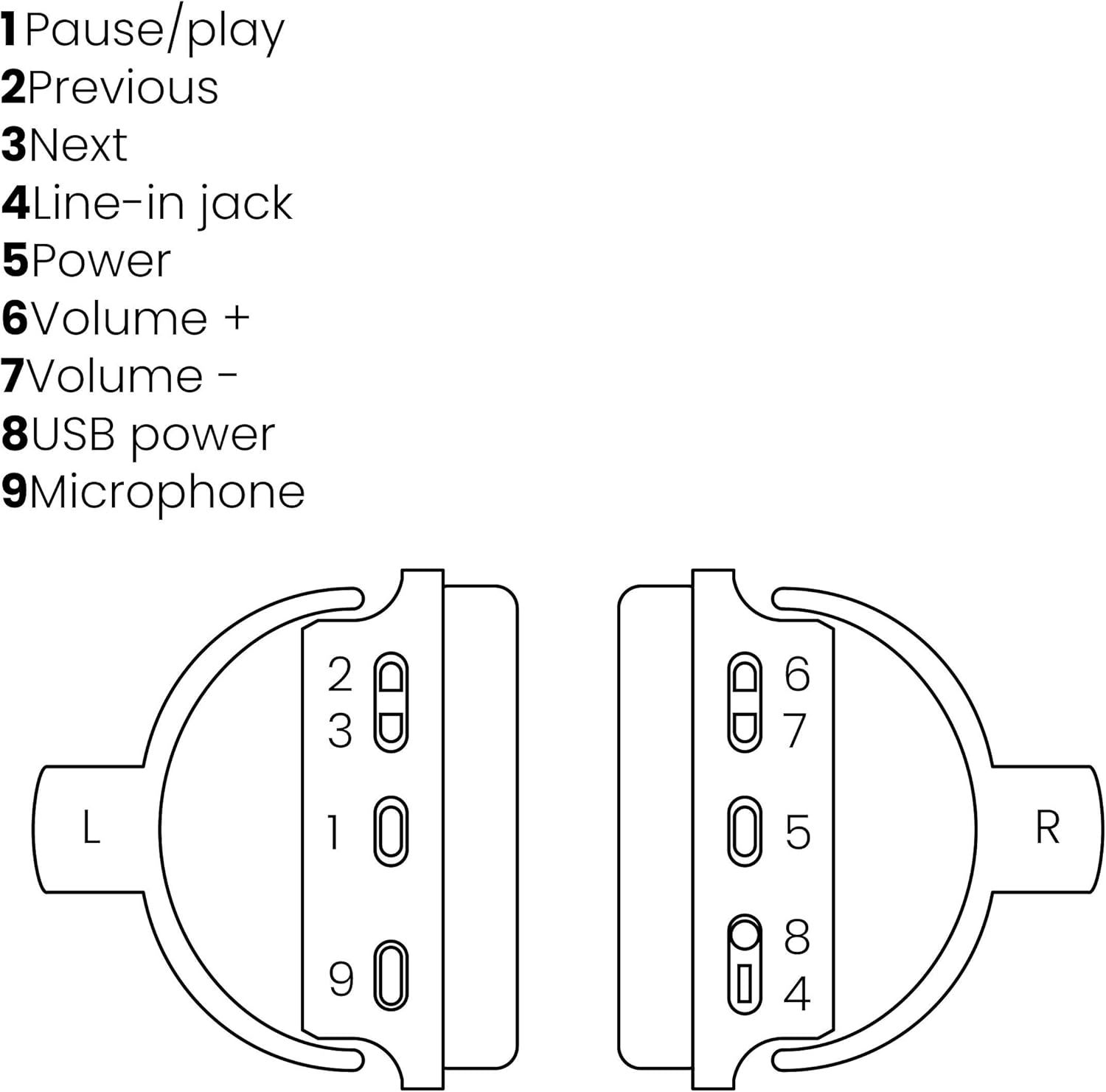
Image: A line drawing illustrating the left and right ear cup controls and ports, numbered for identification.
- Kitufe cha Sitisha/Cheza: Inadhibiti uchezaji wa muziki.
- Kitufe cha Orodha Iliyotangulia: Anaruka hadi kwenye wimbo uliopita.
- Kitufe cha Kufuatilia: Anaruka hadi wimbo unaofuata.
- Line-katika Jack: For wired audio connection using the 3.5mm cable.
- Kitufe cha Nguvu: Turns the headphones on/off and initiates Bluetooth pairing.
- Kitufe cha Sauti + Huongeza sauti.
- Kitufe cha Sauti: Hupunguza sauti.
- Mlango wa Nishati wa USB: For charging the headphones using the Micro USB cable.
- Maikrofoni: Maikrofoni iliyojengewa ndani kwa simu zisizo na mikono.
Sanidi
1. Kuchaji Headphones
Before first use, fully charge your headphones. Connect the Micro USB end of the charging cable to the USB Power Port (8) on the headphones and the standard USB end to a USB power adapter (not included) or a computer's USB port. The LED indicator will show charging status. A full charge provides over 8 hours of playback time.
2. Kuoanisha Bluetooth
To connect your headphones wirelessly to a Bluetooth-enabled device:
- Hakikisha vipokea sauti vya masikioni vimezimwa.
- Bonyeza na ushikilie Kitufe cha Nguvu (5) until the LED indicator flashes blue and red, indicating pairing mode.
- Kwenye simu yako mahiri, kompyuta kibao, au kifaa kingine cha Bluetooth, washa Bluetooth na utafute vifaa vinavyopatikana.
- Select "BoomBoom 560" from the list of found devices.
- Mara baada ya kushikamana, kiashiria cha LED kitaangaza bluu polepole.

Image: Illustration depicting various Bluetooth-enabled devices (laptop, smartphone, tablet) wirelessly transmitting audio to the headphones.
3. Muunganisho wa Waya
If Bluetooth is not available or the battery is depleted, you can use the included 3.5mm audio cable. Connect one end of the cable to the Line-in Jack (4) on the headphones and the other end to the audio output of your device.
Maagizo ya Uendeshaji
Washa/Zima
- Kuwasha: Bonyeza na ushikilie Kitufe cha Nguvu (5) for approximately 3 seconds until the LED indicator flashes blue.
- Kuzima: Bonyeza na ushikilie Kitufe cha Nguvu (5) kwa takriban sekunde 3 hadi kiashiria cha LED kizima.
Uchezaji wa Muziki
- Cheza/Sitisha: Bonyeza kwa Pause/Play Button (1) mara moja.
- Wimbo Ufuatao: Bonyeza kwa Next Track Button (3) mara moja.
- Wimbo Uliopita: Bonyeza kwa Previous Track Button (2) mara moja.
Usimamizi wa simu
When connected via Bluetooth, you can manage phone calls using the built-in microphone (9):
- Jibu/Maliza Simu: Bonyeza kwa Pause/Play Button (1) mara moja.
- Kataa Simu: Bonyeza na ushikilie Pause/Play Button (1) kwa takriban sekunde 2.
Udhibiti wa Kiasi
- Ongeza Sauti: Bonyeza kwa Volume + Button (6).
- Punguza Sauti: Bonyeza kwa Volume - Button (7).

Image: A user enjoying music or media with the Marmitek BoomBoom 560 headphones while relaxing at home.
Matengenezo
Ili kuhakikisha uimara na utendaji bora wa vipokea sauti vyako vya masikioni:
- Safisha vipokea sauti vya masikioni kwa kitambaa laini na kikavu. Usitumie visafishaji au viyeyusho vyenye kukwaruza.
- Epuka kuweka vipokea sauti vinavyobanwa kichwani kwenye joto kali, unyevunyevu au jua moja kwa moja.
- Hifadhi vipokea sauti vinavyobanwa kichwani mahali penye baridi, pakavu wakati havitumiki.
- Usijaribu kutenganisha au kutengeneza vichwa vya sauti mwenyewe, kwani hii itabatilisha dhamana.
Kutatua matatizo
If you encounter issues with your BoomBoom 560 headphones, refer to the following common solutions:
- Hakuna Nguvu: Ensure the headphones are fully charged. Connect them to a power source using the USB charging cable.
- Haiwezi Kuoanisha kupitia Bluetooth:
- Hakikisha vipokea sauti vya masikioni viko katika hali ya kuoanisha (LED inayowaka bluu na nyekundu).
- Ensure your Bluetooth device's Bluetooth function is enabled and within range (typically 10 meters).
- Try turning off and on both the headphones and your Bluetooth device.
- Delete "BoomBoom 560" from your device's Bluetooth list and attempt to pair again.
- Hakuna Sauti:
- Angalia viwango vya sauti kwenye vipokea sauti vinavyobanwa kichwani na kifaa chako kilichounganishwa.
- Hakikisha vipokea sauti vinavyobanwa kichwani vimeoanishwa ipasavyo au kebo ya sauti ya 3.5mm imeunganishwa kwa usalama.
- Ikiwa unatumia Bluetooth, jaribu kukata muunganisho na kuunganisha tena.
- Ubora duni wa Sauti:
- Sogeza karibu na kifaa chako cha Bluetooth ili kupunguza usumbufu.
- Hakikisha hakuna vikwazo kati ya vipokea sauti vya masikioni na kifaa.
- Angalia chanzo cha sauti kwa matatizo ya ubora.
- Loose Earcup Bracket: If the earcup bracket feels loose, handle the headphones with care. Avoid excessive force when adjusting or folding. If the issue persists and affects functionality, contact customer support.
Vipimo
| Jina la Mfano | BoomBoom 560 |
| Nambari ya Mfano | 8122 |
| Chapa | Marmitek |
| Teknolojia ya Uunganisho | Wireless (Bluetooth), Wired (3.5mm jack) |
| Utangamano wa Bluetooth | Ndiyo |
| Kipengele cha Fomu | Juu ya sikio |
| Nyenzo | Ngozi (vikombe vya masikio) |
| Vipengele Maalum | Kupunguza Kelele |
| Teknolojia ya Maikrofoni | Omni (Built-in) |
| Maelezo ya Betri | Lithium-Ion (Li-Ion) |
| Maisha ya Betri | Over 8 hours (approx.) |
| Uwiano wa Sauti-kwa-Kelele (SNR) | 82 dB |
| Vipimo vya Bidhaa | 23 x 5 x 18cm; 100g |
Udhamini na Msaada
Marmitek products are designed and manufactured to high quality standards. For information regarding warranty terms and conditions, please refer to the documentation provided with your purchase or visit the official Marmitek webtovuti.
Kwa usaidizi zaidi au usaidizi wa kiufundi, tafadhali tembelea Marmitek Store on Amazon or the official Marmitek support channels.

Image: Logo indicating "Dutch Quality" and compliance with "EU European Standards".


