1. Utangulizi
Thank you for choosing the TFA 30.5027.02 Digital Thermometer/Hygrometer. This device is designed to accurately measure and display indoor temperature and humidity, providing a clear indication of the comfort level in your environment. Its ultra-flat design and high-gloss surface make it a discreet and functional addition to any room. Please read this manual carefully to ensure proper setup and operation.
2. Taarifa za Usalama
- Weka mwongozo huu wa maagizo kwa marejeleo ya baadaye.
- Kifaa hiki kimekusudiwa kwa matumizi ya ndani tu.
- Do not expose the device to extreme temperatures, direct sunlight, moisture, or strong vibrations.
- Usitumbukize kifaa kwenye maji au vimiminiko vingine.
- Do not attempt to open or modify the device. This will void the warranty.
- Weka betri mbali na watoto. Ikiwa imemeza, tafuta matibabu ya haraka.
- Tupa betri zilizotumiwa kulingana na kanuni za ndani.
- Safisha kifaa kwa laini, damp kitambaa. Usitumie visafishaji vya abrasive au vimumunyisho.
3. Yaliyomo kwenye Kifurushi
Tafadhali hakikisha kuwa vipengele vyote vipo na havijaharibiwa:
- 1x TFA 30.5027.02 Digital Thermometer/Hygrometer
- 1x CR2 Lithium Battery (pre-installed or separate)
- 1x Mwongozo wa Maagizo (hati hii)
4. Bidhaa Imeishaview
The TFA 30.5027.02 features a clear digital display showing current temperature and humidity. It also includes a comfort level indicator and a maximum/minimum value memory function.

Kielelezo cha 1: Mbele view of the TFA 30.5027.02 Digital Thermometer/Hygrometer. The display shows temperature in Celsius and relative humidity percentage, along with a comfort level icon.
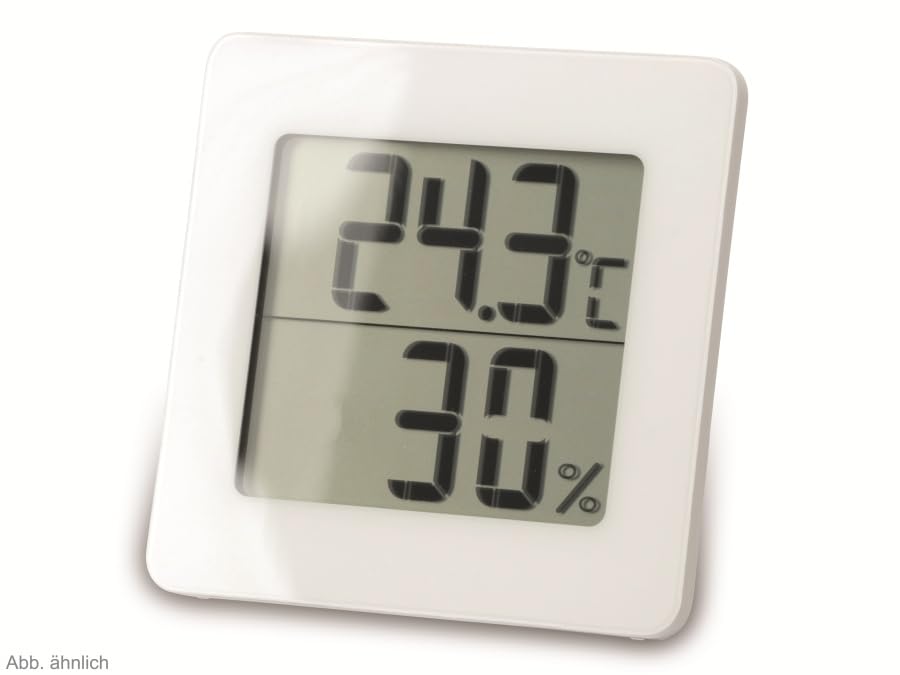
Kielelezo cha 2: Mbadala view of the TFA 30.5027.02 showing different temperature and humidity readings, demonstrating the device's clear digital display.
Sifa Muhimu:
- Digital display for temperature (°C) and humidity (% RH)
- Ultra-flat design with high-gloss finish
- Comfort level indicator (smiley icon)
- Maximum and minimum value memory function
- Inayoweza kuwekwa kwa ukuta
5. Kuweka
5.1 Ufungaji wa Betri
- Tafuta kifuniko cha sehemu ya betri nyuma ya kifaa.
- Ondoa kifuniko kwa kutelezesha au kukifungua kwa upole.
- Insert one CR2 Lithium battery, ensuring the correct polarity (+/-) as indicated inside the compartment.
- Badilisha kifuniko cha sehemu ya betri kwa usalama.
- The device display should activate, showing current temperature and humidity readings.
5.2 Uwekaji wa Awali
For accurate readings, place the thermometer/hygrometer in a location free from direct sunlight, drafts, or heat sources. The device can be placed on a flat surface or mounted on a wall using the integrated mounting hole on the back.
- Uwekaji Ukuta: Use a small screw (not included) suitable for your wall type. Hang the device securely.
- Uwekaji wa Tabletop: Ensure the device is stable on a flat, level surface.
6. Maagizo ya Uendeshaji
6.1 Onyesha Juuview
The large digital display shows two main values:
- Onyesho la Juu: Current temperature in degrees Celsius (°C).
- Onyesho la Chini: Current relative humidity in percentage (% RH).
- Kiashiria cha Kiwango cha Faraja: A small icon (e.g., a smiley face) indicates the current indoor climate comfort level based on temperature and humidity.
6.2 Upeo/Dakika Kazi
The device records the maximum and minimum temperature and humidity values measured since the last reset. To access these values:
- Bonyeza kwa MAX/MIN button (if present, typically on the back or side). The display will show the maximum recorded temperature and humidity.
- Bonyeza kwa MAX/MIN kifungo tena kwa view the minimum recorded temperature and humidity.
- Bonyeza kwa MAX/MIN kitufe mara ya tatu ili kurudi kwenye usomaji wa sasa.
To reset the MAX/MIN values, press and hold the MAX/MIN button for a few seconds while viewing the MAX or MIN values. The memory will clear, and new maximum and minimum values will begin recording from that point.
6.3 Kiashiria cha Kiwango cha Faraja
The comfort level indicator provides a quick visual reference for indoor climate conditions:
- Uso wa Furaha: Inaonyesha faraja bora (km, 20-25°C na 40-70% RH).
- Uso Usio na Upendeleo: Inaonyesha hali zinazokubalika lakini si bora zaidi.
- Uso wa Huzuni: Indicates uncomfortable conditions (e.g., too dry, too humid, too hot, or too cold).
Note: Specific ranges for comfort levels may vary slightly by model. Refer to the device's display for the exact icon representation.
7. Matengenezo
7.1 Kusafisha
Safisha kifaa kwa laini, d kidogoamp cloth. Do not use abrasive cleaning agents, solvents, or alcohol, as these can damage the surface and display.
7.2 Ubadilishaji wa Betri
When the battery power is low, a low battery indicator (if available) will appear on the display. Replace the battery as follows:
- Fungua kifuniko cha sehemu ya betri nyuma ya kifaa.
- Remove the old CR2 Lithium battery.
- Insert a new CR2 Lithium battery, observing the correct polarity (+/-).
- Funga kifuniko cha sehemu ya betri.
Note: After battery replacement, the device may reset, and MAX/MIN values will be cleared.
8. Utatuzi wa shida
| Tatizo | Sababu inayowezekana | Suluhisho |
|---|---|---|
| Hakuna onyesho au onyesho hafifu | Betri imekufa au imeingizwa vibaya. | Replace the battery with a new CR2 Lithium battery, ensuring correct polarity. |
| Usomaji sahihi | Device is placed in an unsuitable location (e.g., near a window, heat source, or vent). | Relocate the device to a stable indoor environment away from direct influences. Allow 15-30 minutes for readings to stabilize. |
| Comfort indicator always shows the same face | Environmental conditions are consistently outside or within a specific comfort range. | This indicates the device is functioning correctly. Adjust your indoor environment if desired. |
9. Vipimo
- Nambari ya Mfano: 30.5027.02
- Chapa: TFA
- Rangi: Nyeupe
- Vipimo vya Bidhaa (L x W x H): Sentimita 10 x 1.2 x 8.2 (inchi 3.94 x 0.47 x 3.23)
- Uzito wa Kipengee: Gramu 70 (wakia 2.47)
- Betri: Lithiamu 1 x CR2 (imejumuishwa)
- Aina ya Kupachika: Mlima wa Ukuta
- Operational Humidity Range: 20% hadi 95% RH
- Upper Rated Temperature: 50°C (122°F)
- Usahihi wa Halijoto: ±1°C
- Usahihi wa Kusoma kwa Halijoto: ±1°C
10. Udhamini na Msaada
For warranty information and customer support, please refer to the terms and conditions provided by your retailer or contact the manufacturer directly. Keep your proof of purchase for any warranty claims.
Mtengenezaji: TFA Dostmann GmbH & Co. KG
For further assistance, please visit the official TFA webtovuti au wasiliana na idara yao ya huduma kwa wateja.


