Olympus LS-100 Voice Recorder Instruction Manual
Mfano: LS-100
Utangulizi
This manual provides detailed instructions for the proper use and maintenance of your Olympus LS-100 Voice Recorder. The LS-100 is designed for high-fidelity audio capture, offering features such as 24-bit/96kHz Linear PCM recording, multi-track capabilities, and versatile input options including XLR with phantom power. Please read this manual thoroughly before operating the device to ensure optimal performance and longevity.
Taarifa za Usalama
- Usalama wa Betri: Use only the specified Lithium Ion battery. Do not expose to extreme temperatures or attempt to disassemble.
- Maji na Unyevu: Keep the device away from water and high humidity to prevent damage.
- Kusafisha: Use a soft, dry cloth for cleaning. Avoid liquid cleaners or solvents.
- Utupaji: Dispose of the device and batteries according to local regulations. Do not incinerate.
- Ulinzi wa kusikia: Epuka kusikiliza kwa sauti ya juu kwa muda mrefu ili kuzuia uharibifu wa kusikia.
Yaliyomo kwenye Kifurushi
Thibitisha kuwa vipengee vyote vipo kwenye kifurushi:
- Olympus LS-100 Digital Voice Recorder
- Betri ya Lithium Ion (iliyosakinishwa awali au kutengwa)
- Kebo ya USB
- Mwongozo wa Maagizo (hati hii)
Utambulisho wa Sehemu
Mbele View

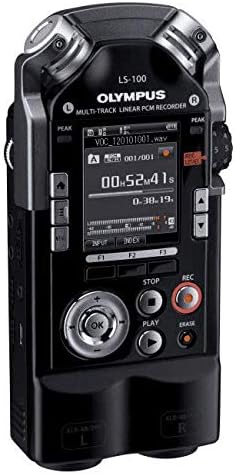
Picha: Mbele view of the Olympus LS-100 Voice Recorder, showing the display, control buttons, and built-in microphones.
- Maikrofoni za Stereo Zilizojengwa ndani: Left and Right 90-degree directional condenser microphones.
- Onyesho la LCD: Shows recording status, menu options, and file habari.
- Peak Level Indicators: LED lights to indicate audio input levels.
- Kitufe cha Menyu: Accesses the device's settings and options.
- Function Buttons (F1, F2, F3): Vifungo vinavyozingatia muktadha kwa shughuli mbalimbali.
- Navigation/OK Button: Inatumika kwa urambazaji na uteuzi wa menyu.
- Kitufe cha Kuacha: Huacha kurekodi au kucheza tena.
- Kitufe cha Cheza: Huanza au husitisha kucheza.
- Kitufe cha Rekodi: Huanzisha kurekodi.
- Kitufe cha Kufuta: Inafuta files.
- REC Level Dial: Hurekebisha unyeti wa ingizo la kurekodi.
- XLR/Phantom Power Inputs: Connect external microphones requiring XLR or phantom power.
Nyuma View
Picha: Nyuma view of the Olympus LS-100 Voice Recorder, showing the battery compartment and external speaker.
- Sehemu ya Betri: Houses the rechargeable Lithium Ion battery.
- Spika Imejengewa ndani: For basic audio playback.
- Mlima wa Tripod: Standard thread for mounting on a tripod.
Sanidi
Ufungaji wa Battery na Kuchaji
- Tafuta sehemu ya betri nyuma ya kifaa.
- Fungua kifuniko cha compartment.
- Insert the supplied Lithium Ion battery, ensuring correct polarity.
- Funga kifuniko cha sehemu ya betri kwa usalama.
- Connect the device to a power source using the supplied USB cable to charge the battery. The charging indicator will illuminate.
Uingizaji wa Kadi ya SD
- Tafuta nafasi ya kadi ya SD upande wa kifaa.
- Insert a compatible SD, SDHC, or SDXC card into the slot until it clicks into place.
- To remove, push the card gently until it ejects.
Kuwasha/Kuzima
- Kuwasha: Press and hold the power button (usually located on the side) until the display illuminates.
- Kuzima: Bonyeza na ushikilie kitufe cha kuwasha/kuzima hadi kifaa kizima.
Mipangilio ya Awali
Upon first power-on, you may be prompted to set the date, time, and language. Use the navigation buttons to select options and the OK button to confirm.
Maagizo ya Uendeshaji
Basic Recording (Internal Microphones)
- Hakikisha kuwa kifaa kimewashwa.
- Select your desired recording mode (e.g., PCM, MP3) and quality settings via the Menu.
- Adjust the REC Level dial to set the input sensitivity. Monitor the peak level indicators to avoid distortion.
- Bonyeza kwa Rekodi kitufe ili kuanza kurekodi. Kiashiria cha kurekodi kitaangazia.
- Ili kusitisha kurekodi, bonyeza kitufe Rekodi kitufe tena. Kibonyeze tena ili kuendelea.
- Ili kuacha kurekodi, bonyeza kitufe cha Acha kitufe. The file itahifadhiwa kiotomatiki.
Using External Microphones (XLR/Phantom Power)
The LS-100 features two XLR inputs with switchable phantom power for professional external microphones.
- Connect your XLR microphones to the corresponding L and R XLR inputs.
- If your microphones require phantom power, enable it through the device's menu settings.
- Adjust the individual input levels for each XLR channel using the REC Level dial or menu options.
- Proceed with recording as described in the Basic Recording section.
Uchezaji
- Nenda kwenye taka file kwa kutumia vitufe vya kusogeza.
- Bonyeza kwa Cheza kitufe cha kuanza kucheza.
- Use the navigation buttons to fast-forward or rewind during playback.
- Bonyeza kwa Acha kitufe cha kukomesha uchezaji.
File Usimamizi
- Inahamisha Files: Connect the LS-100 to a computer using the USB cable. The device will appear as a removable storage device, allowing you to drag and drop files.
- Inafuta Files: Chagua file unataka kufuta na kubonyeza Futa button. Confirm the deletion when prompted.
- Kuandaa Files: Files are typically saved into folders (e.g., Folder A, Folder B). You can manage these folders and move files within the device's menu.
Multi-Track Recording
The LS-100 supports up to eight tracks for multi-track recording. Refer to the on-screen menu for specific instructions on track layering, mixing, and editing functions.
Kazi Maalum
- Kitafuta sauti: An integrated tuner assists musicians with instrument tuning.
- Metronome: Provides a rhythmic click for practice or recording.
- Lissajous Function: A visual tool for analyzing stereo phase relationships.
Matengenezo
- Kusafisha: Futa nje ya kifaa na kitambaa laini, kavu. Usitumie visafishaji vya abrasive au vimumunyisho.
- Hifadhi: Store the recorder in a cool, dry place away from direct sunlight and extreme temperatures. Remove the battery if storing for extended periods.
- Sasisho za Firmware: Periodically check the Olympus support website for available firmware updates to ensure optimal performance and access to new features.
Kutatua matatizo
| Tatizo | Sababu inayowezekana | Suluhisho |
|---|---|---|
| Kifaa hakiwashi. | Betri imeisha au imeingizwa vibaya. | Chaji betri au uiweke tena kwa usahihi. |
| Hakuna sauti wakati wa kucheza tena. | Volume is too low; headphones not connected; file kuharibika. | Increase volume; connect headphones; try playing another file. |
| Recording level is too low or distorted. | REC Level is set too low/high; microphone issue. | Adjust REC Level; check microphone connections and settings. |
| Haiwezi kuhifadhi files kwa kadi ya SD. | SD card is full or write-protected; card error. | Futa isiyo ya lazima files; check write-protect switch; try a different SD card. |
| Kifaa huganda au huacha kufanya kazi. | Hitilafu ya programu ya muda. | Ondoa na uingize betri tena ili kufanya urejeshaji upya kwa nguvu. |
Vipimo
| Kipengele | Maelezo |
|---|---|
| Vipimo vya Bidhaa | Inchi 6.3 x 2.8 x 1.3 |
| Uzito wa Kipengee | Wakia 9.9 (Kilo 0.28) |
| Nambari ya Mfano wa Kipengee | V313020BW000 |
| Betri | Betri 1 ya Lithium Ion inahitajika (imejumuishwa) |
| Mtengenezaji | Olympus |
| Vifaa Sambamba | Kompyuta ya kibinafsi |
| Kiunzi cha vifaa | Salama Kadi ya Dijiti |
| Kipengele cha Fomu ya Maikrofoni | Imejengwa Ndani |
| Umbizo la Kurekodi | WAV (up to 24 Bit/96 KHZ Linear PCM), MP3 |
| Vipaza sauti vya Jack | milimita 3.5 |
| Uwezo wa Kuhifadhi Kumbukumbu | GB 4 (ya ndani) |
| Ukubwa wa skrini | inchi 3.5 |
| Maikrofoni | 90 degree directional, stereo condenser microphones |
| Ingizo | XLR/Phantom Power Supply |
| Nyimbo | Eight Tracks (multi-track recording) |
Udhamini na Msaada
For warranty information and customer support, please refer to the warranty card included with your product or visit the official Olympus support webtovuti. Weka uthibitisho wako wa ununuzi kwa madai ya udhamini.
Rasilimali za Mtandaoni: For additional support, FAQs, and firmware updates, please visit the Olympus Global Webtovuti.


