1. Utangulizi
The SteelSeries Sensei Laser Gaming Mouse is designed for precision and customization, catering to both casual and competitive gamers. It features an advanced laser sensor, an ambidextrous design, and extensive customization options through its dedicated software. This manual provides detailed instructions for setup, operation, maintenance, and troubleshooting to ensure optimal performance of your device.

Picha 1: Juu-chini view of the SteelSeries Sensei Laser Gaming Mouse, showcasing its sleek grey finish and central scroll wheel.
2. Yaliyomo kwenye Kifurushi
Tafadhali thibitisha kuwa vipengee vyote vipo kwenye kifurushi chako:
- SteelSeries Sensei Laser Gaming Mouse
- Mwongozo wa Kuanza Haraka (ikiwa umejumuishwa)

Image 2: Retail packaging for the SteelSeries Sensei Laser Gaming Mouse, displaying the product name and brand logo.
3. Kuweka
Uunganisho wa vifaa
- Unpack the SteelSeries Sensei Laser Gaming Mouse from its packaging.
- Connect the USB cable of the mouse to an available USB port on your computer. The mouse is plug-and-play compatible, and your operating system should automatically detect and install the necessary basic drivers.
3.2 Software Installation (SteelSeries Engine)
For full customization and advanced features, it is recommended to install the SteelSeries Engine software:
- Visit the official SteelSeries webtovuti (steelseries.com/engine) to download the latest version of the SteelSeries Engine software.
- Fuata maagizo kwenye skrini ili kusakinisha programu.
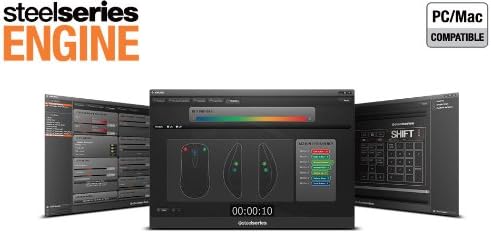
- Once installed, launch the SteelSeries Engine to configure your mouse settings, including CPI, button assignments, macros, and lighting effects.
Picha ya 3: Chini view of the SteelSeries Sensei Laser Gaming Mouse, showing the laser sensor and product information label.
4. Kuendesha Kipanya
4.1 Ambidextrous Design
The Sensei mouse features an ambidextrous shape, making it comfortable for both left-handed and right-handed users. The side buttons are mirrored on both sides to accommodate different grip styles and preferences.
4.2 Vifungo vinavyoweza kupangwa
The mouse is equipped with 7 programmable buttons. These buttons can be customized using the SteelSeries Engine software to perform various functions, including:
- Standard mouse clicks (left, right, middle)
- Keyboard key assignments
- Complex macros
- CPI switching

Picha 4: Upande view of the SteelSeries Sensei Laser Gaming Mouse, highlighting the two programmable side buttons.
4.3 CPI Adjustment
The Sensei mouse allows for on-the-fly CPI (Counts Per Inch) adjustment. The dedicated CPI indicator button, typically located behind the scroll wheel, allows you to cycle between two user-defined CPI settings. These settings can be configured within the SteelSeries Engine software to match your preferred sensitivity levels for different tasks or games.
4.4 Mwangaza
The mouse features three-zone illumination: the scroll wheel, the CPI indicator, and the SteelSeries logo. The color and lighting effects (e.g., steady, pulse) for these zones can be customized through the SteelSeries Engine software.
5. SteelSeries Engine Software
The SteelSeries Engine is a powerful software suite that unlocks the full potential of your Sensei mouse. Key functionalities include:
- Kuchora Kitufe: Assign any function, keyboard key, or macro to any of the 7 programmable buttons.
- CPI Settings: Fine-tune and save multiple CPI profiles kwa programu au michezo tofauti.
- Mhariri wa Macro: Create and manage complex macros for in-game actions or productivity tasks.
- Kiwango cha Kura: Rekebisha kiwango cha upigaji kura cha kipanya kwa mwitikio bora.
- Udhibiti wa Mwangaza: Customize LED colors and effects for the scroll wheel, CPI indicator, and logo.
- Profile Usimamizi: Unda na uhifadhi wataalamu wengifiles, allowing you to switch between different configurations quickly.
- Sasisho za Firmware: Keep your mouse's firmware up-to-date for improved performance and new features.

Image 5: Screenshot of the SteelSeries Engine software interface, showing options for button mapping, CPI adjustment, and lighting customization.
6. Matengenezo
To ensure the longevity and optimal performance of your SteelSeries Sensei mouse, follow these maintenance guidelines:
- Kusafisha: Tumia kitambaa laini na kikavu kufuta uso wa panya. Kwa uchafu mkaidi, futa kidogoamp kitambaa kinaweza kutumika, lakini hakikisha hakuna unyevu unaoingia kwenye panya. Epuka kemikali kali au visafishaji vya kukwaruza.
- Utunzaji wa Sensor: Keep the laser sensor on the bottom of the mouse clean and free from dust or debris. Use a cotton swab or compressed air if necessary.
- Usimamizi wa Cable: Epuka kupinda kwa kasi au kuvuta kebo ya USB kupita kiasi ili kuzuia uharibifu.
7. Utatuzi wa shida
If you encounter issues with your SteelSeries Sensei mouse, refer to the following common solutions:
- Panya haijibu:
- Hakikisha kuwa kebo ya USB imeunganishwa kwa usalama kwenye kompyuta yako.
- Jaribu kuunganisha kipanya kwenye lango tofauti la USB.
- Anzisha tena kompyuta yako.
- Ufuatiliaji usio thabiti:
- Safisha kihisi cha laser chini ya panya.
- Hakikisha unatumia kipanya kwenye sehemu inayofaa (kwa mfano, pedi ya panya).
- Check for dust or debris on your mouse pad.
- Vifungo havifanyi kazi:
- Verify button assignments in the SteelSeries Engine software.
- Ensure the software is running correctly and profiles are loaded.
- Masuala ya Programu:
- Update the SteelSeries Engine software to the latest version.
- Reinstall the SteelSeries Engine software.
- Check for any available firmware updates for your mouse within the software.
8. Vipimo
| Kipengele | Maelezo |
|---|---|
| Chapa | SteelSeries |
| Nambari ya Mfano | 62150 |
| Teknolojia ya kugundua harakati | Laser |
| Teknolojia ya Uunganisho | USB |
| Rangi | Kijivu |
| Jukwaa la Vifaa | PC |
| Utangamano wa Mfumo wa Uendeshaji | All Major PC Operating Systems |
| Uzito wa Kipengee | 14.6 wakia |
| Vipimo vya Bidhaa (LxWxH) | Inchi 7.9 x 6.8 x 2.3 |
| Vifungo vinavyoweza kupangwa | 7 |
| Illumination Zones | 3 (Scroll Wheel, CPI Indicator, Logo) |
9. Udhamini na Msaada
The SteelSeries Sensei Laser Gaming Mouse is covered by a manufacturer's warranty. For detailed information regarding warranty terms, conditions, and duration, please refer to the warranty card included with your product or visit the official SteelSeries website. For technical support, driver downloads, and frequently asked questions, please visit the SteelSeries support page.
Rasmi ya SteelSeries Webtovuti: steelseries.com
SteelSeries Support: msaada.steelseries.com


