1. Utangulizi na Zaidiview
This manual provides detailed instructions for the installation, operation, and maintenance of your Speco PBM-30 30W Contractor Series PA Amplifier. Designed for professional audio applications, this amplifier offers robust performance and versatile connectivity options.
The PBM-30 is a 30W contractor series PA amplifier featuring two independent channels, an auto-mute function, and manual muting contacts. It is UL Listed, ensuring compliance with safety standards. The amplifier accepts inputs from two distinct sound sources and provides a variety of output choices, including 4, 8, and 16 ohm, as well as 70 and 25 volt line outputs. Additionally, it includes a music-on-hold output with separate level control and a 600 ohm telephone line input with its own level control.
2. Sifa Muhimu
- 30W Contractor Series PA Ampmaisha zaidi
- UL Imeorodheshwa kwa usalama na kuegemea
- Two independent input channels
- Automatic mute function for seamless audio management
- Music on hold output with dedicated level control (600 ohm line and one watt 8 ohm)
- 600 ohm telephone line input with adjustable level control
- Manual muting contacts for external control
- Accepts inputs from two distinct sound sources
- Versatile output options: 4, 8, and 16 ohm, plus 70 and 25 volt line outputs
3. Maagizo ya Usalama
Please read and follow all safety instructions carefully to prevent injury or damage to the ampmsafishaji. Weka mwongozo huu kwa marejeleo ya baadaye.
- Chanzo cha Nguvu: Unganisha amplifier pekee kwa ujazo maalum wa usambazaji wa umemetage. Hakikisha waya wa umeme haujaharibika au kubanwa.
- Uingizaji hewa: Do not block any ventilation openings. Install in accordance with the manufacturer's instructions, ensuring adequate airflow around the unit.
- Maji na Unyevu: Usiweke kifaa hiki kwenye mvua au unyevu. Usiweke vitu vilivyojaa vimiminika, kama vile vase, kwenye kifaa.
- Joto: Usisakinishe karibu na vyanzo vyovyote vya joto kama vile radiators, rejista za joto, jiko, au vifaa vingine (pamoja na amplifiers) zinazotoa joto.
- Kuhudumia: Usijaribu kuhudumia bidhaa hii mwenyewe. Rufaa huduma zote kwa wafanyakazi wa huduma waliohitimu. Huduma inahitajika wakati kifaa kimeharibika kwa njia yoyote, kama vile waya wa usambazaji wa umeme au plagi imeharibika, kioevu kimemwagika au vitu vimeanguka kwenye kifaa, kifaa kimeathiriwa na mvua au unyevu, hakifanyi kazi kawaida, au kimeangushwa.
- Kusafisha: Chomoa bidhaa hii kutoka kwa ukuta kabla ya kusafisha. Usitumie visafishaji vya kioevu au visafishaji vya erosoli. Tumia tangazoamp kitambaa cha kusafisha.
4. Mipangilio na Viunganisho
Before connecting any components, ensure the amplifier is powered off and unplugged from the mains supply. Refer to the diagram below for a visual guide to the front panel controls.
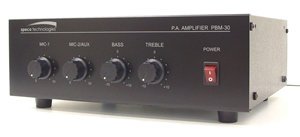
Kielelezo 4.1: Jopo la Mbele View of Speco PBM-30 PA Amplifier, showing MIC 1, MIC 2/AUX, BASS, TREBLE, and POWER controls.
4.1 Viunganisho vya Kuingiza
- Microphone/Auxiliary Inputs: The amplifier accepts inputs from two sound sources. Connect your microphones or auxiliary devices (e.g., CD player, media player) to the designated input jacks on the rear panel. Ensure proper cable types (e.g., XLR for microphones, RCA for auxiliary) are used.
- Telephone Line Input: Connect a 600 ohm telephone line to the dedicated input. This input has its own level control for adjusting the volume of telephone audio.
4.2 Miunganisho ya Pato
- Matokeo ya Spika: Connect your speakers to the appropriate output terminals on the rear panel. The amplifier supports 4, 8, and 16 ohm speaker loads. Ensure the impedance of your speakers matches the selected output terminals.
- Mara kwa mara Voltage Matokeo: For distributed audio systems, connect speakers to the 70 volt or 25 volt line outputs as required. Ensure all speakers in a constant voltage system are compatible with the chosen voltage.
- Music on Hold Output: Connect your music on hold system to this output. It provides both a 600 ohm line output and a one watt 8 ohm output, each with separate level control.
Uunganisho wa Nguvu 4.3
Once all audio connections are made, connect the amplifier's power cord to a suitable AC power outlet. Ensure the power switch on the front panel is in the OFF position before plugging in.
5. Maagizo ya Uendeshaji
This section details the functions of the front panel controls and key features of the PBM-30 ampmaisha zaidi.
5.1 Vidhibiti vya Paneli ya Mbele
- Kubadilisha NGUVU: This is the main power switch for the amplifier. Press to turn the unit ON or OFF. The indicator light will illuminate when the unit is powered on.
- MIC 1 Control: Adjusts the volume level for the microphone connected to Input 1.
- MIC 2/AUX Control: Adjusts the volume level for the microphone connected to Input 2 or the auxiliary audio source.
- Udhibiti wa BASS: Adjusts the low-frequency (bass) response of the audio output. Turn clockwise to increase bass, counter-clockwise to decrease.
- Udhibiti wa TREBLE: Adjusts the high-frequency (treble) response of the audio output. Turn clockwise to increase treble, counter-clockwise to decrease.
5.2 Auto Mute Function
The auto-mute function automatically mutes background music or other audio when a signal is detected on a priority input (e.g., a microphone input for announcements). This ensures that announcements are clear and audible without interference from other audio sources. The sensitivity and priority of the auto-mute function may be configured via internal jumpers or rear panel controls, if available (refer to detailed wiring diagrams for specific setup).
5.3 Manual Muting Contacts
The amplifier includes manual muting contacts, allowing for external control of the muting function. These contacts can be wired to an external switch or control system to manually mute audio output when activated. Consult the wiring diagram in the full technical manual for proper connection of these contacts.
5.4 Music on Hold (MOH) Output
The dedicated Music on Hold output allows you to feed background music to a telephone system's MOH input. Use the separate level control to adjust the volume of the music being sent to the telephone system.
6. Matengenezo
Proper maintenance ensures the longevity and optimal performance of your Speco PBM-30 ampmaisha zaidi.
- Kusafisha: Futa sehemu ya nje ya kifaa mara kwa mara amplifier with a soft, dry cloth. For stubborn dirt, use a slightly damp cloth and then dry thoroughly. Do not use harsh chemicals, abrasive cleaners, or solvents.
- Uingizaji hewa: Ensure that the ventilation openings are clear of dust and debris. Periodically check that nothing is obstructing the airflow around the unit.
- Hifadhi: Ikiwa kuhifadhi ampKifaa cha kulainisha kwa muda mrefu, kiondoe kwenye umeme, kisafishe, na ukihifadhi mahali pakavu na penye baridi mbali na jua moja kwa moja na halijoto kali.
- Ukaguzi: Periodically inspect power cords and audio cables for any signs of damage. Replace damaged cables immediately.
7. Utatuzi wa shida
Ikiwa unakutana na maswala na yako amplifier, refer to the following common troubleshooting steps. If the problem persists, contact qualified service personnel.
| Tatizo | Sababu inayowezekana | Suluhisho |
|---|---|---|
| Hakuna Nguvu | Power cord unplugged; Power switch off; Blown fuse; Power outlet fault. | Ensure power cord is securely plugged in; Turn power switch ON; Check and replace fuse if necessary (refer to service manual); Test power outlet with another device. |
| Hakuna Pato la Sauti | Volume controls too low; Incorrect input selected; Speaker connections loose or incorrect; Mute function active. | Increase MIC/AUX volume controls; Verify input source is active; Check all speaker wiring for secure and correct connections; Check manual muting contacts or auto-mute settings. |
| Sauti Iliyopotoka | Input signal too high (clipping); Speaker impedance mismatch; Damaged speaker or cable. | Reduce input signal level; Ensure speaker impedance matches amplifier output; Test with different speakers or cables to isolate the issue. |
| Kelele ya Humming/Buzzing | Kitanzi cha ardhini; Miunganisho iliyolegea; Kuingiliwa na vifaa vingine vya elektroniki. | Ensure all equipment is on the same electrical circuit; Check all audio cable connections; Move ampkisafishaji mbali na vifaa vingine vya kielektroniki. |
8. Vipimo
| Kipengele | Maelezo |
|---|---|
| Mfano | PBM-30 |
| Pato la Nguvu | 30 Watts |
| Vituo | Mbili |
| Matokeo ya Spika | 4 Ohm, 8 Ohm, 16 Ohm, 25V Line, 70V Line |
| Music on Hold Output | 600 Ohm Line, 1 Watt 8 Ohm (with separate level control) |
| Telephone Line Input | 600 Ohm (with level control) |
| Kazi Maalum | Auto Mute, Manual Muting Contacts |
| Vyeti | UL Imeorodheshwa |
| Uzito wa Kipengee | Pauni 12 |
| Mtengenezaji | Maana |
| ASIN | B005H59JKA |
| Tarehe ya Kwanza Inapatikana | Septemba 14, 2011 |
9. Udhamini na Msaada
Speco Technologies products are designed for reliability and performance. For information regarding warranty coverage, please refer to the warranty card included with your product or visit the official Speco Technologies webtovuti.
For technical support, troubleshooting assistance beyond this manual, or service inquiries, please contact Speco Technologies customer support. Contact details can typically be found on the manufacturer's webtovuti au kwenye ufungaji wa bidhaa.
Rasilimali za Mtandaoni: For the most up-to-date information, FAQs, and additional resources, please visit the official Speco Technologies webtovuti: www.specotech.com


