Utangulizi
This manual provides instructions for the proper use and care of your Dynex Micro USB Cable, model DX-C114201. This cable is designed for connecting devices with a Micro USB port to a standard USB port for both charging and data transfer purposes.
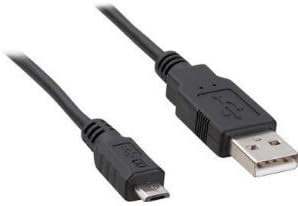
Image: Dynex Micro USB Cable. This image displays the cable with its two distinct connectors: a smaller Micro USB connector on one end, typically used for mobile devices, and a larger standard USB-A connector on the other end, commonly found on computers or wall chargers. The cable itself is black.
Sanidi
- Tambua Bandari: Locate the Micro USB port on your device (e.g., smartphone, tablet, camera) and a standard USB-A port on your power source (e.g., wall adapter, computer, power bank).
- Connect Micro USB: Gently insert the Micro USB connector end of the cable into the Micro USB port on your device. Ensure the connector is oriented correctly to avoid damage. Do not force the connection.
- Connect Standard USB: Insert the standard USB-A connector end of the cable into the USB-A port on your power source or computer.
- Thibitisha Muunganisho: For charging, your device should indicate that it is receiving power. For data transfer, your computer should recognize the connected device.
Maagizo ya Uendeshaji
Vifaa vya Kuchaji
- Connect the cable as described in the "Setup" section.
- Ensure the power source (wall adapter, computer USB port) is active.
- Monitor your device's screen for charging indicators. Charging times may vary depending on the device and power source.
Uhamisho wa Data
- Connect your device to a computer using the cable.
- On your device, you may need to select a "File Transfer" or "MTP" (Media Transfer Protocol) mode from the notification panel.
- Your computer should display the connected device as a removable drive or media device. You can then drag and drop files between your computer and the device.
- Always safely eject or disconnect your device from the computer before physically removing the cable to prevent data corruption.
Matengenezo
- Hifadhi: Hifadhi kebo mahali pakavu na penye baridi mbali na jua moja kwa moja na halijoto kali. Epuka kuizungusha kwa nguvu au kuinamisha kebo kwa kasi, jambo ambalo linaweza kuharibu waya za ndani.
- Kusafisha: If necessary, gently wipe the cable and connectors with a soft, dry, lint-free cloth. Do not use liquid cleaners or solvents.
- Kushughulikia: Shika kichwa cha kiunganishi kila wakati unapochomeka au kuifungua kebo, badala ya kuvuta kebo yenyewe. Hii huzuia mkazo kwenye makutano ya kebo na kiunganishi.
- Ukaguzi: Periodically inspect the cable for any signs of wear, fraying, or damage to the insulation or connectors. Discontinue use if damage is observed.
Kutatua matatizo
- Kifaa hakichaji:
- Hakikisha ncha zote mbili za kebo zimeunganishwa kwa usalama.
- Jaribu mlango tofauti wa USB au adapta ya umeme.
- Thibitisha kwamba mlango wa kuchajia wa kifaa chako ni safi na hauna uchafu.
- Test the cable with another compatible device if possible to determine if the issue is with the cable or the device/power source.
- Computer not recognizing device for data transfer:
- Hakikisha kebo imeunganishwa vizuri kwenye kifaa na kompyuta.
- On your device, check the notification panel for USB connection options and select "File Transfer" or "MTP".
- Jaribu mlango tofauti wa USB kwenye kompyuta yako.
- Anzisha upya kifaa chako na kompyuta.
- Ensure necessary drivers are installed on your computer for the connected device.
- Muunganisho uliolegea:
- If the cable feels loose in the port, gently check for debris in the device's port.
- Avoid excessive wiggling or bending of the cable while connected, as this can damage the port or cable.
Vipimo
| Chapa | Dynex |
| Nambari ya Mfano | DX-C114201 (Item Model Number: 4326668128) |
| Aina ya kiunganishi | USB-A (Male) to Micro USB (Male) |
| Aina ya Cable | USB ndogo |
| Matumizi Yanayopendekezwa | Charging and data transfer for devices with Micro USB ports |
| Vifaa Sambamba | Smartphone, Tablet, Power Bank, Camera, Laptop, Personal Computer, Router, Mouse, GPS Navigation System, Docking Station, Television, Scanner, etc. |
| Idadi ya Pini | 5 |
| Vipimo vya Bidhaa | Inchi 7 x 4 x 4 (vipimo vya kifungashio) |
| Uzito wa Kipengee | 1.6 wakia |
| UPC | 600603141058 |
| ASIN | B005EYMQ2C |
Udhamini na Msaada
For warranty information or technical support regarding your Dynex Micro USB Cable DX-C114201, please refer to the documentation included with your purchase or visit the official Dynex website. Contact information for customer service is typically available on the manufacturer's product packaging or webtovuti.


