1. Utangulizi
Asante kwa ununuziasing the Atlanta 1669/19 Quartz Alarm Clock. This digital alarm clock features a silent movement, a light sensor for automatic display illumination, and a snooze function. This manual provides detailed instructions for setup, operation, and maintenance to ensure optimal performance and longevity of your device.
2. Taarifa za Usalama
- Weka kifaa mbali na maji na unyevu wa juu.
- Epuka kuweka saa kwenye mwanga wa jua moja kwa moja au halijoto kali.
- Usijaribu kutenganisha au kutengeneza saa mwenyewe. Mtafute mfanyakazi wa huduma aliyehitimu.
- Tupa betri zilizotumika kwa uwajibikaji kulingana na kanuni za ndani.
- Usichanganye betri za zamani na mpya, au aina tofauti za betri.
3. Yaliyomo kwenye Kifurushi
- Atlanta 1669/19 Quartz Alarm Clock Unit
- Mwongozo wa Mtumiaji (hati hii)
Kumbuka: Betri hazijajumuishwa na lazima zinunuliwe kando.
4. Bidhaa Imeishaview
The Atlanta 1669/19 features a clear digital display, intuitive controls, and a light sensor for enhanced visibility in low-light conditions.
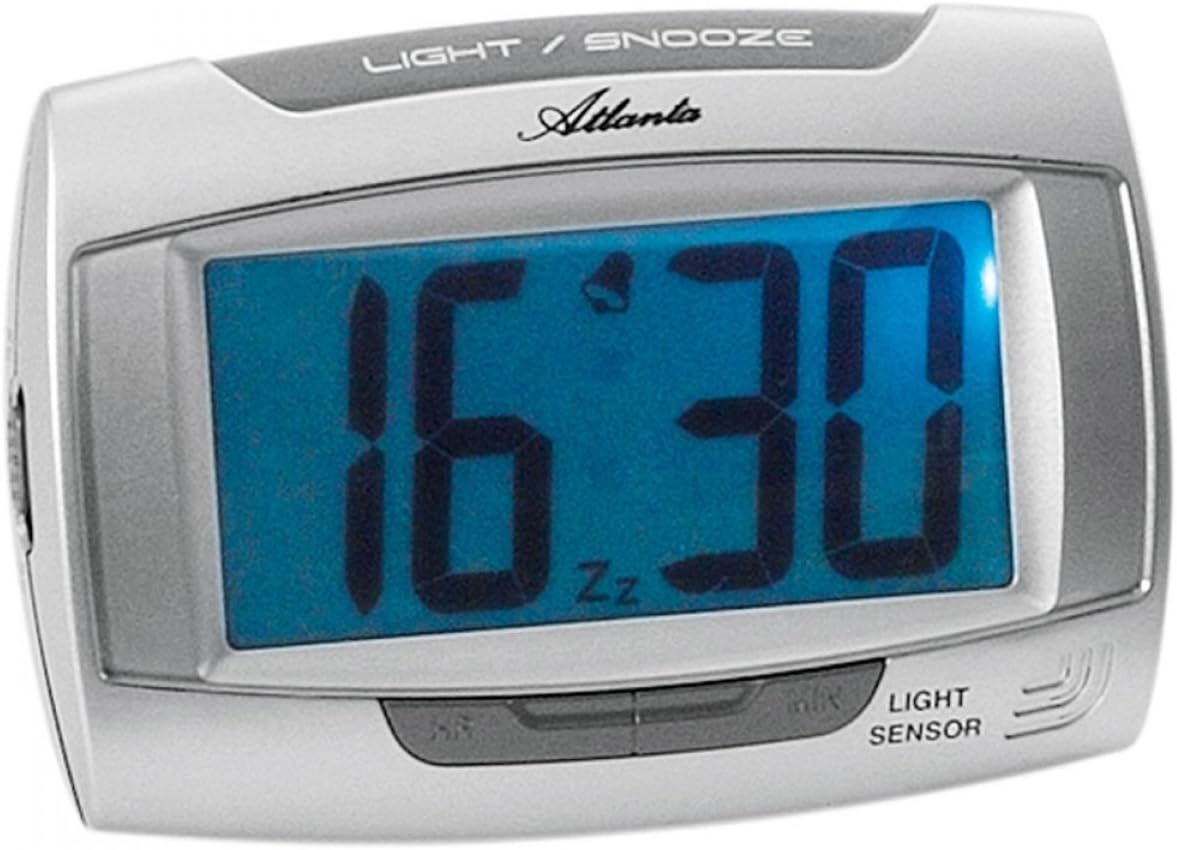
Kielelezo cha 1: Mbele view of the Atlanta 1669/19 Quartz Alarm Clock. The clock features a large digital display, a "LIGHT / SNOOZE" button at the top, and a "LIGHT SENSOR" indicator at the bottom right. The display shows the time 16:30, with an alarm bell icon and 'Zz' indicating snooze functionality.
Vipengele Muhimu:
- Kuonyesha kwa Digital: Shows time and alarm status.
- LIGHT / SNOOZE Button: Activates temporary backlight and snooze function.
- Sensor ya Mwanga: Automatically illuminates the display in dark environments.
- Control Buttons (Rear/Side): Kwa ajili ya kuweka muda na kengele.
- Chumba cha Betri (Nyuma): Hushikilia betri zinazohitajika.
5. Kuweka
5.1. Ufungaji wa Betri
- Tafuta kifuniko cha sehemu ya betri nyuma ya saa ya kengele.
- Ondoa kifuniko kwa kutelezesha au kukiinua.
- Insert the required batteries (typically 1x AA, refer to compartment markings) ensuring correct polarity (+ and -).
- Badilisha kifuniko cha sehemu ya betri kwa usalama.
5.2. Mpangilio wa Muda wa Awali
Upon battery installation, the display will typically show a default time. You will need to set the current time.
- Locate the time setting buttons, usually labeled "SET", "HOUR", and "MINUTE" or similar, on the back or side of the clock.
- Press the "SET" button (or equivalent) to enter time setting mode. The hour digits may start flashing.
- Use the "HOUR" button to adjust the hour.
- Press "SET" again to move to minute setting. The minute digits may start flashing.
- Use the "MINUTE" button to adjust the minutes.
- Press "SET" one more time to confirm and exit time setting mode.
6. Maagizo ya Uendeshaji
6.1. Kuweka Kengele
- Locate the alarm setting buttons, typically labeled "ALARM SET", "ALARM HOUR", and "ALARM MINUTE" or similar.
- Press the "ALARM SET" button to enter alarm setting mode. The alarm hour digits may flash.
- Use the "ALARM HOUR" button to adjust the desired alarm hour.
- Press "ALARM SET" again to move to alarm minute setting. The alarm minute digits may flash.
- Use the "ALARM MINUTE" button to adjust the desired alarm minutes.
- Press "ALARM SET" one more time to confirm and exit alarm setting mode.
6.2. Kuamsha/Kuzima Kengele
There is usually a switch or button to turn the alarm on or off. Look for a switch labeled "ALARM ON/OFF" or an alarm icon button. When the alarm is active, an alarm icon (e.g., a bell) will typically appear on the display.
6.3. Kazi ya Kupumzisha
When the alarm sounds, press the large "LIGHT / SNOOZE" button located on the top of the clock. This will temporarily silence the alarm, and it will sound again after a few minutes (typically 5-9 minutes). The "Zz" icon on the display indicates that the snooze function is active.
6.4. Light Sensor and Display Backlight
- Automatic Backlight (Light Sensor): The clock is equipped with a light sensor. When enabled, the display will automatically illuminate with a soft, constant light in dark environments, making it easy to read the time at night without pressing any buttons. Look for a switch or button labeled "SENSOR ON/OFF" or similar to enable or disable this feature.
- Taa ya Muda ya Nyuma: To briefly illuminate the display in any lighting condition, press the "LIGHT / SNOOZE" button on the top of the clock. The backlight will stay on for a few seconds and then turn off automatically.
7. Matengenezo
- Kusafisha: Wipe the clock with a soft, dry cloth. Do not use abrasive cleaners or solvents, as these may damage the casing au onyesho.
- Ubadilishaji wa Betri: When the display dims or the clock stops functioning correctly, it is time to replace the batteries. Follow the battery installation steps in Section 5.1.
- Hifadhi: Ikiwa saa haitatumika kwa muda mrefu, ondoa betri ili kuzuia uvujaji na uharibifu.
8. Utatuzi wa shida
| Tatizo | Sababu inayowezekana | Suluhisho |
|---|---|---|
| Onyesho la saa ni tupu au hafifu. | Betri za chini au zilizokufa; usakinishaji usio sahihi wa betri. | Badilisha betri na mpya, hakikisha polarity sahihi. |
| Kengele haisikiki. | Alarm is not activated; alarm time is incorrect; low batteries. | Ensure alarm is switched ON (bell icon visible); verify alarm time setting; replace batteries. |
| Automatic backlight not working. | Light sensor feature is disabled; insufficient darkness. | Ensure the light sensor switch is ON; test in a completely dark room. |
| Muda sio sahihi. | Time was not set correctly; batteries were removed/replaced. | Reset the current time following Section 5.2. |
9. Vipimo
| Mfano | 1669/19 |
| Chapa | Atlanta |
| Hali ya Uendeshaji | Dijitali |
| Vipengele Maalum | Alarm, Lighting (Light Sensor) |
| Nyenzo | Plastiki |
| Nyenzo ya Fremu | Plastiki |
| Aina ya Kuweka | Sehemu ya kibao |
| Rangi | Blue (display), Silver-coloured (case) |
| Betri Inahitajika | Yes (Type not specified, typically AA or AAA for such clocks) |
| Betri Imejumuishwa | Hapana |
| Vipimo (Takriban.) | 11 x 7 cm |
10. Udhamini na Msaada
Kwa maelezo ya udhamini au usaidizi wa kiufundi, tafadhali rejelea hati zilizotolewa wakati wa ununuzi au wasiliana na mchuuzi wako. Weka uthibitisho wako wa ununuzi kwa madai yoyote ya udhamini.


