Utangulizi
This manual provides instructions for the setup, operation, and maintenance of your Microsoft Wireless Comfort Desktop 5000. This product combines a wireless keyboard and a wireless mouse designed for comfortable and efficient computer interaction.
The Microsoft Wireless Comfort Desktop 5000 features an ergonomically designed Comfort Curve keyboard and a mouse utilizing BlueTrack Technology for versatile surface tracking. It operates on a 2.4 GHz wireless connection, offering a reliable connection with a range of up to 30 feet.
Mwongozo wa Kuweka
Ni nini kwenye Sanduku
- Microsoft Wireless Comfort Desktop 5000 Keyboard
- Microsoft Wireless Comfort Desktop 5000 Mouse
- USB Mini-Transceiver
- 2 AA Alkaline Batteries (for keyboard)
- 1 AA Alkaline Battery (for mouse)
Mahitaji ya Mfumo
- Mfumo wa Uendeshaji: Windows 8, Windows 7, Windows Vista, Windows XP (ukiondoa Windows XP ya biti 64)
- Hifadhi Ngumu: Nafasi ya bure ya MB 100
- Bandari: Mlango wa USB
Ufungaji wa Betri
The keyboard requires two AA alkaline batteries, and the mouse requires one AA alkaline battery. Batteries are included with the product.
- Tafuta sehemu ya betri kwenye upande wa chini wa kibodi na kipanya.
- Fungua kifuniko cha sehemu ya betri.
- Insert the AA batteries, ensuring correct polarity (+/-).
- Funga kifuniko cha sehemu ya betri kwa usalama.
Connecting the Wireless Transceiver
The wireless desktop set connects to your computer via a USB mini-transceiver.
- Locate the USB mini-transceiver. It may be stored in the mouse's battery compartment for transport.
- Insert the USB mini-transceiver into an available USB port on your computer.
- Kompyuta yako inapaswa kugundua na kusakinisha kiotomatiki viendeshi vinavyohitajika. Mchakato huu unaweza kuchukua muda mfupi.
- Once drivers are installed, the keyboard and mouse should be ready for use.

Figure 1: The compact USB mini-transceiver for wireless connection.

Figure 2: The underside of the mouse showing the storage slot for the USB mini-transceiver.
Maagizo ya Uendeshaji
Vipengele vya Kinanda

Kielelezo 3: Juu-chini view of the Comfort Curve keyboard layout.
- Comfort Curve Design: The keyboard features an ergonomist-approved Comfort Curve design that encourages a natural wrist posture, reducing strain during extended use.
- Funguo za Kugusa Kimya: Experience comfortable typing with low-profile, quiet-touch keys.
- Pumziko la Palm: A soft-touch palm rest is integrated to provide additional comfort and support for your wrists.
- Removable Feet: Adjustable feet on the underside allow you to set the keyboard at a preferred angle for a more comfortable wrist posture.
- Taskbar Favorites for Windows 7: Easily access programs pinned to the Windows Taskbar using dedicated shortcut keys. The keys automatically adapt if you rearrange icons in the Taskbar.
- Media Center Controls: Control media playback directly from your keyboard using dedicated media keys (e.g., play/pause, volume up/down, mute).

Kielelezo 4: Pembe view highlighting the integrated palm rest and Comfort Curve design.
Vipengele vya Panya

Kielelezo 5: Pembe view of the wireless mouse.
- Teknolojia ya BlueTrack: The mouse utilizes Microsoft's BlueTrack Technology, combining the power of optical with the precision of laser for remarkable tracking on virtually any surface, including granite, carpet, and wood.
- Usogezaji wa Njia Nne: The tilt wheel allows for four-way scrolling (up, down, left, and right), enhancing efficiency and comfort when navigating documents or web kurasa.
- Vifungo Vinavyoweza Kubinafsishwa: The mouse buttons can be customized for quick access to programs, files, media, and webpages you use most often. Refer to your operating system's mouse settings for customization options.
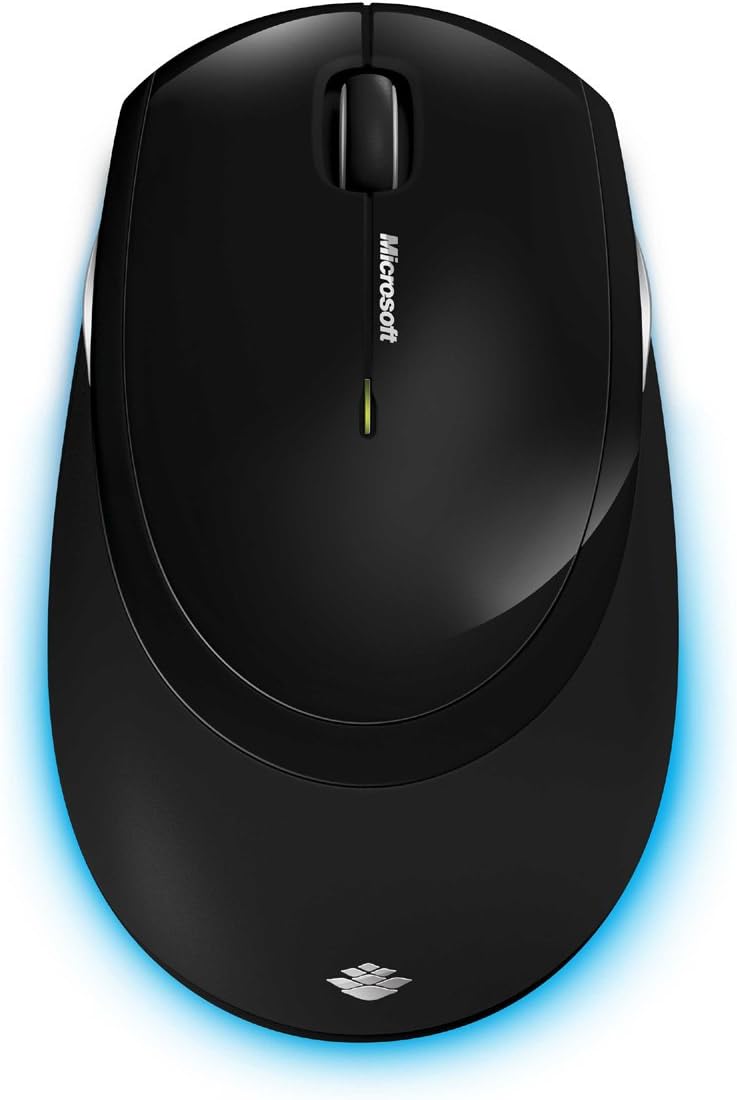
Kielelezo 6: Juu-chini view of the wireless mouse.
Matengenezo
Kusafisha
To maintain the performance and appearance of your Microsoft Wireless Comfort Desktop 5000, follow these cleaning guidelines:
- Disconnect the USB transceiver from your computer before cleaning.
- Tumia kitambaa laini kisicho na pamba kidogo dampiliyotiwa na maji au suluhisho laini la kusafisha.
- Epuka kutumia kemikali kali, visafishaji vya kukwaruza, au viyeyusho, kwani hivi vinaweza kuharibu nyuso.
- For the keyboard, you can use compressed air to remove dust and debris from between the keys.
- For the mouse, gently wipe the optical sensor area on the bottom to ensure optimal tracking performance.
Ubadilishaji wa Betri
When the batteries are low, the indicator light on the keyboard or mouse may flash. Replace the batteries as described in the "Battery Installation" section under Setup Guide.
- Always use new, high-quality AA alkaline batteries.
- Tupa betri zilizotumiwa kulingana na kanuni za ndani.
Kutatua matatizo
Masuala ya Muunganisho
- No response from keyboard/mouse:
- Ensure the USB mini-transceiver is securely plugged into a working USB port on your computer.
- Check if the batteries in the keyboard and mouse are correctly installed and have sufficient charge. Replace if necessary.
- Try plugging the transceiver into a different USB port.
- Anzisha tena kompyuta yako.
- Kuingilia:
- The 2.4 GHz wireless technology can be affected by other wireless devices. Move the transceiver closer to the keyboard and mouse, or move other wireless devices away.
- Avoid placing the transceiver near large metal objects, which can block the wireless signal.
Mouse Tracking Issues
- Erratic or no tracking:
- Ensure the BlueTrack sensor on the bottom of the mouse is clean and free of debris.
- Try using the mouse on a different surface. While BlueTrack is versatile, highly reflective or transparent surfaces (like clear glass) may still cause issues.
Vipimo
| Kipengele | Maelezo |
|---|---|
| Chapa | Microsoft |
| Nambari ya Mfano | CSD-00001 |
| Teknolojia ya Uunganisho | Wireless (USB Transceiver) |
| Aina ya Wireless | Masafa ya Redio ya GHz 2.4 |
| Vifaa Sambamba | Kompyuta ya kibinafsi |
| Utangamano wa Mfumo wa Uendeshaji | Windows 8, Windows 7, Windows Vista, Windows XP (ukiondoa Windows XP ya biti 64) |
| Rangi | Nyeusi |
| Uzito wa Kipengee | Pauni 2.9 |
| Vipimo vya Bidhaa (LxWxH) | Inchi 8.7 x 2.9 x 18.54 |
| Chanzo cha Nguvu | Inaendeshwa na Betri |
| Betri Inahitajika | 3 AA batteries (2 for keyboard, 1 for mouse) |
| Tarehe ya Kwanza Inapatikana | Julai 29, 2009 |
Taarifa ya Udhamini
Specific warranty details for the Microsoft Wireless Comfort Desktop 5000 are not provided within this manual. For comprehensive warranty information, including terms, conditions, and duration, please refer to the official Microsoft webtovuti au kadi ya udhamini iliyojumuishwa na kifungashio cha bidhaa yako.
Msaada
For further assistance, technical support, or to download the latest drivers and software for your Microsoft Wireless Comfort Desktop 5000, please visit the official Microsoft support webtovuti:
You can also visit the Microsoft Store on Amazon for product information and related accessories:
Taarifa Muhimu
Kanusho la Kisheria
Please note that the "Legal Disclaimer" provided with the product pertains to sales terms and conditions, such as return policies and shipping details, and is separate from the operational instructions in this user manual. For specific product usage and safety guidelines, please refer to the relevant sections of this manual.


