1. Utangulizi
Asante kwa ununuziasing the JVC KW-AVX810 Vehicle Multimedia Receiver. This unit is designed to provide advanced audio and video entertainment in your vehicle, featuring a 7-inch touch panel monitor, DVD playback, USB connectivity for iPod/iPhone, and Bluetooth readiness. This manual provides essential information for the proper installation, operation, and maintenance of your new multimedia receiver.
2. Taarifa za Usalama
- Ufungaji wa Kitaalamu Unapendekezwa: Due to the complexity of vehicle electrical systems, professional installation is highly recommended to prevent damage to the unit or your vehicle.
- Ugavi wa Nguvu: This unit is designed for 12V DC negative ground electrical systems. Ensure correct wiring to avoid short circuits or damage.
- Usalama wa Kuendesha: Do not operate the unit's advanced features or watch videos while driving. Always prioritize safe driving practices.
- Bamba la uso linaloweza kutenganishwa: Handle the detachable faceplate with care. Avoid exposing it to direct sunlight or high temperatures for extended periods.
- Uingizaji hewa: Hakikisha uingizaji hewa wa kutosha kuzunguka kifaa ili kuzuia joto kupita kiasi. Usizuie nafasi za uingizaji hewa.
3. Yaliyomo kwenye Kifurushi
Tafadhali hakikisha kuwa vitu vyote vipo kwenye kifurushi:
- JVC KW-AVX810 Multimedia Receiver
- Detachable Faceplate
- Kuunganisha Wiring
- Vifaa vya Kuweka
- Udhibiti wa Mbali (ikiwa umejumuishwa)
- Mwongozo wa Mtumiaji (hati hii)
4. Mipangilio na Usakinishaji
4.1 Viunganisho vya Wiring
Refer to the wiring diagram below for proper connection of the power, speaker, and auxiliary cables. Incorrect wiring can cause damage to the unit or vehicle electrical system.
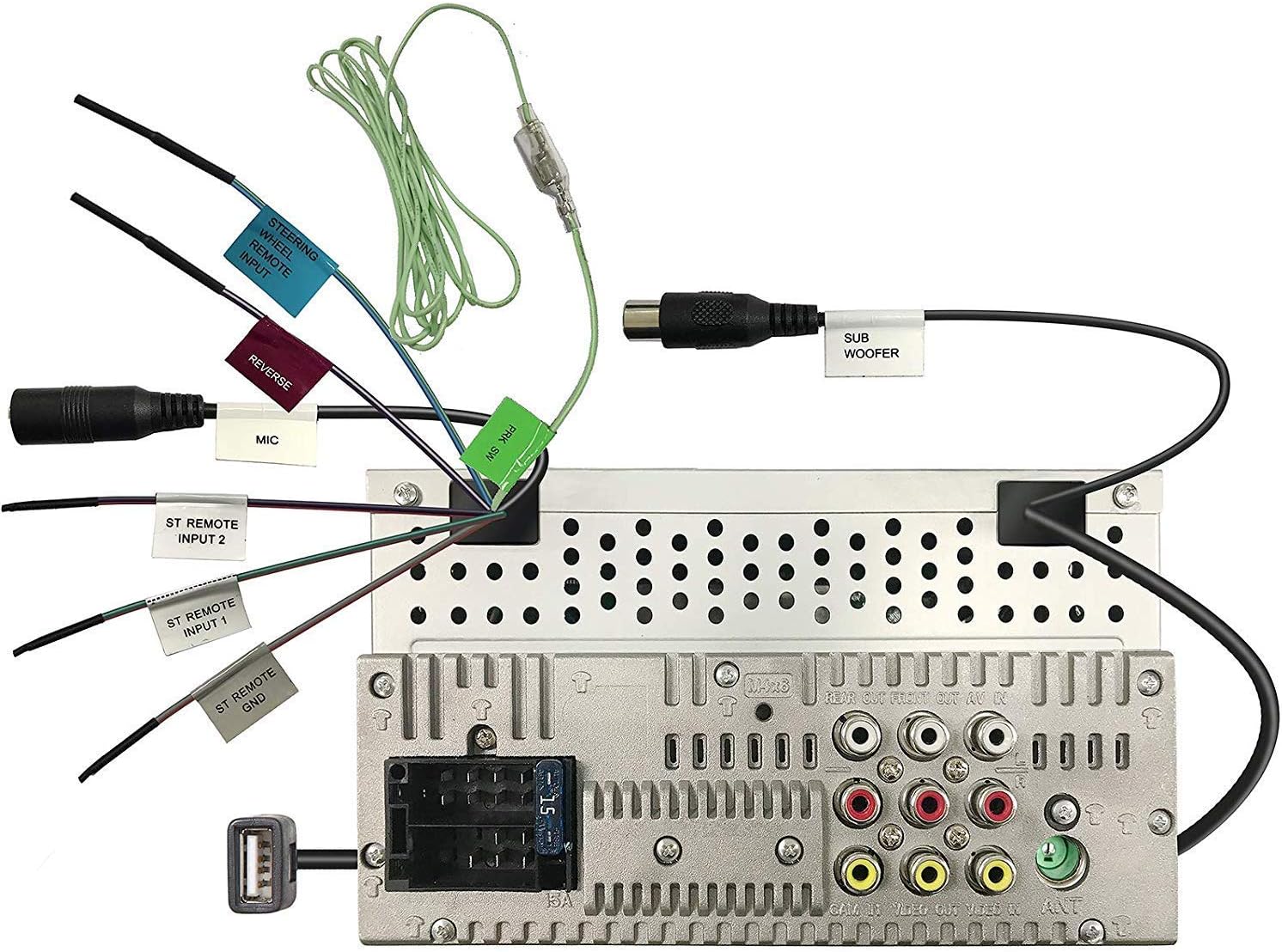
Figure 4.1: Rear panel wiring connections. This image displays the back of the JVC KW-AVX810 unit, illustrating various input and output ports. Key connections include the main power harness, speaker outputs, RCA pre-outs for front, rear, and subwoofer, video input/output, USB port, microphone input, and steering wheel remote input. Each connection is clearly labeled for identification.
- Uunganisho wa Nguvu: Connect the yellow wire to the constant 12V supply, the red wire to the accessory 12V supply, and the black wire to a good chassis ground.
- Viunganisho vya Spika: Connect the speaker wires to the corresponding vehicle speakers, ensuring correct polarity.
- Uingizaji wa USB: The USB port allows connection of compatible devices like iPods/iPhones for audio and video playback, and charging.
- Matokeo ya RCA: Tumia hizi kwa kuunganisha nje amplifiers for front, rear, and subwoofer channels.
- Ingizo/Pato la Video: For connecting external video sources or monitors.
- Ingizo la Mbali la Gurudumu la Uendeshaji: Connect to a compatible steering wheel control interface (sold separately) for integrated control.
4.2 Kuweka Kitengo
The KW-AVX810 is a double-DIN unit. Ensure your vehicle's dashboard opening is compatible. Secure the unit using the provided mounting brackets and screws. After mounting, connect all wiring harnesses before reassembling the dashboard.
5. Maagizo ya Uendeshaji
5.1 Vidhibiti vya Msingi na Onyesho
The unit features a 7-inch touch panel monitor for intuitive control. The main interface provides access to various functions.

Figure 5.1: Front panel and display. This image shows the JVC KW-AVX810's 7-inch touch panel display, featuring a graphical user interface with icons for various functions such as Tuner, Mirroring, AV-IN, Phone, BT Audio, and Settings. Volume controls and power button are visible on the left bezel. The current time is displayed prominently in the center.
- Washa/Zima: Press the power button (usually located on the left bezel) to turn the unit on or off.
- Udhibiti wa Sauti: Use the volume up/down buttons or the on-screen controls to adjust the audio level.
- Uteuzi wa Chanzo: Tap the desired source icon (e.g., Tuner, DVD, USB, BT Audio, AV-IN) on the touch screen to switch between functions.
- Bamba la uso linaloweza kutenganishwa: To detach the faceplate, press the release button (refer to the unit's specific mechanism). Always detach the faceplate when leaving the vehicle to deter theft.
5.2 Uchezaji wa Vyombo vya Habari
- Uchezaji wa DVD/CD: Insert a disc into the slot. The unit will automatically switch to DVD/CD mode. Use the touch screen for playback controls (play, pause, skip, menu).
- USB/iPod/iPhone: Connect your device to the USB port. The unit will detect the device and allow you to browse and play media files. The KS-U20 cable (sold separately) may be required for iPod video functionality.
- Sauti ya Bluetooth: Pair your Bluetooth-enabled device with the KW-AVX810. Once paired, you can stream audio wirelessly.
- Kitafuta Redio: Select the Tuner source. Use the touch screen to scan for stations, save presets, and switch between AM/FM bands.
5.3 Mipangilio na Ubinafsishaji
Access the 'Settings' menu from the main screen to customize various aspects of the unit, including:
- Mipangilio ya Sauti: Adjust equalizer (7-Band iEQ), balance, fader, subwoofer levels, and sound effects (Dolby 5.1 headphone surround sound).
- Mipangilio ya Maonyesho: Adjust brightness, contrast, and background.
- Mipangilio ya Mfumo: Language, time, and other general preferences.
- Mipangilio ya Bluetooth: Dhibiti vifaa vilivyooanishwa na chaguo za muunganisho.
6. Matengenezo
- Kusafisha Onyesho: Use a soft, dry cloth to wipe the touch screen. For stubborn smudges, lightly dampfunika kitambaa kwa maji au kisafisha skrini kilichoundwa kwa ajili ya vifaa vya elektroniki. Usitumie visafishaji vya kukwaruza.
- Cleaning the Faceplate: Wipe the detachable faceplate with a soft, dry cloth. Avoid harsh chemicals.
- Utunzaji wa Diski: Hushughulikia diski kwa kingo zao. Ziweke safi na zisiwe na mikwaruzo. Hifadhi diski katika kesi zao wakati hazitumiki.
- Huduma ya Jumla: Keep the unit free from dust and moisture. Avoid extreme temperatures.
7. Utatuzi wa shida
If you encounter problems with your KW-AVX810, refer to the following common issues and solutions:
| Tatizo | Sababu inayowezekana | Suluhisho |
|---|---|---|
| Hakuna nguvu | Wiring isiyo sahihi; Fuse iliyopigwa; Tatizo la betri ya gari. | Check power connections (yellow, red, black wires). Inspect the unit's fuse and vehicle's fuse box. Ensure vehicle battery is charged. |
| Hakuna sauti | Sauti ya chini sana; Zima sauti; Wiring ya spika isiyo sahihi; Ampsuala la lifier. | Ongeza sauti. Angalia kama kimya kimewashwa. Thibitisha miunganisho ya spika. Ikiwa unatumia nje amplifier, angalia nguvu na miunganisho yake. |
| Onyesho halifanyi kazi | Faceplate not properly attached; Display settings. | Ensure faceplate is securely attached. Check display brightness/contrast settings. |
| USB/iPod not recognized | Incompatible format; Loose connection; Device issue. | Hakikisha vyombo vya habari files are in a supported format. Reconnect the USB device. Try a different USB device. Update iPod/iPhone software if necessary. |
| Matatizo ya muunganisho wa Bluetooth | Device not in pairing mode; Interference; Already paired to another device. | Ensure Bluetooth is enabled on both devices and in pairing mode. Delete previous pairings and re-pair. Move closer to the unit. |
If the problem persists after trying these solutions, contact JVC customer support or a qualified service technician.
8. Vipimo
- Vipimo vya Bidhaa: sentimita 18.39 x 17.81 x 10.01; 2.6 kg
- Nambari ya Mfano wa Kipengee: KWM150BT+XV95BK+MAGNET
- Chapa: JVC
- Teknolojia ya Uunganisho: Bluetooth, USB
- Aina ya Mdhibiti: Android (inayotangamana)
- Vipengele Maalum: Built-In Bluetooth, FM Tuner, Subwoofer Pre-out
- Vifaa Vinavyolingana: Simu mahiri
- Jumla ya Bandari za HDMI: 1 (Note: This may refer to an internal component or specific model variant, as the main description does not highlight HDMI)
- Aina ya Kiunganishi: USB
- Njia ya Pato la Sauti: Mzunguko
- Usanidi wa Idhaa ya Sauti inayozunguka: 4.1
- Mtengenezaji: JVC
9. Udhamini na Msaada
9.1 Taarifa ya Udhamini
The JVC KW-AVX810 Vehicle Multimedia Receiver comes with a warranty. For Mobile Products, the warranty covers Sehemu za Mwaka 1 na Kazi from the date of purchase. Please retain your proof of purchase for warranty claims. The warranty does not cover damage caused by improper installation, accident, misuse, abuse, or unauthorized modification.
9.2 Usaidizi kwa Wateja
For technical assistance, service, or warranty inquiries, please contact JVC customer support. Refer to the official JVC webtovuti au ufungaji wa bidhaa yako kwa maelezo ya sasa ya mawasiliano.


