1. Utangulizi
The Extech EX310 is a compact, manual-ranging digital multimeter designed for a variety of electrical measurements. It features an extra-large 2000-count LCD and a built-in Non-Contact AC Voltage Detector (NCV) for enhanced safety. This device is capable of measuring AC/DC Voltage, AC/DC Current, Resistance, Diode, and Continuity, and includes a battery test function for 1.5V and 9V batteries. Its robust design, including a protective rubber holster and tilt stand, makes it suitable for field use.
2. Taarifa za Usalama
Daima zingatia tahadhari za usalama unapotumia kifaa chochote cha kupima umeme. Kushindwa kufanya hivyo kunaweza kusababisha jeraha au uharibifu wa mita au kifaa kinachojaribiwa.
- The Extech EX310 is UL listed with a CAT III – 600 Volt safety rating.
- Usitumie zaidi ya juzuu iliyokadiriwatage, as marked on the meter, between terminals or between any terminal and ground.
- Always inspect test leads for damage before use. Replace if insulation is compromised.
- Kuwa mwangalifu sana unapofanya kazi na saketi za moja kwa moja.
- Use the Non-Contact Voltage (NCV) detector as a preliminary check for live AC voltage, but always verify with direct contact measurements when possible.
- Ensure the function switch is set to the correct range before making measurements.
3. Bidhaa za Bidhaa
- 9-Function Manual-Ranging DMM: Hupima AC/DC ujazotage, AC/DC current (up to 10 A), resistance, diode, continuity, plus 1.5 V/9 V battery tests.
- Usiwasiliana na Voltage (NCV) Detector: Built-in NCV with red LED and audible beeper alerts to the presence of live AC (100-600 VAC) without probes.
- Extra-Large 2000-Count Display: Clear, easy-to-read 1-inch digits on a high-count LCD ensure readability.
- Rugged, Portable Design: Compact meter (5.7 × 2.9 × 1.6 in, 9 oz) with protective rubber holster, tilt stand, and low-battery indicator.
- Reliable Safety & Accuracy: 0.5% basic accuracy. Designed to UL/CAT II-1000 V & CAT III-600 V safety standards.
4. Yaliyomo kwenye Kifurushi
The Extech EX310 package includes the following items:
- Extech EX310 Mini Digital Multimeter
- Miongozo ya Mtihani
- 9 Betri ya Volt
- Tilt Stand
5. Bidhaa Imeishaview (Controls and Display)
Familiarize yourself with the components of your EX310 multimeter:

Picha: Mbele view of the Extech EX310 Mini Digital Multimeter, showing the large LCD display, function dial, NCV button, and input jacks.
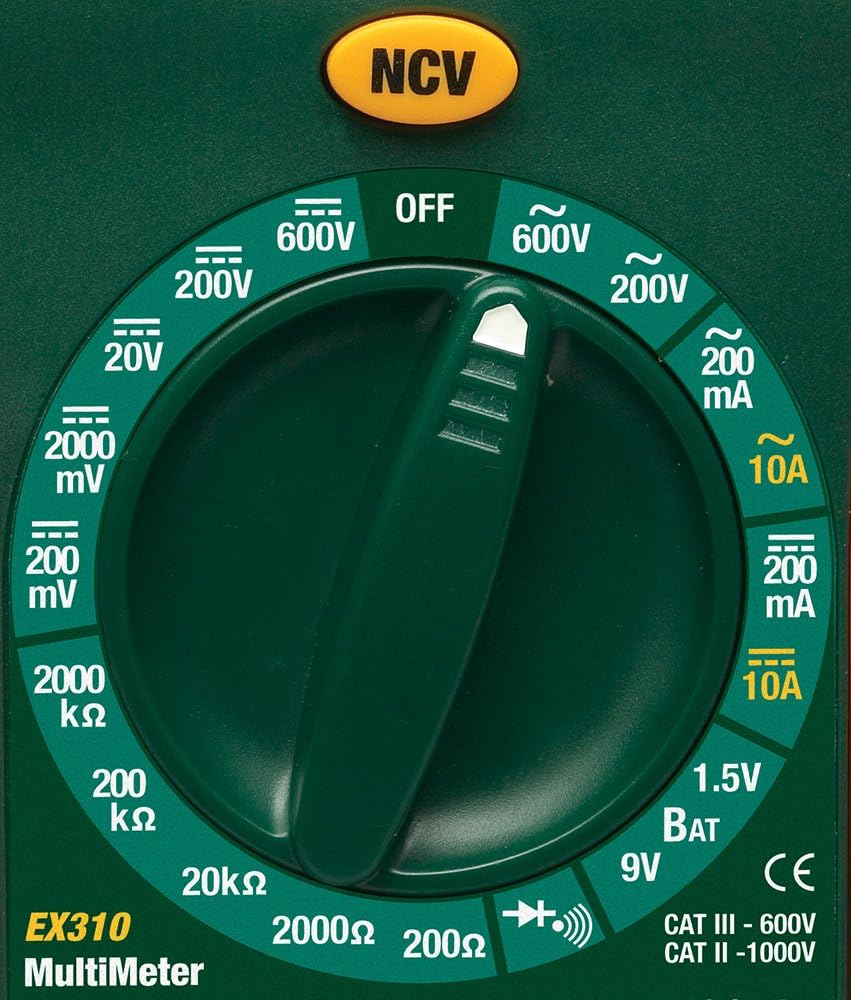
Image: Close-up of the Extech EX310's function dial, illustrating the various measurement ranges and functions such as voltage, current, resistance, diode, continuity, and battery test.
- Onyesho la LCD: Inaonyesha usomaji wa vipimo, vitengo na viashirio vya utendaji.
- Swichi ya Utendakazi: Rotary dial to select the desired measurement function and range.
- Kitufe cha NCV: Huwasha Voliyumu Isiyo ya Kugusatagkipengele cha kugundua.
- Ingizo Jacks: Terminals for connecting test leads (COM, VΩmA, 10A).
6. Kuweka
6.1. Ufungaji wa Betri
- Hakikisha multimeter IMEZIMWA.
- Locate the battery compartment cover on the rear of the meter.
- Fungua skrubu za kubakiza na uondoe kifuniko.
- Ingiza betri mpya ya 9V, ukizingatia polarity sahihi.
- Replace the cover and secure with the screw(s).
A low battery indicator will appear on the display when the battery needs replacement.
6.2. Kuunganisha Miongozo ya Mtihani
Unganisha vielekezi vya majaribio kwenye jeki zinazofaa za kuingiza data:
- Ingiza mwongozo wa mtihani mweusi kwenye COM (common) jack.
- Kwa vipimo vingi (Juzuutage, Resistance, Diode, Continuity, mA Current), insert the red test lead into the VΩmA jack.
- Kwa vipimo vya mkondo wa juu (hadi 10A), ingiza risasi nyekundu ya majaribio kwenye 10A jack.
7. Maagizo ya Uendeshaji
Before making any measurement, ensure the test leads are correctly connected and the function switch is set to the desired range.
7.1. AC/DC Voltage Kipimo
- Set the function switch to the desired ACV (~) or DCV (---) range (e.g., 200V, 600V).
- Connect the red test lead to the VΩmA jack and the black test lead to the COM jack.
- Gusa probes za majaribio hadi sehemu za saketi ambapo voltage inapaswa kupimwa.
- Soma juzuu yatage thamani kwenye LCD.
7.2. Kipimo cha Sasa cha AC/DC
Tahadhari: Never attempt to measure current on a circuit with voltage present across the current terminals. This can blow the fuse or damage the meter.
- Zima nguvu kwenye mzunguko.
- Set the function switch to the desired ACA (~) or DCA (---) range (e.g., 200mA, 10A).
- Connect the red test lead to the appropriate current jack (VΩmA for mA, 10A for 10A) and the black test lead to the COM jack.
- Open the circuit where current is to be measured and connect the meter in series.
- Weka nguvu kwenye saketi na usome thamani ya sasa kwenye LCD.
7.3. Upimaji wa Upinzani
- Hakikisha mzunguko au kijenzi kimeondolewa nishati.
- Set the function switch to the desired Resistance (Ω) range (e.g., 200Ω, 20kΩ).
- Connect the red test lead to the VΩmA jack and the black test lead to the COM jack.
- Gusa probe za majaribio kwenye sehemu au saketi itakayopimwa.
- Soma thamani ya upinzani kwenye LCD.

Image: The Extech EX310 Multimeter displaying a reading while test leads are connected to a circuit board, demonstrating a typical measurement scenario.
7.4. Mtihani wa Diode
- Ensure the component is de-energized.
- Set the function switch to the Diode (→|) position.
- Connect the red test lead to the VΩmA jack and the black test lead to the COM jack.
- Touch the red probe to the anode and the black probe to the cathode of the diode.
- Soma juzuu ya mbeletage drop on the LCD. Reverse the probes to check for an open circuit (OL).
7.5. Mtihani wa kuendelea
- Hakikisha mzunguko au kijenzi kimeondolewa nishati.
- Set the function switch to the Continuity (→))) position.
- Connect the red test lead to the VΩmA jack and the black test lead to the COM jack.
- Gusa probe za majaribio kwenye saketi au sehemu.
- An audible tone will sound if continuity exists (resistance below approximately 30Ω).

Picha: Karibu view of the Extech EX310 Multimeter with its test leads connected to an internal electronic circuit, demonstrating precise measurement capabilities.
7.6. Wasiowasiliana Voltage (NCV) Utambuzi
- Weka swichi ya kukokotoa kwa nafasi yoyote.
- Press and hold the NCV button.
- Move the top of the meter (where the NCV sensor is located) close to the suspected AC voltage source (e.g., wire, outlet).
- A red LED will illuminate and an audible beeper will sound, increasing in intensity as the meter gets closer to the live AC voltage.

Image: A hand holding the Extech EX310 Multimeter near an electrical wall outlet, demonstrating the use of the Non-Contact Voltage (NCV) detection feature to identify live circuits.
7.7. Battery Test (1.5V/9V)
- Set the function switch to the 1.5V BAT or 9V BAT position.
- Connect the red test lead to the VΩmA jack and the black test lead to the COM jack.
- Touch the red probe to the positive terminal and the black probe to the negative terminal of the battery.
- Soma ujazo wa betritage kwenye LCD.
8. Matengenezo
8.1. Kubadilisha Betri
Refer to Section 6.1 for detailed instructions on replacing the 9V battery when the low battery indicator appears.
8.2. Uingizwaji wa Fuse
If the current measurement functions cease to operate, the internal fuse(s) may need replacement. The fuses are typically located beneath the battery compartment. Refer to the full product manual for specific fuse ratings and replacement procedures. Always replace with fuses of the identical type and rating.
8.3. Kusafisha
Futa kesi mara kwa mara kwa tangazoamp kitambaa na sabuni laini. Usitumie viyeyusho au vimumunyisho. Hakikisha mita imekauka kabisa kabla ya matumizi.
9. Utatuzi wa shida
- Hakuna Onyesho: Check the 9V battery. Ensure it is correctly installed and has sufficient charge.
- Usomaji usio sahihi: Verify that the function switch is set to the correct measurement type and range. Ensure test leads are properly connected and making good contact with the circuit.
- Kipimo cha Sasa Hakifanyi Kazi: Check the internal fuse(s). Refer to the Maintenance section for fuse replacement.
- NCV Haigunduzi: Ensure the NCV button is pressed and held. Confirm the presence of AC voltage (100-600 VAC) in the area being tested.
10. Vipimo
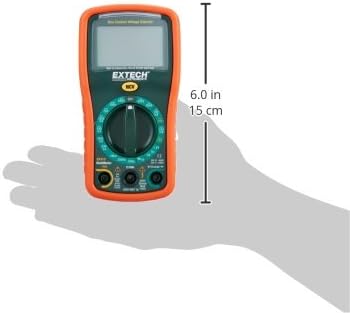
Image: Diagram illustrating the physical dimensions of the Extech EX310 Multimeter, showing a length of 6.0 inches (15 cm).
| Vipimo | Thamani |
|---|---|
| Chapa | Extech |
| Nambari ya Mfano | EX310 |
| Aina ya Kipimo | Multimeter |
| Mtindo | Kubadilisha Mwongozo |
| Usahihi wa kimsingi | +/-0.5% |
| Onyesho | 2000-Count LCD |
| Ukadiriaji wa Usalama | UL listed CAT III - 600V, CAT II - 1000V |
| Chanzo cha Nguvu | Betri ya 9V |
| Vipimo vya Kipengee (L x W x H) | Inchi 5.7 x 1.6 x 2.9 (sentimita 14.5 x 4.1 x 7.4) |
| Uzito wa Kipengee | Wakia 0.704 (Kilo 0.02) |
| Vipengee vilivyojumuishwa | Test leads, 9 Volt battery, tilt stand |
11. Taarifa za Udhamini
The Extech EX310 Mini Digital Multimeter is covered by a Sehemu za miaka 1 na dhamana ya kazi from the date of purchase. Please retain your proof of purchase for warranty claims. This warranty covers manufacturing defects and workmanship under normal use.
12. Msaada kwa Wateja
For technical assistance, troubleshooting beyond this manual, or warranty service, please contact Extech customer support. Refer to the official Extech webtovuti au ufungaji wa bidhaa kwa maelezo ya sasa ya mawasiliano.


