1. Utangulizi
The Extech SDL200 is a versatile four-channel thermometer and data logger designed for precise temperature measurement and recording. It supports six types of thermocouples (J, K, E, T, R, S) and two channels for RTD (Pt100Ohm) probes, allowing for a wide range of applications. This device can display individual channel readings (T1, T2, T3, T4) or differential readings (T1-T2). It features an offset adjustment for relative measurements and can store up to 99 readings manually, with an extensive capacity of 20 million readings via a 2GB SD memory card. All recorded data is time-stamped and saved in an Excel-compatible format for easy transfer and analysis on a PC. The SDL200 also includes user-programmable sampling rates, Min/Max recording, Data Hold, Auto Power Off, and a built-in PC interface.
2. Taarifa za Usalama
Please read and understand all safety instructions before operating the Extech SDL200. Failure to follow these instructions may result in injury or damage to the device.
- Do not operate the device if it appears damaged or if the insulation is compromised.
- Ensure proper probe connection before taking measurements.
- Epuka kuhatarisha kifaa kwenye joto kali, unyevunyevu au jua moja kwa moja.
- Use only specified battery types and ensure correct polarity during installation.
- Keep the device clean and dry. Refer to the maintenance section for cleaning instructions.
- Usijaribu kutengeneza au kurekebisha kifaa. Waelekeze wafanyakazi wote waliohitimu huduma.
3. Yaliyomo kwenye Kifurushi
Thibitisha kuwa vipengee vyote vipo wakati wa kufungua:
- Extech SDL200 Four-Channel Thermometer SD Logger unit
- Betri 6 za AA
- Four general purpose Type K bead wire temperature probes
- SD memory card (2GB)
- Kesi ngumu ya kubeba

Kielelezo cha 3.1: Extech SDL200 unit with four Type K thermocouple probes inserted into the top ports. The display shows temperature readings for T1, T2, T3, and T4.

Kielelezo cha 3.2: The retail packaging box for the Extech SDL200, displaying the brand logo, model name, and UPC code (0793950432105).
4. Bidhaa Imeishaview
The SDL200 features a clear digital display and intuitive button layout for easy operation. The top of the device includes four input ports for thermocouple probes. The side of the device houses connectivity ports for power and PC interface, along with RTD probe inputs.

Kielelezo cha 4.1: Upande view of the Extech SDL200, illustrating the DC 9V power input, RS232 serial port for PC connection, and two RTD (PT100Ohm) probe input ports labeled PT1 and PT2, protected by a rubber flap.

Kielelezo cha 4.2: A set of four yellow Type K bead wire temperature probes with standard mini-connectors, alongside a larger clamp-style temperature probe, demonstrating the variety of probes that can be used with the device.
5. Kuweka
5.1. Ufungaji wa Betri
- Fungua kifuniko cha sehemu ya betri kwenye sehemu ya nyuma ya kifaa.
- Insert six (6) AA batteries, ensuring correct polarity as indicated inside the compartment.
- Funga kifuniko cha sehemu ya betri kwa usalama.
5.2. Muunganisho wa Kichunguzi
- For thermocouple probes (Type J, K, E, T, R, S), connect them to the four input jacks located at the top of the meter. Ensure the correct thermocouple type is selected in the device settings if applicable.
- For RTD (Pt100Ohm) probes, connect them to the PT1 and PT2 ports on the side of the device (refer to Figure 4.1).
5.3. Uingizaji wa Kadi ya SD
- Locate the SD card slot, typically on the side or bottom of the device.
- Insert the provided 2GB SD memory card into the slot until it clicks into place.
- Ili kuiondoa, sukuma kwa upole kadi ndani hadi itoke.
6. Maagizo ya Uendeshaji
6.1. Washa/Zima
Bonyeza kwa NGUVU kitufe cha kuwasha au kuzima kifaa.
6.2. Kipimo cha Joto la Msingi
- Connect the desired temperature probes.
- Power on the device. The display will show real-time temperature readings for the connected channels (T1, T2, T3, T4).
- Bonyeza kwa T1-T2 button to switch between individual channel display and differential temperature (T1-T2) display.
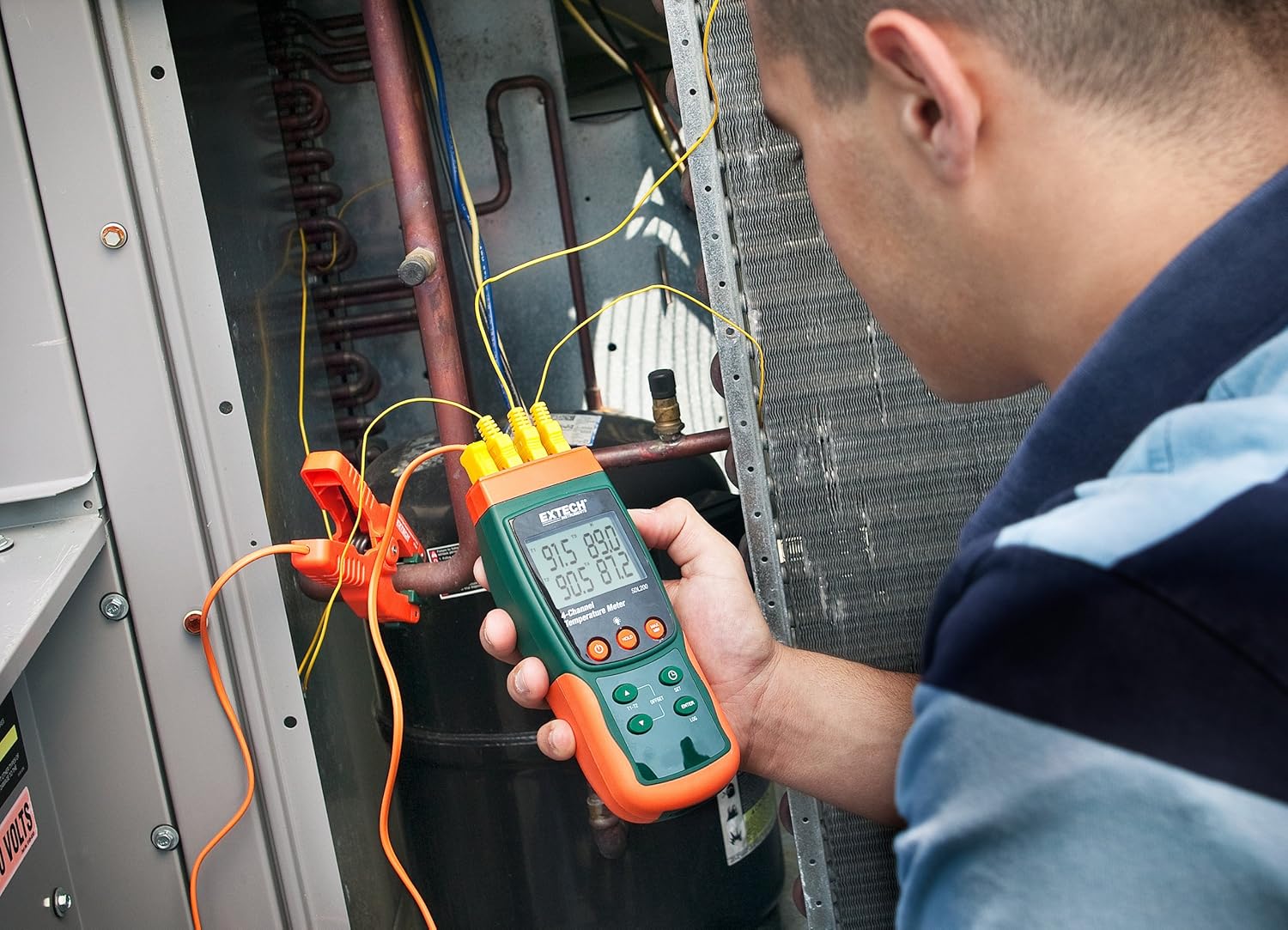
Kielelezo cha 6.1: A technician utilizing the Extech SDL200 to monitor multiple temperature points on an HVAC system, demonstrating its application in industrial and scientific settings.
6.3. Uwekaji Data
The SDL200 can record temperature data to the SD card with a real date and time stamp.
- Weka SampKiwango cha ling: Tumia WEKA button to access settings and adjust the sampkasi ya muda (sekunde 1 hadi 3600).
- Anza Kuingia: Bonyeza kwa LOG button to begin recording data to the SD card. A logging indicator will appear on the display.
- Stop Logging: Bonyeza kwa LOG button again to stop data recording.
- Uhamisho wa Data: Remove the SD card and insert it into a computer to access the data, which is saved in Excel (.xls) format.
6.4. Min/Max and Data Hold
- Kiwango cha chini/Upeo: Bonyeza kwa MAX/MIN button to display the maximum or minimum recorded temperature since the function was activated. Press again to cycle through Max, Min, and current readings.
- Kushikilia Data: Bonyeza kwa SHIKA kitufe cha kugandisha usomaji wa sasa kwenye onyesho. Bonyeza tena ili kuachilia.
6.5. Offset Adjustment
Tumia OFFSET button to perform a zero function for relative measurements. Consult the full manual for detailed calibration procedures.
6.6. Nguvu ya Zima
The device features an Auto Power Off function to conserve battery life. This can typically be disabled or adjusted in the settings menu if continuous operation is required.
6.7. PC Interface
The built-in RS232 PC interface allows for real-time data streaming and advanced control using compatible software (sold separately or available for download from Extech's website). Connect the device to your PC using an appropriate RS232 cable.
7. Matengenezo
7.1. Kusafisha
Futa kifaa safi kwa kutumia kifaa laini, damp cloth. Do not use abrasive cleaners or solvents. Ensure the device is dry before storage or further use.
7.2. Kubadilisha Betri
Badilisha betri wakati kiashiria cha betri ya chini kinapoonekana kwenye onyesho. Rejelea Sehemu ya 5.1 kwa maagizo ya usakinishaji wa betri.
7.3. Hifadhi
When not in use for extended periods, remove the batteries and store the device in its hard carrying case in a cool, dry place.
8. Utatuzi wa shida
- Kifaa hakiwashi: Angalia usakinishaji wa betri na uhakikishe kuwa betri hazijaisha. Badilisha ikiwa ni lazima.
- Usomaji wa joto usio sahihi: Verify probe connections are secure and that the correct probe type is selected (if applicable). Ensure probes are not damaged.
- Data logging not working: Check if the SD card is properly inserted and has sufficient free space. Ensure the logging function is activated.
- PC connection issues: Verify the RS232 cable connection and ensure the correct drivers and software are installed on your PC.
9. Vipimo
| Kipengele | Vipimo |
|---|---|
| Chapa | Extech |
| Jina la Mfano | SDL200 |
| Kipengele Maalum | 4-Channel Datalogging |
| Aina ya Kuonyesha | Dijitali |
| Teknolojia ya Uunganisho | USB (via RS232 interface) |
| Chanzo cha Nguvu | Inaendeshwa na Betri (betri 6 za AA zimejumuishwa) |
| Ukadiriaji wa Halijoto ya Juu | Digrii 2732 Fahrenheit |
| Muda wa Majibu | Sekunde 1 |
| Datalogging Capacity | 20M readings via 2G memory card |
| SampKiwango cha ling | 1 to 3600 seconds (user programmable) |
| Aina za Thermocouple | J, K, E, T, R, S (4-channel) |
| Uchunguzi wa RTD | Pt100Ohm (2-channel) |
| Vipengee vilivyojumuishwa | Batteries, Bead wire temperature probes, memory card, case |
| Uzito wa Kipengee | Pauni 1.1 |
| Urefu wa Kipengee | Inchi 7.2 |
| Nyenzo ya Nje | Polycarbonate (PC) |
| Uainishaji Met | CE |
10. Udhamini na Msaada
Extech products are designed for reliability and performance. For warranty information, technical support, or service inquiries, please refer to the official Extech webtovuti au wasiliana na idara yao ya huduma kwa wateja. Weka risiti yako ya ununuzi kama dhibitisho la ununuzi kwa madai ya udhamini.
Kwa rasilimali zaidi, tembelea Extech Store on Amazon.


