
1. Notisi Muhimu
Please carefully check the store name and ensure you are purchasing products sold by "LUZHAN." We have received customer feedback stating that products received did not match the description and were of poor quality. Upon investigation, we found that these customers did not purchase the products from us. To prevent such incidents from happening again in the future and to avoid unnecessary misunderstandings, please carefully verify the store name LUZHAN.

Image: Important notice to verify seller name LUZHAN for authentic products.
2. Zaidiview
The XIAOMI POCO X8 Pro Max 5G is a high-performance smartphone designed for advanced users. It features a powerful Mediatek Dimensity 9500s processor, a vibrant 1.5K 120Hz AMOLED display, a large 8500mAh battery with 100W HyperCharge, and a 50 MP Light Fusion 600 camera system with OIS. This manual provides essential information for setting up and operating your device.
Picha: mbele na nyuma view of the POCO X8 Pro Max 5G smartphone.
Video: Kumalizikaview of the POCO X8 Pro Series, highlighting key features and design.
3. Kuweka
3.1 Ni nini kwenye Sanduku
- XIAOMI POCO X8 Pro Max 5G Smartphone
- Chaja
- Kinga ya Skrini (iliyowekwa awali au iliyojumuishwa)
3.2 Usanidi wa Awali wa Kifaa
- Washa: Press and hold the power button located on the side of the device until the XIAOMI logo appears.
- Lugha na Eneo: Fuata vidokezo vilivyo kwenye skrini ili kuchagua lugha na eneo unalopendelea.
- Unganisha kwa Wi-Fi: Select your Wi-Fi network and enter the password to connect to the internet. This is necessary for initial setup and software updates.
- Akaunti ya Google: Ingia ukitumia akaunti yako ya Google au uunde mpya. Hii ni muhimu kwa kufikia Duka la Google Play na huduma zingine za Google.
- Uhamisho wa Data: If you are upgrading from another device, you may have the option to transfer your data (apps, photos, contacts) during this stage.
- Mpangilio wa Usalama: Set up your preferred security method, such as a PIN, pattern, password, or fingerprint. The device supports an ultrasonic fingerprint sensor.
- Kamilisha Kuweka: Fuata vidokezo vyovyote vilivyobaki ili kukamilisha mchakato wa usanidi.
3.3 SIM Card and eSIM Setup
The POCO X8 Pro Max 5G supports physical SIM cards and eSIM functionality.
- Physical SIM: Use the provided SIM ejector tool to open the SIM tray. Insert your Nano-SIM card(s) into the tray, ensuring proper orientation. Close the tray securely.
- eSIM: Kwa uanzishaji wa eSIM, nenda kwenye Mipangilio > Mtandao na intaneti > SIM and follow the instructions to add an eSIM profile provided by your carrier.
4. Maagizo ya Uendeshaji
Vipengele 4.1 vya Kuonyesha
Your device features a 6.83-inch 1.5K ultra-bright AMOLED display with a 120Hz refresh rate for smooth visuals and a 24x super resolution touch for enhanced responsiveness. It also includes eye protection features and Corning Gorilla Glass 7i for durability.
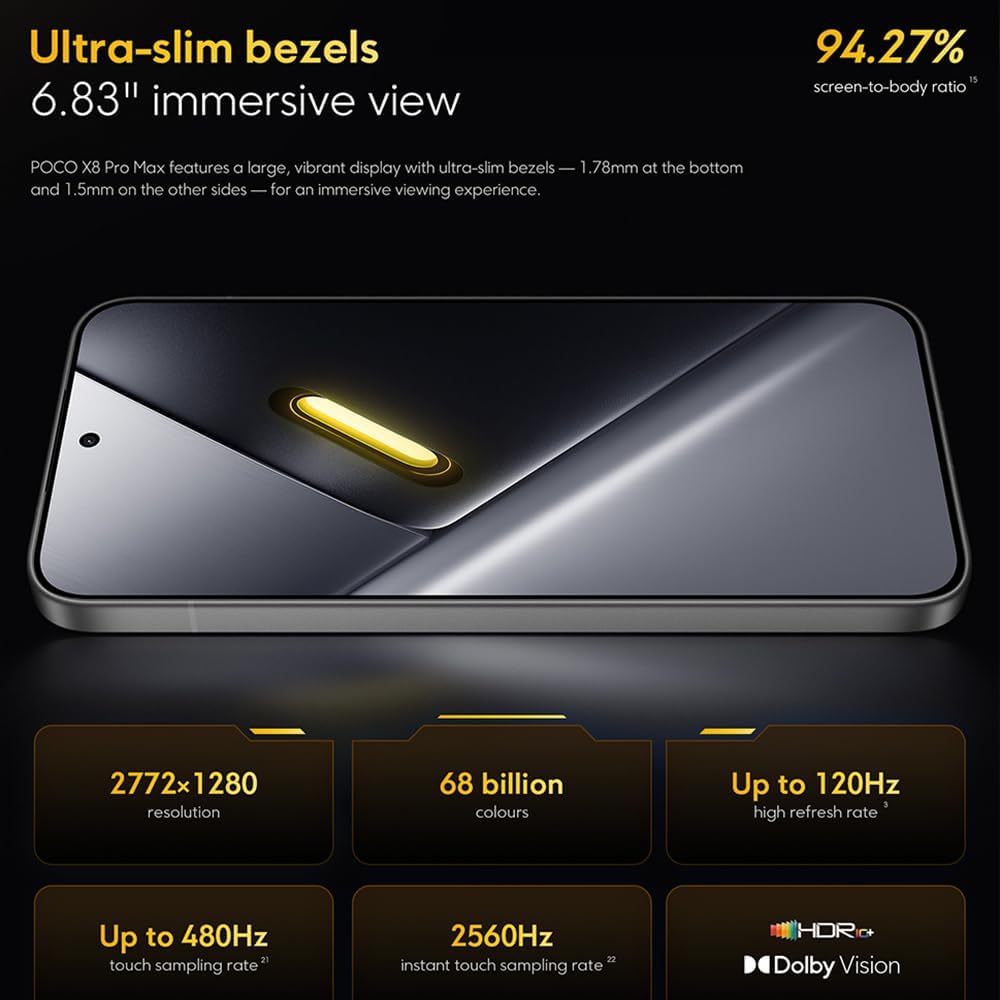
Image: The 6.83-inch 1.5K ultra-bright AMOLED display with minimal bezels.
4.2 Utendaji
Powered by the Mediatek Dimensity 9500s chipset (3nm, 4+4 All Big Core architecture, NPU890 AI processor), the POCO X8 Pro Max 5G delivers high performance. The POCO 3D IceLoop cooling system ensures efficient heat dissipation, maintaining optimal performance during intensive tasks like gaming.

Image: Diagram illustrating the Mediatek Dimensity 9500s flagship platform.

Image: Illustration of the 5800mm² ultra-large LHP area for cooling.
4.3 Mfumo wa Kamera
The device features a 50 MP Light Fusion 600 main camera with OIS (Optical Image Stabilization) and an 8 MP ultra-wide camera. It supports portrait mode with bokeh + HDR and dynamic video-to-still conversion.

Image: Close-up of the 50 MP main camera and 8 MP ultra-wide camera system.
4.4 Betri na kuchaji
Equipped with a massive 8500 mAh (typical) battery, the POCO X8 Pro Max 5G offers extended usage. It supports 100W HyperCharge, allowing for rapid recharging. A 16% ultra-high carbon-silicon content contributes to its high energy density.

Image: Illustration highlighting the massive 8500mAh battery capacity.

Image: Visual representation of the 100W HyperCharge technology.
4.5 Sauti
The device features symmetrical dual stereo speakers (1115F) for a balanced and immersive audio experience.
Programu ya 4.6
The POCO X8 Pro Max 5G comes with Xiaomi HyperOS 3 installed, offering an optimized and user-friendly interface based on Android 16.
5. Matengenezo
5.1 Kusafisha Kifaa Chako
- Tumia kitambaa laini kisicho na pamba ili kufuta skrini na paneli ya nyuma.
- Epuka kutumia kemikali kali, vifaa vya abrasive au vinyunyuzi vya erosoli.
- Kwa smudges mkaidi, kidogo dampjw.org sw kitambaa chenye maji au kisafisha skrini kilichoundwa kwa ajili ya vifaa vya elektroniki.
5.2 Upinzani wa Vumbi na Maji
The device is certified for IP68 dust and water resistance. This means it can withstand immersion in up to 2 meters of water for 30 minutes under specific laboratory conditions. However, water and dust resistance may deteriorate over time with normal wear and tear. The warranty does not cover liquid damage. Avoid exposing the device to hot water, saltwater, or other liquids.

Image: Visual representation of the IP68 dust and water resistance.
5.3 Usasisho wa Programu
Angalia na usakinishe masasisho ya programu mara kwa mara ili kuhakikisha kuwa kifaa chako kina vipengele vipya zaidi, viraka vya usalama na utendakazi kuboreshwa. Kwa kawaida unaweza kupata chaguo hili ndani Mipangilio > Kuhusu simu > Sasisho la mfumo.
6. Utatuzi wa shida
6.1 Masuala ya Kawaida na Suluhu
- Kifaa hakiwashi: Ensure the battery is charged. Connect the device to the charger and wait a few minutes before attempting to power it on again.
- Skrini imegoma kujibu: Try restarting the device by holding the power button for an extended period (e.g., 10-15 seconds) until it reboots.
- Programu zinaharibika: Futa akiba ya programu yenye matatizo (Mipangilio > Programu > [Jina la Programu] > Hifadhi > Futa akiba) au sakinisha upya programu. Hakikisha programu ya kifaa chako imesasishwa.
- Maisha duni ya betri: Check background app usage, reduce screen brightness, disable unnecessary features like GPS or Bluetooth when not in use, and ensure your software is updated.
- Masuala ya muunganisho wa mtandao: Restart your device. Check if your SIM card is properly inserted. Toggle Airplane Mode on and off. Reset network settings (Mipangilio > Mfumo > Weka upya chaguo > Weka upya Wi-Fi, simu ya mkononi na Bluetooth).
6.2 Rudisha Kiwanda
If you encounter persistent issues, a factory reset may be necessary. Onyo: This will erase all data on your device. Back up important data before proceeding. Go to Mipangilio > Mfumo > Weka upya chaguo > Futa data zote (weka upya kiwandani) na ufuate maagizo kwenye skrini.
7. Vipimo
| Kipengele | Vipimo |
|---|---|
| Chapa | XIAOMI |
| Jina la Mfano | POCO X8 Pro Max 5G |
| Mfumo wa Uendeshaji | Android 16 (with Xiaomi HyperOS 3) |
| Uwezo wa Kuhifadhi Kumbukumbu | GB 512 |
| Ukubwa wa skrini | Inchi 6.83 |
| Aina ya Kuonyesha | AMOLED, 1.5K, 120Hz refresh rate |
| Teknolojia ya Simu | 5G |
| Rangi | Noir (Nyeusi) |
| Aina ya kiunganishi | USB Aina C |
| Usalama wa Biometriska | Fingerprint Recognition (Ultrasonic) |
| Uwezo wa Betri | 8500 mAh (Lithiamu-polima) |
| Inachaji | 100W HyperCharge |
| Kamera kuu | 50 MP Light Fusion 600 with OIS |
| Kamera pana zaidi | 8 Mbunge |
| Kichakataji | Mediatek Dimensity 9500s |
| Upinzani wa Vumbi na Maji | IP68 |
| Mwaka wa Model | 2025 |
| Nchi ya Asili | China |
8. Udhamini na Msaada
For detailed warranty information and customer support, please refer to the warranty card included with your product or visit the official XIAOMI webtovuti. Weka uthibitisho wako wa ununuzi kwa madai ya udhamini.
Online resources and FAQs may also be available on the XIAOMI support portal.