
1. Utangulizi
Thank you for choosing the Aigostar Smart LED Bulb. This bulb features Bluetooth Mesh 5.0 technology, offering stable and fast connectivity for smart lighting control. It supports RGB color changes, tunable white light from 2700K to 6500K, and dimming from 1% to 100%. This manual provides detailed instructions for installation, operation, and troubleshooting to ensure optimal use of your smart bulb.
The Aigostar Smart LED Bulb can be controlled directly via Alexa Echo devices (2nd generation or later) without a separate gateway, or through the Aigosmart app with an Aigostar smart gateway for extended functionalities like remote control and scheduling.
2. Taarifa za Usalama
- Ensure the power is turned off before installing or replacing the bulb.
- Balbu hii imeundwa kwa matumizi ya ndani tu.
- Usivunje au kurekebisha balbu. Hii itabatilisha udhamini na inaweza kusababisha uharibifu au jeraha.
- Avoid exposing the bulb to direct water or high humidity.
- Use in an operating environment between -20°C and 40°C.
- Do not use with standard dimmers. This smart bulb is dimmable via its smart control features.
- Weka mbali na watoto.
3. Yaliyomo kwenye Kifurushi
Kifurushi chako kinapaswa kuwa na vitu vifuatavyo:
- Aigostar Smart LED Bulb A60 E27 12W (2 units)
- Mwongozo wa Mtumiaji (hati hii)
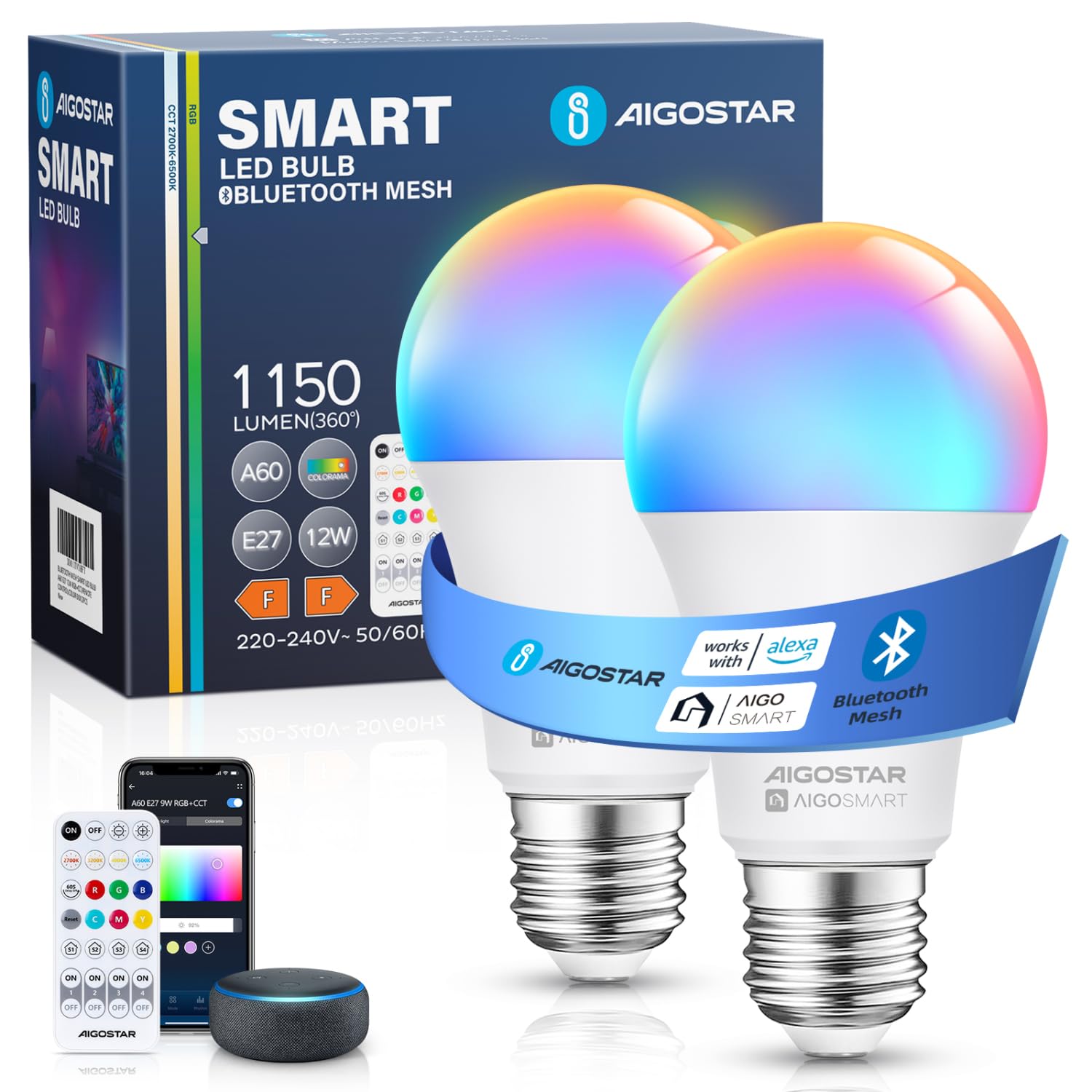
Image: A single Aigostar Smart LED Bulb, showcasing its design and E27 base.
4. Vipimo
| Kipengele | Maelezo |
|---|---|
| Nambari ya Mfano | HLLEDST64-6GF-BLE-CW |
| Chapa | Aigostar |
| Wattage | Wati 12 (sawa na incandescent ya 80W) |
| Pato la Lumen | mita 1150 |
| Joto la Rangi | 2700K-6500K (Tunable White) + RGB |
| Safu Inayoweza Kuzimika | 1% - 100% |
| Kielezo cha Utoaji wa Rangi (Ra) | ≥80 |
| Voltage | 220-240V, 50Hz |
| Aina ya Msingi | E27 |
| Muunganisho | Bluetooth Mesh 5.0 |
| Utangamano | Alexa, Google Home (via Aigosmart app and gateway) |
| Vipimo | 11.8 x 6 x 6 cm |
| Uzito | 200 g |
5. Mipangilio na Usakinishaji
5.1 Ufungaji wa Kimwili
- Zima nguvu: Before installation, ensure the power switch to the light fixture is in the OFF position.
- Weka balbu kwenye skrubu: Carefully screw the Aigostar Smart LED Bulb into a standard E27 light socket. Do not overtighten.
- Washa nishati: Restore power to the light fixture. The bulb should light up.

Image: An infographic illustrating the simple steps to connect the Aigostar Bluetooth Mesh smart bulb directly to Alexa, showing a bulb being screwed in and an Alexa device discovering it.
5.2 Connecting to Alexa (Direct Bluetooth Mesh Connection)
This method allows direct control via Alexa Echo devices (2nd generation or later) without needing the Aigosmart app or a separate gateway.
- Ensure Alexa is updated: Before connecting, ensure your Alexa Echo device has the latest software version. You can ask, "Alexa, is my software updated?"
- Sakinisha balbu: Follow the physical installation steps above.
- Discover device: Say to your Alexa Echo device, "Alexa, discover devices."
- Uthibitisho: Alexa will search for and connect to the Aigostar Smart LED Bulb. Once discovered, you can control it using voice commands or the Alexa app.
Kumbuka: This direct connection supports up to three bulbs at a time. For more bulbs, repeat the discovery process for subsequent sets.
5.3 Connecting via Aigosmart App (with Aigostar Smart Gateway)
For advanced features like remote control outside your home, scheduling, and grouping more than three bulbs, an Aigostar smart gateway and the Aigosmart app are required.
- Sakinisha balbu: Follow the physical installation steps above.
- Install Aigostar Smart Gateway: Follow the instructions provided with your Aigostar smart gateway to set it up and connect it to your home network.
- Download Aigosmart App: Download the Aigosmart app from your smartphone's app store (iOS or Android).
- Jisajili/Ingia: Open the Aigosmart app and register for a new account or log in if you already have one.
- Ongeza Lango: In the Aigosmart app, add your Aigostar smart gateway.
- Ongeza Balbu: Within the Aigosmart app, follow the prompts to add the smart bulb to your gateway. The app will guide you through the pairing process.
- Sync with Alexa/Google Home (Optional): If you wish to control the bulbs via Alexa or Google Home through the Aigosmart app, link your Aigosmart account in the respective voice assistant app.

Image: A comparison table highlighting the simpler connection process of Aigostar Bluetooth Mesh bulbs directly with Alexa versus other Wi-Fi smart bulbs requiring a third-party app and registration.
6. Maagizo ya Uendeshaji
6.1 Voice Control (via Alexa)
Once connected to your Alexa Echo device, you can use voice commands to control your Aigostar Smart LED Bulb. Ensure your Alexa device is within range.
- "Alexa, washa [Jina la Balbu]."
- "Alexa, zima [Jina la Balbu]."
- "Alexa, dim [Jina la Balbu] hadi 50%."
- "Alexa, weka [Jina la Balbu] kuwa nyeupe yenye joto."
- "Alexa, badilisha [Jina la Balbu] kuwa bluu."
- "Alexa, brighten [Bulb Name]."

Image: A family in a living room, demonstrating voice control of smart lighting with an Alexa device, with a speech bubble showing "Alexa, dim the light to 50% brightness".
6.2 App Control (via Aigosmart App with Gateway)
If you have connected your bulbs via the Aigosmart app and an Aigostar smart gateway, you can access a wider range of features:
- Marekebisho ya Mwangaza: Adjust the brightness from 1% to 100%.
- Udhibiti wa Joto la Rangi: Change the white light from warm (2700K) to cool (6500K).
- Uteuzi wa Rangi ya RGB: Choose from 16 million colors to create different atmospheres.
- Njia Inayobadilika: Select from 10 pre-set dynamic lighting modes.
- Kazi ya Muda: Set schedules for the bulb to turn on/off at specific times.
- Udhibiti wa Kikundi: Group multiple Aigostar smart bulbs of the same model for simultaneous control.
- Udhibiti wa Mbali: Dhibiti taa zako kutoka mahali popote ukiwa na muunganisho wa intaneti.

Image: A smartphone displaying the Aigosmart app interface, allowing users to select colors and adjust brightness for their smart LED lights.

Image: A split image showing a person waking up as a smart light turns on at 7:00 AM, and another person sleeping as the light turns off at 10:00 PM, illustrating the timing function.

Image: An illustration depicting multiple smart bulbs connected in a Bluetooth Mesh network, controlled as a group via a smartphone app.
6.3 Bluetooth Mesh Network Benefits
The Bluetooth Mesh 5.0 protocol allows for stable and fast communication between multiple devices (up to 200 mesh devices). Each smart device acts as a node, transmitting signals and instructions to each other, which makes the network distribution speed faster and more stable.

Image: A diagram showing a modern home with multiple smart lights connected via a Bluetooth Mesh network, indicating stable and fast communication across different rooms.
7. Matengenezo
- Kusafisha: Ensure the bulb is off and cool before cleaning. Wipe with a soft, dry cloth. Do not use liquid cleaners or aerosols.
- Hifadhi: Ikiwa utahifadhi balbu kwa muda mrefu, ihifadhi mahali pakavu na penye baridi mbali na jua moja kwa moja.
- Utupaji: Dispose of the bulb according to local electronic waste regulations.
8. Utatuzi wa shida
8.1 Masuala ya Kawaida na Suluhu
- Q: Why can't the Bluetooth Mesh smart bulb be controlled even after connecting to the Alexa app?
- A: If you do not have an Echo speaker and are only using the Alexa app, the Mesh bulb cannot be connected. It is suggested to use an Echo speaker for voice detection of devices and connection. This will allow successful use of the bulb through the Echo speaker or the Alexa app.
- Q: Can Aigostar Bluetooth Mesh smart bulbs be used remotely?
- A: There are two ways:
- Connect the bulb to an Echo speaker for remote control via the Alexa app.
- Use an Aigostar gateway (if not available, it is necessary to purchase separately) and link the gateway and the Bluetooth Mesh smart bulb to the AigoSmart app for remote control.
Note: Without an Echo speaker or Aigostar gateway, the Bluetooth Mesh smart bulb can be used within a range of 20 meters.
- Q: What are the differences between controlling smart bulbs with Alexa Echo or the AigoSmart app?
- A:
- Alexa Echo: No prior registration is required if you already have the app or register as a user of the app; Alexa can "find" and connect directly to these smart bulbs. A maximum of three connections at a time; after a successful connection, proceed with the next set of connections.
- AIGOSMART: Requires registration as an app user, can connect up to 200 bulbs. After connecting to the Aigostar gateway, these 200 bulbs can also be connected to Alexa.
- Swali: Je! Ni advan ganitages of Bluetooth Mesh technology?
- A: The Bluetooth Mesh protocol is an excellent solution for controlling multiple lamps (supports up to 200 mesh devices) without affecting your Wi-Fi network speed. It provides more stable connectivity and faster connection speed, overcoming the limitations of short-range infrared remote controls, control of fewer lights, Wi-Fi light disconnections, and susceptibility to network speed.
- Q: When connecting the Aigostar Bluetooth Mesh smart bulb for the first time, is it necessary to update the Amazon Alexa device to its latest version?
- A: Yes, you can say, "Alexa, is my software updated?" If it is not the latest version, Alexa will update automatically. After the update, you can say, "Alexa, discover device."
- Q: Is the Bluetooth Mesh smart bulb compatible with the Smart Life app?
- A: No, it is not compatible. Aigostar Bluetooth Mesh smart bulbs are ONLY compatible with the AIGOSMART app and cannot be used with other applications.
- Q: What are the differences between the Aigostar Bluetooth Mesh smart bulb and previous versions of smart bulbs?
- A: The Bluetooth Mesh smart bulb is Aigostar's third-generation product, with the main differences being that remote control is not required:
- Njia ya Uunganisho: The Bluetooth Mesh smart bulb can connect directly to Alexa Echo. In contrast, previous versions of smart bulbs required connection to the AIGOSMART app before authorizing Alexa through a 'Skill'.
- Mbinu ya Mtandao: To connect the Bluetooth Mesh smart bulb, simply open the Bluetooth settings on your phone and use 5GHz WiFi or mobile data. In contrast, previous versions of smart bulbs only supported 2.4GHz WiFi connection.

Image: A chat-style infographic explaining how to control smart bulbs remotely, including options with an Echo speaker or Aigostar gateway.

Image: A table comparing control methods for smart bulbs using Alexa Echo directly versus the Aigosmart app with a gateway, detailing user registration and connection limits.

Image: A chat-style infographic explaining the benefits of Bluetooth Mesh technology, such as stable connectivity and support for many devices.

Image: A chat-style infographic answering questions about Alexa software updates for smart bulb connection and compatibility with the Smart Life app.

Image: An infographic comparing the Aigostar Bluetooth Mesh smart bulb with older smart bulb versions, highlighting differences in connection methods and Wi-Fi requirements.
9. Udhamini na Msaada
Aigostar products are designed and manufactured to the highest quality standards. This product comes with a standard manufacturer's warranty. Please refer to the warranty card included in your product packaging or visit the official Aigostar webtovuti kwa sheria na masharti ya udhamini wa kina.
For technical support, troubleshooting assistance, or any questions regarding your Aigostar Smart LED Bulb, please contact Aigostar customer service through their official webtovuti au maelezo ya mawasiliano yaliyotolewa katika nyaraka za bidhaa yako.