
1. Utangulizi
This manual provides detailed instructions for the setup, operation, and maintenance of your Eyoyo EY-009L 1D Mini Bluetooth Barcode Scanner. This compact and portable scanner offers versatile 3-in-1 connectivity options: USB wired, 2.4G wireless, and Bluetooth. It is designed for efficient 1D barcode scanning across various platforms including iOS, Windows, Android, tablets, and computers.
2. Yaliyomo kwenye Kifurushi
Kabla ya kuendelea, tafadhali hakikisha kwamba vitu vyote vipo kwenye kifurushi chako:
- Eyoyo EY-009L Barcode Scanner
- USB Charging/Data Cable
- Dongle Isiyotumia Waya ya 2.4G
- Kesi ya Kinga ya Silikoni
- Mkanda wa Kifundo
- Mwongozo wa Mtumiaji (hati hii)
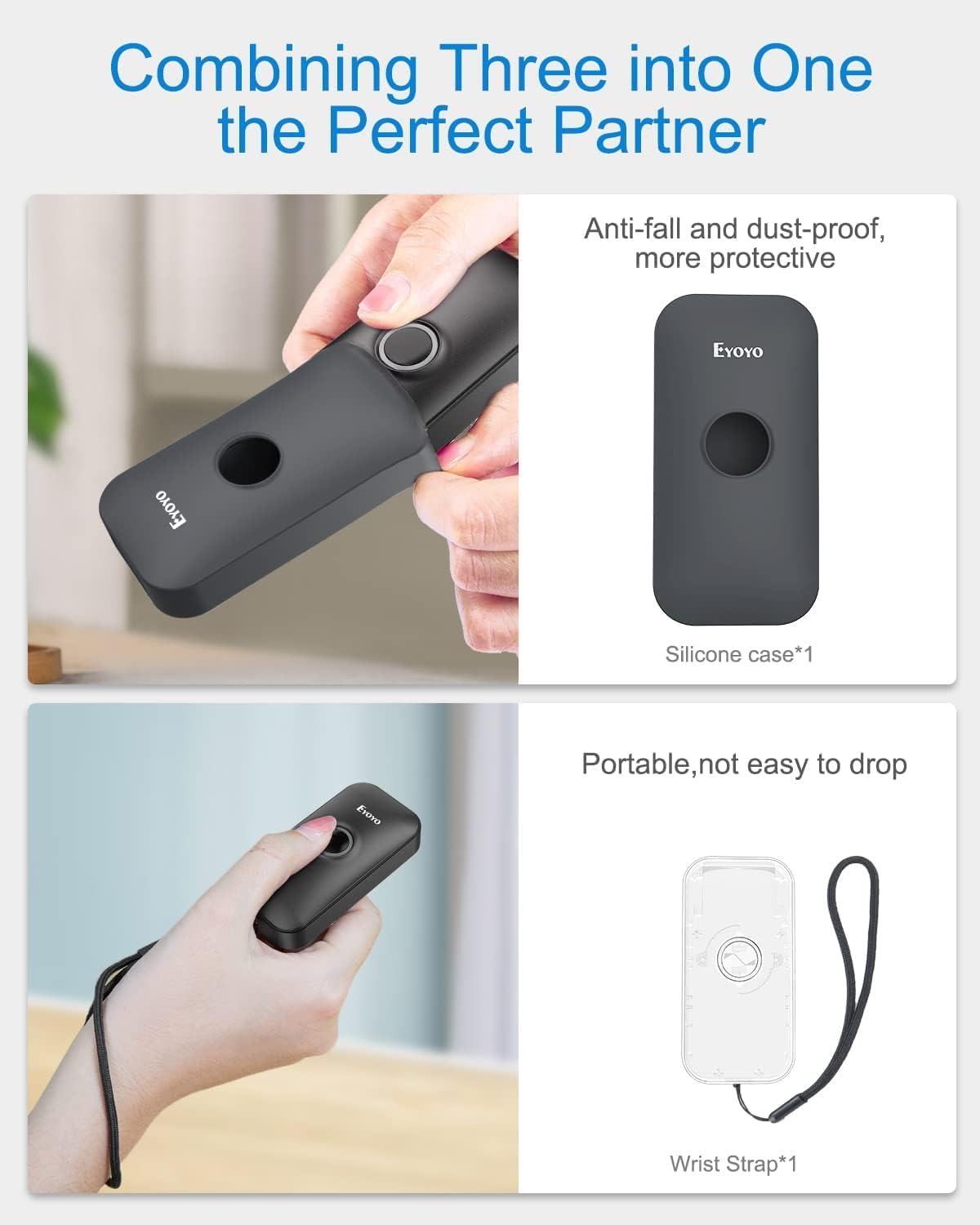
Image: Contents of the Eyoyo EY-009L package, including the scanner, USB cable, 2.4G dongle, silicone case, wrist strap, and user manual.
3. Bidhaa Imeishaview
The Eyoyo EY-009L is a compact and lightweight 1D barcode scanner designed for portability and ease of use. It features a durable silicone case for protection and multiple connectivity options.
3.1 Sifa Muhimu
- Muundo Kompakt: Weighs approximately 35g (1.23oz) with dimensions of 3.07" x 1.50" x 0.47".
- Muunganisho wa 3-katika-1: Supports 2.4G Wireless, Bluetooth, and USB Wired modes.
- Usaidizi wa Msimbopau wa 1D: Reads UPC/EAN, Code 39, Interleaved 2 of 5, Code 93, Code 128, Codabar, Industrial 2 of 5, and Matrix 2 of 5.
- Maisha marefu ya Betri: 650mAh rechargeable battery provides up to 5 hours of continuous scanning.
- Utangamano wa Juu: Works with Windows, Mac OS, Linux, iOS, and Android devices.

Image: The compact Eyoyo EY-009L barcode scanner held in a hand, illustrating its small size and portability.
4. Kuweka na Kuunganisha
The scanner offers three connection modes. Choose the mode that best suits your device and environment.

Image: Visual representation of the three connection modes: USB Wired, 2.4G Wireless, and Bluetooth, connecting the scanner to various devices.
4.1 Hali ya Waya ya USB
- Unganisha kichanganuzi kwenye kompyuta yako kwa kutumia kebo ya USB iliyotolewa.
- The scanner will automatically enter wired mode and begin charging.
- No additional drivers are typically required. The scanner will function as a keyboard input device.
Hali Isiyotumia Waya ya 4.2 2.4G
- Insert the 2.4G wireless dongle into a USB port on your computer or device.
- Washa kichanganuzi. Kinapaswa kuunganishwa kiotomatiki kwenye dongle.
- A successful connection is indicated by a specific LED light pattern or sound (refer to the scanner's indicator guide for details).
- The 2.4G wireless mode offers a transmission range of up to 30m (98ft) in a barrier-free environment.
Njia ya Bluetooth ya 4.3
- Ensure the scanner is powered on and in Bluetooth pairing mode (usually indicated by a blinking blue LED). If not, scan the "Bluetooth Pairing" barcode from the full user manual.
- On your host device (smartphone, tablet, computer), enable Bluetooth and search for available devices.
- Select "Eyoyo Barcode Scanner" or a similar name from the list of devices to pair.
- Once paired, the scanner's LED will change to a solid blue, and a confirmation sound may be heard.
- Bluetooth mode provides a transmission range of up to 50m (164ft) in a barrier-free environment.

Image: Diagram showing the effective transmission distances for 2.4G wireless mode (up to 30m/98ft) and Bluetooth mode (up to 50m/164ft) in different environments.

Image: Illustration of the scanner's compatibility with Windows, Android, iOS/macOS, and Linux operating systems, connecting to PCs, laptops, tablets, and smartphones.
5. Maagizo ya Uendeshaji
5.1 Uchanganuzi wa Msingi
- Ensure the scanner is connected to your device in the desired mode.
- Open an application or text field where you want the scanned data to appear (e.g., Notepad, Word document, POS software).
- Point the scanner's light beam at the 1D barcode you wish to scan.
- Press the scan button. A successful scan will be indicated by a beep and/or a green LED flash, and the barcode data will appear in your application.
5.2 Njia za Uendeshaji
Kichanganuzi kinaunga mkono aina mbili kuu za uendeshaji:
- Hali ya Upakiaji wa Papo hapo: Scanned data is immediately transmitted to the connected device. This is the default mode.
- Hali ya Uhifadhi: Scanned data is stored in the scanner's internal memory. Data can be uploaded later by scanning a specific "Upload Data" barcode (refer to the full user manual for this barcode). This mode is useful when out of range of the host device.
To switch between modes, scan the corresponding configuration barcodes found in the comprehensive user manual.
5.3 Chaguzi za Kubinafsisha
The scanner offers various customizable settings by scanning specific configuration barcodes:
- Sauti na Mtetemo: Washa au zima milio inayosikika na maoni ya mtetemo.
- Kiambishi awali/Kiambishi tamati: Ongeza herufi maalum kabla au baada ya data kuchanganuliwa.
- Kufuta herufi: Remove specific characters from scanned data.
- Funguo za Kibodi: Insert special keys like TAB or CR&LF (Carriage Return & Line Feed) after each scan for automatic cursor movement.
Refer to the complete user manual for a full list of configuration barcodes and detailed instructions.
6. Betri na Kuchaji
The scanner is equipped with a 650mAh rechargeable battery.
- Inachaji: Connect the scanner to a USB power source (computer USB port or USB wall adapter) using the provided USB cable. The charging indicator light will show charging status. A full charge takes approximately 2 hours.
- Maisha ya Betri: A fully charged battery provides up to 5 hours of continuous scanning or 720 hours of standby time.

Image: Infographic detailing the 650mAh rechargeable battery, 5 hours scanning time, 720 hours standby time, and 4 hours charging time for the Eyoyo barcode scanner.
7. Matengenezo
- Kusafisha: Tumia kitambaa laini na kikavu kusafisha sehemu ya nje ya skana. Usitumie visafishaji au viyeyusho vyenye kukwaruza.
- Hifadhi: Hifadhi skana mahali pakavu na penye baridi mbali na jua moja kwa moja na halijoto kali.
- Ulinzi: Always use the provided silicone protective case to guard against drops and scratches.

Image: The Eyoyo barcode scanner being inserted into its anti-fall and dust-proof silicone case, and an image showing the scanner with an attached wrist strap for portability.
8. Utatuzi wa shida
| Tatizo | Sababu inayowezekana | Suluhisho |
|---|---|---|
| Scanner not turning on. | Betri ya chini. | Chaji kichanganuzi kwa angalau saa 2. |
| Hakuna data iliyotumwa baada ya kuchanganua. | Not connected to host device; incorrect operating mode; application not in focus. | Ensure proper connection (USB, 2.4G, or Bluetooth). Check if the scanner is in "Instant Upload Mode". Make sure the cursor is in the desired text field of your application. |
| Haiwezi kuoanisha kupitia Bluetooth. | Kichanganuzi hakipo katika hali ya kuoanisha; Bluetooth ya kifaa imezimwa; kuingiliwa. | Scan the "Bluetooth Pairing" barcode. Ensure Bluetooth is enabled on your device. Move closer to the device and away from potential interference sources. |
| Scanner reads barcodes incorrectly or not at all. | Damaged barcode; scanner lens dirty; incorrect barcode type enabled. | Try scanning a different, known-good barcode. Clean the scanner lens. Refer to the full manual to enable/disable specific barcode symbologies. |
9. Vipimo
| Kipengele | Maelezo |
|---|---|
| Nambari ya Mfano | EY-009L |
| Teknolojia ya Uunganisho | 2.4G Isiyo na Waya, Bluetooth, Kebo ya USB |
| Vifaa Sambamba | Desktop, Laptop, Smartphone, Tablet (iOS, Windows, Android, Mac OS, Linux) |
| Aina za Msimbopau Zinazoungwa Mkono | 1D codes: UPC/EAN, Code 39, Interleaved 2 of 5, Code 93, Code 128, Codabar, Industrial 2 of 5, Matrix 2 of 5 |
| Uwezo wa Betri | 650mAh |
| Muda wa Kuchanganua Ulioendelea | Hadi saa 5 |
| Muda wa Kuchaji | Takriban masaa 2 |
| Vipimo (D x W x H) | 0.48" x 1.56" x 3" |
| Uzito | Gramu 35 (oz 1.23) |
| Uendeshaji Voltage | 5 Volts |
| Kiwango cha Juu cha Joto la Uhifadhi | 50 Digrii Celsius |
| Vyeti | CE, FCC, RoHS |
10. Udhamini na Msaada
The Eyoyo EY-009L Barcode Scanner comes with a Udhamini wa Miaka 1 wa Mtengenezaji.
For technical support, warranty claims, or further assistance, please contact Eyoyo customer service through their official webtovuti au maelezo ya mawasiliano yaliyotolewa pamoja na hati zako za ununuzi.
Tafadhali hifadhi uthibitisho wako wa ununuzi kwa madhumuni ya udhamini.