
1. Taarifa Muhimu za Usalama
Please read all instructions carefully before using this monitor. Keep this manual for future reference.
- Usiweke kidhibiti kwenye mvua, unyevu, au halijoto kali.
- Hakikisha uingizaji hewa wa kutosha karibu na kufuatilia ili kuzuia overheating.
- Use only the power adapter provided with the monitor.
- Epuka kuweka vitu vizito kwenye waya wa umeme au kifuatiliaji.
- Tenganisha plagi ya umeme kutoka kwa plagi ikiwa kidhibiti hakitatumika kwa muda mrefu.
- Usijaribu kuhudumia mfuatiliaji mwenyewe. Rejelea huduma zote kwa wafanyikazi waliohitimu.
2. Yaliyomo kwenye Kifurushi
Thibitisha kuwa vipengee vyote vipo kwenye kifurushi chako:
- 27-inch QHD 210Hz Monitor (1 unit)
- Monitor Stand (1 unit)
- Quick Start Guide (QSG) (1 unit)
- DP Cable (1 unit)
- Adapta ya Umeme (kitengo 1)
- Kamba ya Nguvu (unit 1)
- Shielding Hood (2 units)

Video: KTC 27M1 27 Inch 210Hz Gaming Monitor. This video provides a visual overview of the monitor and its features.
3. Maagizo ya Kuweka
3.1 Kukusanya Stendi ya Kufuatilia
- Ondoa kwa uangalifu vipengele vya kufuatilia na kusimama kutoka kwenye ufungaji.
- Attach the stand base to the stand arm using the provided screw.
- Align the stand arm with the mounting slot on the back of the monitor and push until it clicks into place.
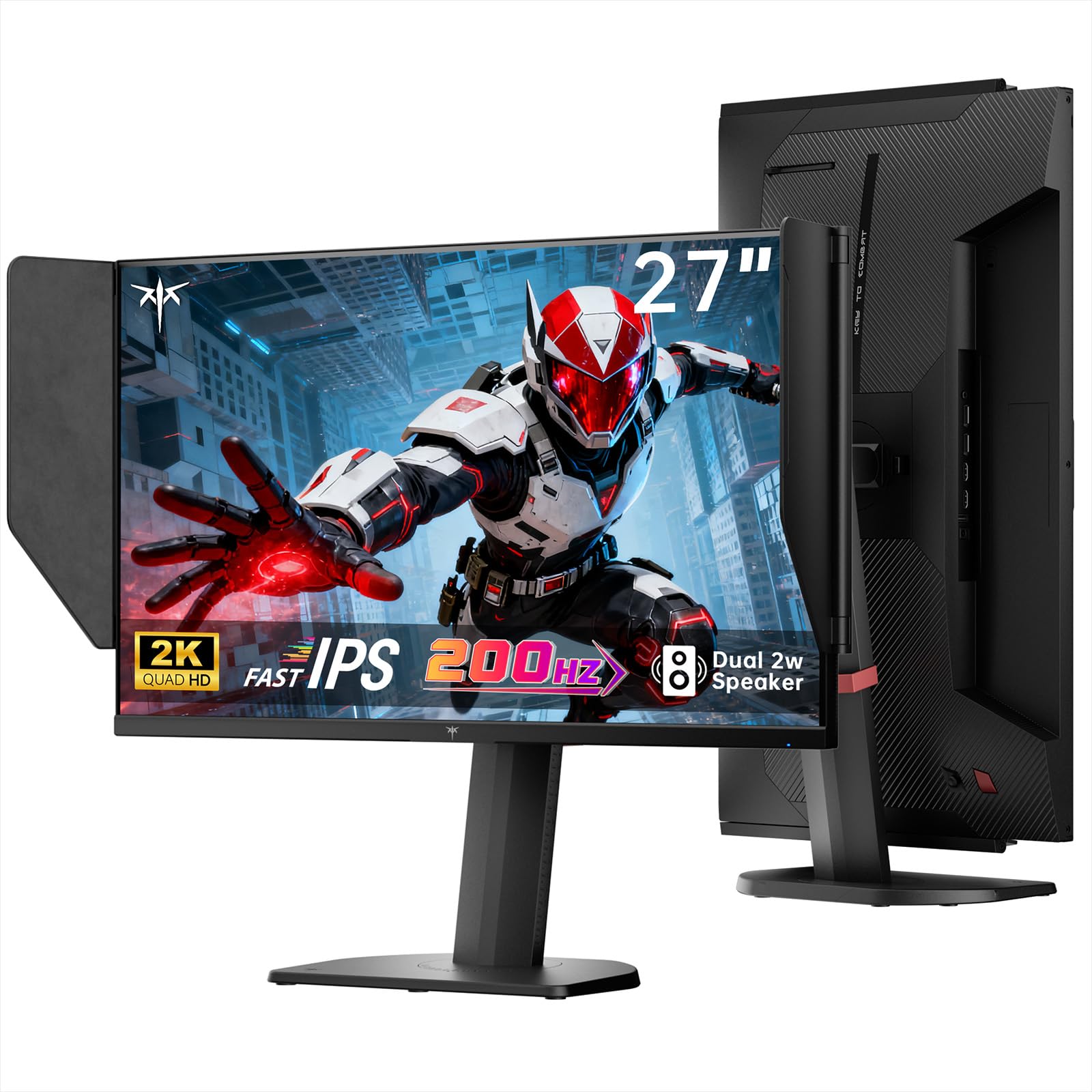
Image: The KTC 27M1 monitor with its stand fully assembled, ready for use.
3.2 Attaching the Shielding Hood
The shielding hood helps reduce glare and reflections for an optimal viewuzoefu.
- Locate the two shielding hood pieces.
- Align each piece with the designated slots on the sides of the monitor and gently slide them into place until secure.

Image: The KTC 27M1 monitor shown with the shielding hood attached, designed to block reflected light.
3.3 Kuunganisha nyaya
Unganisha kifuatiliaji kwenye kompyuta yako au vifaa vingine kwa kutumia nyaya zinazofaa:
- DisplayPort (DP): For 200Hz (overclockable to 210Hz) refresh rates, connect the DP cable from your graphics card to the monitor's DP 1.4 port.
- HDMI: For 144Hz refresh rates, connect an HDMI 2.0 cable from your device to one of the monitor's HDMI ports.
- Nguvu: Connect the power adapter to the DC input on the monitor, then plug the power cord into a wall outlet.
- Sauti: Connect headphones or external speakers to the 3.5mm earphone jack if desired.

Picha: Karibu view of the KTC 27M1 monitor's rear ports, including HDMI, DisplayPort, USB, and earphone jack.
4. Maagizo ya Uendeshaji
4.1 Washa/Zima
Press the 5-way navigation joystick located on the back of the monitor to power it on or off.
4.2 Urambazaji wa Menyu ya OSD
The 5-way navigation joystick is used to access and navigate the On-Screen Display (OSD) menu:
- Bonyeza kijiti cha kufurahisha ili kufungua menyu ya OSD.
- Move the joystick Up/Down/Left/Right to navigate through menu options.
- Press the joystick again to select an option or confirm a setting.
- Move the joystick Left to go back to the previous menu or exit the OSD.
4.3 Kurekebisha Mipangilio ya Onyesho
Within the OSD menu, you can adjust various display settings:
- Mwangaza/Utofautishaji: Rekebisha viwango vya jumla vya mwangaza na utofautishaji.
- Mipangilio ya Rangi: Modify color temperature (Warm, Cool, User), gamma, hue, and saturation. The monitor offers 130% sRGB color gamut and ΔE<2 for accurate color reproduction.
- Mpangilio wa Michezo: Enable/disable Adaptive Sync (FreeSync/G-Sync Compatible), adjust Overdrive (Ultra Fast recommended for gaming), and activate Game Assist features.
- Mipangilio ya Kina: Toggle HDR (Auto/Off) and OverClock (to achieve 210Hz refresh rate).
- Ingizo: Manually select the input source (DP, HDMI1, HDMI2).
- Seti ya Mfumo: Change OSD language, LED indicator, audio volume, and other system preferences.
4.4 Marekebisho ya Ergonomic
The monitor stand supports multiple ergonomic adjustments for comfortable viewing:
- Marekebisho ya Urefu: Adjust the monitor height by 150±5mm.
- Teke: Tilt the screen from -5° to 35°.
- Sogeza: Swivel the monitor ±60°.
- Egemeo: Pivot the screen from -5° to 90° for vertical orientation.

Image: Visual representation of the KTC 27M1 monitor's tilt, swivel, elevate, and pivot adjustments.
5. Vipengele
- Onyesha: 27-inch QHD (2560x1440) Fast IPS panel.
- Kiwango cha Kuonyesha upya: 200Hz, overclockable to 210Hz.
- Muda wa Majibu: 1ms (MPRT) for sharp visuals.
- Usahihi wa Rangi: 130% sRGB color gamut, 99% DCI-P3 coverage, ΔE<2, 450 cd/m² brightness, 1.07 Billion Colors, 1000:1 Contrast Ratio.
- Usawazishaji Unaojirekebisha: FreeSync and G-Sync Compatible to eliminate screen tearing.
- Huduma ya Macho: Flicker-free and low blue light modes for extended comfortable viewing.
- Sauti: Built-in dual 2W speakers.
- Muunganisho: 2x HDMI 2.0 ports, 1x DisplayPort 1.4 port, 1x USB 2.0 port, 1x Earphone jack.
- Kupachika: 100x100mm VESA mount compatible.
- Muundo: Includes a detachable shielding hood to block reflected light.

Image: The KTC 27M1 monitor displaying vibrant colors, highlighting its color accuracy and brightness features.
6. Vipimo
| Kipengele | Vipimo |
|---|---|
| Chapa | CTC |
| Nambari ya Mfano | H27T8 (Marketed as 27M1) |
| Ukubwa wa skrini | Inchi 27 |
| Azimio la Asili | 2560x1440 (QHD) |
| Teknolojia ya Kuonyesha | IPS haraka |
| Kiwango cha Kuonyesha upya | 200 Hz (Overclockable to 210 Hz) |
| Muda wa Majibu | Milisekunde 1 (MPRT) |
| Mwangaza | Candela 450 (cd/m²) |
| Uwiano wa Tofauti | 1000:1 |
| Rangi ya Gamut | 130% sRGB, 99% DCI-P3 |
| ViewAngle | 178 Digrii |
| Msaada wa HDR | Ndiyo |
| Usawazishaji Unaojirekebisha | FreeSync, G-Sync Compatible |
| Spika zilizojengwa ndani | Spika 2 za 2W |
| Muunganisho | 2x HDMI 2.0, 1x DisplayPort 1.4, 1x USB 2.0, 1x Earphone |
| Mlima wa VESA | 100x100 mm |
| Ergonomics | Height, Tilt, Swivel, Pivot Adjustment |
| Matumizi ya Nguvu | 48 Watts |
7. Matengenezo na Matunzo
- Kusafisha skrini: Futa skrini kwa upole kwa kitambaa laini kisicho na pamba. Kwa alama za ukaidi, dampen the cloth with a mild, non-abrasive screen cleaner.
- Kusafisha Casing: Tumia kitambaa laini na kikavu kusafisha kifaa casing. Epuka kutumia sabuni kali au visafishaji vyenye kukwaruza.
- Uingizaji hewa: Ensure the ventilation openings on the monitor are clear and unobstructed to prevent overheating.
- Hifadhi: Ikiwa utahifadhi kifuatiliaji kwa muda mrefu, kiondoe kwenye umeme na ukihifadhi mahali pakavu na penye baridi.
8. Utatuzi wa shida
8.1 Hakuna Nguvu
- Angalia kama waya ya umeme imeunganishwa vizuri kwenye kifuatiliaji na sehemu ya kutoa umeme.
- Thibitisha kuwa umeme unafanya kazi ipasavyo kwa kuchomeka kifaa kingine.
- Hakikisha kuwa adapta ya umeme imeunganishwa vizuri.
8.2 No Signal/Blank Screen
- Thibitisha kwamba kebo ya video (DP au HDMI) imeunganishwa salama kwenye kifuatiliaji na kompyuta/kifaa chako.
- Press the OSD joystick to open the menu and manually select the correct input source.
- Hakikisha kompyuta/kifaa chako kimewashwa na hakipo katika hali ya usingizi.
- Try using a different video cable or port to rule out cable/port issues.
8.3 Flickering/Distorted Image
- Angalia kebo ya video kwa uharibifu wowote au miunganisho iliyolegea.
- Adjust the refresh rate in your computer's display settings to match the monitor's native refresh rate (200Hz or 210Hz if overclocked).
- Enable Adaptive Sync (FreeSync/G-Sync Compatible) in the monitor's OSD menu and your graphics card settings.
- Hakikisha viendeshi vya kadi yako ya michoro ni vya kisasa.
8.4 No Sound from Built-in Speakers/Earphone Jack
- Check the volume settings in the monitor's OSD menu and your computer's operating system.
- Hakikisha kifaa sahihi cha kutoa sauti kimechaguliwa katika mipangilio ya sauti ya kompyuta yako.
- Verify that the audio cable (if using external speakers) or headphones are properly connected.
9. Udhamini na Msaada
KTC is committed to providing quality service and support for your monitor.
- Udhamini: This product comes with a 3-year quality guarantee.
- Usaidizi wa Kiufundi: Lifetime technical support is available for all KTC products.
- Wasiliana Nasi: If you have any questions or encounter issues, please contact KTC customer support. Solutions will be provided within 24 hours.