
Cillso H97
Mwongozo wa Mtumiaji wa Vipokea Sauti vya Masikioni Visivyotumia Waya vya Cillso H97
Mfano: H97
Brand: Cillso
Utangulizi
Thank you for choosing the Cillso H97 Wireless Earbuds. These earbuds feature advanced Bluetooth 5.4 technology, HiFi stereo sound with deep bass, Environmental Noise Cancelling (ENC) for clear calls, and an IPX7 waterproof rating. Designed for comfort and extended use, they offer up to 40 hours of total playtime with the charging case. This manual provides essential information for setup, operation, maintenance, and troubleshooting to ensure optimal performance.
Ni nini kwenye Sanduku
- Vipokea Sauti Visivyotumia Waya vya Cillso H97 (Kushoto na Kulia)
- Kesi ya Kuchaji
- Kebo ya Kuchaji ya USB-C
- Mwongozo wa Mtumiaji
Bidhaa Imeishaview
Familiarize yourself with the components and features of your Cillso H97 Wireless Earbuds.
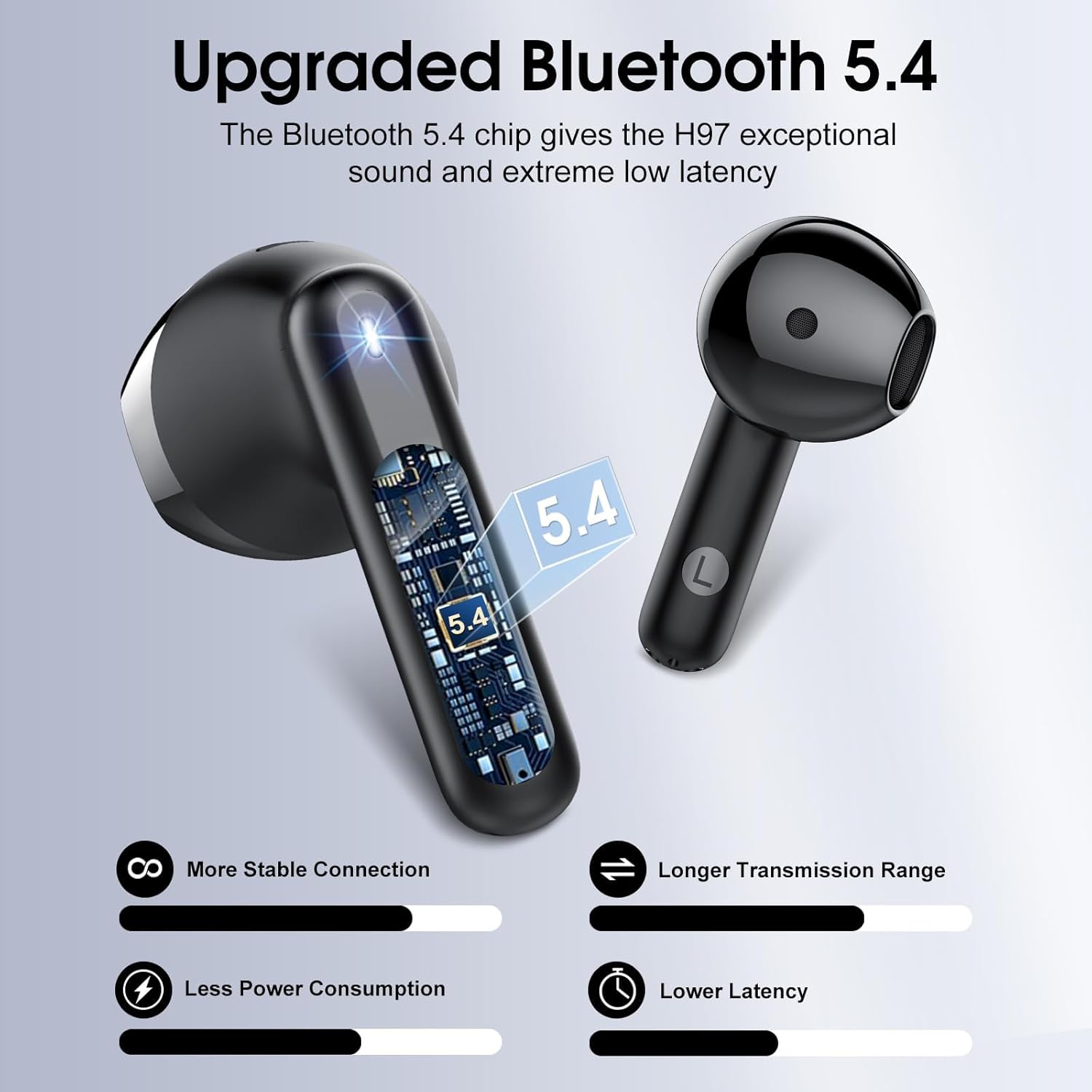
Kielelezo cha 1: Ndani view ya kifaa cha masikioni, onyeshoasing the advanced Bluetooth 5.4 chip for stable connection and low latency.
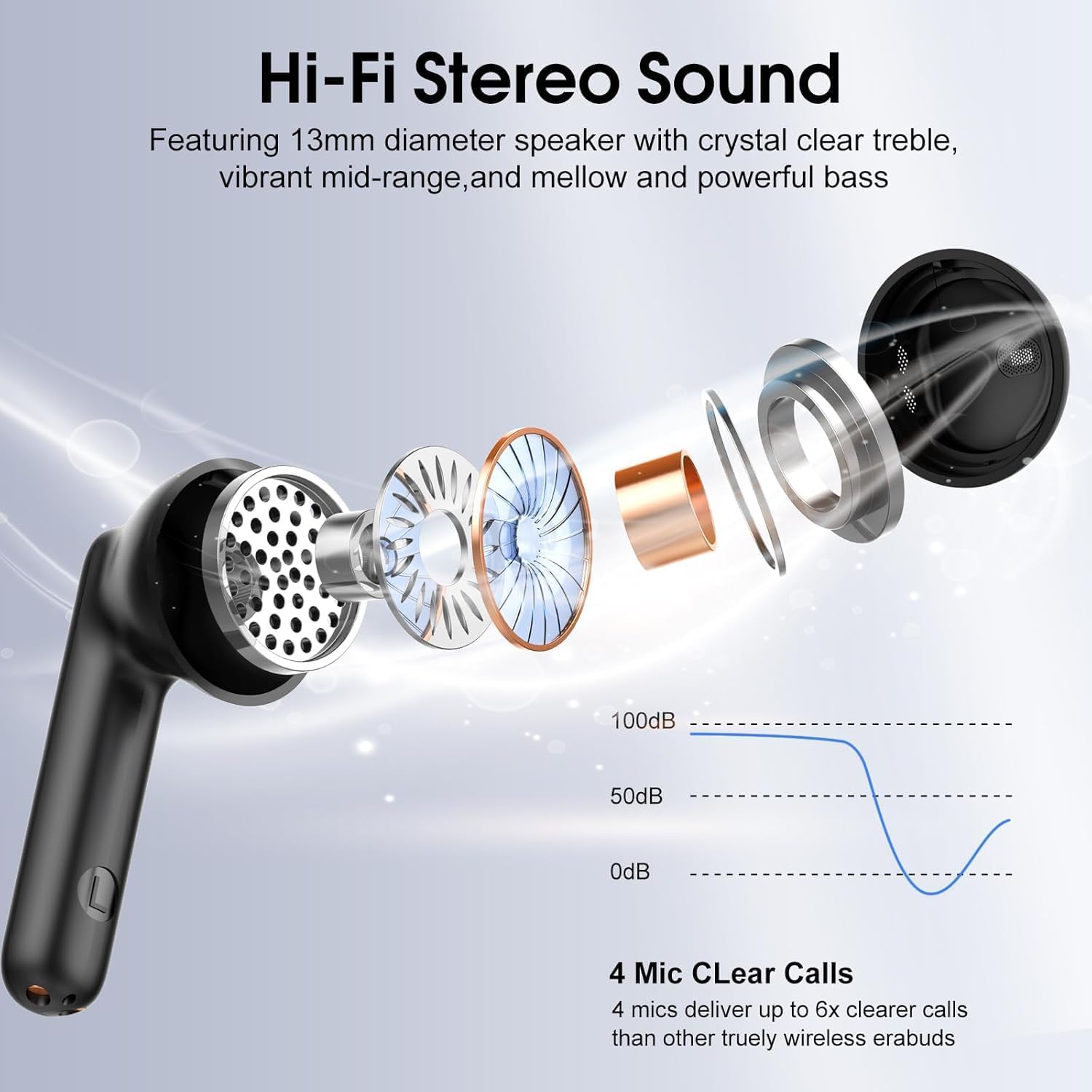
Kielelezo cha 2: Ililipuka view illustrating the 13mm diaphragm drivers responsible for Hi-Fi stereo sound with deep bass and clear highs.

Kielelezo cha 3: The charging case features an independent LED display to show real-time battery levels for both earbuds and the case.

Kielelezo cha 4: Dimensions of the earbuds and charging case, emphasizing their lightweight and portable design. Each earbud weighs 3.5 grams, and the case weighs 32 grams.

Kielelezo cha 5: Zaidiview of the sensitive touch controls on the earbuds for various functions.

Kielelezo cha 6: The earbuds feature an IPX7 waterproof rating, providing protection against sweat, rain, and splashes.
Sanidi
1. Uchaji wa Awali
- Kabla ya matumizi ya kwanza, weka vifaa vya sauti vya masikioni vyote kwenye kipochi cha kuchaji.
- Unganisha kebo ya kuchaji ya USB-C kwenye mlango wa kuchaji kwenye kipochi na chanzo cha umeme.
- The LED display on the case will indicate the charging status. A full charge for the case takes approximately 1.5 hours.
- Ensure the earbuds are fully charged before initial use for optimal battery performance.
2. Kuoanisha na Kifaa
- Fungua kesi ya malipo. Vifaa vya sauti vya masikioni vitawashwa kiotomatiki na kuingia katika hali ya kuoanisha.
- Kwenye kifaa chako (smartphone, kompyuta ya mkononi, kompyuta ya mkononi), washa Bluetooth.
- Tafuta available Bluetooth devices and select "H97" from the list.
- Once connected, your device will confirm successful pairing. The earbuds will automatically reconnect to the last paired device when removed from the case and within range (up to 15 meters).
Maagizo ya Uendeshaji
The Cillso H97 earbuds feature sensitive touch controls for easy management of audio playback and calls.
| Kitendo | Kazi |
|---|---|
| Double tap Left/Right earbud | Cheza/Sitisha muziki |
| One tap Left/Right earbud | Jibu/Katisha simu |
| Long press Right earbud (2s) | Wimbo unaofuata |
| Long press Left earbud (2s) | Wimbo uliopita |
| One tap Left/Right earbud (during call) | Volume control (specific tap pattern may vary, refer to device settings if needed) |
| Triple tap Left/Right earbud (typically) | Washa Mratibu wa Sauti |
Matengenezo
Kusafisha
- Safisha vifaa vya masikioni na kipochi cha kuchaji mara kwa mara kwa kitambaa laini, kikavu na kisicho na pamba.
- Usitumie visafishaji abrasive, pombe, au vimumunyisho vya kemikali.
- Hakikisha miguso ya kuchaji kwenye vifaa vya masikioni na kisanduku ni safi na kavu kwa ajili ya kuchaji ipasavyo.
Hifadhi
- Wakati haitumiki, hifadhi vifaa vya sauti vya masikioni kwenye kipochi chao cha kuchaji ili kuvilinda na kuendelea kuwa na chaji.
- Hifadhi mahali pa baridi, kavu mbali na joto kali na jua moja kwa moja.
Upinzani wa Maji
- The earbuds are IPX7 waterproof, meaning they are protected against temporary immersion in water up to 1 meter for 30 minutes.
- This rating protects against sweat, rain, and splashes. However, it is not recommended to swim or shower with the earbuds.
- Hakikisha vifaa vya masikioni vimekauka kabla ya kuvirudisha kwenye kisanduku cha kuchaji ili kuzuia uharibifu.
Kutatua matatizo
Vifaa vya sauti vya masikioni havioanishi au kuunganishwa
- Hakikisha vifaa vyote viwili vya masikioni vimechajiwa na kuondolewa kwenye kisanduku cha kuchaji.
- Zima kisha uwashe Bluetooth kwenye kifaa chako.
- Delete "H97" from your device's Bluetooth list and attempt to pair again.
- Try resetting the earbuds (refer to specific reset instructions if available in a separate quick start guide, or place them back in the case and close for 10 seconds, then reopen).
Kifaa kimoja tu cha sauti cha masikioni kinachofanya kazi
- Hakikisha vifaa vya sauti vya masikioni vyote viwili vimechajiwa.
- Weka vifaa vyote viwili vya masikioni kwenye kisanduku cha kuchajia, funga kifuniko, subiri sekunde chache, kisha fungua kifuniko na uviondoe kwa wakati mmoja.
- Ikiwa tatizo litaendelea, jaribu kuweka upya vifaa vya sauti vya masikioni na kuoanisha upya.
Masuala ya malipo
- Check that the USB-C cable is securely connected to both the charging case and the power source.
- Hakikisha kwamba anwani za kuchaji kwenye vifaa vya masikioni na ndani ya kipochi ni safi na hazina uchafu.
- Jaribu kutumia kebo tofauti ya USB-C au adapta ya umeme.
Ubora duni wa sauti
- Hakikisha vifaa vya sauti vya masikioni vimekaa vizuri masikioni mwako.
- Check the audio source and volume levels on your connected device.
- Move closer to your connected device to reduce potential interference.
- Clean any earwax or debris from the earbud speaker grilles.
Vipimo
| Kipengele | Maelezo |
|---|---|
| Jina la Mfano | H97 |
| Toleo la Bluetooth | 5.4 |
| Msururu wa Bluetooth | Hadi mita 15 (futi 49) |
| Ukubwa wa Dereva wa Sauti | 13mm Dynamic Dereva |
| Majibu ya Mara kwa mara | 20Hz - 20kHz |
| Udhibiti wa Kelele | Kufuta Kelele za Mazingira (ENC) |
| Maisha ya Betri (Earbuds) | Hadi saa 8 kwa malipo moja |
| Jumla ya Muda wa Kucheza (pamoja na Kipochi cha Kuchaji) | Hadi saa 40 |
| Muda wa Kuchaji (Kesi) | Takriban saa 1.5 (USB-C) |
| Kiwango cha Upinzani wa Maji | IPX7 |
| Uzito wa Earbud | Gramu 3.5 (kila moja) |
| Uzito wa Kesi ya Kuchaji | gramu 32 |
| Aina ya Kudhibiti | Udhibiti wa Kugusa |
| Vifaa Sambamba | iOS 9.0+/Android 5.0+ and Bluetooth 4.0+ devices |
Udhamini na Msaada
Cillso products are designed for reliability and performance. For warranty information, technical support, or any questions regarding your H97 Wireless Earbuds, please refer to the warranty card included in your packaging or contact Cillso customer service through the retailer where you purchased the product.
Tafadhali hifadhi uthibitisho wako wa ununuzi kwa madai yoyote ya udhamini.
Ask a question about this manual
Ask about setup, troubleshooting, compatibility, parts, safety, or missing instructions. Manuals+ will review the question and use this page’s manual context to help answer it.