
Utangulizi
The Thermal Master T2 Max is a versatile Android thermal night vision monocular designed for long-range detection and observation. This manual provides essential information for setting up, operating, maintaining, and troubleshooting your device to ensure optimal performance.
Ni nini kwenye Sanduku
- T2 Max Android Thermal Monocular ×1
- Power Handle ×1
- Extension Cable ×1
- Mwongozo wa Haraka
- Kadi ya Huduma ya Baada ya Uuzaji
- Betri ya 5000mAh
- Thermal Scope Protect Case
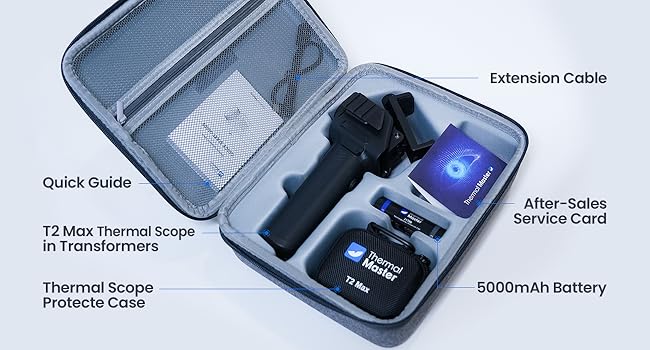
Image: Contents of the T2 Max package, including the monocular, power handle, cables, and documentation.
Maagizo ya Kuweka
- Chaji Betri: Ensure the 5000mAh battery is fully charged before first use.
- Assemble the Monocular:
- Attach the T2 Max Android Thermal Monocular to the Power Handle.
- Secure your Android phone to the phone mount on the Power Handle.
- Connect the monocular to your phone using the provided extension cable.
- Install the Thermal Master App: Scan the QR code in the Quick Guide or search for "Thermal Master" in your Android device's app store to download and install the official application.
- Muunganisho wa Awali: Open the Thermal Master app. The device should connect automatically. If not, ensure your phone's Wi-Fi is off and try reconnecting.
- Marekebisho ya Kuzingatia: Rotate the focus ring on the 15mm f/0.8 front lens to achieve a clear image. The device can focus on objects as close as 30cm.
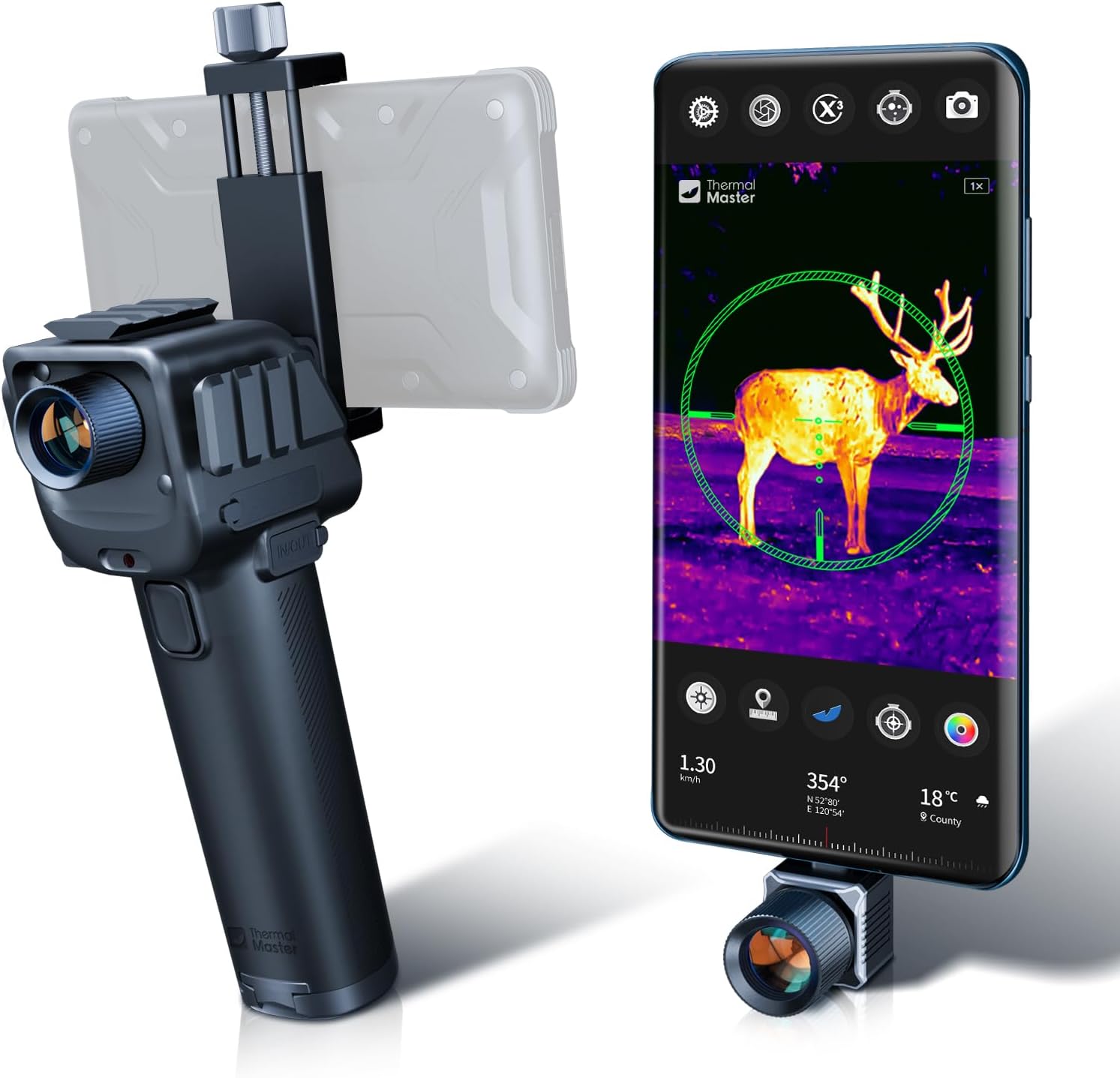
Image: The T2 Max monocular connected to a smartphone via a power handle, ready for use.
Maagizo ya Uendeshaji
Operesheni ya Msingi
- Washa/Zima: The device powers on automatically when connected to your phone and the app is launched. Disconnect to power off.
- Kuzingatia: Use the focus ring on the lens to sharpen the thermal image for various distances.
- Kuza Dijitali: Utilize a two-finger pinch gesture on your smartphone screen to adjust the 15x digital zoom for better target identification.
Viewing Modes and Palettes
The Thermal Master app offers various viewing modes and color palettes to optimize observation in different environments.
- X³ Super Resolution: This technology upgrades resolution from 256×192 to 512×384, improving temperature sensitivity and delivering clearer images.
- Chaguzi nyingi za Reticle: Choose from 9 professional reticles with 8 shapes and 5 color options, offering over 40 combinations for accurate targeting. A unique compound bow target mode is available.
- Palette za rangi: Switch between different color palettes (e.g., white-hot, black-hot, iron red, night vision green) to highlight thermal signatures effectively.
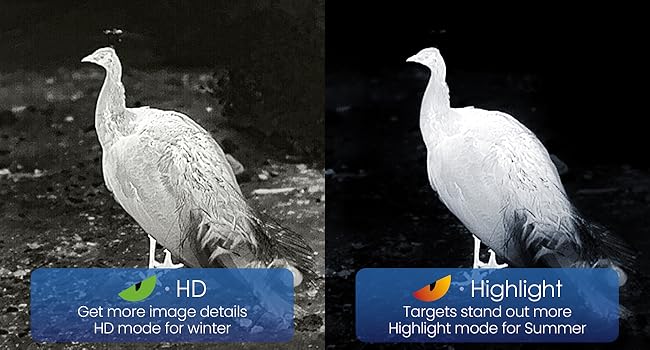
Image: Different thermal modes for varying environmental conditions.
Chaguzi Zinazotumika za Kuweka
The T2 Max kit includes two reserved rails for mounting over 20 accessories and retrofitting options, enhancing its adaptability.
- Handheld Monocular: Use with the power handle for portable observation.
- Weapon Mount: Can be mounted on a compound bow or crossbow for hunting scenarios.
- Mlima wa Tripod: Attach to a tripod for surveillance or stable long-range observation.
- Vehicle/Ship Integration: Convert into a night vision system for vehicles or ships.
- Mlima wa Chapeo: Attach to a helmet for hands-free operation.
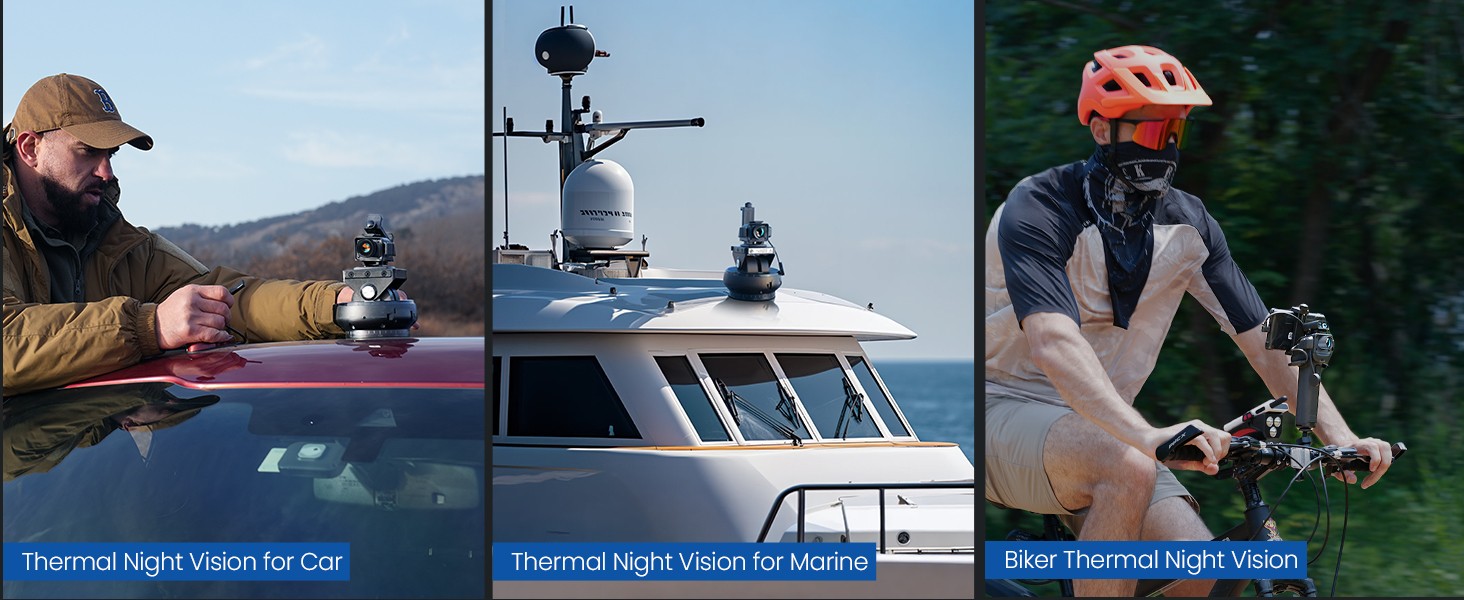
Image: The T2 Max in different operational setups, including handheld, rifle-mounted, and bow-mounted.
Video: Demonstration of the T2 Max's versatility and various mounting options, including car, hunting, and drone applications.
Matengenezo
- Kusafisha: Use a soft, dry cloth to clean the lens and device body. Avoid abrasive materials or harsh chemicals.
- Hifadhi: Store the monocular in its protective case in a cool, dry place when not in use.
- Utunzaji wa Betri: Recharge the battery regularly, even if not in use, to maintain its lifespan.
- Ulinzi wa Mazingira: The T2 Max is weatherproof (IP54) and has 1-meter drop protection. However, avoid direct exposure to extreme conditions or prolonged submersion.
- Smart Burn Protection: Thermal imaging detectors are not repairable once burnt by direct sunlight, flames, cigarettes, etc. Always protect the lens from direct exposure to intense heat sources.

Image: App interface showing a warning about thermal detector burn protection.
Kutatua matatizo
- Device Not Connecting to Phone:
- Ensure your phone's Wi-Fi is turned off.
- Verify the connection cable is securely plugged into both the monocular and your phone.
- Restart the Thermal Master app and reconnect the device.
- Check if your Android device's operating system is compatible (some users reported issues with Android 10).
- Kukatika kwa Miunganisho ya Mara kwa Mara:
- Ensure the connection cable is not loose or damaged.
- Power down both the phone and the monocular, then restart and reconnect.
- Unclear or Pixelated Image:
- Rekebisha pete ya kuzingatia kwenye lenzi.
- Use the two-finger pinch gesture to adjust digital zoom.
- Hakikisha kuwa lenzi ni safi na haina vumbi au uchafu.
- Activate X³ Super Resolution technology in the app for enhanced detail.
Vipimo
| Kipengele | Maelezo |
|---|---|
| Chapa | Mwalimu wa joto |
| Jina la Mfano | T2 Max Android |
| Rangi | Nyeusi |
| Nyenzo | Chuma |
| Lengo la Kipenyo cha Lenzi | Milimita 15 |
| Maono ya Usiku | Ndiyo |
| Aina ya Reticle | Compound Bow Target (9 professional reticles) |
| Vifaa Sambamba | Android Phones, Compound Bow, Cross Bow, Vehicle, Ship |
| Aina ya Kuweka | Picatinny Mount or Weaver Mount |
| Upinzani wa Maji | IP54 (isiyo na hali ya hewa) |
| Ulinzi wa Kuacha | mita 1 |
| Joto la Uendeshaji | -20°C hadi 60°C |

Image: Detailed specifications comparison of T2 Max with a competitor.
Udhamini & Msaada
The Thermal Master T2 Max comes with a dhamana ya mwaka 2. For technical support, troubleshooting assistance, or warranty claims, please contact Thermal Master Official customer service.
You can find contact information on the After-Sales Service Card included in your package or visit the official Thermal Master webtovuti.