
1. Utangulizi
Thank you for choosing the Angrox Backlit Universal Remote Control for LG Smart TVs. This remote is designed to provide a seamless and enhanced television viewing experience, especially in low-light conditions. It serves as a direct replacement for your original LG TV remote, offering broad compatibility and ease of use without requiring complex setup procedures. This manual provides detailed instructions for setting up, operating, maintaining, and troubleshooting your new remote control.
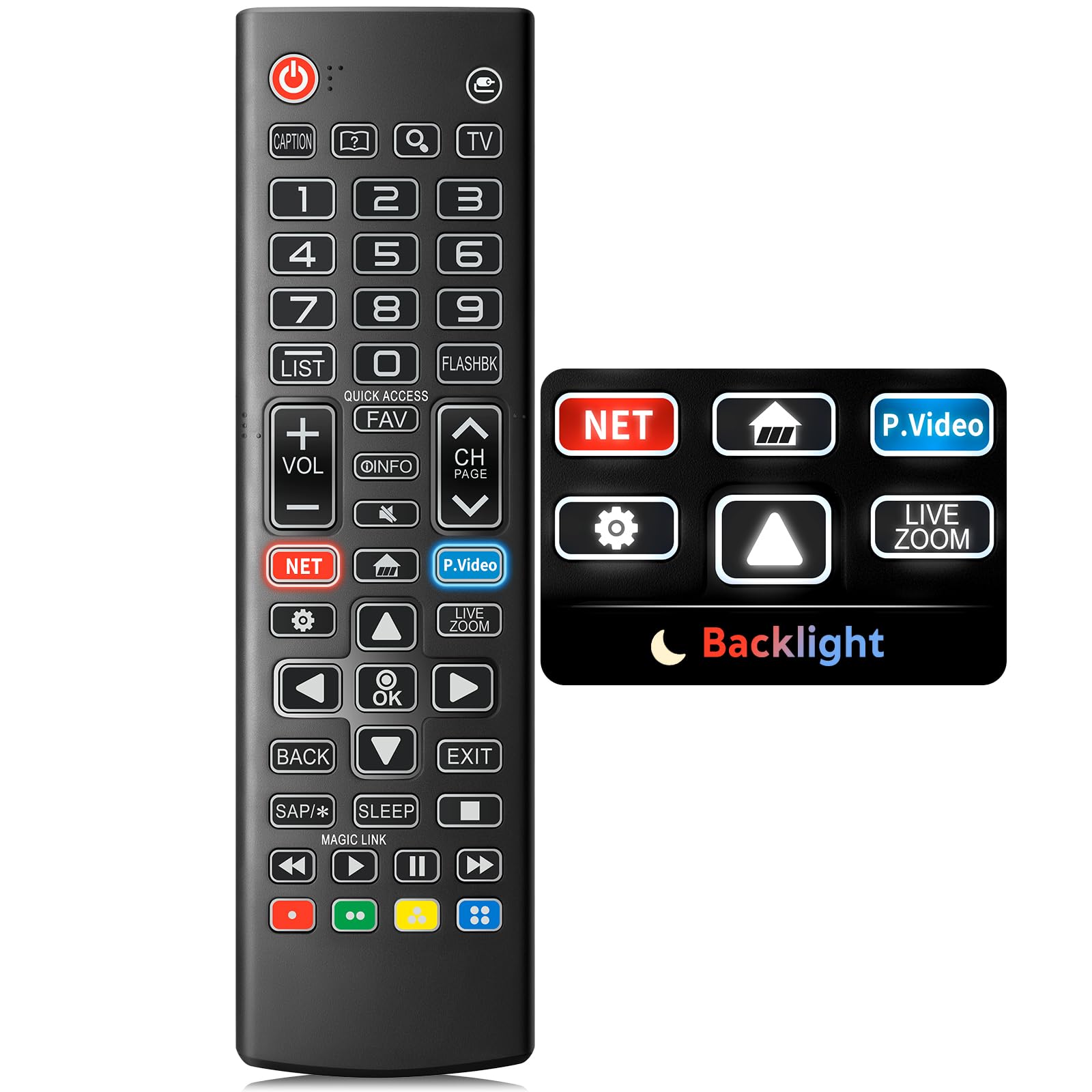
Image: The Angrox Backlit Universal Remote Control, a sleek black remote with clearly labeled buttons.
2. Sifa Muhimu
- Easy Nighttime Operation: Features soft glow buttons that illuminate, allowing for clear visibility and use in dark environments without causing glare. The backlight activates with any button press and automatically turns off after 10 seconds of inactivity.
- Utangamano wa Universal: Designed as a direct replacement for LG TV remotes, compatible with all LG TV models. No programming or complex pairing is required; it works immediately out of the box.
- High-Quality Performance: Equipped with sensitive buttons and stable signal transmission for smooth and responsive operation.
- Muundo wa Ergonomic: Shaped to fit comfortably in the hand, reducing fatigue during extended use. The button layout is intuitive for users of all ages.
- Inadumu na ya kuaminika: Constructed from high-quality, sturdy materials to withstand daily use and accidental drops, ensuring a long lifespan.

Image: A comparison showing the remote control with its backlight off and then with its buttons illuminated, highlighting the easy nighttime operation feature.

Image: The remote control displayed alongside various LG TV models (OLED, UHD, QNED, NanoCell), illustrating its broad compatibility.
3. Maagizo ya Kuweka
3.1 Ufungaji wa Betri
- Tafuta kifuniko cha sehemu ya betri nyuma ya kidhibiti cha mbali.
- Telezesha kifuniko chini au bonyeza latch ili kufungua sehemu.
- Ingiza betri mbili (2) za AAA, kuhakikisha vituo chanya (+) na hasi (-) vinaendana ipasavyo na viashiria vilivyo ndani ya sehemu.
- Badilisha kifuniko cha sehemu ya betri kwa kutelezesha tena mahali pake hadi ibofye kwa usalama.
Kumbuka: Batteries are not included with the remote control. Please use new AAA alkaline batteries for optimal performance.

Image: A visual guide demonstrating the correct insertion of two AAA batteries into the remote control's battery compartment.
3.2 Initial Use (No Pairing Required)
The Angrox Backlit Universal Remote Control is designed for immediate use with LG Smart TVs. No pairing or programming steps are necessary. Once batteries are installed, the remote is ready to control your LG television.
4. Maagizo ya Uendeshaji
This section details the functions of the buttons on your Angrox remote control.

Image: A comprehensive layout of the remote control, with labels pointing to each button and describing its primary function.
4.1 Kazi za Msingi
- Nguvu (
 ): Huwasha au kuzima TV.
 - Ingizo (): Changes the input source (e.g., HDMI 1, HDMI 2).
- Sauti Juu/Chini (VOL +/-): Hurekebisha kiwango cha sauti.
- Kituo Juu/Chini (CH Page): Inabadilisha kituo cha televisheni.
- Nyamazisha (): Inazima au kurejesha sauti ya TV.
- Vifungo vya Nambari (0-9): Huingiza moja kwa moja nambari za chaneli au ingizo zingine za nambari.
- Vifungo vya Kusogeza (Juu/Chini/Kushoto/Kulia): Hutumika kusogeza kupitia menyu na chaguo.
- Kitufe Sawa: Selects menu items or confirms your input.
4.2 Vifungo Maalum vya Utendaji
- Kitufe cha Netflix: Launches the Netflix application directly.
- Amazon Prime Video Button: Launches the Amazon Prime Video application directly.
- Ufikiaji wa Haraka: A feature that allows you to enter a specified app or Live TV directly by pressing and holding the number buttons.
- Orodha: Inapata orodha ya mipango iliyohifadhiwa.
- Flashback: Inarudi kwa hapo awali viewed channel or input.
- Taarifa: Displays information on the current program.
- Fav: Fikia orodha ya vituo unavyopenda.
- Mipangilio (): Accesses the Quick Settings menu.
- Nyuma: Hufuta maonyesho ya skrini na kurudi kwenye TV viewing.
- Utgång: Ondoka kwenye menyu ya sasa.
- Kulala: Accesses the sleep timer.
- Vitufe vya Kudhibiti Vyombo vya Habari (Cheza, Sitisha, Simamisha, Sogeza Mbele Haraka, Rudisha Nyuma): Controls media content playback.
4.3 Kazi ya Mwangaza nyuma
The remote control features a soft backlight for easy use in the dark. Simply press any button, and the backlight will turn on. It will automatically turn off after 10 seconds of inactivity to conserve battery life.
Video: A demonstration of the Angrox Backlit Remote for LG Smart TV, showcasing its easy nighttime use and responsive buttons. This video highlights the convenience of the backlit feature in dark environments.
5. Vipimo
| Chapa | Angrox |
| Jina la Mfano | AKB75095307 |
| Nambari ya Mfano | AKB75095307 |
| Vipengele Maalum | Backlit, Ergonomic, Lightweight, No Programming Required, Universal |
| Vifaa Sambamba | Televisheni (Mifumo yote ya TV ya LG) |
| Idadi ya Juu ya Vifaa Vinavyotumika | 1 |
| Teknolojia ya Uunganisho | Infrared |
| Kiasi cha Kitufe | 30 |
| Aina ya Kidhibiti | Udhibiti wa Kitufe |
| Masafa ya Juu | 10 Meters (approximately 33 feet) |
| Idadi ya Betri Inahitajika | Betri 2 za AAA |
| Aina ya Betri | Alkali |
| Vipimo vya Kipengee (L x W x H) | 9.25"L x 1.89"W x 0.73"H |
6. Utatuzi wa shida
Ukikumbana na matatizo na udhibiti wako wa mbali, tafadhali rejelea suluhisho zifuatazo za kawaida:
- Kidhibiti cha mbali hakijibu:
- Hakikisha kuwa betri zimeingizwa kwa usahihi na polarity sahihi (+/-).
- Badilisha betri za zamani na betri mpya za alkali za AAA.
- Check for any obstructions between the remote control and the TV's infrared receiver.
- Ensure you are within the maximum operating range (10 meters) of the TV.
- Backlight haifanyi kazi:
- Verify battery power. Low batteries may affect backlight functionality.
- The backlight is designed to turn off after 10 seconds of inactivity. Press any button to reactivate it.
- Specific buttons not working (e.g., Netflix, Amazon Prime):
- Ensure your LG Smart TV is connected to the internet and the respective applications are installed and updated.
- Some smart TV features or app shortcuts may vary slightly depending on your TV's model and region.
- Remote inahisi kama ni mvivu au haijibu:
- Badilisha betri na mpya.
- Clean the remote's infrared emitter (at the top) and the TV's IR receiver with a soft, dry cloth to ensure a clear signal path.
7. Matengenezo
To ensure the longevity and optimal performance of your Angrox remote control, follow these maintenance guidelines:
- Kusafisha: Use a soft, dry cloth to clean the remote's surface. Avoid using liquid cleaners, aerosols, or harsh chemicals, as they may damage the remote.
- Ubadilishaji wa Betri: Replace batteries promptly when the remote's performance declines or if the backlight becomes dim. Remove batteries if the remote will not be used for an extended period to prevent leakage.
- Hifadhi: Hifadhi kidhibiti cha mbali katika sehemu yenye ubaridi, pakavu mbali na jua moja kwa moja, halijoto kali na unyevunyevu mwingi.
- Epuka Matone: While durable, repeated drops can damage internal components. Handle the remote with care.
8. Udhamini na Msaada
8.1 Taarifa ya Udhamini
The Angrox Backlit Universal Remote Control (Model AKB75095307) is covered by a udhamini wa siku 90 from the date of purchase. This warranty covers manufacturing defects and ensures the product functions as described under normal use. It does not cover damage caused by misuse, accidents, unauthorized modifications, or normal wear and tear.
8.2 Usaidizi kwa Wateja
For any questions, technical assistance, or warranty claims, please contact Angrox customer support through the retailer where you purchased the product or visit the official Angrox store online. Please have your purchase receipt and product model number available when contacting support.