
Utangulizi
Thank you for choosing the Digitus DA-70919 USB-C 8K 12-Port Docking Station. This device is designed to expand the connectivity of your USB-C enabled laptop or computer, providing a comprehensive solution for video output, data transfer, network access, and power delivery. Please read this manual carefully to ensure proper installation and operation.
Bidhaa Imeishaview
The Digitus DA-70919 docking station offers 12 essential ports to enhance your workspace. It supports high-resolution video output, fast data transfer, and efficient power delivery to your host device.

Kielelezo cha 1: Detailed diagram of the Digitus DA-70919 docking station ports and their functions. This diagram labels each of the 12 ports on the docking station, including Audio Jack, USB-A, USB-C, USB-C PD, DisplayPort, HDMI, RJ45 Gigabit Ethernet, and SD/MicroSD card slots, along with anti-theft protection.

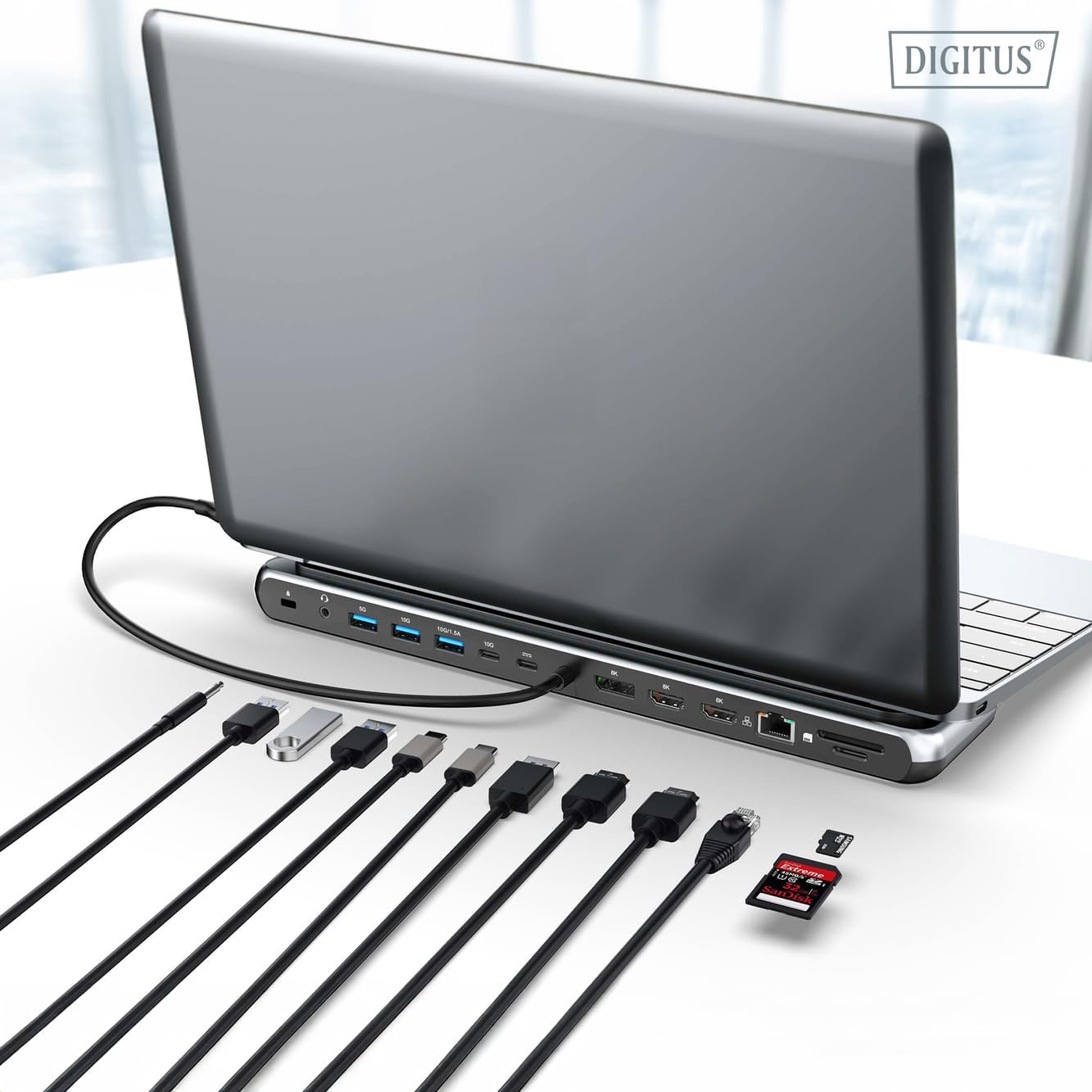
Kielelezo cha 2: Mbele view of the Digitus DA-70919 docking station showing all accessible ports. A clear view of the docking station's front panel, displaying the various input and output ports including USB-A, USB-C, HDMI, DisplayPort, Ethernet, and card readers.
Sifa Muhimu:
- Pato la Video: 2x HDMI, 1x DisplayPort (DP) supporting up to 8K/30Hz for single display, or multi-display configurations.
- Milango ya Data ya USB: 2x USB-A 3.2 Gen 2 (10Gbps), 1x USB-A 3.2 Gen 1 (5Gbps), 1x USB-C 3.2 Gen 2 (10Gbps).
- Utoaji wa Nguvu (PD): USB-C PD 3.0 port for charging your host laptop (up to 85W output).
- Mtandao: Gigabit Ethernet (RJ45) for stable wired internet connection.
- Wasomaji wa Kadi: SD and MicroSD card slots with 104 MBps transfer speed.
- Sauti: Jeki ya sauti ya 3.5mm kwa vipokea sauti vya masikioni au spika.
Maagizo ya Kuweka
Follow these steps to set up your Digitus DA-70919 docking station:
- Check Host USB-C Port Compatibility: Ensure your laptop's USB-C port supports DisplayPort Alternate Mode (DP Alt Mode) for video output and Power Delivery for charging. Without DP Alt Mode, video output will not function.

Kielelezo cha 3: Guide to USB-C port compatibility for DisplayPort Alternate Mode. This graphic explains which types of USB-C ports on your laptop support the full functionality of the docking station, specifically highlighting the requirement for DisplayPort Alternate Mode (DP Alt Mode) for video output.
- Unganisha kwenye Kifaa cha Kupangisha: Connect the integrated USB-C cable from the docking station to the USB-C port on your laptop.
- Unganisha Adapta ya Umeme (Si lazima lakini Inapendekezwa): If you wish to charge your laptop via the docking station or power high-demand peripherals, connect a USB-C Power Delivery adapter (not included, up to 100W recommended) to the USB-C PD input port on the docking station.
- Unganisha Maonyesho ya Nje: Unganisha vichunguzi vyako kwenye matokeo ya HDMI na/au DisplayPort kwenye kituo cha kuingilia kwa kutumia nyaya zinazofaa.
- Unganisha Pembeni: Plug in your USB devices (keyboard, mouse, external drives), Ethernet cable, SD/MicroSD cards, and audio devices to the corresponding ports on the docking station.
- Ufungaji wa Dereva: In most cases, the docking station is plug-and-play and does not require additional drivers. If prompted, allow your operating system to install any necessary drivers automatically.
Maagizo ya Uendeshaji
Maonyesho ya Njia
Kituo cha kuegesha kinaunga mkono usanidi mbalimbali wa onyesho:
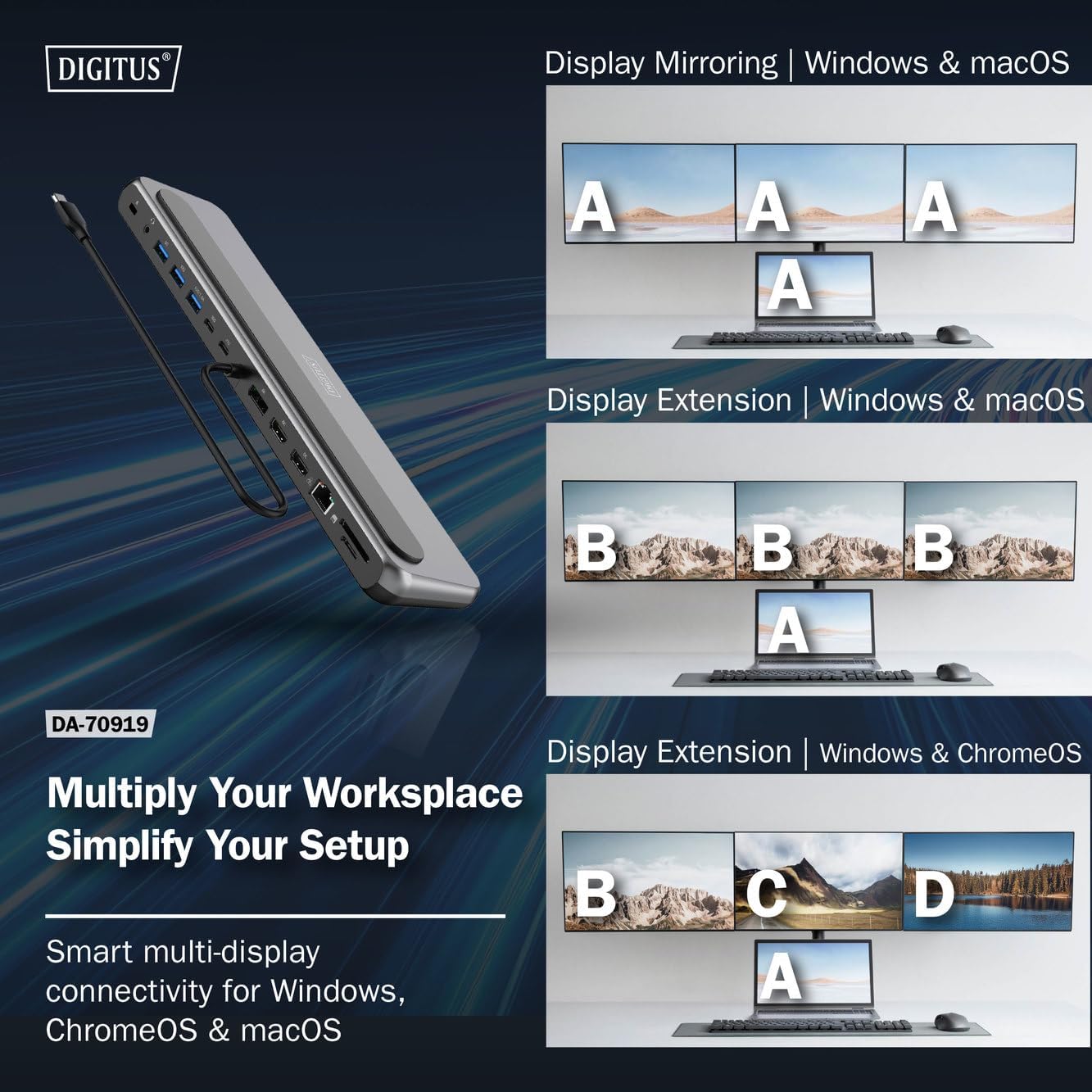
Kielelezo cha 4: Diagram showing display mirroring and extension modes for Windows, macOS, and ChromeOS. This image illustrates the various display configurations supported by the docking station, including mirroring your screen or extending it across multiple external monitors on Windows, macOS, and ChromeOS.
- Hali ya Kioo: Duplicates your laptop's display onto the external monitors.
- Extend Mode (Windows/ChromeOS): Extends your desktop across multiple external monitors, allowing for a multi-tasking environment. Supports dual monitors (2x 4K/60Hz) and triple monitors (1x 4K/60Hz + 2x 4K/30Hz) in MST (Multi Stream Transport) mode.
- Extend Mode (macOS): macOS typically supports extended desktop to one external monitor, with other external monitors mirroring each other.
To configure display settings, access your operating system's display settings (e.g., Windows Display Settings, macOS System Preferences > Displays).
Uhamisho wa Data
Utilize the USB-A and USB-C data ports for connecting external storage devices, keyboards, mice, and other USB peripherals. The USB 3.2 Gen 2 ports offer speeds up to 10Gbps, while the USB 3.2 Gen 1 port offers speeds up to 5Gbps.
Utoaji wa Nguvu
When a compatible USB-C PD power adapter is connected to the docking station's PD input port, the docking station can deliver up to 85W of power to charge your connected laptop. This allows you to power your laptop and peripherals through a single USB-C connection.
Kielelezo cha 5: Illustration of the docking station's fast charging capability via USB-C Power Delivery. This image demonstrates the Power Delivery function, showing a 100W input to the docking station and an 85W output to charge the connected laptop.
Muunganisho wa Mtandao
Connect an Ethernet cable to the RJ45 port for a stable and high-speed wired network connection (10/100/1000 Mbps Gigabit Ethernet).
Wasomaji wa Kadi
Insert SD or MicroSD cards into the dedicated slots for quick access to photos, videos, and other files. The card readers support transfer speeds up to 104 MBps.
Pato la Sauti
Connect your headphones or speakers to the 3.5mm audio jack for audio output.
Matengenezo
- Kusafisha: Use a soft, dry cloth to clean the surface of the docking station. Avoid using liquid cleaners or solvents.
- Hifadhi: Hifadhi kituo cha kizimbani mahali pa baridi, pakavu mbali na jua moja kwa moja na halijoto kali.
- Kushughulikia: Epuka kuangusha au kuathiri kifaa kwa nguvu. Usijaribu kutenganisha kituo cha kuegesha.
Kutatua matatizo
Ukikumbana na matatizo na kituo chako cha kuegesha, tafadhali rejelea suluhisho zifuatazo za kawaida:
- Hakuna Toleo la Kuonyesha:
- Ensure your laptop's USB-C port supports DisplayPort Alternate Mode.
- Check all video cables (HDMI/DP) are securely connected to both the docking station and the monitor.
- Thibitisha kuwa kifuatiliaji kimewashwa na uweke kwenye chanzo sahihi cha ingizo.
- Jaribu kuunganisha kifuatiliaji kimoja baada ya kingine ili kutenganisha tatizo.
- Sasisha viendeshi vya michoro vya kompyuta yako ya mkononi.
- Hakuna Uwasilishaji wa Nguvu kwenye Kompyuta Mpakato:
- Ensure a compatible USB-C PD power adapter (up to 100W) is connected to the docking station's PD input port.
- Thibitisha kwamba lango la USB-C la kompyuta yako ya mkononi linaunga mkono Uwasilishaji wa Nguvu.
- Angalia adapta ya umeme na kebo kwa uharibifu.
- Vifaa vya USB Havitambuliwi:
- Unganisha tena kifaa cha USB kwenye mlango tofauti kwenye kituo cha kuingilia.
- Ensure the docking station is properly connected to the host laptop.
- If using a high-power USB device, ensure the docking station is connected to an external power adapter.
- Matatizo ya Muunganisho wa Ethaneti:
- Angalia muunganisho wa kebo ya Ethernet kwenye kituo cha kuwekea na kipanga njia/modemu chako.
- Thibitisha mipangilio ya mtandao kwenye kompyuta yako ya mkononi.
- Anzisha upya kipanga njia/modemu na kompyuta yako ya mkononi.
- Kisoma Kadi Hakifanyi Kazi:
- Ensure the SD/MicroSD card is inserted correctly and fully.
- Test the card with another device to confirm it is not damaged.
Vipimo
| Kipengele | Vipimo |
|---|---|
| Mfano | DA-70919 |
| Uunganisho wa Jeshi | USB-C (kebo iliyounganishwa) |
| Pato la Video | 2x HDMI, 1x DisplayPort (DP) |
| Max. Single Display Resolution | 8K (7680x4320) @ 30Hz |
| Max. Dual Display Resolution (MST) | 2x 4K (3840x2160) @ 60Hz |
| Max. Triple Display Resolution (MST) | 1x 4K@60Hz + 2x 4K@30Hz |
| Bandari za Data za USB-A | 2x USB 3.2 Gen 2 (10Gbps), 1x USB 3.2 Gen 1 (5Gbps) |
| Mlango wa Data wa USB-C | 1x USB 3.2 Gen 2 (10Gbps) |
| Power Delivery (PD) Input | USB-C PD 3.0 (up to 100W) |
| Power Delivery (PD) Output to Host | Hadi 85W |
| Ethaneti | RJ45 Gigabit (10/100/1000 Mbps) |
| Wasomaji wa Kadi | SD, MicroSD (104 MBps) |
| Sauti | Jack ya Sauti ya 1x 3.5mm |
| Utangamano | Windows, macOS, ChromeOS |
| Joto la Uendeshaji | 0°C hadi 45°C (32°F hadi 113°F) |
| Joto la Uhifadhi | -10°C hadi 70°C (14°F hadi 158°F) |
Udhamini na Msaada
The Digitus DA-70919 USB-C 8K 12-Port Docking Station comes with a dhamana ya mwaka 2 kuanzia tarehe ya ununuzi. Dhamana hii inashughulikia kasoro za utengenezaji na inahakikisha bidhaa inafanya kazi kama ilivyoelezwa katika matumizi ya kawaida.
For technical support, warranty claims, or further assistance, please contact your retailer or visit the official Digitus website for contact information. Please have your product model number (DA-70919) and proof of purchase ready when seeking support.