
Utangulizi
This manual provides instructions for the setup, operation, and maintenance of your replacement remote control for Casio Projectors. Please read this manual thoroughly before use to ensure proper functionality and to maximize the lifespan of your device.
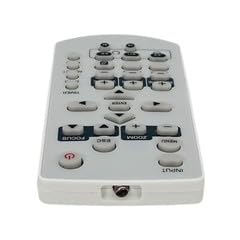
Picha 1: Juuview ya kidhibiti cha mbali kinachobadilisha.
Yaliyomo kwenye Kifurushi
- Kidhibiti cha Mbali Kinachobadilishwa 1 x
Kumbuka: Batteries are not included and must be purchased separately. This is a replacement remote control and may not offer all functions of the original remote. Minor scratches may be present due to bulk item storage.
Sanidi
1. Ufungaji wa Betri
- Tafuta sehemu ya betri nyuma ya kidhibiti cha mbali.
- Telezesha kidole fungua kifuniko cha betri.
- Ingiza betri mbili za AAA (hazijajumuishwa), kuhakikisha polarity sahihi (+ na -) kama inavyoonyeshwa ndani ya sehemu.
- Funga kifuniko cha betri kwa usalama.
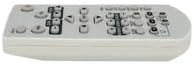
Image 2: Battery compartment for AAA batteries.
2. Pairing (Not Required)
This remote control operates via infrared (IR) technology and typically does not require pairing. It is designed to work directly with compatible Casio projector models upon battery installation.
Maagizo ya Uendeshaji
Point the remote control directly at the infrared receiver on your Casio projector. Ensure there are no obstructions between the remote and the projector.
Kazi za Msingi:
- Washa/Zima: Bonyeza kwa NGUVU kitufe cha kuwasha au kuzima projekta.
- Uteuzi wa Ingizo: Tumia PEMBEJEO or source buttons to cycle through available input sources (e.g., HDMI, VGA).
- Urambazaji: Tumia vitufe vya mshale wa mwelekeo (JUU, CHINI, KUSHOTO, KULIA) na INGIA or OK kitufe cha kusogeza menyu.
- Udhibiti wa Sauti: If your projector has audio output, use the JUZUU //- vifungo vya kurekebisha kiwango cha sauti.
- Ufikiaji wa Menyu: Bonyeza kwa MENU button to access the projector's on-screen display (OSD) menu.
- Toka/Rudi: Tumia EXIT or NYUMA button to close menus or return to the previous screen.
Refer to your Casio projector's original manual for specific functions and button layouts, as this replacement remote aims to replicate common controls.
Matengenezo
- Kusafisha: Futa udhibiti wa kijijini kwa kitambaa laini na kavu. Usitumie visafishaji vya kioevu au vifaa vya abrasive.
- Ubadilishaji wa Betri: Badilisha betri wakati mwitikio wa kidhibiti cha mbali unapopungua au unapoacha kufanya kazi. Daima badilisha betri zote mbili kwa wakati mmoja na mpya za aina moja (AAA).
- Hifadhi: Ikiwa kidhibiti cha mbali hakitatumika kwa muda mrefu, ondoa betri ili kuzuia uvujaji na uharibifu unaoweza kutokea. Hifadhi mahali pakavu na penye baridi.
- Epuka Uharibifu: Usiangushe kidhibiti cha mbali au kukiweka kwenye halijoto kali, unyevunyevu, au jua moja kwa moja.
Kutatua matatizo
- Kijijini hakifanyi kazi:
- Hakikisha betri zimeingizwa kwa usahihi na polarity sahihi.
- Badilisha betri za zamani na betri mpya za AAA.
- Check for any obstructions between the remote control and the projector's IR receiver.
- Ensure you are within the maximum operating range (approximately 5 meters).
- Baadhi ya vipengele havifanyi kazi:
- This is a replacement remote. Some advanced or specific functions of your original projector remote may not be supported.
- Verify the function exists on your projector model.
Vipimo
| Nambari ya Mfano | ATFO-RPL-RMT-070925-22182 |
| Compatible Projectors | Casio XJ-FC330XN, XJ-F210WN, XJ-UT310WN |
| Teknolojia ya Uunganisho | Infrared (IR) |
| Masafa ya Juu | Takriban mita 5 (futi 16) |
| Aina ya Betri | 2 x AAA (haijajumuishwa) |
| Rangi | White/Light Grey |
| Kipengele Maalum | Muundo wa ergonomic |
| Mtengenezaji | VieRemote |
Udhamini na Msaada
This product is a replacement remote control. For specific warranty information, please refer to the seller's policy at the time of purchase. For technical support or inquiries, please contact the seller directly through the platform where the purchase was made.