
Utangulizi
This manual provides detailed instructions for the setup, operation, and maintenance of your LIGE EF19-A Smartwatch. This device features a 1.85-inch HD display, Bluetooth calling capabilities, extensive health monitoring, and over 100 sports modes. It is designed for durability with IP68 waterproofing and a robust build. Please read this manual thoroughly to ensure proper use and to maximize the functionality of your smartwatch.
1. Kuweka
1.1 Yaliyomo kwenye Kifurushi
- 1 x LIGE EF19-A Smartwatch
- 2 x Watch Straps (1 steel, 1 silicone)
- 1 x Kebo ya Kuchaji ya USB
- 1 x Kebo ya Kuchaji ya Aina ya C
- 1 x Strap Adjuster (Regulator)
- 1 x Mwongozo wa Mtumiaji
1.2 Kuchaji Smartwatch
Kabla ya matumizi ya kwanza, chaji kikamilifu saa yako mahiri.
- Unganisha kebo ya kuchaji yenye sumaku kwenye viunganishi vya kuchaji vilivyo nyuma ya saa janja.
- Connect the other end of the charging cable (USB or Type-C) to a compatible power source (e.g., USB wall adapter, computer USB port, power bank, car charger).
- Onyesho la saa litaonyesha hali ya kuchaji. Chaji kamili huchukua takriban saa 2.

Image: The smartwatch connected to a charging cable, illustrating its 1000 mAh battery capacity and charging process.
A fully charged battery provides up to 7-15 days of normal use and up to 50 days in standby mode.
1.3 Kusakinisha na Kuoanisha Programu
To access all features, download the companion app on your smartphone. The smartwatch is compatible with Android 5.1 and higher, and iOS 9.0 and higher.
- Scan the QR code provided in the manual or on the watch packaging, or search for the app name (usually specified in the quick start guide) in your phone's app store (Google Play Store for Android, Apple App Store for iOS).
- Sakinisha programu na ufungue akaunti ikiwa imekusudiwa.
- Hakikisha kuwa Bluetooth imewashwa kwenye simu yako mahiri.
- Open the app and follow the on-screen instructions to add your device. The app will search for your smartwatch.
- Select your smartwatch (e.g., "EF19-A" or similar Bluetooth name) from the list of available devices to pair.
- Confirm the pairing request on both your smartphone and smartwatch if a prompt appears.
1.4 Strap Installation/Adjustment
The smartwatch comes with two interchangeable straps: a steel strap and a silicone strap.
- Ili kuunganisha kamba: Align the spring bar with the lug holes on the watch body and slide the pin into place.
- Ili kuondoa kamba: Locate the small lever on the spring bar, pull it inwards, and gently detach the strap from the watch body.
- For the steel strap: Use the provided strap adjuster (regulator) to remove or add links for a comfortable fit. Refer to the specific instructions for the strap adjuster if needed.
2. Maagizo ya Uendeshaji
2.1 Urambazaji Msingi
- Skrini ya kugusa: Telezesha kidole kushoto/kulia, juu/chini ili kupitia menyu na vipengele. Gusa ili kuchagua.
- Kitufe(Vifungo) cha Upande: Typically, one button serves as a power on/off, back, or home button. Long press for power options, short press to return to the watch face or previous screen.
2.2 Simu na Arifa za Bluetooth
Once paired with your smartphone, the smartwatch allows you to manage calls and receive notifications.
- Kupiga/Kupokea Simu: When a call comes in, the watch will display the caller ID. You can answer or reject calls directly from the watch. You can also dial numbers or select contacts from the watch interface.
- Arifa za Ujumbe: Receive notifications for SMS, Facebook, WhatsApp, Twitter, TikTok, and other apps directly on your watch. Swipe down from the watch face to view arifa za hivi majuzi.

Image: The smartwatch showing an incoming call, message notifications, and the voice assistant interface.
2.3 Ufuatiliaji wa Afya
Saa mahiri hufuatilia vipimo mbalimbali vya afya kila mara.
- Kiwango cha Moyo: Access the heart rate monitoring function to view Kiwango chako cha sasa cha mapigo ya moyo na data ya kihistoria.
- Oksijeni ya Damu (SpO2): Pima viwango vya oksijeni ya damu yako.
- Ubora wa Kulala: The watch automatically tracks your sleep patterns, including deep sleep, light sleep, and wake times. View detailed sleep reports in the companion app.
- Kiwango cha Mkazo: Fuatilia viwango vyako vya msongo wa mawazo siku nzima.
- Mafunzo ya kupumua: Engage in guided breathing exercises to help manage stress.

Image: A user wearing the smartwatch, with the display showing real-time heart rate, blood oxygen saturation, and breathing exercise prompts.
Kumbuka: This device is not a medical device. Health monitoring data is for reference only and should not be used for medical diagnosis or treatment.
Njia 2.4 za Michezo
The smartwatch supports over 100 sports modes for tracking your physical activity.
- Navigate to the "Workout" or "Sports" menu on your watch.
- Select your desired activity (e.g., running, cycling, swimming, hiking, yoga, badminton, basketball, golf).
- Saa itaanza kufuatilia vipimo kama vile hatua, umbali, kalori ulizotumia na mapigo ya moyo.
- End the workout by following the on-screen prompts. Detailed summaries are available on the watch and in the companion app.

Image: A person cycling while wearing the smartwatch, with the display showing steps, distance, calories, and heart rate for different sports activities.
2.5 Kazi ya Mwenge
The smartwatch includes a built-in torch function for instant illumination.
- Access the torch function from the quick settings menu or app list.
- It offers different modes such as constant light, warning mode, and SOS mode.
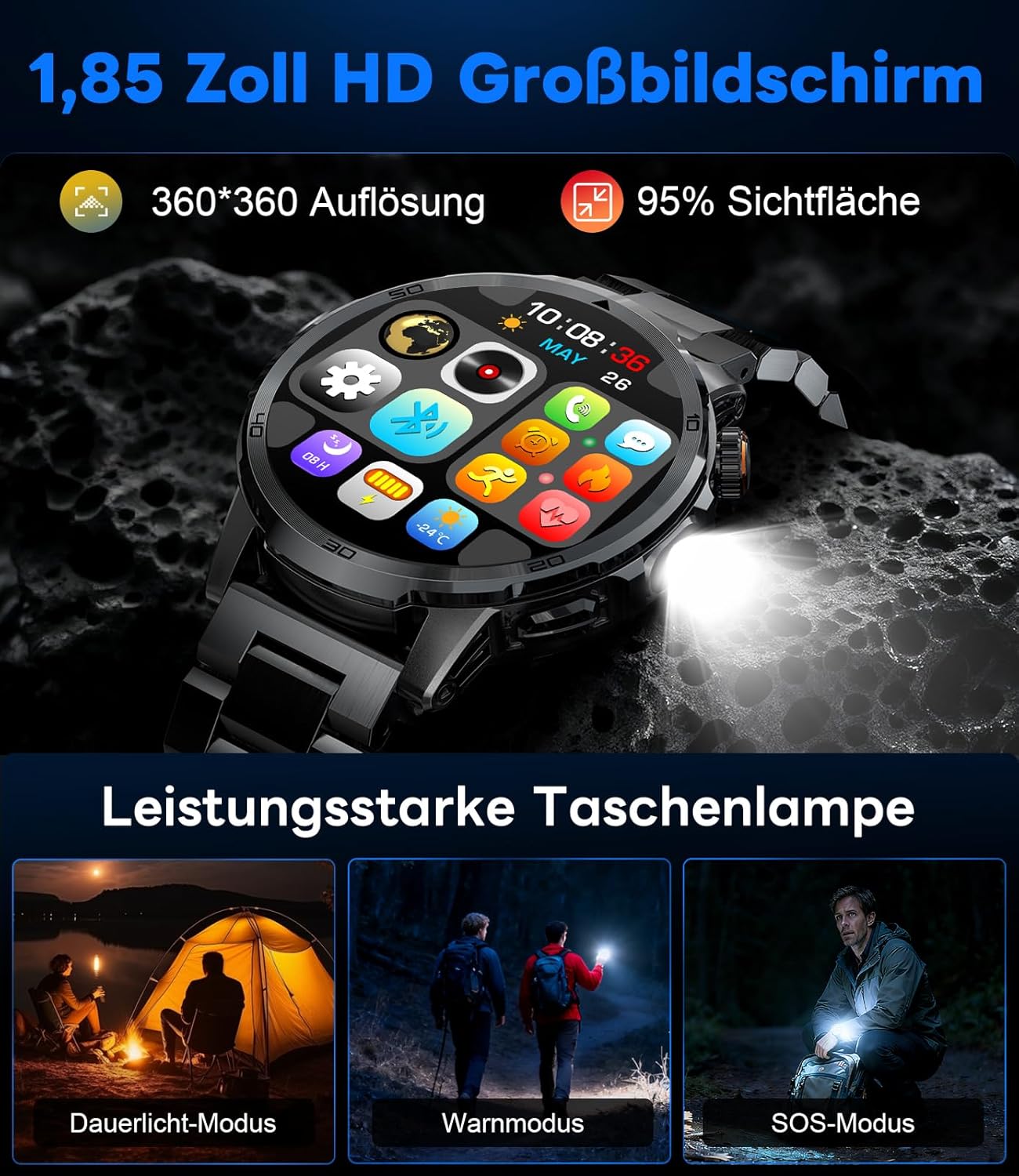
Image: The smartwatch displaying its 1.85-inch HD screen and demonstrating its powerful flashlight feature with different modes.
2.6 Kazi Nyingine
- Msaidizi wa Sauti: Activate the voice assistant to control your phone or get information (e.g., "What's the weather?").
- Udhibiti wa Muziki: Control music playback on your smartphone (play, pause, skip tracks, adjust volume) directly from your watch.
- Udhibiti wa Kamera: Tumia saa yako kama kifaa cha kuzima kamera ya simu yako mahiri.
- Utabiri wa hali ya hewa: View hali ya hewa ya sasa na utabiri.
- Kengele na Vipima Muda: Set alarms and use stopwatch/timer functions.
- Kikumbusho cha Kunywa: Set reminders to drink water.
- Nyuso za Kuangalia: Customize your watch face from over 100 options or upload your own photos via the app.

Image: The smartwatch interface displaying icons for music control, flashlight, camera control, weather, alarm, and drink reminders.

Image: A selection of diverse watch faces available for customization on the LIGE EF19-A Smartwatch.
3. Matengenezo
3.1 Kusafisha
- Regularly clean your smartwatch and straps with a soft, dry, lint-free cloth.
- Ikiwa ni lazima, tumia d kidogoamp Sabuni laini, kisha paka kitambaa kikavu.
- Epuka kutumia kemikali kali, visafishaji vya kukwaruza, au viyeyusho, kwani hivi vinaweza kuharibu umaliziaji na mihuri ya saa.
- Hakikisha anwani za kuchaji ni safi na kavu kabla ya kuchaji.
3.2 Ustahimilivu wa Maji (IP68)
The LIGE EF19-A Smartwatch is IP68 waterproof, meaning it is resistant to dust and can withstand immersion in water up to 1.5 meters for up to 30 minutes.
- It is suitable for daily use, such as hand washing, rain, and shallow water swimming.
- Avoid using the watch in hot water, saunas, or steam rooms, as steam can penetrate the seals and cause damage.
- Usibonye vitufe chini ya maji.
- After exposure to water, wipe the watch dry before charging or using.

Image: The smartwatch highlighting its robust military-grade design, including resistance to temperature extremes, shock, dust, and IP68 water resistance.
4. Utatuzi wa shida
4.1 Saa Isiyowashwa
- Hakikisha kuwa saa imejaa chaji. Iunganishe kwenye chaja kwa angalau dakika 30.
- Try long-pressing the side button for 10-15 seconds to force a restart.
4.2 Haiwezi Kuoanisha na Simu mahiri
- Hakikisha kuwa Bluetooth imewashwa kwenye simu mahiri yako.
- Ensure the smartwatch is within Bluetooth range (typically 10 meters).
- Anzisha upya simu mahiri na saa mahiri.
- Check if the app has the necessary permissions (location, Bluetooth, etc.).
- If previously paired, try "forgetting" the device in your phone's Bluetooth settings and re-pairing through the app.
4.3 Data Isiyo Sahihi ya Afya
- Hakikisha kuwa saa inavaliwa vizuri kwenye kifundo cha mkono chako, takriban upana wa kidole kimoja juu ya mfupa wa kifundo cha mkono.
- Epuka harakati nyingi wakati wa vipimo.
- Safisha kihisi kilicho nyuma ya saa.
- Vipengele vya mazingira na fiziolojia ya mtu binafsi vinaweza kuathiri usomaji.
4.4 Arifa hazionekani
- Thibitisha kwamba saa imeunganishwa vizuri na simu yako mahiri.
- Check notification settings within the companion app to ensure desired apps are enabled for notifications.
- Ensure your phone's notification settings allow the companion app to display notifications.
- Make sure your phone is not in "Do Not Disturb" mode.
5. Vipimo
| Kipengele | Vipimo |
|---|---|
| Nambari ya Mfano | EF19-A |
| Onyesho | 1.85-inch IPS HD Touch Screen, 360x360 pixels |
| Uwezo wa Betri | 1000 mAh Lithium Polymer |
| Maisha ya Betri (Matumizi ya Kawaida) | Siku 7-15 |
| Maisha ya Betri (ya kusubiri) | Hadi siku 50 |
| Muda wa Kuchaji | Takriban. 2 masaa |
| Muunganisho | Bluetooth 5.2 |
| Upinzani wa Maji | IP68 (isiyopitisha maji) |
| Uwezo wa Kuhifadhi Kumbukumbu | 128 MB |
| Vifaa Sambamba | Simu mahiri za Android 5.1+ / iOS 9.0+ |
| Ufuatiliaji wa Afya | Heart Rate, Blood Oxygen, Sleep Quality, Stress Level |
| Njia za Michezo | 100+ (e.g., Running, Cycling, Swimming, Hiking, Yoga) |
| Vipengele vya Ziada | Bluetooth Calls, Message Notifications, Torch, Voice Assistant, Music Control, Camera Control, Weather, Alarms, Timers, Drink Reminder, Customizable Watch Faces |
| GPS | Kupitia Smartphone |
| Watazamaji Walengwa | Wanaume |
6. Taarifa za Udhamini
The LIGE EF19-A Smartwatch comes with a dhamana ya mwaka 2 kuanzia tarehe ya ununuzi. Udhamini huu unashughulikia kasoro za utengenezaji na utendakazi chini ya matumizi ya kawaida.
Udhamini haujumuishi:
- Damage caused by improper use, accident, abuse, neglect, or unauthorized modification.
- Normal wear and tear, including scratches, dents, or cosmetic damage.
- Damage caused by exposure to extreme temperatures, liquids (beyond IP68 rating), or corrosive environments.
- Damage to accessories (straps, charging cables) unless defective upon receipt.
To claim warranty service, please retain your proof of purchase and contact customer support.
7. Msaada kwa Wateja
If you encounter any issues or have questions regarding your LIGE EF19-A Smartwatch that are not covered in this manual, please contact our customer support team.
- Refer to the contact information provided on the product packaging or the official LIGE webtovuti.
- When contacting support, please provide your product model number (EF19-A) and a detailed description of the issue.