
1. Utangulizi
The Radtel RT-6D PRO DMR Radio is a dual-band two-way communication device designed for both amateur radio enthusiasts and professional users. It supports DMR Tier 1 and Tier 2 digital operations, as well as traditional analog communication, across VHF (144-148MHz) and UHF (420-450MHz) frequency ranges. This manual provides essential information for the proper setup, operation, and maintenance of your RT-6D PRO radio.
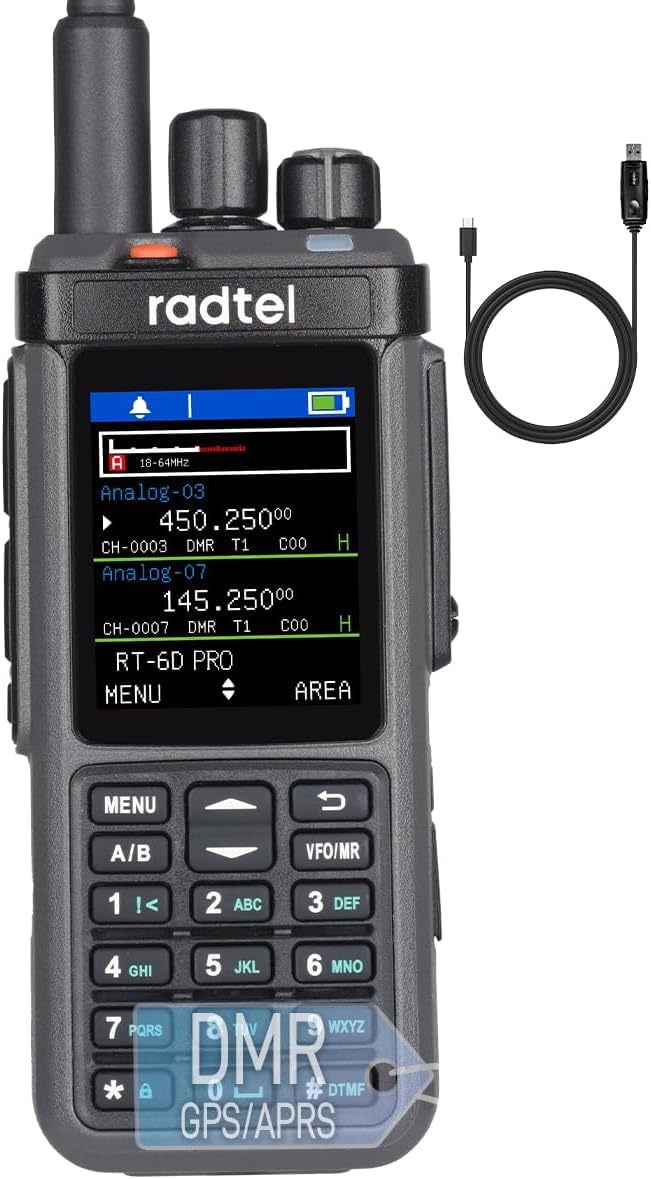
Figure 1: Radtel RT-6D PRO DMR Radio
2. Yaliyomo kwenye Kifurushi
Thibitisha kuwa vipengee vyote vipo kwenye kifurushi chako:
- 1x RT-6D PRO Main unit
- 1x 2400mAh Betri ya Li-ioni
- 1x Dual band antenna
- 1 x Klipu ya Ukanda
- 1x Charging base
- 1x Type-C Power cable
- Mwongozo wa Mtumiaji wa Kiingereza 1x
3. Bidhaa Imeishaview
3.1 Vipengele vya Redio

Figure 2: Radtel RT-6D PRO Labeled Components
Familiarize yourself with the main parts of your radio:
- Antena: Kwa kusambaza na kupokea ishara.
- Kitufe cha Kituo: Hutumika kuchagua vituo.
- Volume/ON/OFF Button: Controls power and audio volume.
- Mwanga wa Kiashirio: Huonyesha hali ya redio (km, kusambaza, kupokea, kuchaji).
- PTT1 / PTT2: Push-to-Talk buttons for initiating transmissions.
- Side-key: Programmable function button.
- Kitufe: For manual frequency input, menu navigation, and DTMF tones.
- Spika: Sauti ilipokea matokeo.
- Sikio Jack: Kwa kuunganisha vifaa vya sauti vya nje.
- Type-C Charging/Programming Port: For battery charging and connecting to a computer for programming.
3.2 Sifa Muhimu
- GPS and APRS Functionality: Integrated GPS for location services and APRS for position reporting.
- Hali ya Uzinzi: Automatically scans and monitors digital channels for active talk groups and color codes.
- Mlango wa USB Aina ya C: Conveniently handles both charging and programming.
- Large Data Capacity: Stores 2,000 contacts, manages 90 Talk Group lists (up to 128 groups each), and accesses a global database of 500,000 contacts with CSV import capability.
- Channel and Zone Capacity: Supports 256 zones and 1024 channels.
- Usimbaji fiche: Operates with AES-256 encryption protocols.
- One-Touch Frequency Scanner: Simplifies signal identification.
- Tahadhari za Hali ya Hewa za NOAA: Provides live weather feeds.

Figure 3: Radtel RT-6D PRO Feature Icons
4. Usanidi wa Awali
4.1 Ufungaji na Kuchaji Betri
- Pangilia betri ya Li-ion ya 2400mAh na sehemu ya betri nyuma ya redio.
- Telezesha betri mahali pake hadi ibofye kwa usalama.
- To charge, connect the Type-C power cable to the radio's Type-C port and a compatible power source (e.g., wall adapter, car charger, power bank, or computer USB port). The indicator light will show charging status.
4.2 Kiambatisho cha Antena
- Screw the dual-band antenna clockwise onto the antenna connector at the top of the radio until it is finger-tight. Do not overtighten.
4.3 Basic Power On/Off
- To power on, rotate the Volume/ON/OFF button clockwise until you hear a click and the display illuminates.
- To power off, rotate the Volume/ON/OFF button counter-clockwise until you hear a click and the display turns off.
5. Operesheni ya Msingi
5.1 Uchaguzi wa Chaneli
Rotate the Channel Knob at the top of the radio to cycle through available channels. The selected channel will be displayed on the screen.
5.2 Kurekebisha Kiasi
After powering on, rotate the Volume/ON/OFF button to increase or decrease the audio output level.
5.3 Kutuma na Kupokea
- To transmit, press and hold one of the PTT (Push-to-Talk) buttons (PTT1 or PTT2) on the side of the radio. Speak clearly into the microphone.
- Achilia kitufe cha PTT ili uache kutuma na urudi kwenye hali ya kupokea.
- When receiving a signal, the indicator light will illuminate, and audio will be heard through the speaker or connected earphone.
5.4 Contact Management
The RT-6D PRO supports extensive contact management features:
- Mawasiliano ya Karibu: Store up to 2,000 individual contacts.
- Talk Group Lists: Manage up to 90 Talk Group lists, each supporting up to 128 groups.
- Global Database: Access a built-in global database of 500,000 contacts.
- Import Functionality: Import custom contact lists via CSV files for streamlined call management.

Figure 4: Contact Management Interface
5.5 GPS and APRS Functions
The integrated GPS module allows the radio to determine its location. This data can be used for APRS (Automatic Packet Reporting System) to transmit your position to other APRS-enabled devices or networks.
5.6 Tahadhari za Hali ya Hewa za NOAA
The radio can receive NOAA weather alerts, providing timely information on severe weather conditions in your area.
6. Vipengele vya Juu
6.1 DMR Tier 1 & Tier 2 Operation
The RT-6D PRO supports both DMR Tier 1 (unlicensed, direct mode) and Tier 2 (licensed, repeater mode) digital communication, offering enhanced audio quality and spectral efficiency compared to analog modes.

Figure 5: 1024 Channel Capacity and Call Types
6.2 Promiscuous Mode
This mode allows the radio to automatically scan and monitor all digital channels, identifying active talk groups and color codes without prior programming, facilitating seamless communication in dynamic environments.
6.3 Encryption Protocols (AES-256)
For secure communications, the RT-6D PRO supports AES-256 encryption, ensuring privacy and preventing unauthorized interception of your transmissions.
6.4 Programming via Type-C Port
The radio can be programmed using Customer Programming Software (CPS) via the Type-C USB port. This allows for customization of channels, contacts, talk groups, and other advanced settings. Refer to the specific CPS software manual for detailed programming instructions.

Figure 6: 10W High Power Transmission
7. Taarifa za Usalama
Please read and adhere to the following safety guidelines to ensure safe operation and prevent damage to your radio:
- Mazingira ya Uendeshaji: Operate the radio in environments with temperatures between 0-40°C and below 2000m altitude. Operating outside these conditions may damage the radio.
- Maadili ya SAR: The radio has been tested for Head SAR (25mm from device) and Body SAR (0mm from device, with headset and belt clip). Specific Absorption Rate (SAR) values are: Face up (25mm): 0.277W/Kg; Back (0mm): 4.061W/Kg; Hand (0mm): 4.270W/Kg.
- Usalama wa Betri: Hatari ya mlipuko ikiwa betri itabadilishwa na aina isiyo sahihi. Tupa betri zilizotumiwa kulingana na kanuni za mitaa.
- Maonyo ya Jumla: Be cautious of electric shock, flammable materials, and ionizing radiation.
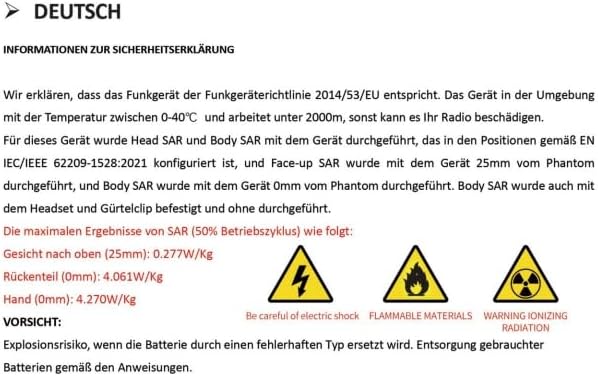
Figure 7: Safety Declaration (German original, summarized above)
8. Matengenezo na Matunzo
Proper care will extend the life of your Radtel RT-6D PRO radio:
- Kusafisha: Tumia laini, damp kitambaa kusafisha nje ya redio. Usitumie kemikali kali au vimumunyisho.
- Upinzani wa Maji: Redio hii ni Sio Sugu ya Maji. Avoid exposure to water, rain, or high humidity.
- Utunzaji wa Betri: Store the battery in a cool, dry place when not in use. Avoid overcharging or fully discharging the battery frequently.
- Hifadhi: When storing for extended periods, remove the battery and store the radio in a dry, dust-free environment.
9. Utatuzi wa shida
9.1 Masuala ya Kawaida na Suluhu
| Suala | Sababu inayowezekana | Suluhisho |
|---|---|---|
| Redio haiwashi | Low or depleted battery; improperly installed battery. | Chaji betri kikamilifu. Hakikisha betri imewekwa kwa usahihi. |
| Poor signal reports or audio quality | Loose antenna connection; incorrect microphone gain setting; wrong frequency/channel. | Ensure antenna is securely attached. Adjust microphone gain via CPS if available. Verify correct frequency and channel settings. |
| Difficulty programming via Type-C port | Incorrect CPS version; driver issues; antivirus interference; faulty cable. | Download the latest CPS from the official Radtel website. Install necessary drivers. Temporarily disable antivirus software during installation/programming. Try a different Type-C cable. |
| Incorrect time display or GPS issues | Firmware bug; poor GPS signal reception; incorrect UTC offset setting. | Check for firmware updates. Ensure the radio has a clear view of the sky for GPS signal acquisition. Verify UTC offset settings in the radio menu or CPS. |
| Radio stops receiving intermittently | Software/firmware issue; channel interference. | Restart the radio. Try switching to a different channel and then back. Check for firmware updates from Radtel. |
10. Vipimo
| Kipengele | Vipimo |
|---|---|
| Nambari ya Mfano | RT-6D PRO |
| Uzito wa Kipengee | Pauni 1.45 |
| Vipimo vya Bidhaa | 1.5 x 2.36 x 9.84 inches (radio body: 1.57"D x 2.36"W x 10.23"H) |
| Aina ya Betri | 1x 9V Li-ion battery (included) |
| Idadi ya Vituo | 1024 |
| Masafa ya Marudio | 144-148Mhz / 420-450Mhz |
| Upeo wa Masafa ya Kuzungumza | Kilomita 6 |
| Voltage | 7.4 Volts |
| Kiwango cha Upinzani wa Maji | Sio Sugu ya Maji |
| Vipengele Maalum | GPS/APRS, Type C Charging, Digital/Analog, 500K Global Contacts |

Figure 8: Radtel RT-6D PRO Dimensions
11. Udhamini na Msaada
11.1 Taarifa ya Udhamini
The Radtel RT-6D PRO radio comes with a Udhamini wa Miaka 1. Tafadhali hifadhi uthibitisho wako wa ununuzi kwa madai ya udhamini.
11.2 Usaidizi kwa Wateja
For technical assistance, troubleshooting beyond this manual, or warranty inquiries, please contact Radtel customer support through their official website or the retailer where the product was purchased. Ensure you have your model number and purchase details ready when contacting support.