
1. Utangulizi
Thank you for choosing the DazzlingStage 60W 9LED RGBW Stage Wall Wash Bar Light. This manual provides essential information for the safe and effective operation of your lighting fixture. Please read it thoroughly before installation and use, and retain it for future reference.
Hii stage light bar features 9 high-power RGBW LEDs, offering a wide spectrum of colors and dynamic lighting effects suitable for various events and venues.

Picha 1.1: Juuview of the DazzlingStage 60W 9LED RGBW Stage Wall Wash Bar Lights in various colors.
2. Maagizo ya Usalama
- Usalama wa Umeme: Hakikisha ugavi wa umeme ujazotage matches the specifications of the fixture. Always disconnect power before cleaning, servicing, or moving the unit.
- Usakinishaji: Install the fixture in a well-ventilated area, away from heat sources. Ensure secure mounting to prevent accidental falls.
- Operesheni: Do not look directly into the light source when the fixture is operating, as it can cause eye damage. Avoid operating the unit in wet or damp masharti.
- Matengenezo: Rufaa huduma zote kwa wafanyakazi waliohitimu. Usijaribu kutengeneza kitengo mwenyewe.
- Watoto: Weka kifaa mbali na watoto.
3. Yaliyomo kwenye Kifurushi
Baada ya kufungua, tafadhali hakikisha kwamba vitu vyote vilivyoorodheshwa hapa chini vimejumuishwa na viko katika hali nzuri:
- DazzlingStage 60W 9LED RGBW Stage Wall Wash Bar Light (x1 per pack)
- Power Cord (x1 per pack)
- Remote Control (x1 per pack)
- Mounting Bracket (x1 per pack)
- Knobs (x2 per pack)
- Black Gaskets (x2 per pack)
- Instruction Manual (x1 per pack)

Picha 3.1: Yaliyomo yamejumuishwa kwenye kifurushi cha bidhaa.
4. Vipengele vya Bidhaa
Familiarize yourself with the main components of the light bar:
- Safu ya LED: 9 RGBW LEDs for color mixing.
- Jopo la Kudhibiti: Features a 4-digit LED display and control buttons (MENU, UP, DOWN, ENTER) for mode selection and parameter adjustment.
- DMX IN/OUT Ports: For connecting to a DMX controller or linking multiple units.
- Nguvu INGIA/NJE: For power connection and daisy-chaining power to other units.
- Mabano ya Kupachika: Adjustable bracket for floor standing or truss mounting.
- Sink ya joto: Integrated cooling system to maintain optimal operating temperature.

Image 4.1: Key components and dimensions of the light bar.
5. Kuweka na Kuweka
The DazzlingStage Wall Wash Bar Light offers flexible installation options:
5.1 Kuweka Mabano
Attach the included mounting bracket to the light bar using the provided knobs and gaskets. Ensure the bracket is securely fastened.
5.2 Chaguzi za Kuweka
- Kusimama Sakafu: The bracket allows the light bar to stand upright on a flat surface. Adjust the angle as needed.
- Uwekaji wa Truss: Tumia cl inayofaaamps (not included) to attach the bracket to a lighting truss. Ensure the truss and clamps can support the weight of the fixture.
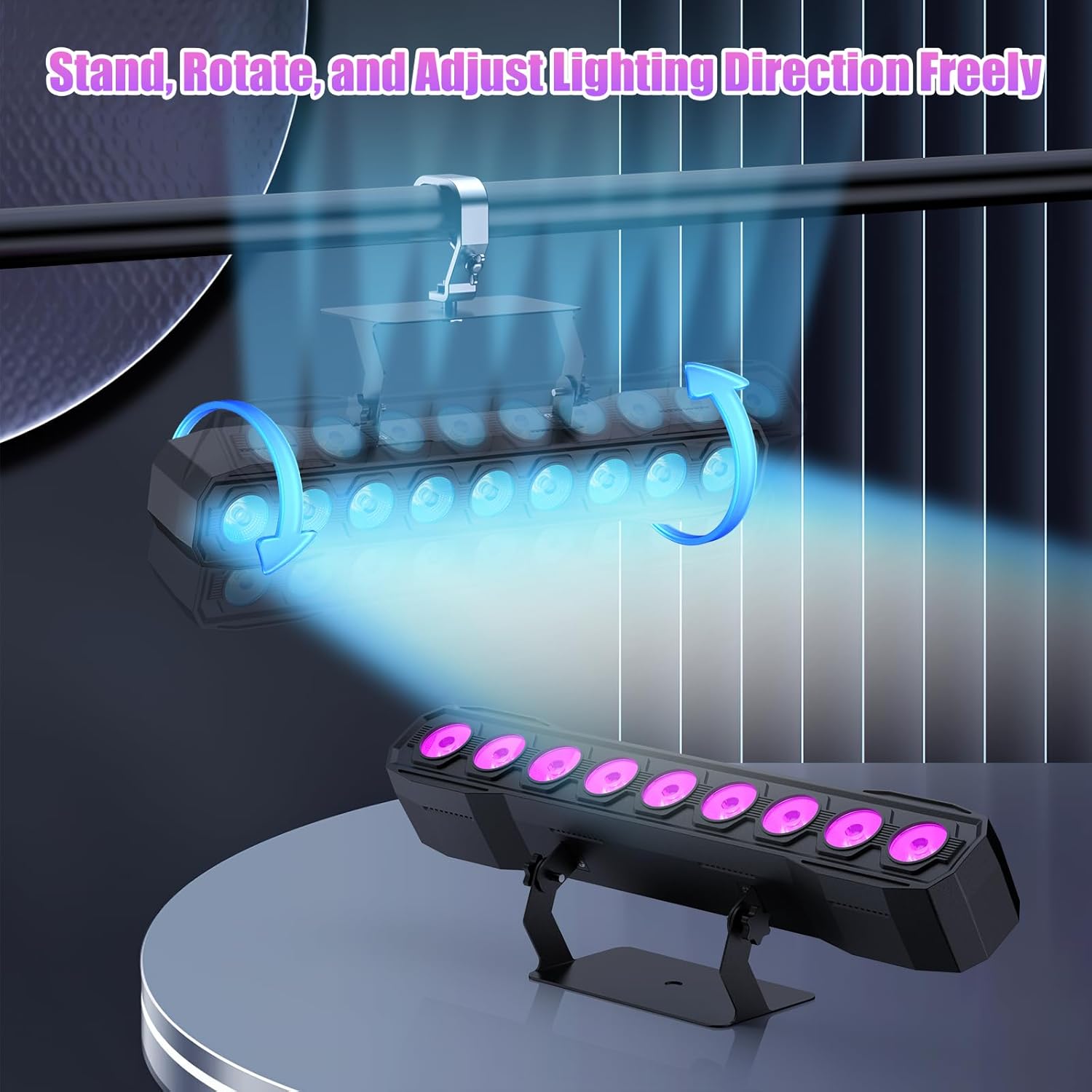
Image 5.1: Illustration of mounting and angle adjustment options.
Uunganisho wa Nguvu 5.3
Connect the power cord to the Power IN port on the back of the fixture and then to a suitable power outlet. Multiple units can be daisy-chained using the Power OUT port to simplify wiring for larger setups.
6. Njia za Uendeshaji
The DazzlingStage Wall Wash Bar Light supports several control modes:
- Udhibiti wa DMX512: For professional control via a DMX console.
- Njia ya Hifadhi: Pre-programmed lighting sequences.
- Sound-Activated Control: Lights react to ambient sound.
- Udhibiti wa Mbali: Convenient wireless control using the included remote.
- Hali ya Mwalimu-Mtumwa: Link multiple units where one acts as a master and others as slaves, synchronizing effects.
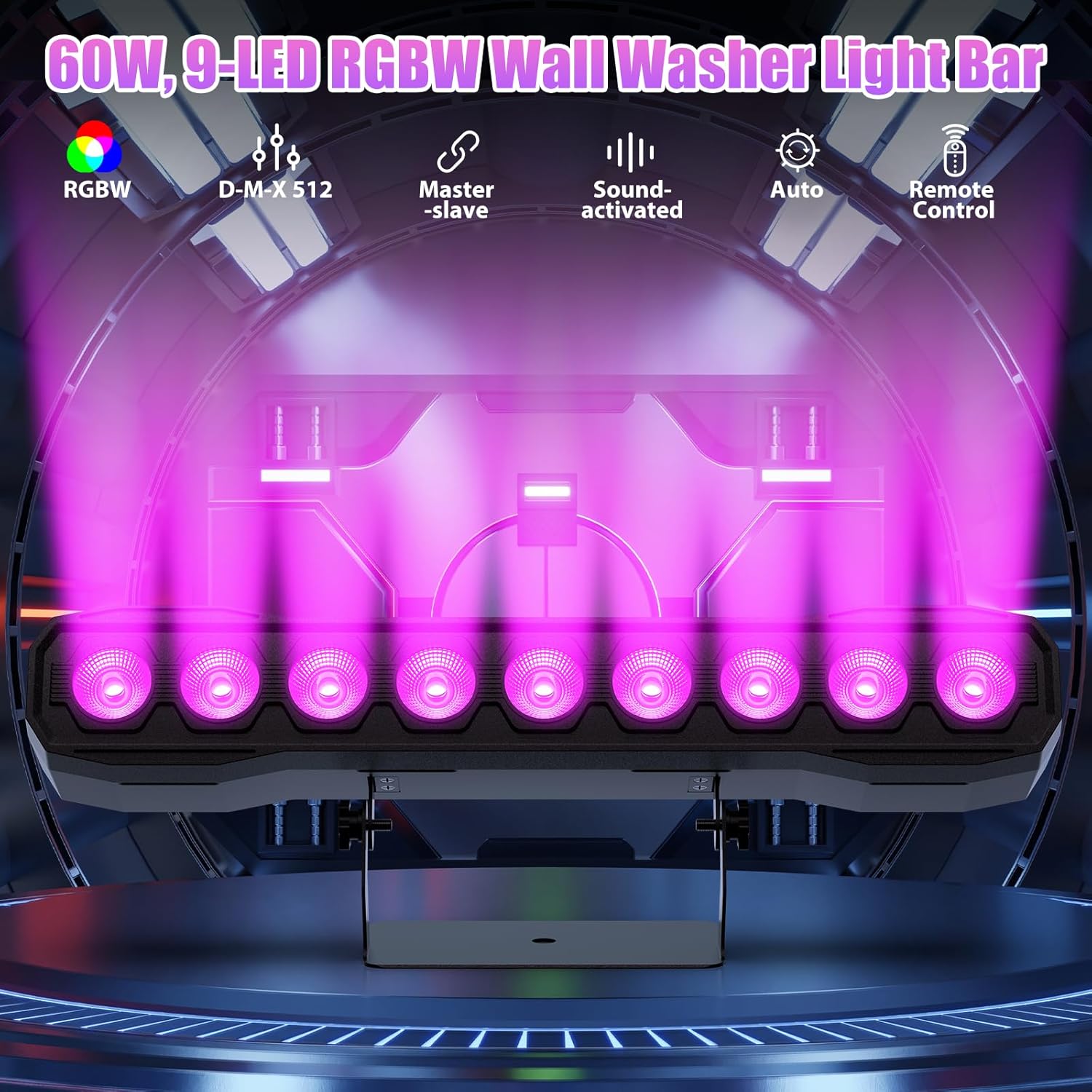
Picha 6.1: Juuview ya njia za udhibiti zinazopatikana.
6.1 Display Panel Operation
Use the buttons on the back of the fixture to navigate the menu and select modes:
- MENU: Mizunguko kupitia chaguo za menyu kuu.
- JUU CHINI: Adjusts values or navigates sub-menus.
- INGIA: Inathibitisha uteuzi.
6.2 Athari za Mwangaza
The fixture supports various dynamic effects:
- Mchanganyiko wa Rangi: Over 16.7 million color combinations with 0-100% linear dimming.
- Nguo: Athari ya kuwaka.
- Rukia: Instant color changes.
- Fifia: Smooth transitions between colors.
- Pulse: Gradual changing effects.
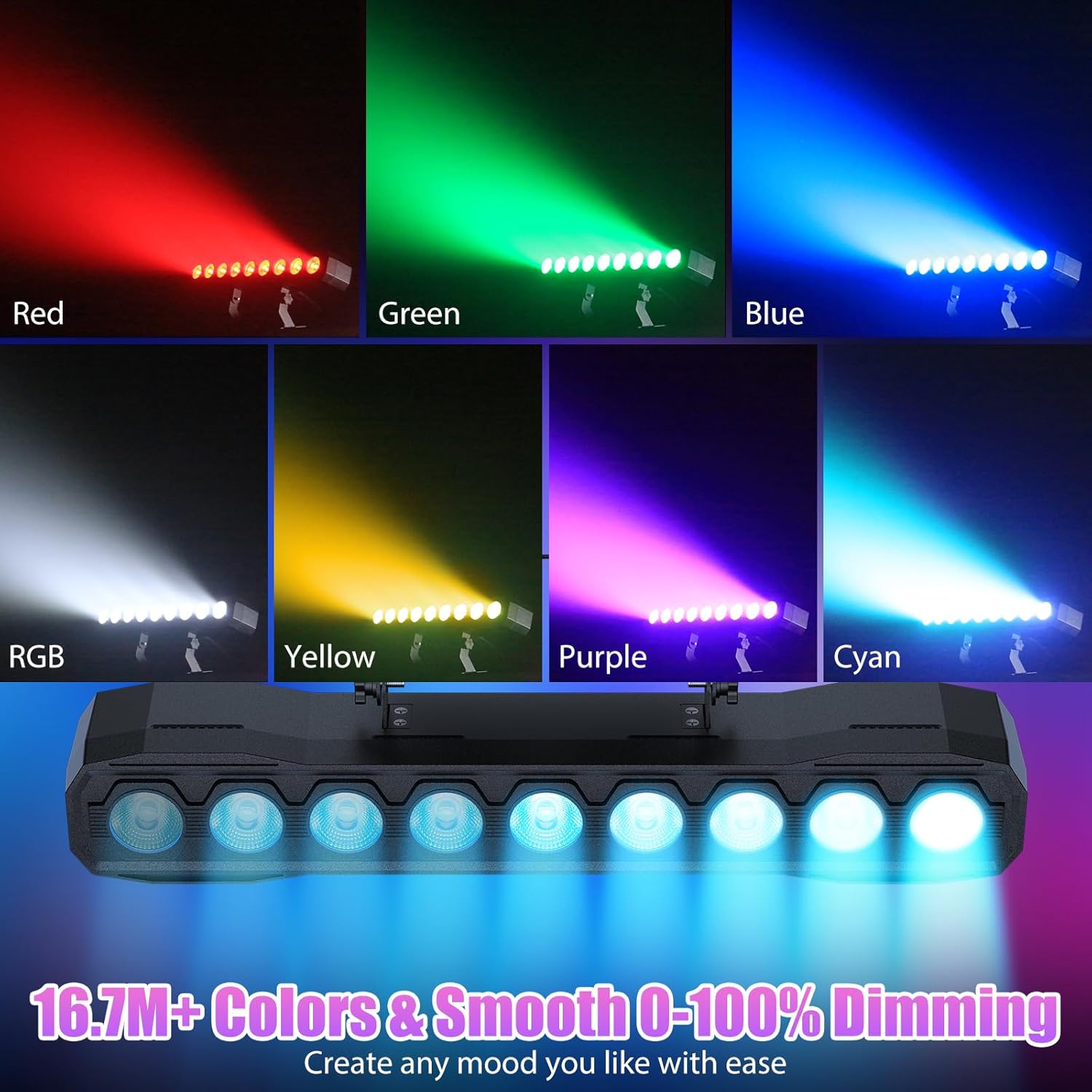
Picha 6.2: Kutamples of color mixing and dimming capabilities.

Image 6.3: Visual representation of Strobe, Jump, Fade, and Pulse effects.
7. Kazi za Udhibiti wa Kijijini
Kidhibiti cha mbali kilichojumuishwa hutoa ufikiaji rahisi wa kazi mbalimbali:
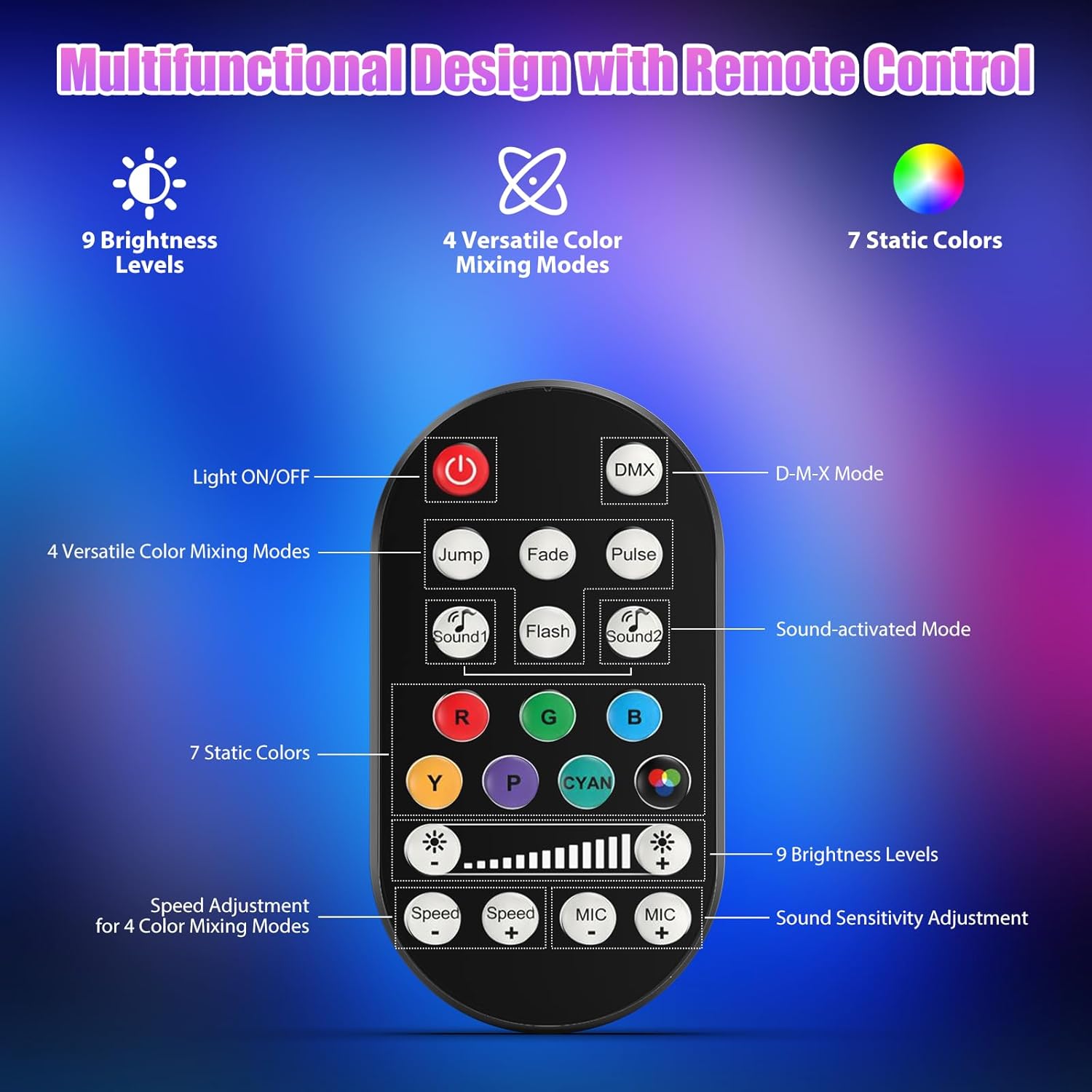
Picha 7.1: Mpangilio na vitendaji vya udhibiti wa mbali.
- Mwangaza ZIMWA/ZIMWA: Huwasha au kuzima kitengo.
- DMX: Huwasha hali ya udhibiti wa DMX.
- Jump, Fade, Pulse, Flash: Selects different color mixing modes.
- Sound1, Sound2: Activates sound-activated modes with different sensitivities.
- R, G, B, Y, P, Cyan, White: Selects static colors.
- Viwango vya Mwangaza: Adjusts the overall intensity of the light (9 levels).
- Kasi +/-: Adjusts the speed of dynamic effects.
- MIC +/-: Adjusts the sound sensitivity for sound-activated modes (15 levels).
8. Udhibiti wa DMX512
For advanced control, connect the fixture to a DMX512 controller. The light bar typically uses 4 or 8 DMX channels. Refer to the display panel for DMX address setting and channel assignments.
8.1 DMX Address Setting
Use the MENU, UP, DOWN, and ENTER buttons on the fixture's display panel to set the DMX starting address. The display will show 'AXXX' where XXX is the address (e.g., A001).
8.2 DMX Channel Functions (Example - 8 Channel Mode)
| Kituo | Kazi | Kiwango cha Thamani | Maelezo |
|---|---|---|---|
| CH1 | Mwalimu Dimmer | 0-255 | Mwangaza wa jumla (0% hadi 100%) |
| CH2 | Nguvu Nyekundu | 0-255 | Red LED brightness (0% to 100%) |
| CH3 | Nguvu ya Kijani | 0-255 | Green LED brightness (0% to 100%) |
| CH4 | Nguvu ya Bluu | 0-255 | Blue LED brightness (0% to 100%) |
| CH5 | Nguvu Nyeupe | 0-255 | White LED brightness (0% to 100%) |
| CH6 | Strobe/Effect | 0-255 | 0-10: No function; 11-255: Strobe speed (slow to fast) |
| CH7 | Programu ya Auto | 0-255 | Selects and controls speed of built-in auto programs |
| CH8 | Sauti inayotumika | 0-255 | Activates sound mode and adjusts sensitivity |
Jedwali la 8.1: Kutample DMX Channel Functions (may vary slightly by firmware version).
9. Matengenezo
Regular maintenance ensures optimal performance and extends the lifespan of your fixture.
- Kusafisha: Periodically clean the lens and housing with a soft, lint-free cloth. Do not use abrasive cleaners or solvents. Ensure the fixture is powered off and cool before cleaning.
- Ukaguzi: Angalia nyaya za umeme mara kwa mara, nyaya za DMX, na vifaa vya kupachika kwa dalili zozote za uchakavu au uharibifu. Badilisha vipengele vilivyoharibika mara moja.
- Hifadhi: When not in use for extended periods, store the fixture in a dry, dust-free environment.
10. Utatuzi wa shida
Ukikumbana na masuala, rejelea matatizo na suluhisho zifuatazo za kawaida:
| Tatizo | Sababu inayowezekana | Suluhisho |
|---|---|---|
| Hakuna nguvu | Power cable disconnected; No power from outlet; Blown fuse | Check power cable connection; Test outlet with another device; Replace fuse if necessary |
| Hakuna pato la mwanga | Dimmer channel at 0%; Incorrect mode selected; DMX signal issue | Increase dimmer level; Select desired operating mode; Check DMX cable and address settings |
| Incorrect colors/effects | Incorrect DMX channel values; Remote control interference | Verify DMX channel settings; Ensure remote is pointed directly at the sensor; Check for other IR interference |
| Hali iliyoamilishwa na sauti haifanyi kazi | Microphone sensitivity too low; No sound input | Increase MIC sensitivity via remote or display; Ensure sufficient sound is present near the fixture |
| Fixture overheating | Poor ventilation; Blocked heat sink | Ensure adequate airflow around the unit; Clean any dust or debris from the heat sink fins |
11. Vipimo
| Kipengele | Maelezo |
|---|---|
| Chapa | DazzlingStage |
| Nambari ya Mfano | ZQ06190 |
| Chanzo cha Nuru | LED za 9 x 60W za RGBW |
| Kuchanganya Rangi | RGBW 4-in-1, 16.7 million colors |
| Kufifia | 0-100% ya ufifishaji wa kielektroniki wa mstari |
| Angle ya Boriti | 35° Upana wa Pembe |
| Njia za Kudhibiti | DMX512, Auto, Sound-Activated, Remote Control, Master-Slave |
| Njia za DMX | 4 or 8 Channels (selectable) |
| Onyesho | Onyesho la LED la tarakimu 4 |
| Nyenzo | Acrylonitrile Butadiene Styrene (ABS) |
| Vipimo vya Bidhaa | Inchi 18.1 x 5.5 x 5.1 (sentimita 46 x 14 x 13) |
| Uzito wa Kipengee | Takriban. Pauni 1.98 (kilo 0.9) |
| Ingizo la Nguvu | AC 100-240V, 50/60Hz |
| Mtengenezaji | Shenzhen Zhuoqiong Technology Co., Ltd. |
12. Udhamini na Msaada
DazzlingStage products are designed for reliability and performance. For warranty information, please refer to the terms and conditions provided at the time of purchase or contact your retailer.
If you require technical assistance or have questions not covered in this manual, please contact DazzlingStage customer support through the retailer's platform or the official brand website. Please have your model number (ZQ06190) and purchase details ready when contacting support.