
1. Utangulizi
This manual provides essential information for the safe and efficient operation of your Tornado 65UA5300E 65-inch 4K Frameless Android Smart TV. Please read it thoroughly before using the product and retain it for future reference.

Picha 1.1: Mbele view of the Tornado 65UA5300E Smart TV, showcasing its frameless design and included stand.
2. Taarifa za Usalama
Fuata tahadhari za kimsingi za usalama kila wakati unapotumia televisheni hii ili kupunguza hatari ya moto, mshtuko wa umeme na majeraha.
- Usiweke TV kwenye mvua au unyevu.
- hakikisha uingizaji hewa sahihi; usizuie fursa za uingizaji hewa.
- Usiweke TV kwenye toroli, stendi, tripod, mabano au meza isiyo imara.
- Chomoa TV wakati wa dhoruba za umeme au wakati haijatumika kwa muda mrefu.
- Rejelea huduma zote kwa wahudumu waliohitimu.
3. Yaliyomo kwenye Kifurushi
Thibitisha kuwa vipengee vyote vipo kwenye kifurushi:
- Tornado 65UA5300E 65-inch 4K Frameless Android Smart TV
- Udhibiti wa Kijijini
- Cable ya Nguvu
- Stendi ya TV (vipande 2)
- Screws za Bunge la Kudumu
- Mwongozo wa Mtumiaji (hati hii)
4. Kuweka
4.1 Kufungua
Ondoa TV kwa uangalifu kutoka kwa kifurushi chake. Inashauriwa kuweka kifurushi asilia kwa usafiri au huduma zinazowezekana za siku zijazo.
4.2 Kuunganisha Stendi
If you are not wall-mounting the TV, attach the included stand pieces. Place the TV face down on a soft, flat surface to prevent screen damage. Align each stand piece with the corresponding slots on the bottom of the TV and secure them with the provided screws.
Picha ya 4.1: Chini view of the TV, illustrating the designated areas for stand attachment.
4.3 Kuweka Ukuta
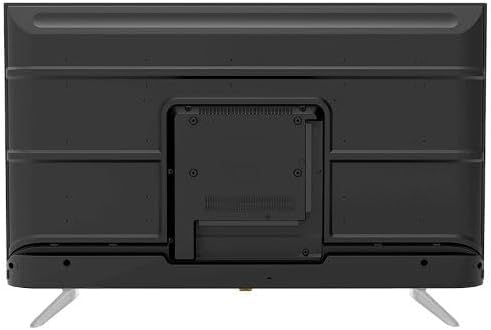
For wall mounting, remove the stand (if attached). Use a VESA-compatible wall mount (not included) that supports the TV's weight and dimensions. Consult a professional for wall mounting to ensure safety and proper installation.

Picha ya 4.2: Nyuma view of the TV, highlighting the VESA mounting pattern and various input/output ports.
4.4 Viungo vya Kuunganisha
Unganisha vifaa vyako vya nje kwenye TV kwa kutumia milango inayofaa:
- HDMI: For high-definition devices like Blu-ray players, gaming consoles, or set-top boxes. The TV has 3 HDMI ports, one with ARC support.
- USB: For connecting USB storage devices to play media (video, photos, music). The TV has 2 USB ports.
- LAN: Kwa muunganisho wa mtandao wa waya.
- Uingizaji wa RF: For connecting an antenna or satellite dish for the built-in digital receiver.
- Pato la Sauti Dijitali (Macho): Kwa ajili ya kuunganisha kwenye mfumo wa sauti wa nje.
- Kipaza sauti cha Jack (3.5mm): Kwa kuunganisha vichwa vya sauti.

Picha 4.3: Upande view of the TV, illustrating the accessible side input ports.
4.5 Kuwasha na Kuweka Mchawi wa Awali
After connecting the power cable, press the power button on the remote control or TV. The TV will guide you through an initial setup wizard, including language selection, network connection (Wi-Fi or LAN), channel scanning, and Google account setup for Android TV features.
5. Kuendesha TV
5.1 Udhibiti wa mbaliview
The included remote control allows you to navigate the TV's functions. It features dedicated buttons for power, volume, channel, input selection, smart TV apps (Netflix, YouTube, Prime Video, Disney+), Google Assistant voice search, and menu navigation.
5.2 Kazi za Msingi
- Washa/Zima: Bonyeza kitufe cha nguvu.
- Udhibiti wa Sauti: Tumia vitufe vya Kuongeza Sauti Juu/Chini.
- Uteuzi wa Kituo: Use the Channel Up/Down buttons or numeric keypad.
- Chanzo cha Ingizo: Press the 'Input' button to select between HDMI, AV, TV, etc.
5.3 Smart TV Features (Android 11)
Your TV runs on Android 11, providing access to a wide range of smart features:
- Maombi: Access pre-installed apps like Netflix, YouTube, Prime Video, Disney+, Shahid VIP, and download more from the Google Play Store.
- Mratibu wa Google: Tumia amri za sauti kupitia kidhibiti cha mbali kwa utafutaji, udhibiti, na taarifa.
- Chromecast Imejengwa ndani: Tuma maudhui kutoka kwa simu yako mahiri au kompyuta kibao moja kwa moja hadi kwenye TV.
- Web Kivinjari: Vinjari mtandao moja kwa moja kwenye TV yako.
- Bluetooth 5.0: Unganisha vipokea sauti vya masikioni visivyotumia waya, spika, au vifaa vingine vya Bluetooth.
5.4 Mipangilio ya Picha na Sauti
Customize yako viewuzoefu wa kusikiliza na kutazama kupitia menyu ya mipangilio ya TV:
- Njia za Picha: Select from Dynamic, Game, Sports, Cinema, or User-defined modes.
- Joto la Rangi: Adjust to Normal, Cool, or Warm.
- Njia za Sauti: Choose from Smart, User, Game, Movie, Music, or News.
- Dolby Digital Plus: Enhanced audio processing for compatible content.
6. Matengenezo
6.1 Kusafisha TV
- Skrini: Futa skrini kwa upole kwa kitambaa laini kisicho na pamba. Kwa alama za ukaidi, tumia kisafisha skrini kilichoundwa mahususi kwa ajili ya TV, kinachowekwa kwenye kitambaa, na si moja kwa moja kwenye skrini.
- Mwili: Wipe the TV's frame and back panel with a soft, dry cloth. Do not use abrasive cleaners or solvents.
6.2 Usasisho wa Programu
Ensure your TV's software is up to date for optimal performance and security. Connect the TV to the internet and check for updates periodically through the settings menu.
7. Utatuzi wa shida
Ukikumbana na masuala, rejelea masuluhisho yafuatayo ya kawaida:
| Tatizo | Suluhisho linalowezekana |
|---|---|
| Hakuna nguvu | Angalia kama kebo ya umeme imechomekwa vizuri kwenye TV na soketi ya ukutani. Hakikisha soketi inafanya kazi. |
| Hakuna picha, lakini sauti iko | Angalia chanzo cha ingizo. Hakikisha vifaa vya nje vimewashwa na kuunganishwa kwa usahihi. |
| Hakuna sauti, lakini picha iko | Check the volume level and mute status. Verify audio settings and external audio connections. |
| Udhibiti wa mbali haufanyi kazi | Badilisha betri. Hakikisha hakuna vizuizi kati ya kidhibiti cha mbali na kihisi cha IR cha TV. |
| Haiwezi kuunganisha kwenye Wi-Fi | Angalia kipanga njia chako na modem. Ingiza tena nenosiri la Wi-Fi. Jaribu kuanzisha upya TV na kipanga njia. |
Tatizo likiendelea, wasiliana na usaidizi kwa wateja.
8. Vipimo
| Kipengele | Maelezo |
|---|---|
| Nambari ya Mfano | 65UA5300E |
| Ukubwa wa skrini | Inchi 65 |
| Teknolojia ya Kuonyesha | LED |
| Azimio | 4K UHD (3840 x 2160) |
| Uwiano wa kipengele | 16:9 |
| ViewAngle | 178 Digrii |
| Mwangaza | 250 cd/m² |
| Kiwango cha Kuonyesha upya | 50/60 Hz |
| Msaada wa HDR | HDR10, HLG |
| Teknolojia ya Sauti | Dolby Digital Plus, Surround Sound |
| Nguvu ya Pato la Sauti | 10W x 2 |
| Mfumo wa Uendeshaji | Android 11 |
| Kumbukumbu ya ndani | GB 16 |
| Muunganisho | Wi-Fi, Bluetooth 5.0, LAN |
| Ingizo | RF Input (Digital) x1, Video Input x1, HDMI x3 (ARC), USB x2, LAN x1 |
| Matokeo | Digital Audio Output (Optical) x1, Headphone Jack (3.5mm) x1 |
| Ugavi wa Nguvu | AC 90-240V / 50Hz |
| Nguvu ya Kusimama | 0.5W |
| Vipimo (W x H x D) bila kusimama | 1446 x 832 x 84 mm |
| Vipimo (W x H x D) na stendi | 1446 x 892 x 305 mm |
| Uzito Net | 15.32 kg |
| Uzito wa Jumla | 21.32 kg |
| Nchi ya Asili | Misri |
9. Udhamini
This Tornado TV comes with a 3-year full free warranty. Please retain your proof of purchase for warranty claims. For specific terms and conditions, refer to the warranty card included with your product or contact Tornado customer service.
10. Msaada
For further assistance, technical support, or service inquiries, please contact Tornado customer service. Contact details can typically be found on the manufacturer's official webtovuti au kwenye kadi ya udhamini.