
MUBVIEW Kengele J7
MUBVIEW Bell J7 2K Wireless Video Doorbell Camera with Chime User Manual
Model: Bell J7
1. Utangulizi
This manual provides detailed instructions for the installation, operation, and maintenance of your MUBVIEW Bell J7 2K Wireless Video Doorbell Camera with Chime. Please read this manual thoroughly before using the product to ensure proper function and safety. This device is designed to enhance your home security with advanced features like 2K video, motion detection, and two-way audio.
2. Ni nini kwenye Sanduku
Thibitisha kwamba vipengele vyote vipo kabla ya kuendelea na usakinishaji:
- Camera Doorbell x1
- Chime x1
- Mwongozo wa Mtumiaji x1
- Kuchaji Cable x1
- Betri x3
- Other Accessories (screws, anchors, screwdriver)

Image: Contents of the MUBVIEW Bell J7 package, including the doorbell, chime, and installation tools.
3. Bidhaa Imeishaview
Familiarize yourself with the main parts of your video doorbell and chime:
Kamera ya kengele ya mlango
- 2K Camera Lens: Captures high-resolution video.
- Sensorer ya Mwendo wa PIR: Inatambua harakati za binadamu.
- Maikrofoni: Kwa mawasiliano ya sauti ya njia mbili.
- Spika: Kwa mawasiliano ya sauti ya njia mbili na king'ora.
- Kitufe cha Mlango: Activates the chime and sends notifications.
- Micro USB-C Port: Kwa kuchaji betri ya ndani.
- Badilisha Kitufe: Kwa ajili ya kuweka upya kifaa.
- Slot ya Kadi ya SD ndogo: For local video storage (up to 128GB, card not included).
- Anti-Theft Button: Triggers an alarm if the doorbell is removed from its mount.
Kengele isiyo na waya
- Spika: Emits doorbell sound.
- Udhibiti wa Sauti: Adjusts chime volume.
- Kiteuzi Toni: Changes chime melody.
- Chanzo cha Nguvu: Inaendeshwa na betri kwa uwekaji rahisi.

Picha: Mbele view of the MUBVIEW Bell J7 doorbell and chime.
4. Kuweka
Follow these steps to set up your MUBVIEW Bell J7 doorbell camera:
4.1 Kuchaji Kengele ya Mlango
- Before first use, fully charge the doorbell camera using the provided USB charging cable.
- The charging port is located on the side of the doorbell, protected by a rubber flap.
- A full charge can last up to 180 days, depending on usage.
4.2 Usakinishaji wa Programu na Muunganisho wa Wi-Fi
- Pakua CloudEdge or MUBVIEW app from your smartphone's app store (Apple App Store or Google Play Store).
- Jisajili kwa akaunti au ingia ikiwa tayari unayo.
- Hakikisha simu yako mahiri imeunganishwa kwenye Mtandao wa Wi-Fi wa 2.4GHz. The doorbell is not compatible with 5GHz Wi-Fi.
- In the app, select "Add Device" and choose "Smart Video Doorbell".
- Follow the on-screen prompts to connect the doorbell to your Wi-Fi network. This typically involves scanning a QR code displayed on your phone with the doorbell camera.
- Once connected, you can name your device and complete the setup.
4.3 Kuweka kengele ya mlango
The doorbell can be mounted using screws or strong adhesive tape (not included for all mounting types).
- Attach the mounting bracket to your desired location on the wall or door frame. Ensure it is at an appropriate height for optimal viewing.
- Secure the bracket using the provided screws and anchors.
- Slide the doorbell camera into the mounting bracket until it clicks securely into place.
- For added security, a small screw can be inserted from the bottom of the bracket into the doorbell to prevent easy removal.

Image: Installation of the MUBVIEW Bell J7 doorbell camera onto its mounting bracket.
5. Maagizo ya Uendeshaji
5.1 Ishi View na Sauti ya Njia Mbili
- Fungua MUBVIEW app to access the live video feed from your doorbell camera.
- Use the microphone icon in the app to enable two-way audio and speak with visitors at your door.
- The voice changer feature can be activated for added privacy and security.

Image: Demonstrating two-way audio and voice message functionality via the app.
5.2 Utambuzi wa Mwendo na Tahadhari
- The doorbell features advanced PIR motion and human detection to minimize false alarms.
- When motion is detected, you will receive instant push notifications on your smartphone.
- Adjust motion detection sensitivity and set custom motion zones within the app to suit your environment.

Image: Smartphone notification for human detection from the doorbell camera.
5.3 Maono ya Usiku
- The doorbell camera automatically switches to IR night vision in low-light conditions.
- Enhanced night vision provides clear images up to 33 feet.
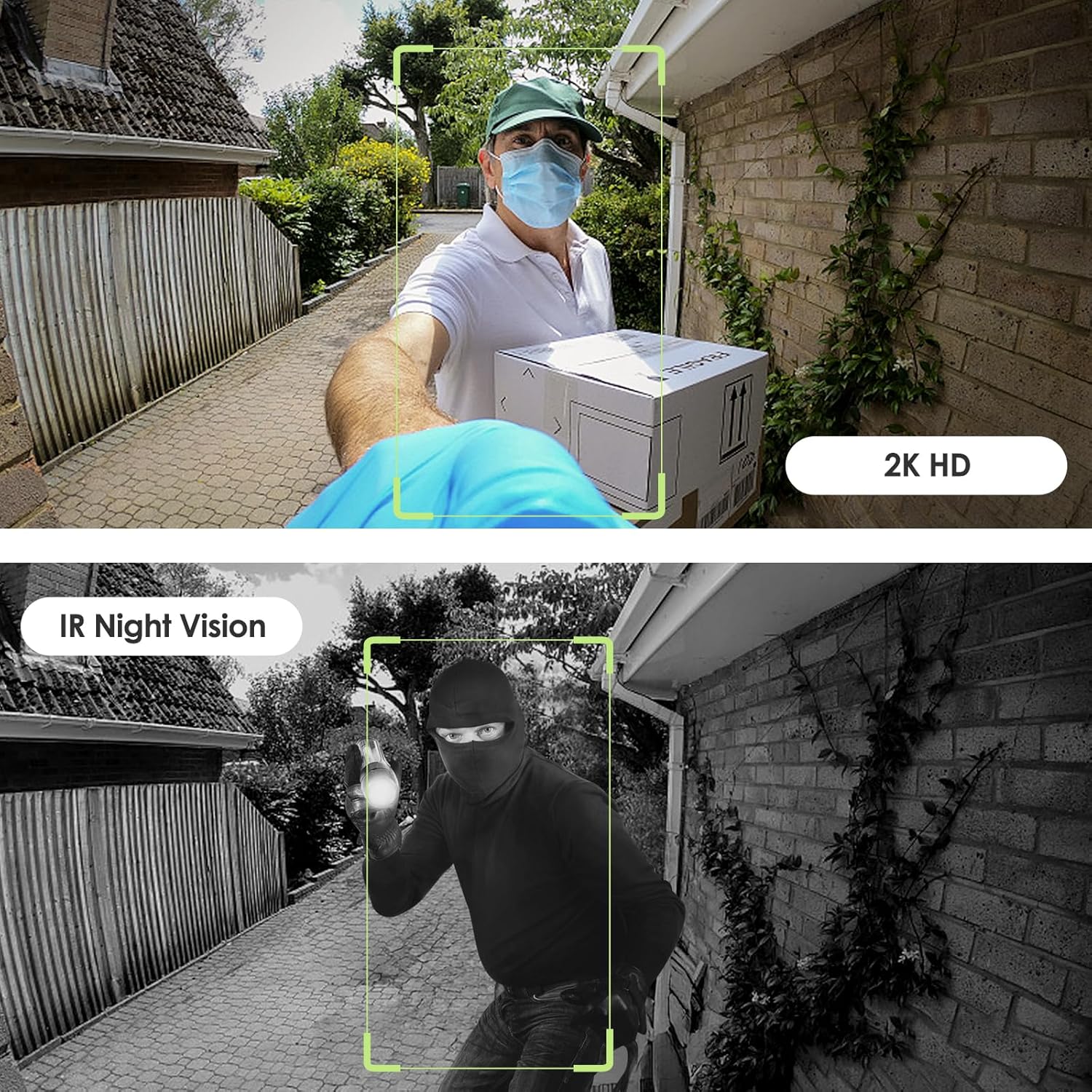
Image: Day and night vision capabilities of the MUBVIEW Bell J7 doorbell.
Uhifadhi wa Video 5.4
- Kadi ya SD ya Micro: Insert a micro SD card (up to 128GB, not included) into the designated slot for local storage of recorded footage.
- Hifadhi ya Wingu: Enjoy 7-day free cloud loop storage. Optional premium cloud storage plans are available for extended storage and features.

Image: Multiple storage options: local Micro SD card and cloud service.
6. Vipengele
- 2K Full HD Resolution: Hutoa video iliyo wazi na yenye maelezo.
- Lenzi ya Pembe Pana ya 145°: Offers a broad view ya mlango wako.
- Inayotumia Betri: Ensures easy, wire-free installation.
- Muunganisho wa Wi-Fi wa 2.4GHz: Stable and reliable wireless connection.
- Upinzani wa Hali ya Hewa wa IP65: Built to withstand various outdoor conditions (rain, heat, hail, sun, dust).
- Kengele ya Kuzuia Wizi: Siren sounds if the doorbell is tampered na.
- Kibadilisha Sauti: Enhances privacy during two-way audio.
- Pre-Recorded Voice Messages: Respond quickly with custom messages.
- Kushiriki kwa Familia: Supports up to 15 online users and 20 user accounts.
- Utangamano: Inafanya kazi na Alexa na Msaidizi wa Google.

Picha: Juuview of MUBVIEW Bell J7 features.
7. Matengenezo
7.1 Kuchaji Betri
The doorbell is powered by rechargeable batteries. Monitor the battery level through the app and recharge as needed. The battery life can extend up to 180 days on a single charge, depending on activity and settings.
7.2 Kusafisha
Wipe the camera lens and the doorbell's exterior with a soft, damp kitambaa ili kuondoa vumbi na uchafu. Epuka kutumia kemikali kali au vifaa vya kukwaruza ambavyo vinaweza kuharibu kifaa.
7.3 Upinzani wa Hali ya Hewa
MUBVIEW Bell J7 is IP65 weather-resistant, designed to endure various outdoor conditions. However, extreme weather conditions may still impact performance or battery life.

Image: IP65 Weather Resistance of the MUBVIEW Bell J7 doorbell.
8. Utatuzi wa shida
| Suala | Suluhisho linalowezekana |
|---|---|
| Kengele ya mlango haiunganishi kwenye Wi-Fi | Ensure your Wi-Fi is 2.4GHz. Move the doorbell closer to your router during setup. Reset the doorbell and try again. |
| Kengele za mara kwa mara za mwendo wa uwongo | Adjust the motion detection sensitivity in the app. Set custom motion zones to exclude busy areas or moving foliage. |
| Ubora duni wa video | Angalia nguvu ya mawimbi yako ya Wi-Fi katika programu. Hakikisha lenzi ya kamera ni safi na haina vizuizi. |
| Maisha mafupi ya betri | Punguza unyeti wa kugundua mwendo au marudio ya mwangaza wa moja kwa moja view access. Ensure the doorbell is fully charged. |
| Anti-theft alarm not working | Ensure the anti-theft feature is enabled in the app settings. Check if the doorbell is properly seated in its mounting bracket, activating the tampkitufe cha. |
9. Vipimo
- Jina la Mfano: Kengele J7
- Ubora wa Kurekodi Video: 2K
- Teknolojia ya Uunganisho: Waya (Wi-Fi ya 2.4GHz)
- Chanzo cha Nguvu: Battery Powered (3 A batteries included)
- Matumizi ya Ndani/Nje: Nje
- Kiwango cha Upinzani wa Maji: IP65 Inayozuia maji
- Vipengele Maalum: 2-Way Audio, Built-In Light, HD Resolution, Image Sensor, Motion Sensor, Voice Changer, Anti-Theft Alarm
- Vifaa Vinavyolingana: Smartphone (via CloudEdge/MUBVIEW programu)
- Vipimo vya Bidhaa: Inchi 1.37 x 5.27 x 2.2
- Uzito wa Kipengee: 15.4 wakia
10. Udhamini na Msaada
MUBVIEW is committed to providing quality products and customer satisfaction. For any inquiries or support needs, please refer to the following:
- Huduma kwa Wateja: Available via Call Service (9AM-5PM EST) and Online Email.
- Inarudi: 30-day Amazon return policy applies.
- Mipango ya Ulinzi: Mipango ya ulinzi ya hiari ya miaka 2 na miaka 3 inapatikana kwa ununuzi.
For detailed contact information, please visit the official MUBVIEW website or refer to the contact details provided in the product packaging.

Image: MUBVIEW Customer Service details.
Ask a question about this manual
Ask about setup, troubleshooting, compatibility, parts, safety, or missing instructions. Manuals+ will review the question and use this page’s manual context to help answer it.