
1. Utangulizi
The NANLITE Pico Portable LED Fill Light is a compact and versatile lighting tool designed for content creators, photographers, and videographers. Weighing only 130g, this full-color RGB light offers intuitive controls, a bright display, and flexible mounting options, making it ideal for various shooting scenarios from phone photography to live streaming.
2. Ni nini kwenye Sanduku
- Pico Pocket Light x1
- Attachable Magnetic Diffuser x1
- Cold Shoe Adapter x1

Figure 1: Included items with the NANLITE Pico Portable LED Fill Light.
3. Bidhaa Imeishaview
The Pico light features a compact, square design with rounded corners, making it easy to handle and transport. It incorporates a single knob and double button design for intuitive one-handed operation.
3.1 Physical Dimensions and Weight
- Vipimo: inchi 2.82 x 1.33 x 1.33 (milimita 67.3 x 71.6 x 33.7)
- Item Weight: 5.9 ounces (130g)

Figure 2: The compact size of the Pico light, fitting comfortably in one hand.
3.2 Vidhibiti na Maonyesho
The device features a 1.28-inch round color screen that displays all essential parameters clearly. Control is managed via a multi-function knob and two buttons, allowing for quick adjustments and mode switching.

Kielelezo 3: Kina view of the intuitive round display screen.
Chaguzi 3.3 za Kuweka
The Pico light is equipped with a versatile U-shaped frame that includes a magnetic base and a 1/4"-20 mounting thread. This allows for attachment to various surfaces and accessories.
Figure 4: Magnetic base and 1/4"-20 mount for flexible positioning.
3.4 Adjustable U-Frame
The U-shaped frame allows for stepped adjustment in 30° increments, providing 12 pitch adjustment angles for flexible light positioning.
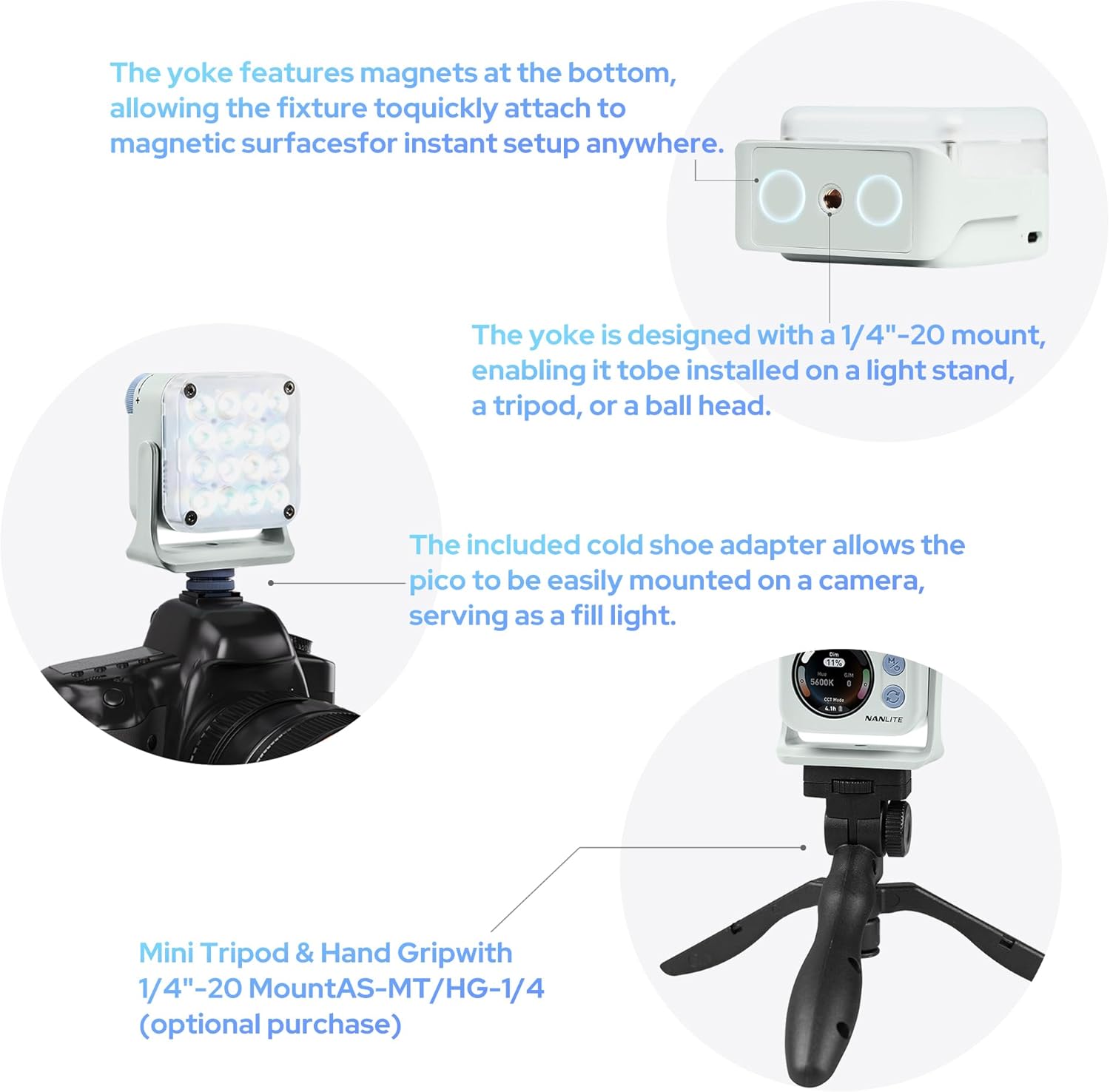
Figure 5: Flexible U-frame with 12 pitch adjustment angles.
4. Kuweka
4.1 Kuchaji Kifaa
The Pico light has a built-in 1500mAh lithium battery. Connect a USB-C cable (not included) to the USB-C port on the side of the device to charge. The screen will display the charging status and estimated remaining runtime.
4.2 Attaching the Diffuser
The included magnetic diffuser can be easily attached to the front of the light. It snaps securely into place, softening the light output.
4.3 Kuweka Nuru
- Adapta ya Viatu Baridi: Attach the cold shoe adapter to the 1/4"-20 thread on the U-frame, then slide it onto a camera's hot shoe or a cold shoe mount on a rig.
- Kitengo cha Tatu/Kituo Kinachobebeka: Directly mount the Pico light onto any tripod or light stand with a 1/4"-20 screw.
- Kiambatisho cha Sumaku: Utilize the magnetic base of the U-frame to attach the light to any metallic surface.

Figure 6: Charging port, physical controls, and battery life display.
5. Maagizo ya Uendeshaji
5.1 Kuwasha / Kuzima
To power on the Pico light, press and hold the 'M' (Mode/Power) button for a few seconds, then rotate the large dial to confirm. To power off, press and hold the 'M' button again.
5.2 Navigating Menus and Adjusting Settings
- Kitufe cha Hali (M): Short press to cycle through the main operating modes: CCT Mode, HSI Mode, Effect Mode, and Settings.
- Switch Button (Circular Arrows): In each mode, short press this button to switch between different adjustable parameters (e.g., Dim, CCT, G/M in CCT Mode; Hue, Saturation, Intensity in HSI Mode).
- Piga simu: Rotate the large dial to adjust the value of the currently selected parameter.
5.3 Hali ya CCT (Joto la Rangi Linalohusiana)
In CCT Mode, you can adjust the color temperature from 2700K (warm) to 7500K (cool) and fine-tune the green/magenta balance (G/M) to match ambient lighting or achieve specific creative looks. The dimming percentage can also be adjusted from 0-100%.
5.4 HSI Mode (Hue, Saturation, Intensity)
HSI Mode allows for full-color control. Adjust the Hue (0-360°) to select any color in the spectrum, Saturation (0-100%) to control the color's intensity, and Dimming (0-100%) for overall brightness.
5.5 Athari Modi
The Pico light includes 14 built-in special effects to enhance your creative projects. These effects include: Hue Loop, CCT Flash, Hue Flash, CCT Pulse, Hue Pulse, Storm, Police Car, TV, Paparazzi, Candle/Fire, Disco, Bad Bulb, Fireworks, and Explosion. Use the control dial to select and adjust parameters for each effect.
5.6 Udhibiti wa Programu (Bluetooth)
The Pico light supports Bluetooth connectivity, allowing you to control all settings and modes remotely via the NANLINK app on your smartphone. This is particularly useful for adjusting the light when it's placed in hard-to-reach locations or for synchronizing multiple Pico lights.
6. Vipengele
- Kali Sana na Nyepesi: Weighs only 130g, easily fits into a pocket for on-the-go shooting.
- Vidhibiti Intuitive: Single knob and double button design for effortless one-handed parameter adjustment.
- Onyesho Wazi: 1.28-inch round color screen for clear and intuitive parameter display.
- Maisha marefu ya Betri: Built-in 1500mAh lithium battery provides 1.3 to 6.5 hours of runtime depending on brightness.
- Kuweka Rahisi: U-shaped frame with magnetic base and 1/4"-20 thread, offering 12 pitch adjustment angles.
- High Illumination: Delivers up to 4211 lux at 0.3m/5600K (bare light).
- Magnetic Diffuser: Standard inclusion for instant soft light.
- Full Color & Effects: 36,000 rich colors and 14 special effects for creative lighting.
- Professional Color Reproduction: High CRI (Average 95) and TLCI (Average 95) for accurate colors.

Figure 7: High illumination output of the Pico light.

Figure 8: Magnetic diffuser for soft light in a second.

Figure 9: 36,000 colors for diverse lighting needs.

Figure 10: 14 built-in effects to unlock creativity.

Figure 11: Professional-grade color reproduction for accurate lighting.
7. Matengenezo
- Kusafisha: Use a soft, dry cloth to clean the exterior of the light. Avoid using harsh chemicals or abrasive materials.
- Hifadhi: Hifadhi taa mahali penye baridi, pakavu mbali na jua moja kwa moja na joto kali.
- Utunzaji wa Betri: Kwa muda bora wa matumizi ya betri, chaji kifaa mara kwa mara na epuka kukitoa kikamilifu kwa muda mrefu.
8. Utatuzi wa shida
- Mwanga hauwashi: Ensure the battery is charged. Press and hold the 'M' button, then rotate the dial to confirm power-on.
- Betri haitozi: Check the USB-C cable and power adapter. Ensure they are properly connected and functional.
- Matatizo ya muunganisho wa programu: Reset Bluetooth on the device via the settings menu and restart the NANLINK app. Ensure the device is within Bluetooth range.
- Inaccurate color output: Perform a factory reset via the settings menu or recalibrate using the NANLINK app.
9. Vipimo
| Sifa | Thamani |
|---|---|
| Vipimo vya Bidhaa | Inchi 2.82 x 1.33 x 1.33 |
| Uzito wa Kipengee | 5.9 wakia |
| Nambari ya mfano wa bidhaa | Pico Light |
| Betri | Betri 1 za Lithium Ion zinahitajika. |
| Chapa | NANLITE |
| Teknolojia ya Uunganisho | Bluetooth |
| Kiunzi cha vifaa | USB Aina C |
10. Udhamini na Msaada
For warranty information and technical support, please refer to the official NANLITE webtovuti au wasiliana na huduma kwa wateja wao. Hifadhi risiti yako ya ununuzi kwa madai ya udhamini.
Webtovuti: www.nanlite.com
Huduma kwa Wateja: Rejelea sehemu ya mawasiliano kwenye afisa webtovuti kwa maelezo ya usaidizi wa kikanda.


