
Utangulizi
Thank you for choosing the Fisher Pro Active Noise Cancelling Headphones. This manual provides essential information for setting up, operating, and maintaining your headphones. Please read it thoroughly to ensure optimal performance and longevity of your device.
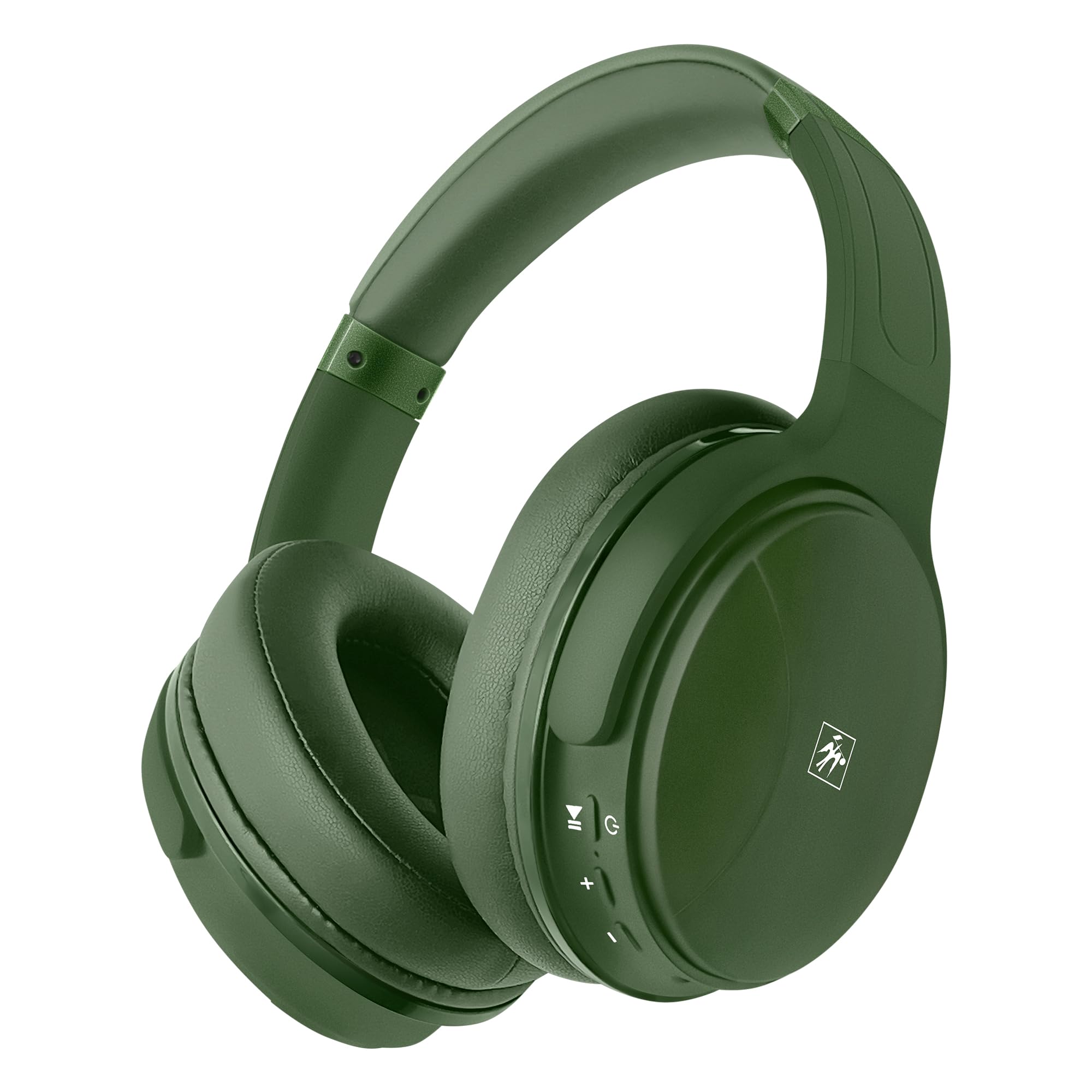
Picha: Mbele view of the Fisher Pro Active Noise Cancelling Headphones in dark green.
Yaliyomo kwenye Kifurushi
Hakikisha bidhaa zote zipo kwenye kifurushi:
- Fisher Pro Active Noise Cancelling Headphones
- Kebo ya Kuchaji ya USB-C
- 3.5mm Stereo AUX Cable
- Mwongozo wa Mtumiaji (hati hii)
- Kadi ya Udhamini
Vidhibiti na Vipengele
Familiarize yourself with the headphone controls and key features:

Image: Right earcup showing control buttons for power, volume, and ANC.
- Kitufe cha Nguvu: Bonyeza na ushikilie ili kuwasha/kuzima.
- Kiasi Juu / Wimbo Ufuatao: Bonyeza kwa muda mfupi ili kuongeza sauti, bonyeza kwa muda mrefu kwa wimbo unaofuata.
- Kiasi cha chini / Wimbo uliotangulia: Bonyeza kwa muda mfupi ili kupunguza sauti, bonyeza kwa muda mrefu kwa wimbo uliopita.
- Kitufe cha kazi nyingi (MFB): Cheza/simamisha muziki, jibu/maliza simu, washa msaidizi wa sauti.
- Kitufe cha ANC: Washa/kuzima Ufutaji wa Kelele Inayotumika.
- Bandari ya USB-C: Kwa kuchaji vichwa vya sauti.
- Jack ya Sauti ya 3.5mm: Kwa uunganisho wa waya.
- Maikrofoni: Kwa simu zisizo na mikono.

Picha: Juuview of headphone features including Active Noise Cancellation, 16-hour battery life, voice assistant support, premium sound, device compatibility, foldable design, adjustable headband, easy-access buttons, hands-free microphone, and comfort cushions.
Sanidi
1. Kuchaji Headphones
Kabla ya matumizi ya kwanza, chaji vipokea sauti vya masikioni kikamilifu.
- Connect the provided USB-C charging cable to the headphone's USB-C port.
- Unganisha ncha nyingine ya kebo kwenye chanzo cha umeme cha USB (km, adapta ya ukutani, mlango wa USB wa kompyuta).
- Kiashiria cha LED kitaonyesha hali ya kuchaji (km, nyekundu kwa kuchaji, bluu kwa kuchajiwa kikamilifu).
A full charge provides up to 16 hours of playback. Quick charging is supported.

Image: Visual representation of the 16-hour battery life feature.
2. Washa/Zima
- Kuwasha: Press and hold the Power button for approximately 3 seconds until the LED indicator flashes blue.
- Kuzima: Bonyeza na ushikilie kitufe cha Kuwasha kwa takriban sekunde 3 hadi kiashiria cha LED kizime.
3. Kuoanisha Bluetooth
Pair your headphones with a Bluetooth-enabled device:
- Hakikisha vipokea sauti vya masikioni vimezimwa.
- Press and hold the Power button for 5-7 seconds until the LED indicator flashes red and blue alternately, indicating pairing mode.
- Kwenye kifaa chako (smartphone, kompyuta ndogo, kompyuta kibao), washa Bluetooth na utafute vifaa vinavyopatikana.
- Select "Fisher Pro" from the list of devices.
- Mara baada ya kushikamana, kiashiria cha LED kitaangaza bluu polepole.
Vipokea sauti vya masikioni vitajaribu kuunganisha tena kiotomatiki kwenye kifaa cha mwisho kilichounganishwa vikiwa vimewashwa.

Image: Illustration showing the headphones' compatibility with various devices via Bluetooth 5.3.
4. Muunganisho wa Waya (Njia ya AUX)
Use the included 3.5mm AUX cable for a wired connection:
- Plug one end of the 3.5mm AUX cable into the headphone's audio jack.
- Plug the other end into your audio source's 3.5mm audio output.
- The headphones will automatically switch to AUX mode. Bluetooth functionality is disabled in this mode.
Maagizo ya Uendeshaji
1. Kufuta Kelele Inayotumika (ANC)
The Fisher Pro headphones feature Active Noise Cancellation to reduce ambient sounds.
- To Activate/Deactivate ANC: Press the dedicated ANC button. The LED indicator for ANC will illuminate when active.

Image: Diagram illustrating how Active Noise Cancellation works by generating anti-phase sound waves to cancel ambient noise.
2. Uchezaji wa Muziki
- Cheza/Sitisha: Bonyeza MFB mara moja.
- Wimbo Ufuatao: Bonyeza kitufe cha Kuongeza Sauti kwa muda mrefu.
- Wimbo Uliopita: Bonyeza kitufe cha Kupunguza Sauti kwa muda mrefu.
- Kiasi Juu: Bonyeza kwa kifupi kitufe cha kuongeza sauti.
- Punguza sauti: Bonyeza kwa kifupi kitufe cha Kupunguza Sauti.
3. Usimamizi wa Simu
- Jibu/Maliza Simu: Bonyeza MFB mara moja.
- Kataa Simu: Bonyeza na ushikilie MFB kwa sekunde 2.
- Piga tena Nambari ya Mwisho: Bonyeza MFB mara mbili.

Image: Icon indicating the presence of a hands-free microphone for calls.
4. Msaidizi wa Sauti
Activate your device's voice assistant (Siri, Google Assistant, etc.):
- Washa Msaidizi wa Sauti: Bonyeza mara tatu MFB.
Matengenezo
Ili kuhakikisha uimara na utendaji bora wa vipokea sauti vyako vya masikioni, fuata miongozo hii ya matengenezo:
- Kusafisha: Tumia kitambaa laini na kikavu kusafisha vichwa vya sauti. Usitumie visafishaji vya abrasive au vimumunyisho.
- Hifadhi: Wakati haitumiki, hifadhi vipokea sauti vya masikioni mahali penye baridi, pakavu, mbali na jua moja kwa moja na halijoto kali. Muundo unaoweza kukunjwa huruhusu kuhifadhi kompakt.
- Epuka unyevu: Usiweke vichwa vya sauti kwenye maji au unyevu kupita kiasi.
- Kushughulikia kwa Uangalifu: Epuka kudondosha au kuelekeza vipokea sauti vinavyobanwa kichwani kwenye athari kali.

Image: Detail of the earcup, showing the comfortable memory foam cushions and foldable design for easy storage.
Kutatua matatizo
Ikiwa utapata shida na vipokea sauti vyako vya sauti, rejelea suluhisho zifuatazo za kawaida:
| Tatizo | Suluhisho linalowezekana |
|---|---|
| Vipokea sauti vya masikioni havitawashwa. | Hakikisha vipokea sauti vya masikioni vimechajiwa kikamilifu. Unganisha kwenye chanzo cha umeme kwa kutumia kebo ya USB-C. |
| Haiwezi kuoanisha kupitia Bluetooth. | Ensure headphones are in pairing mode (flashing red/blue). Turn off and on Bluetooth on your device. Move closer to the device. |
| Hakuna sauti au sauti ya chini. | Check volume levels on both headphones and connected device. Ensure headphones are properly paired or AUX cable is fully inserted. |
| ANC haifanyi kazi ipasavyo. | Ensure ANC is activated via the ANC button. Adjust headphone fit to ensure a good seal around your ears. |
| Maikrofoni haifanyi kazi. | Ensure headphones are connected via Bluetooth (microphone functionality is not available in AUX mode). Check device settings for microphone input. |
Vipimo
| Kipengele | Maelezo |
|---|---|
| Jina la Mfano | SBHP550ADG |
| Teknolojia ya Uunganisho | Waya (Bluetooth 5.3), Inayotumia Waya (3.5mm AUX) |
| Toleo la Bluetooth | 5.3 |
| Udhibiti wa Kelele | Kufuta Kelele Inayotumika (ANC) |
| Aina ya Kiendesha Sauti | Kiendeshi Kinachobadilika, 40mm |
| Majibu ya Mara kwa mara | 15Hz - 20kHz |
| Impedans | 32 ohm |
| Maisha ya Betri | Hadi saa 16 |
| Kuchaji Bandari | USB-C |
| Maikrofoni | Imeundwa ndani kwa ajili ya simu zisizo na mikono |
| Njia ya Kudhibiti | Gusa/Kifungo |
| Umbo la sikio | Zaidi ya Sikio |
| Vipimo | Inchi 8.1 x 7.5 x 3.15 |
| Uzito wa Kipengee | 6.6 wakia |
| Nyenzo | Plastiki |

Picha: Kina view of the 40mm Hi-Res Audio driver, responsible for clear and immersive sound.
Udhamini na Msaada
Taarifa ya Udhamini
Your Fisher Pro Active Noise Cancelling Headphones come with a limited warranty. Please refer to the included Warranty Card for detailed terms and conditions, including coverage period and how to make a claim.
Usaidizi wa Wateja
For technical assistance, troubleshooting beyond this manual, or warranty inquiries, please contact Fisher customer support. Contact details can be found on the Warranty Card or the official Fisher webtovuti.