Utangulizi
This manual provides essential information for setting up, operating, maintaining, and troubleshooting your Thunderobot Zero 18 Pro 5070 Ti Gaming Laptop. Please read this guide thoroughly to ensure optimal performance and longevity of your device.
Ni nini kwenye Sanduku
Baada ya kufungua, thibitisha kuwa vipengee vyote vilivyoorodheshwa hapa chini vipo:
- THUNDEROBOT Zero Laptop
- Adapta ya Nguvu
- Mwongozo wa Mtumiaji (hati hii)
- Kadi ya Udhamini
If any items are missing or damaged, contact your retailer or Thunderobot customer support immediately.
Sanidi
Kuwasha kwa Awali
- Connect the power adapter to the laptop's power input port and then to a wall outlet.
- Fungua kifuniko cha laptop.
- Bonyeza kitufe cha kuwasha/kuzima ili kuwasha kompyuta ya mkononi.
- Fuata maagizo kwenye skrini ili kukamilisha usanidi wa Nyumbani wa Windows 11.
Kuunganisha Pembeni
Utilize the available ports to connect external devices such as a mouse, keyboard, external display, or other accessories. Refer to the "Connectivity (Ports)" section for port details.
Maagizo ya Uendeshaji
Washa/Zima
- To power on: Press the power button located on the keyboard deck.
- To shut down: Click the Start button, then Power, and select "Shut down".
- To restart: Click the Start button, then Power, and select "Restart".
- To sleep: Close the laptop lid or click the Start button, then Power, and select "Sleep".
Keyboard and RGB Lighting
The laptop features a full-size keyboard with per-key customizable RGB backlighting and a dedicated numeric keypad.
- Per-Key RGB Backlight: Customize individual key lighting through the AI Intelligent Control Center software.
- Funguo za Utendakazi: Tumia Fn key in combination with other keys for various functions (e.g., volume control, screen brightness, keyboard backlight adjustment).
- Performance Mode Switching: Dedicated keys (Fn+Space) allow for quick toggling between performance profiles.
- One-Click Cooling: A dedicated key (often near the numeric keypad) can activate maximum cooling. Ensure cooling mode is exited before using the first three keys to switch modes.
Vipengele vya Kuonyesha
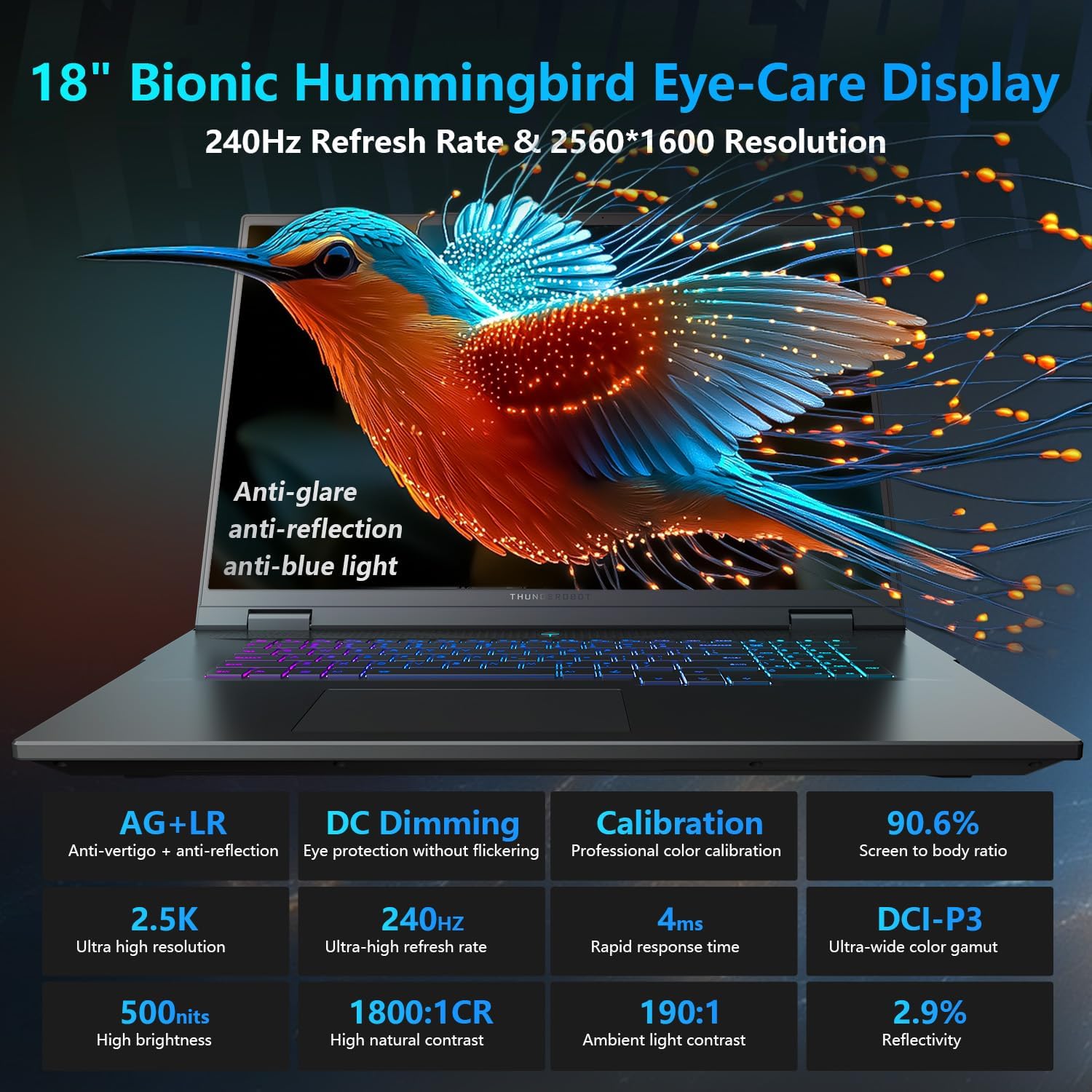
The 18-inch QHD+ (2560x1600) Bionic Hummingbird Eye-Care display offers a 240Hz refresh rate and 4ms response time for clear and fluid visuals. It includes anti-glare, anti-reflection, and anti-blue light technologies for eye comfort.

Connectivity (Ports)
The laptop is equipped with various ports for extensive connectivity:
- 3 x Superspeed USB Type-A ports
- 2 x Superspeed USB Type-C ports (including Thunderbolt 5 support)
- 1 x HDMI port (HDMI 2.1)
- 1 x RJ-45 Ethernet port
- Lango 1 la Sauti (3.5mm)
- Kisomaji cha Kadi ya SD ya UHS-II
- Wi-Fi 6E for high-speed wireless internet
- Bluetooth for wireless peripheral connections

Mfumo wa kupoeza
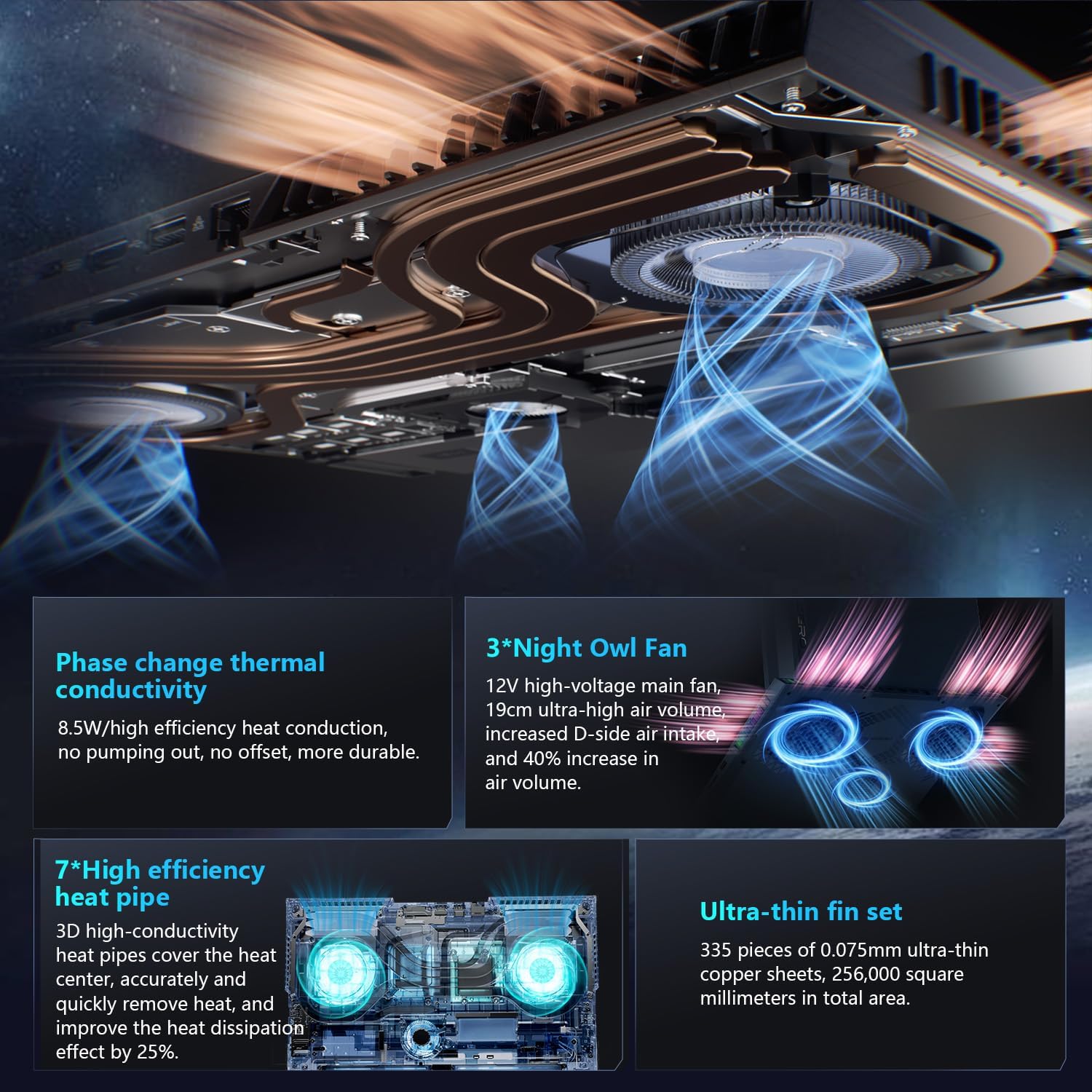
The advanced cooling system features 3 Night Owl fans, 7 high-efficiency heat pipes, and 338 ultra-thin copper fins to ensure optimal thermal management during intensive use, allowing for 270W super performance release.
AI Intelligent Control Center
The AI Intelligent Control Center software allows for comprehensive system management, including performance tuning, intelligent light adjustment, and personalized customization. This includes monitoring CPU/GPU temperatures and fan speeds.
- Urekebishaji wa Utendaji: Adjust power settings for quiet, balanced, or turbo modes.
- Intelligent Light Adjustment: Customize keyboard, strip, and logo RGB lighting effects.
- Ufuatiliaji wa Mfumo: View real-time CPU and GPU status.
Note: System mode switching in Control Center requires the device to be connected to a power source.
Matengenezo
Kusafisha Laptop yako
- Skrini: Tumia kitambaa laini kisicho na pamba chepesi dampimefungwa kwa maji au kisafishaji skrini. Epuka kemikali kali.
- Kibodi na Chassis: Tumia kitambaa laini kuifuta nyuso. Kwa vumbi kwenye nyufa, tumia hewa iliyoshinikwa.
- Mahali: Periodically clean the cooling vents with compressed air to prevent dust buildup, which can affect performance.
Utunzaji wa Betri
- Epuka kutoa betri kikamilifu mara kwa mara.
- Hifadhi kompyuta ndogo mahali penye baridi, kavu ikiwa haitumiki kwa muda mrefu.
- For optimal battery health, avoid extreme temperatures.
Sasisho za Programu
Regularly check for and install operating system updates (Windows Update) and driver updates (via Thunderobot's official website or the AI Intelligent Control Center) to ensure system stability and performance.
Kutatua matatizo
| Tatizo | Sababu inayowezekana | Suluhisho |
|---|---|---|
| Laptop haiwashi. | Hakuna umeme, betri iliyotoka, au tatizo la vifaa. |
|
| Skrini ni tupu au nyeusi. | Mipangilio ya maonyesho, kifuatiliaji cha nje kimeunganishwa, au tatizo la maunzi. |
|
| Overheating wakati wa matumizi. | Blocked vents, high performance settings, or dust buildup. |
|
| Matatizo ya muunganisho wa Wi-Fi. | Wi-Fi imezimwa, matatizo ya kiendeshi, au matatizo ya kipanga njia. |
|
For further assistance, please contact Thunderobot customer support.
Vipimo
| Kipengele | Maelezo |
|---|---|
| Jina la Mfano | Zero 18 Pro |
| Kichakataji | Intel Core Ultra 9 275HX (24 Cores, 24 Threads, up to 5.40GHz) |
| Michoro | NVIDIA GeForce RTX 5070 Ti (8 GB GDDR6 Dedicated) |
| RAM | GB 32 DDR5 (4800 MHz) |
| Hifadhi | 2 TB PCIe M.2 SSD |
| Onyesho | 18-inch QHD+ (2560x1600) 240Hz Bionic Hummingbird Eye-Care Display |
| Mfumo wa Uendeshaji | Windows 11 Nyumbani |
| Muunganisho | Wi-Fi 6E, Bluetooth, 3x USB-A, 2x USB-C (Thunderbolt 5), HDMI 2.1, RJ-45, Audio Port |
| Kibodi | Per-Key RGB Backlit, Numeric Keypad |
| Vipimo (LxWxH) | Inchi 16.04 x 11.78 x 1.41 |
| Uzito wa Kipengee | Pauni 15 |
| Chanzo cha Nguvu | AC na Betri |
Udhamini na Msaada
Every Thunderobot laptop includes a dhamana ya miezi 12, offering expert support, thorough diagnostics, and genuine parts if a repair is needed. Additionally, a udhamini wa siku 90 is provided on all warranty replacement parts, ensuring hassle-free repairs. Your complete satisfaction is our commitment.
For technical support, warranty claims, or service inquiries, please visit the official Thunderobot webtovuti au wasiliana na idara yao ya huduma kwa wateja. Weka risiti yako ya ununuzi na nambari ya serial karibu kwa huduma ya haraka zaidi.