
1. Utangulizi
This manual provides instructions for the Generic universal replacement remote control, designed for use with a wide range of Samsung Smart TVs. This infrared remote offers a convenient and direct replacement for your original Samsung TV remote, requiring no complex setup or programming.
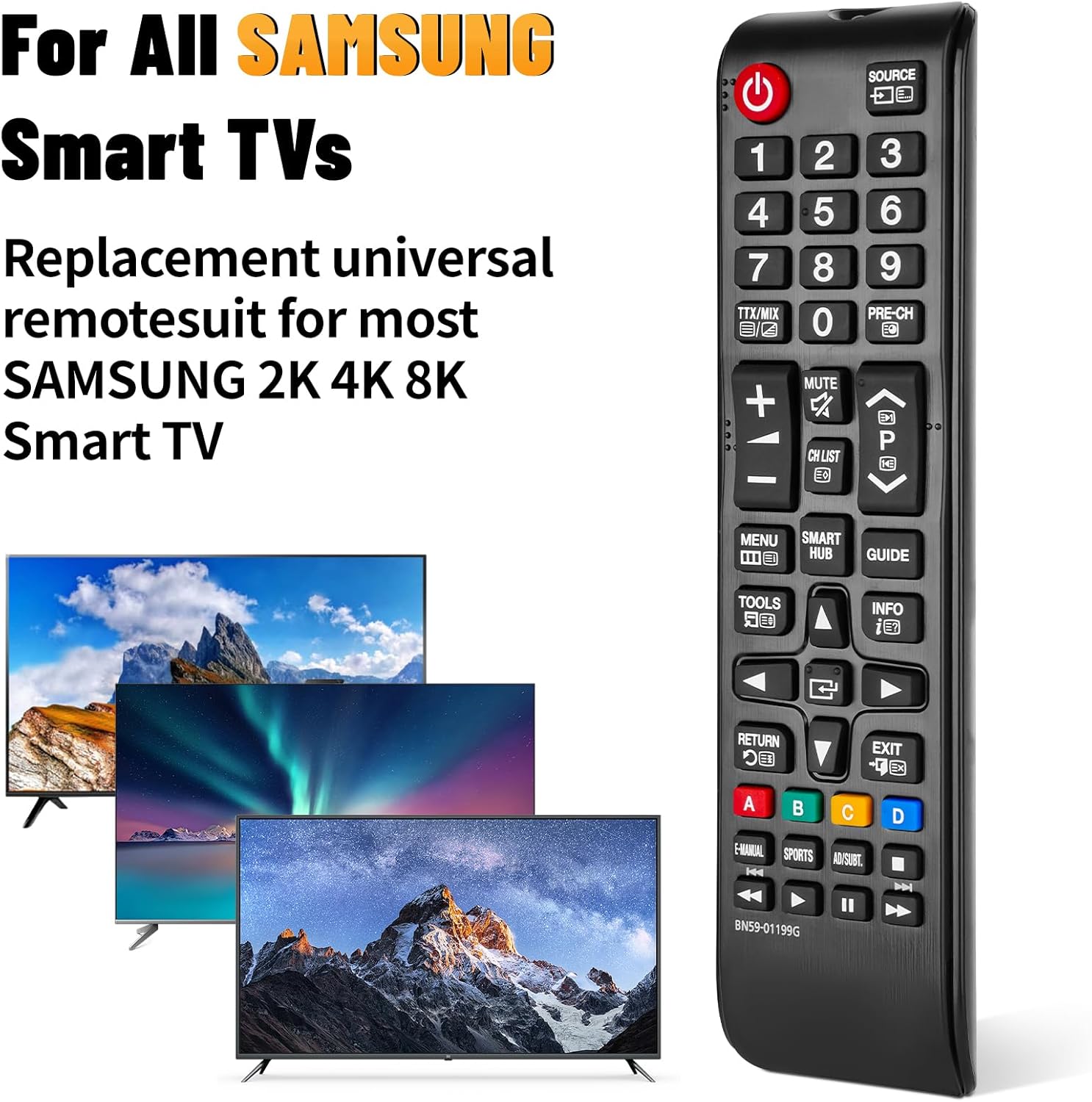
Image: The universal remote control compatible with various Samsung Smart TV models.
2. Kuweka
2.1 Ufungaji wa Betri
To begin using your remote control, you must first install two AAA batteries. Batteries are not included with this product.
- Tafuta kifuniko cha sehemu ya betri nyuma ya kidhibiti cha mbali.
- Slide the cover downwards or press the release tab (if present) to remove it.
- Ingiza betri mbili za AAA, hakikisha vituo chanya (+) na hasi (-) vinapatana ipasavyo na alama zilizo ndani ya chumba.
- Badilisha kifuniko cha sehemu ya betri kwa kukirudisha katika nafasi yake hadi kibofye vizuri.

Image: Step-by-step guide for installing AAA batteries into the remote control.
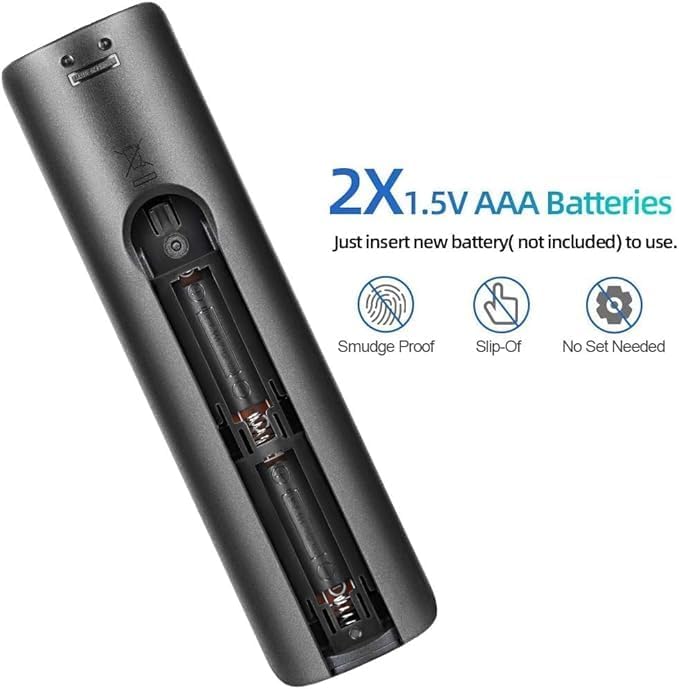
Picha: Kina view of the battery compartment, showing correct battery placement.
Kumbuka: Betri hazijajumuishwa.
2.2 Matumizi ya Awali
This remote control is designed for immediate use with compatible Samsung Smart TVs. No additional programming, pairing, or setup is required after battery installation. Simply point the remote at your TV and begin operating it.
3. Maagizo ya Uendeshaji
The remote control provides full functionality for your Samsung Smart TV. Ensure there are no obstructions between the remote and the TV's infrared receiver for optimal performance.
3.1 Vipengee vya Kitufe Zaidiview
Refer to the image below for a visual guide to the remote's buttons and their primary functions:

Picha: Mbele, pembeni, na nyuma views of the remote control, highlighting its layout and dimensions.
- Kitufe cha Nguvu (⏻): Huwasha au kuzima TV.
- Kitufe Chanzo: Huchagua vyanzo vya ingizo (HDMI, AV, nk.).
- Vifungo vya Nambari (0-9): Uteuzi wa moja kwa moja wa njia.
- TTX/MIX, PRE-CH: Teletext and previous channel functions.
- Sauti Juu/Chini (+/-): Adjusts TV volume.
- Kitufe cha Kunyamazisha: Mutes or unmutes TV audio.
- Channel Up/Down (CH LIST, P): Hubadilisha vituo vya televisheni.
- Kitufe cha Menyu: Hufikia menyu kuu ya TV.
- Kitufe cha Smart Hub: Hufungua Kitovu Mahiri cha Samsung kwa programu na huduma za utiririshaji.
- Kitufe cha Mwongozo: Huonyesha mwongozo wa programu ya kielektroniki.
- Tools Button: Hufikia mipangilio ya haraka au menyu ya zana.
- Kitufe cha Taarifa: Inaonyesha taarifa kuhusu programu ya sasa au ingizo.
- Pedi ya Urambazaji (Juu/Chini/Kushoto/Kulia/Ingiza): Husogeza menyu na kuchagua chaguo.
- Kitufe cha Kurudisha: Hurudi kwenye skrini au menyu iliyotangulia.
- Kitufe cha Kuondoka: Hutoka kwenye menyu ya sasa au programu.
- Vifungo vya Rangi (A, B, C, D)Utendaji hutofautiana kulingana na mfumo wa TV na programu.
- E-MANUAL, SPORTS, AD/SUBT: Accesses e-manual, sports mode, or audio description/subtitle options.
- Playback Controls (Play, Pause, Stop, Fast Forward, Rewind): Hudhibiti uchezaji wa vyombo vya habari.
3.2 Masafa ya Uendeshaji
The remote control operates effectively within a range of up to 10 meters (approximately 32 feet) from the television. Ensure a clear line of sight between the remote and the TV's infrared sensor for optimal performance.
4. Utangamano
This universal replacement remote control is compatible with a wide range of Samsung Smart TVs, including:
- All Samsung LED, QLED, SUHD, UHD, HDR, LCD, Frame, Curved, Solar HDTV, 3D, 4K, and 8K Smart TVs.
- Compatible with Samsung TV series from 2017, 2018, 2019, 2020, 2021, and 2022.
It serves as a replacement for many original Samsung remote models, including but not limited to:
- BN59-01199G, BN59-01312G, BN59-01310A, BN59-01266A, BN59-01259E, BN59-01330A, BN59-01329A, BN59-01298A, BN59-01298H, BN59-01292A, BN59-01241A, BN59-01293A, BN59-01357A, BN59-01199F, BN59-01301A, BN59-01289A.
5. Matengenezo
- Kusafisha: Use a soft, dry cloth to clean the remote control. Avoid using liquid cleaners or abrasive materials, as they may damage the surface or internal components.
- Ubadilishaji wa Betri: Replace batteries when the remote's response becomes sluggish or it stops functioning. Always replace both batteries at the same time with new AAA alkaline batteries.
- Hifadhi: If the remote will not be used for an extended period, remove the batteries to prevent leakage and potential damage. Store the remote in a cool, dry place.
- Epuka kujiweka hatarini: Do not expose the remote control to direct sunlight, extreme temperatures, high humidity, or water.
6. Utatuzi wa shida
- Kidhibiti cha Mbali hakijibu:
- Angalia kama betri zimeingizwa kwa usahihi na polarity sahihi (+/-).
- Badilisha betri za zamani na betri mpya za alkali za AAA.
- Hakikisha hakuna vizuizi kati ya kidhibiti cha mbali na kitambuzi cha infrared cha TV.
- Thibitisha kuwa kidhibiti cha mbali kimeelekezwa moja kwa moja kwenye TV.
- Masafa Mafupi ya Uendeshaji:
- Badilisha betri na mpya.
- Hakikisha hakuna vyanzo vikali vya mwanga (kama vile mwanga wa jua moja kwa moja au taa za fluorescent zinazoingiliana na kipokezi cha IR cha TV.
- Vifungo Maalum Havifanyi Kazi:
- This remote is a universal replacement. While it covers most functions, some highly specific or advanced features of original remotes might not be directly mapped. Refer to your TV's manual for alternative access to such functions if needed.
7. Vipimo
| Kipengele | Maelezo |
|---|---|
| Chapa | Jenerali |
| Jina la Mfano | BN59-01199G |
| Teknolojia ya Uunganisho | Infrared |
| Vifaa Sambamba | Samsung LCD LED HDTV 3D Curved Frame Solar Smart TVs |
| Idadi ya Juu ya Vifaa Vinavyotumika | 5 |
| Aina ya Kidhibiti | Udhibiti wa Kitufe |
| Kiasi cha Kitufe | 25 |
| Masafa ya Juu | Mita 10 (futi 32) |
| Aina ya Betri | Betri 2 za AAA Alkali (hazijajumuishwa) |
| Vipimo vya Kipengee (L x W x H) | 0.7"Upana x 0.39"Upana x 2.63"Urefu (takriban) |
8. Msaada
For any questions regarding your Generic universal replacement remote control, please contact our customer service. We aim to provide professional after-sale service and will respond to inquiries within 12 hours on working days.
Tafadhali rejelea hati yako ya ununuzi kwa maelezo mahususi ya mawasiliano.


