
1. Utangulizi
The Uniden BEARTRACKER 885 Hybrid CB Radio and Digital Scanner is a versatile communication device designed to keep you informed and connected. This unit combines a full-featured 40-channel CB radio with a digital trunk-tracking scanner, providing access to public safety transmissions across the US and Canada. With integrated GPS for automatic channel selection and a BearTracker Warning System, it ensures you are always aware of nearby police, fire, ambulance, and DOT radio traffic. The device also includes NOAA Weather with Alerts and a noise-canceling microphone for clear communication.
2. Bidhaa Imeishaview
The BEARTRACKER 885 offers dual functionality, allowing seamless switching between CB communication and public safety monitoring. Its robust design and advanced features make it an essential tool for road users.
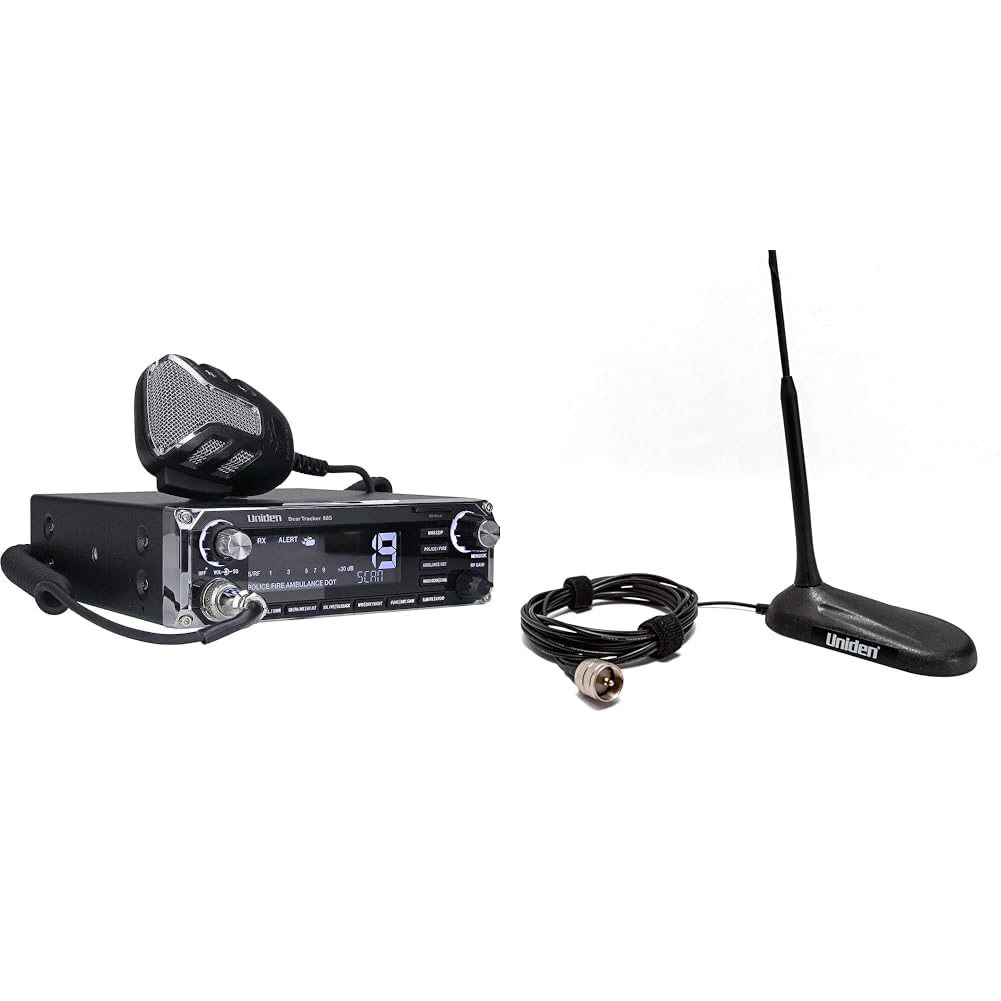
Figure 1: The Uniden BEARTRACKER 885 Hybrid CB Radio and Digital Scanner, shown with its noise-canceling microphone, mounting bracket, power cable, and antenna connector.
Sifa Muhimu:
- Utendaji Mseto: Combines a 40-channel CB radio with a digital trunk-tracking scanner.
- Mfumo wa Onyo wa BearTracker: Alerts you to nearby public safety transmissions (Police, Fire, Ambulance, DOT).
- GPS Iliyounganishwa: Automatically selects nearby public safety channels from a nationwide database.
- NOAA Weather with Alerts: Provides real-time weather information and alerts.
- 7-Color Display: Customizable display for enhanced visibility.
- Maikrofoni ya Kughairi Kelele: Ensures clear transmissions even in noisy environments.
- Mita ya SWR: For precise antenna tuning.
- RF Gain, Mic Gain, PA Mode, Talkback: Comprehensive controls for optimal performance.
Video 1: Video hii inatoa taswira zaidiview of the Uniden BEARTRACKER 885 Hybrid CB Radio and Digital Scanner, highlighting its key components and functionalities.
3. Kuweka
- Kuweka kitengo: Use the included mounting bracket to securely install the BEARTRACKER 885 in your vehicle. Ensure it is placed in a location that does not obstruct your view au kuingilia udhibiti wa gari.
- Muunganisho wa Antena: Connect your CB antenna to the SO-239 antenna connector on the rear of the unit. For optimal performance, use a high-quality 18-inch magnetic mount CB antenna (such as the Uniden 18 Inch Magnetic Mount CB Antenna) and ensure proper SWR calibration.
- Muunganisho wa Nishati: Connect the power cable to a 12V DC power source in your vehicle. Ensure correct polarity (red to positive, black to negative).
- Muunganisho wa Maikrofoni: Plug the noise-canceling microphone into the front panel connector.
- Moduli ya GPS: Connect the GPS module to the designated port. This enables automatic channel selection for the scanner feature.
4. Maagizo ya Uendeshaji
4.1. CB Radio Operation
- Washa/Zima: Turn the VOL/SQL knob clockwise to power on the unit.
- Uteuzi wa Kituo: Use the channel selector knob to choose one of the 40 available CB channels.
- Udhibiti wa Sauti: Adjust the VOL/SQL knob to set the desired listening volume.
- Udhibiti wa Squelch: Rotate the VOL/SQL knob counter-clockwise until background noise disappears to set the squelch level.
- Faida ya RF: Adjust the RF GAIN control to optimize reception sensitivity.
- Faida ya Mic: Use the MIC GAIN control to adjust microphone sensitivity for clear transmissions.
- PA Mode: Switch to PA (Public Address) mode to use an external speaker for public address functionality.
- Talkback: Activate Talkback to monitor your own voice through the radio's speaker during transmission.
- Sambaza: Press and hold the PTT (Push-To-Talk) button on the microphone to transmit. Release to listen.
4.2. Digital Scanner Operation
- Activating Scanner: Press the dedicated scanner button to activate the public safety scanning feature. The scanner operates alongside CB radio features, eliminating the need to switch modes.
- Mfumo wa Onyo wa BearTracker: The system will automatically alert you when nearby public safety transmissions are detected.
- Ujumuishaji wa GPS: The built-in GPS automatically selects and scans relevant public safety channels based on your current location, ensuring you receive local alerts without manual programming.
- Hali ya hewa NOAA: Access NOAA Weather channels and receive alerts for severe weather conditions.
4.3. Mipangilio ya Maonyesho
- 7-Color Display: The display can be customized with 7 different colors for personal preference and optimal visibility in various lighting conditions. Refer to the full user manual for specific instructions on changing display colors.
5. Matengenezo
- Kusafisha: Tumia kitambaa laini na kikavu kusafisha sehemu ya nje ya kifaa. Epuka visafishaji au viyeyusho vyenye kukwaruza.
- Viunganisho: Periodically check all cable connections (antenna, power, microphone, GPS) to ensure they are secure and free from corrosion.
- Ukaguzi wa Antena: Inspect your antenna regularly for any damage or wear, especially if it is a magnetic mount antenna exposed to the elements.
6. Utatuzi wa shida
- Hakuna Nguvu: Check power cable connections, vehicle's fuse box, and ensure the VOL/SQL knob is turned on.
- Poor CB Transmission/Reception: Verify antenna connection, check SWR calibration, adjust RF Gain and Mic Gain. Ensure the antenna is properly tuned for the operating frequency.
- Scanner Not Picking Up Signals: Ensure the GPS module is connected and receiving a signal. Confirm you are in an area with active public safety transmissions.
- Sauti Iliyopotoka: Adjust Mic Gain and RF Gain. Check microphone connection.
7. Vipimo
| Kipengele | Thamani |
|---|---|
| Chapa | Uniden |
| Idadi ya Vituo | 40 |
| Masafa ya Marudio | 26-28 MHz |
| Kiwango cha Upinzani wa Maji | Sio Sugu ya Maji |
| Vifaa Sambamba | CB Radios, CB Antennas, CB Microphones |
| Hesabu ya kitengo | 1.0 Hesabu |
| Itifaki ya Muunganisho | CB |
| Nambari ya Mfano | BEARTRACKER 885 |
8. Udhamini na Msaada
For warranty information, technical support, or further assistance, please refer to the official Uniden website or contact Uniden customer service. Keep your purchase receipt for warranty claims.