
1. Bidhaa Imeishaview
The Hemudu Dual Monitor Articulating Desk Mount Arm Stand (Model HD04W-001P) is designed to enhance your workspace by supporting two computer monitors in a vertical stack configuration. This stand provides ergonomic benefits, helps relieve strain on the neck, back, and shoulders, and optimizes desktop space. It is compatible with a wide range of monitors and offers versatile adjustability for a customized viewuzoefu.
Sifa Muhimu:
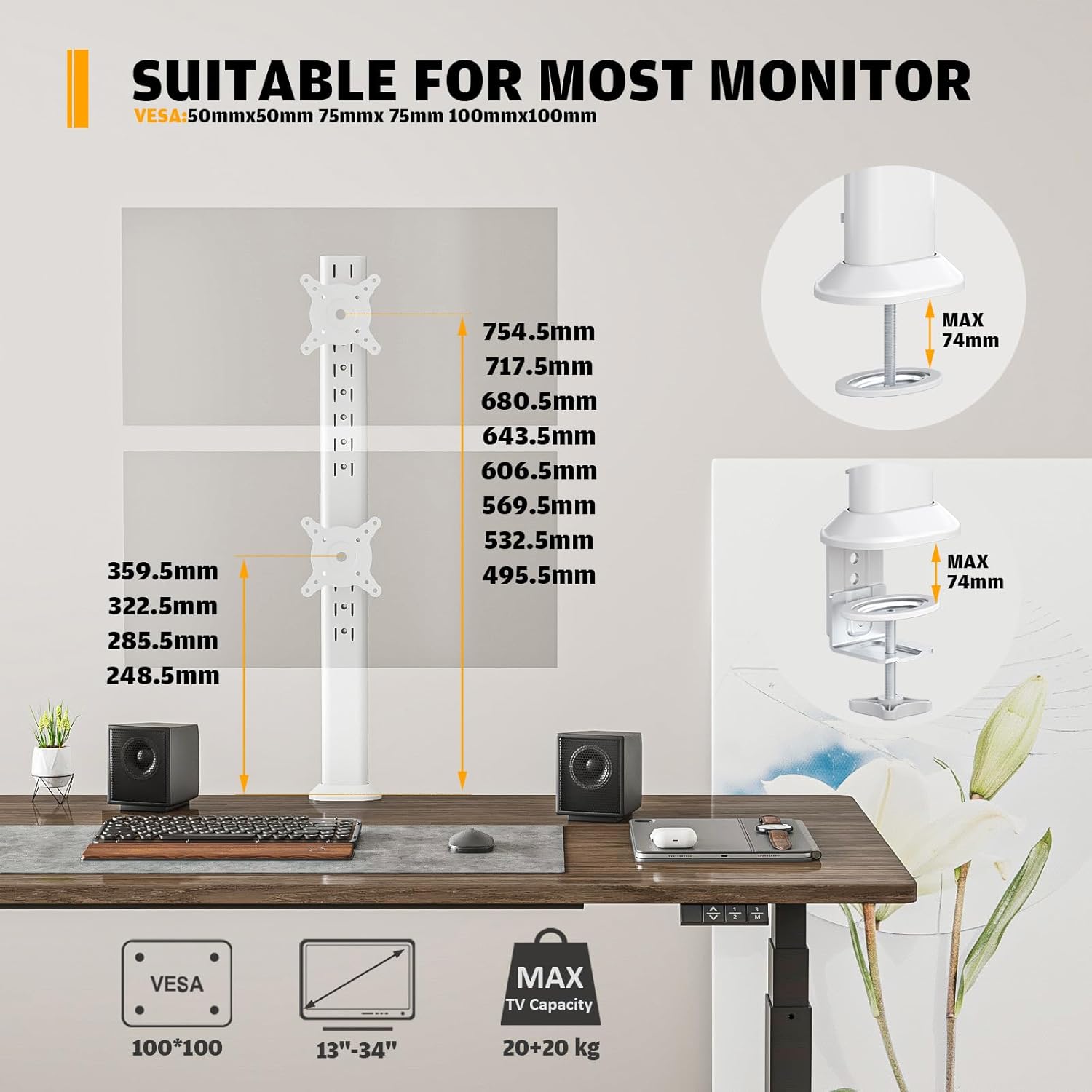
- Screen Compatibility: Supports two screens from 13 to 34 inches, each weighing up to 44 pounds (20 kg).
- Uzingatiaji wa VESA: Compatible with VESA mounting patterns of 75x75mm and 100x100mm.
- Muundo wa Ergonomic: Allows monitors to be raised to an ergonomic height, reducing physical strain.
- Multifunction Adjustments: Offers -15° to +10° tilt, -50° to +50° swivel, 360° rotation, and 4+8 level height adjustments along the central pole.
- Chaguo za Ufungaji: Supports both C-clamp na njia za kuweka grommet.
- Usimamizi wa Cable: Integrated detachable cable clips keep power and AV cables organized.
- Kuhifadhi Nafasi: Holds two monitors on a single stand, freeing up valuable desktop space.

2. Taarifa za Usalama
Please read all instructions carefully before installation and use. Failure to follow these instructions may result in property damage, serious injury, or death. If you do not understand these instructions, or have doubts about the safety of the installation, please contact customer support.
- Uwezo wa Uzito: Usizidi kiwango cha juu cha uzani cha pauni 44 (kilo 20) kwa kila kifaa. Kupakia kupita kiasi kunaweza kusababisha kukosekana kwa utulivu na uwezekano wa kuumia.
- Ukubwa wa Kufuatilia: Ensure your monitors are within the supported size range of 13 to 34 inches.
- Utangamano wa VESA: Verify that your monitors have VESA mounting holes (75x75mm or 100x100mm) before installation.
- Unene wa Dawati: Ensure your desk surface is strong enough to support the combined weight of the stand and monitors. For C-clamp installation, the desk thickness should be within the specified range (typically up to 2.9 inches or 74mm).
- Ufungaji Salama: Always ensure all screws and bolts are securely tightened before placing monitors on the stand.
- Usimamizi wa Cable: Route cables carefully to prevent pinching or snagging, which could damage cables or cause monitors to fall.
- Watoto na Wanyama wa Kipenzi: Keep children and pets away from the monitor stand during installation and adjustment.

3. Yaliyomo kwenye Kifurushi
Please check the package contents against the list below to ensure all components are present and undamaged. If any parts are missing or damaged, please contact customer support.
- Bunge Kuu la Pole
- Monitor VESA Plates (x2)
- C-Clamp Bunge
- Vipengele vya Kuweka Grommet
- Cable Management Sehemu
- Hardware Kit (screws, washers, spacers for VESA mounting)
- Tools (Allen keys, wrench)
- Mwongozo wa Maagizo
4. Kuweka na Kuweka
The Hemudu Dual Monitor Arm Stand offers two primary installation methods: C-clamp and Grommet mounting. Choose the method best suited for your desk.
4.1 Chagua Njia Yako ya Kuweka

4.2 C-Clamp Installation (Method 1)
- Ambatanisha C-clamp msingi hadi chini ya nguzo kuu.
- Weka C-clamp pembeni mwa dawati lako.
- Kaza C-clamp screw until the stand is securely fastened to the desk. Ensure the desk thickness does not exceed 74mm (2.9 inches).
4.3 Grommet Mounting (Method 2)
- If your desk has an existing grommet hole, remove its cover. If not, you may need to drill a hole (consult a professional if unsure).
- Assemble the grommet mount components to the main pole.
- Insert the pole through the grommet hole and secure it from underneath the desk using the provided plate and nut.
4.4 Kuunganisha Vichunguzi
- Attach the VESA plates to the back of your monitors using the appropriate screws, washers, and spacers from the hardware kit. Ensure the VESA pattern matches (75x75mm or 100x100mm).
- Slide the VESA plates with attached monitors onto the mounting brackets on the main pole.
- Secure the monitors to the brackets using the reinforcement knobs or screws as indicated in the diagram.

4.5 Usimamizi wa Cable
Utilize the integrated cable management clips on the main pole to route and organize your monitor cables. This helps maintain a clean and clutter-free workspace.

4.6 Mwongozo wa Video ya Usakinishaji
For a visual guide on the installation process, please refer to the official product video below:
Video 1: Hemudu Dual Monitor Stand Installation Guide. This video demonstrates the various installation methods and features of the monitor arm stand.
5. Uendeshaji na Marekebisho
The Hemudu Dual Monitor Arm Stand offers extensive adjustability to achieve your preferred viewing angles and ergonomic setup.
5.1 Marekebisho ya Urefu
The monitors can be adjusted vertically along the main pole. The stand features 4+8 level height adjustments, allowing you to position each monitor at an optimal height for your comfort.

5.2 Marekebisho ya Tilt
Each monitor can be tilted from -15° to +10°. Use the reinforcement knob on the VESA plate to adjust the tilt angle and then tighten it to secure the position.

5.3 Marekebisho ya Swivel
Monitors can be swiveled -50° to +50° horizontally. This allows for flexible screen sharing or adjusting the viewpembe ya kuingilia bila kusogeza sehemu nzima ya kusimama.

5.4 Marekebisho ya Mzunguko
Monitors can be rotated 360° (portrait to landscape and vice versa) for different viewing orientations. Simply rotate the monitor to the desired position.
6. Matengenezo
Regular maintenance ensures the longevity and optimal performance of your Hemudu Dual Monitor Arm Stand.
- Kusafisha: Futa kibanda kwa kutumia laini, damp kitambaa. Epuka kutumia visafishaji vya abrasive au vimumunyisho ambavyo vinaweza kuharibu umalizio.
- Ukaguzi wa Ugumu: Periodically check all screws and connections, especially the C-clamp/grommet mount and VESA plate screws, to ensure they remain tight. Re-tighten if necessary.
- Ukaguzi wa Cable: Regularly inspect cables for any signs of wear or damage. Replace damaged cables immediately.
7. Utatuzi wa shida
If you encounter any issues with your monitor stand, refer to the following common problems and solutions:
7.1 Monitor Sagging or Not Holding Position
- Sababu: Tilt or swivel tension is too loose.
- Suluhisho: Locate the reinforcement knobs or tension screws on the VESA plate and tighten them until the monitor holds its position securely.
7.2 Stand Feels Unstable
- Sababu: C-clamp or grommet mount is not sufficiently tightened, or desk surface is too thin/weak.
- Suluhisho: Kaza tena C-clamp or grommet mount. Ensure your desk meets the minimum thickness and strength requirements. If using C-clamp, verify the desk thickness is within 74mm.
7.3 Difficulty Adjusting Height
- Sababu: Mounting brackets are too tight on the pole, or debris is obstructing movement.
- Suluhisho: Loosen any screws that secure the mounting brackets to the pole slightly. Clean the pole and bracket channels if any obstruction is visible.
7.4 Monitors Not Aligned
- Sababu: Monitors are not positioned correctly on the VESA plates or the VESA plates are not at the same height on the pole.
- Suluhisho: Adjust the height of each VESA plate independently along the pole. Ensure monitors are centered on their respective VESA plates.
8. Vipimo
| Kipengele | Vipimo |
|---|---|
| Nambari ya Mfano | HD04W-001P |
| Chapa | Hemudu |
| Utangamano wa Ukubwa wa Kichunguzi | 13 to 34 inches (per monitor) |
| Uzito Uwezo | Up to 44 lbs (20 kg) per monitor |
| Utangamano wa VESA | 75x75mm, 100x100mm |
| Pembe ya Kuinamisha | -15 ° hadi +10 ° |
| Pembe ya Kuzunguka | -50 ° hadi +50 ° |
| Mzunguko | 360° (Picha/Mazingira) |
| Marekebisho ya Urefu | 4+8 Level adjustments along the pole |
| Aina ya Kuweka | C-Clamp, Mlima wa Grommet |
| C-Clamp Unene wa Dawati | Max 2.9 inches (74mm) |
| Nyenzo | Aloi ya chuma |
| Rangi | Nyeupe |
9. Udhamini na Msaada
Hemudu products are manufactured with quality and care. This product comes with a standard manufacturer's warranty against defects in materials and workmanship. For specific warranty details, please refer to the product packaging or contact our customer support.
Usaidizi kwa Wateja:
If you have any questions, require assistance with installation, or need to report a missing/damaged part, please contact Hemudu customer support through the retailer's platform or the official Hemudu website. Please have your product model number (HD04W-001P) and purchase information ready when contacting support.