
Utangulizi
Thank you for choosing BUGANI True Wireless Earbuds. This manual provides detailed instructions on how to set up, operate, and maintain your earbuds to ensure the best possible audio experience. Please read this manual carefully before use and keep it for future reference.

Image: BUGANI True Wireless Earbuds and their charging case.
Ni nini kwenye Sanduku
Your BUGANI True Wireless Earbuds package should contain the following items:
- 1 x BUGANI B09 Wireless Earbuds
- 1 x Cable ya kuchaji ya USB-C
- 3 x Different Sizes of Eartips (S, M, L)
- 3 x Different Sizes of Silicone Earwings (S, M, L)
- 1 x Mwongozo wa Mtumiaji (hati hii)
Bidhaa Imeishaview na Sifa Muhimu
The BUGANI B09 earbuds are designed for superior sound and user convenience. Here are some of their main features:
Immersive Sound Quality & Extra Deep Bass
Experience rich, powerful audio with oversized 10mm dynamic drivers. These earbuds deliver enhanced bass, clear trebles, and balanced mids for an immersive listening experience across music, movies, and games.

Picha: Ililipuka view of the earbud, highlighting its internal audio components and dynamic driver for superior sound.
ENC Enhanced Crystal-Clear Calls
Equipped with a BUGANI intelligent noise reduction algorithm and built-in dual microphones, these earbuds precisely pick up your voice while effectively blocking out background noise. This ensures clear communication during calls, video chats, and live sessions.

Image: A woman smiling while wearing the earbuds, illustrating their use for crystal-clear calls with the microphone highlighted.
Extended Playtime & IPX6 Water-Resistant
Enjoy up to 6 hours of listening on a single charge, with the compact charging case providing an additional 3 charges for a total of 24 hours of playtime. The IPX6 water-resistant rating protects your earbuds from sweat, splashes, and light rain, making them ideal for workouts and outdoor activities. Note: Do not submerge in water.

Image: The earbuds in their charging case, illustrating the 24-hour total playtime with the case and 6 hours on a single charge.

Image: A woman exercising, demonstrating the IPX6 waterproof and sweatproof capabilities of the earbuds.
Lightweight & Comfortable Fit
Designed ergonomically, these earbuds ensure comfortable wear for extended periods. They come with three sizes of ear tips and earwings (S, M, L) to help you find the perfect, secure fit for optimal sound performance.

Image: An earbud shown in an ear, alongside various ear tip and earwing sizes to illustrate the customizable and secure fit.
Bluetooth 5.3 and One-Step Pairing
Featuring the latest Bluetooth 5.3 technology, the earbuds offer improved transmission speed and a low-latency listening experience. They automatically connect to your device quickly after the initial pairing, thanks to their memory function.

Image: Earbuds and their charging case positioned near a smartphone and laptop, illustrating the one-step pairing process and wide compatibility.
Sanidi
Kuchaji Vifaa vya masikioni na Kipochi cha Kuchaji
Kabla ya matumizi ya kwanza, chaji kikamilifu vifaa vya sauti vya masikioni na kisanduku cha kuchaji.
- Place the earbuds into the charging case. Ensure they are correctly seated in their respective slots (L for left, R for right).
- Unganisha kebo ya kuchaji ya USB-C kwenye mlango wa kuchaji kwenye kipochi na upande mwingine kwenye adapta ya umeme ya USB (haijajumuishwa) au mlango wa USB wa kompyuta.
- Taa za kiashiria kwenye kisanduku cha kuchaji zitaonyesha hali ya kuchaji. Mara tu zikishachajiwa kikamilifu, taa zitaonyesha kukamilika au kuzimwa.
- Malipo kamili kwa kesi huchukua takriban saa 1.5.
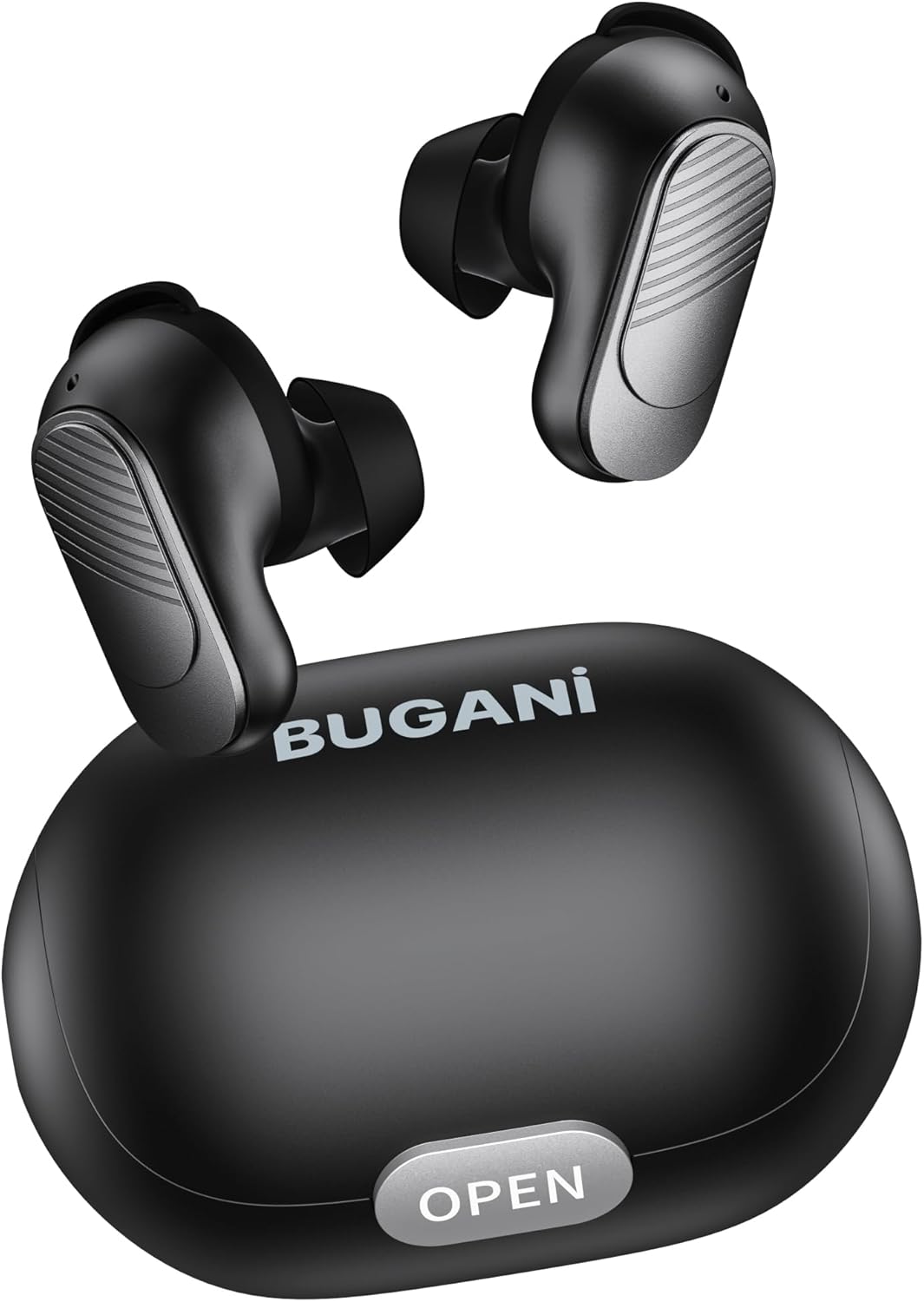
Image: The BUGANI earbuds placed inside their open charging case, ready for charging.
Kuoanisha na Kifaa chako
Fuata hatua hizi kwa ajili ya kuunganisha awali:
- Hakikisha vifaa vya sauti vya masikioni vimechajiwa.
- Fungua kesi ya malipo. Vifaa vya sauti vya masikioni vitawashwa kiotomatiki na kuingia katika hali ya kuoanisha.
- Kwenye simu yako mahiri au kifaa kinachotumia Bluetooth, nenda kwenye mipangilio ya Bluetooth na uwashe Bluetooth.
- Tafuta available devices. Select "BUGANI B09" from the list.
- Ukishaunganisha, utasikia sauti ya uthibitisho, na taa za kiashiria cha vifaa vya masikioni zitabadilika.
- Kwa matumizi yanayofuata, vifaa vya masikioni vitaunganishwa kiotomatiki kwenye kifaa cha mwisho kilichooanishwa vinapotolewa kwenye kipochi.
Kuendesha vifaa vyako vya masikioni
Vidhibiti vya Kugusa
The BUGANI B09 earbuds feature intuitive touch controls on each earbud. Refer to the diagram below for specific functions:

Image: A visual guide detailing the touch control functions for the BUGANI earbuds, including power, playback, call management, volume, and voice assistant.
- Washa: L/R Long press for 3 seconds.
- Zima umeme: L/R Long press for 5 seconds.
- Cheza/Sitisha: L/R Touch 1 quickly.
- Wimbo Ufuatao: R Touch 2 quickly.
- Wimbo Uliotangulia: L Touch 2 quickly.
- Kiasi Juu: R Touch 3 quickly.
- Punguza sauti: L Touch 3 quickly.
- Jibu Simu: L/R Touch 1 quickly.
- Piga simu: L/R Touch 1 quickly.
- Kataa Simu: L/R Touch 2 quickly.
- Msaidizi wa Sauti: L/R Long press for 2 seconds.
- Rudisha: L & R Touch 5 quickly.
Matengenezo
To ensure the longevity and optimal performance of your BUGANI earbuds, follow these maintenance guidelines:
- Kusafisha: Safisha vifaa vya masikioni na kipochi cha kuchaji mara kwa mara kwa kitambaa laini, kikavu na kisicho na pamba. Usitumie kemikali kali au vifaa vya abrasive.
- Vidokezo vya Masikio: Remove and clean the ear tips periodically with a damp Hakikisha zimekauka kabisa kabla ya kuziunganisha tena.
- Mlango wa Kuchaji: Weka mlango wa kuchaji wa USB-C bila vumbi na uchafu.
- Hifadhi: Wakati haitumiki, hifadhi vifaa vya sauti vya masikioni kwenye kipochi chao cha kuchaji ili kuvilinda dhidi ya vumbi na uharibifu.
- Epuka hali mbaya: Do not expose the earbuds to extreme temperatures, high humidity, or direct sunlight for prolonged periods.
- Mfiduo wa Maji: While IPX6 water-resistant, avoid submerging the earbuds in water. Dry them thoroughly if they get wet from sweat or splashes.
Kutatua matatizo
If you encounter any issues with your BUGANI earbuds, try the following solutions:
- Vifaa vya sauti vya masikioni havioanishi:
- Hakikisha vifaa vya sauti vya masikioni vyote viwili vimechajiwa.
- Zima Bluetooth kwenye kifaa chako, kisha ukiwashe tena.
- Forget/delete "BUGANI B09" from your device's Bluetooth list and try pairing again.
- Perform a factory reset on the earbuds (refer to 'Reset' in Touch Controls section).
- Kifaa kimoja tu cha sauti cha masikioni kinachofanya kazi:
- Rejesha vifaa vya sauti vya masikioni vyote kwenye kipochi cha kuchaji, funga kifuniko, subiri sekunde chache, kisha uzitoe tena.
- Hakikisha vifaa vya sauti vya masikioni vyote viwili vimechajiwa.
- Rejesha mipangilio ya kiwandani.
- Hakuna sauti au sauti ya chini:
- Rekebisha sauti kwenye kifaa chako na vifaa vya sauti vya masikioni.
- Hakikisha vifaa vya sauti vya masikioni vimeunganishwa ipasavyo kwenye kifaa chako.
- Safisha uchafu wowote kutoka kwenye matundu ya kifaa cha masikioni.
- Masuala ya malipo:
- Angalia kebo ya kuchaji na adapta kwa uharibifu.
- Hakikisha mlango wa kuchaji kwenye kisanduku ni safi.
- Hakikisha vifaa vya sauti vya masikioni vimewekwa vizuri kwenye kisanduku cha kuchaji.
If the issue persists after trying these steps, please contact BUGANI customer support.
Vipimo
| Kipengele | Maelezo |
|---|---|
| Jina la Mfano | BUGANI B09 |
| Teknolojia ya Uunganisho | Isiyo na waya (Bluetooth 5.3) |
| Uwekaji wa Masikio | Katika Masikio |
| Aina ya Kiendesha Sauti | Kiendeshaji Kinachobadilika (10mm) |
| Maisha ya Betri (Earbuds) | Hadi saa 6 |
| Jumla ya Muda wa Kucheza (pamoja na Kesi) | Hadi saa 24 |
| Muda wa Kuchaji (Kesi) | Takriban. 1.5 masaa |
| Kiwango cha Upinzani wa Maji | IPX6 (Inayostahimili Maji) |
| Aina ya Kudhibiti | Udhibiti wa Kugusa |
| Maikrofoni | Built-in 2 mics with ENC Noise Cancelling |
| Uzito | 4.2 ounces (total item weight) |
| Nyenzo | Plastiki |
Udhamini na Msaada
BUGANI products are designed for reliability and performance. For warranty information and customer support, please refer to the warranty card included in your package or visit the official BUGANI webtovuti. Ikiwa una maswali yoyote au unahitaji usaidizi, usisite kuwasiliana na timu yetu ya usaidizi.
Thank you for choosing BUGANI.