
1. Utangulizi
The Radtel RT16 FRS Two Way Radio is designed for reliable, license-free communication across 16 channels. Featuring a durable build, USB-C charging, and VOX functionality, it is suitable for various environments from outdoor activities to commercial settings.
Yaliyomo kwenye Kifurushi
Your Radtel RT16 package includes:
- 2x Radtel RT16 Two Way Radios
- 2x Rechargeable Lithium-Ion Batteries (2000mAh)
- Sehemu za 2x za Ukanda
- 2x USB-C Charger Cables
- 2x Vifaa vya masikioni
- 1x Mwongozo wa Mtumiaji
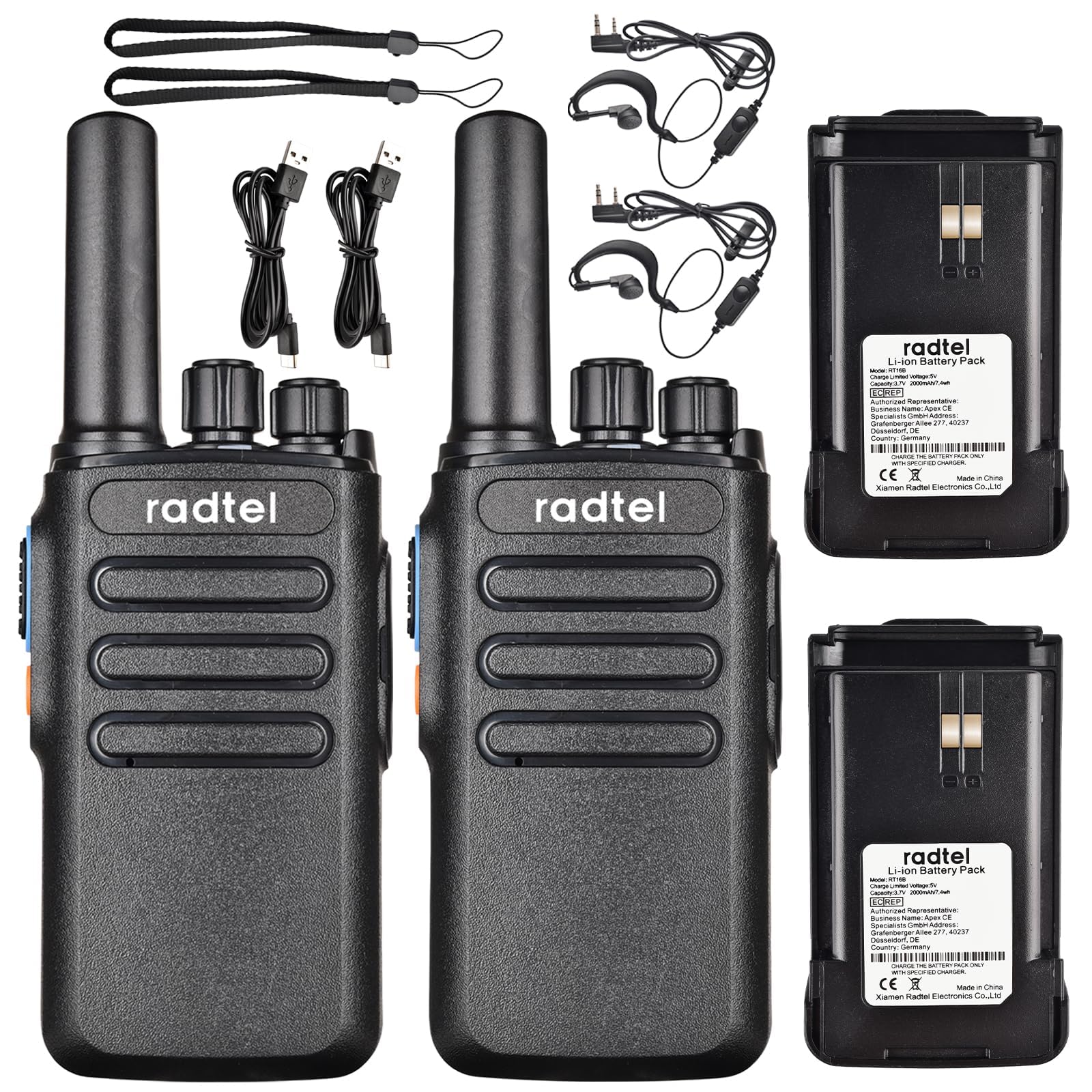
Image 1.1: Radtel RT16 Two Way Radios and included accessories.
2. Kuweka
2.1 Ufungaji wa Betri
- Hakikisha kuwa redio imezimwa.
- Tafuta sehemu ya betri nyuma ya redio.
- Ingiza betri kwenye sehemu hadi ibofye vizuri mahali pake.

Image 2.1: Battery compartment and belt clip attachment.
2.2 Belt Clip Attachment
- Panga klipu ya mkanda na nafasi zilizotengwa nyuma ya redio.
- Push the clip firmly until it locks into position.
2.3 Kuchaji Betri
The RT16 radios feature convenient USB-C charging. Use the provided USB-C cable to charge the radio. The charging port is located at the bottom of the radio.
- Connect the USB-C cable to the charging port on the radio.
- Connect the other end of the cable to a compatible USB power source (e.g., phone charger, power bank, car adapter).
- The indicator light on the radio will show charging status (refer to the LED indicator section for details).

Image 2.2: USB-C charging options for the RT16.
3. Maagizo ya Uendeshaji
3.1 Kuwasha/Kuzima na Kudhibiti Kiasi
To power on the radio, rotate the top-left knob clockwise until you hear a click and a voice prompt indicating the current channel. Continue rotating to adjust the volume. To power off, rotate the knob counter-clockwise until it clicks off.
3.2 Uchaguzi wa Chaneli
The RT16 has 16 available channels. To select a channel, rotate the top-right knob. The radio will announce the selected channel number.

Picha 3.1: Juu view of the RT16 showing power/volume and channel knobs.
Kitufe cha 3.3 cha Kushinikiza-Kuzungumza (PTT)
To transmit your voice, press and hold the large button on the side of the radio. Release the button to listen.
3.4 Muunganisho wa vifaa vya sauti
The radio supports a 2-pin K-connector headset for hands-free operation. Open the rubber cover on the side of the radio and plug in the headset connectors.

Image 3.2: Headset connection port on the RT16.
3.5 Voice Operated Exchange (VOX) Function
The VOX function allows for hands-free transmission without pressing the PTT button. The radio will automatically transmit when it detects your voice. This feature requires software activation for first use and offers 9 adjustable levels.

Image 3.3: Illustration of VOX function for hands-free use.
Activating VOX Mode
To activate VOX mode, hold down the small side button while powering on the radio. Continue holding until you hear a beep indicating activation.
Video 3.1: Demonstrates how to activate the voice control (VOX) mode on the Radtel RT16 radio.
Deactivating VOX Mode
To deactivate VOX mode, hold down the small side button while powering on the radio. Continue holding until you hear two beeps, confirming deactivation.
Video 3.2: Demonstrates how to deactivate the voice control (VOX) mode on the Radtel RT16 radio.
3.6 Language Switch Operation
The radio supports both Chinese and English voice prompts. To switch the language, turn the channel knob to channel 16. Then, power off the radio. While powering on, hold down the small side button until you hear a beep. This will switch the language mode.
Video 3.3: Instructions for switching between Chinese and English voice prompts on the Radtel RT16 radio.
4. Matengenezo
- Weka redio safi kwa kuifuta kwa laini, damp kitambaa. Epuka kutumia kemikali kali au vimumunyisho.
- Do not immerse the radio in water as it is not water resistant.
- Hifadhi redio mahali pa baridi, pakavu wakati haitumiki.
- Ensure the USB-C port cover is securely closed to prevent dust and moisture ingress.
5. Utatuzi wa shida
| Tatizo | Sababu inayowezekana | Suluhisho |
|---|---|---|
| Hakuna nguvu | Betri iko chini au haijasakinishwa ipasavyo. | Chaji betri au isakinishe tena kwa usalama. |
| Haiwezi kuwasiliana na redio zingine | Redio ziko kwenye chaneli tofauti au nje ya eneo. | Hakikisha redio zote mbili ziko kwenye chaneli moja. Sogea karibu na redio nyingine. Angalia kama kuna vizuizi. |
| Ubora duni wa sauti | Ishara dhaifu, kuingiliwa, au sauti ya chini. | Adjust volume. Move to an area with fewer obstructions. Change channel if interference is present. |
| VOX haifanyi kazi | VOX not activated or sensitivity too low. | Activate VOX mode (see Section 3.5). Adjust VOX sensitivity level via programming software. |
6. Vipimo
| Kipengele | Maelezo |
|---|---|
| Chapa | Radtel |
| Nambari ya Mfano | RT16 |
| Idadi ya Vituo | 16 |
| Masafa ya Marudio | 462/467 MHz (FRS Band) |
| Upeo wa Masafa ya Kuzungumza | Up to 5 Kilometers (open outdoor areas) |
| Nguvu ya Pato | 2W |
| Aina ya Betri | Ioni ya Lithium (2000mAh) |
| Inachaji | USB-C |
| Vipengele Maalum | Long Range, Type-C rechargeable battery, VOX Function, Channel Scan |
| Kiwango cha Upinzani wa Maji | Sio Sugu ya Maji |
| Vipimo vya Bidhaa | 1.37"D x 2.16"W x 5.9"H |
| Uzito wa Kipengee | Pauni 0.39 |
| Vifaa Sambamba | Other FRS two-way radios, Standard earpieces |
7. Udhamini
The Radtel RT16 FRS Two Way Radio comes with a 1-Year Warranty from the manufacturer, Xiamen Radtel Electronics Co.,Ltd.
8. Msaada
For further assistance or to explore other Radtel products, please visit the official Radtel Store: