
CHOYONG 097049251
Mwongozo wa Mtumiaji wa Redio ya Mtandao wa CHOYONG A8W
Portable Smart WIFI/4G Radio FM Receiver
Utangulizi
The CHOYONG A8W Internet Radio is a versatile and portable device designed to provide a rich listening experience. It offers seamless Wi-Fi and 4G connectivity, granting access to over 40,000 internet radio stations globally, alongside traditional FM stations. Its advanced voice search function allows for effortless navigation, while features like a rechargeable battery, alarm clock, and Micro SD card support enhance user convenience. This manual provides comprehensive instructions for setting up, operating, and maintaining your A8W radio.
Yaliyomo kwenye Kifurushi
- CHOYONG A8W Internet Radio Unit
- Kebo ya Kuchaji ya USB
- Mwongozo wa Mtumiaji (hati hii)
- (Kumbuka: Vifaa maalum vinaweza kutofautiana. Tafadhali angalia kifungashio cha bidhaa yako.)
Bidhaa Imeishaview

Kielelezo cha 1: Mbele view of the CHOYONG A8W Internet Radio, showing the speaker grille, display screen, and control buttons.

Kielelezo cha 2: Upande view illustrating the Micro SD card slot and the Type-C headphone port.
Vidhibiti na Bandari:
- Skrini ya Kuonyesha: Huonyesha taarifa za kituo, muda, hali ya betri, na chaguo za menyu.
- Spika Grille: Integrated multimedia speaker for audio output.
- Vifungo vya Kudhibiti: Includes OK, Play/Pause, Skip, Menu, News, Music, Favorite, Settings, and Voice Search.
- Volume/Navigation Knobs: Located on the side for adjusting volume and navigating menus.
- Slot ya Kadi ya SD ndogo: Kwa kucheza sauti files kutoka kwa kadi ya Micro SD.
- Aina ya C C: Used for charging the device and connecting Type-C headphones.
Sanidi
1. Kuchaji Kifaa
Before first use, fully charge the A8W radio. Connect the supplied USB charging cable to the Type-C port on the device and the other end to a standard USB power adapter (not included) or a computer's USB port. The charging indicator on the display will show the charging status.
2. Kuwasha/Kuzima
- Kuwasha: Press and hold the Power button (usually integrated with one of the side knobs) until the display lights up.
- Kuzima: Press and hold the Power button again until the device shuts down.
3. Network Connection (Wi-Fi/4G)
To access internet radio stations, the A8W requires a network connection.
- Kutoka kwenye menyu kuu, nenda kwenye Mipangilio.
- Chagua Mtandao or Usanidi wa Wi-Fi.
- The radio will scan for available Wi-Fi networks. Select your desired network from the list.
- Enter the Wi-Fi password using the on-screen keyboard and navigation buttons.
- Confirm the password and connect.
Important Note on Wi-Fi Security: For optimal compatibility, particularly with older firmware versions, this device may perform best with Wi-Fi networks configured to WPA2 security protocols. While WPA3 offers enhanced security, some devices may require a WPA2 setting for a stable connection. Consult your router's documentation for changing Wi-Fi security settings if needed.

Kielelezo cha 3: Zaidiview of key features including network connectivity options.
Maagizo ya Uendeshaji
1. Redio ya Mtandao
Access thousands of stations worldwide once connected to Wi-Fi or 4G.
- Nenda kwa Redio ya Mtandao kutoka kwa menyu kuu.
- Browse stations by continent, country, genre, or popularity.
- Chagua kituo ili kuanza kucheza.
- Tumia Kipendwa button to save frequently listened stations.
2. Utafutaji wa Sauti
The A8W features voice search for convenient station discovery.
- Bonyeza kwa Utafutaji wa Sauti button (microphone icon).
- Speak clearly into the device's microphone, stating the name of the station or a keyword (e.g., "Play VOA").
- The radio will search and display relevant results.

Kielelezo cha 4: Demonstrating the voice search functionality for easy station access.
3. Redio ya FM
To listen to local FM broadcasts:
- Nenda kwa Redio ya FM kutoka kwa menyu kuu.
- Use the navigation knobs or buttons to tune to your desired frequency (87.5-108MHz).
- The radio may automatically scan and save available stations upon first use.
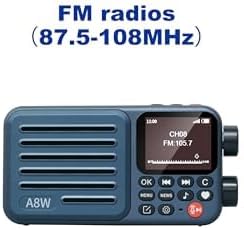
Kielelezo cha 5: Display showing FM radio mode with a tuned frequency.
4. Uchezaji wa Kadi Ndogo ya SD
The A8W supports playing audio files kutoka kwa kadi ya Micro SD.
- Insert a Micro SD card into the designated slot (refer to Figure 2).
- Nenda kwa Kicheza Muziki or Kadi ya SD kutoka kwa menyu.
- Browse and select audio files (MP3, AAC, etc.) to play.
5. Alarm Clock and Timer
Set alarms and timers for personalized use.
- Ufikiaji Kengele or Kipima muda settings from the main menu.
- Follow the on-screen prompts to set time, alarm sound (radio station or tone), and recurrence.
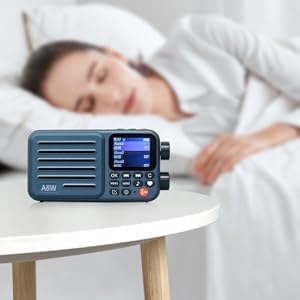
Kielelezo cha 6: The A8W functioning as an alarm clock on a bedside table.
6. Audio Output (Headphones)
For private listening, connect Type-C headphones to the dedicated port.
- Insert Type-C headphones into the Type-C port on the side of the device.
- The audio will automatically switch from the internal speaker to the headphones.
- Note: This device uses a Type-C port for audio output. Standard 3.5mm headphones are not directly compatible without an adapter.

Kielelezo cha 7: The compact size of the A8W and its compatibility with Type-C earphones.
Matengenezo
- Kusafisha: Tumia kitambaa laini na kikavu kusafisha sehemu ya nje ya redio. Usitumie visafishaji vya kioevu au vifaa vya kukwaruza.
- Utunzaji wa Betri: Ili kuongeza muda wa matumizi ya betri, epuka kutoa betri mara kwa mara. Chaji kifaa mara kwa mara, hata kama hakitumiki kwa muda mrefu.
- Hifadhi: Hifadhi redio mahali pa baridi, pakavu mbali na jua moja kwa moja na halijoto kali.
Kutatua matatizo
| Tatizo | Sababu inayowezekana | Suluhisho |
|---|---|---|
| Kifaa hakiwashi. | Betri ya chini; Kitufe cha nguvu hakijabonyezwa kwa usahihi. | Charge the device fully. Press and hold the Power button for a few seconds. |
| Haiwezi kuunganisha kwenye Wi-Fi. | Incorrect password; Router too far; Wi-Fi security protocol incompatibility. | Double-check password. Move closer to router. Ensure your router is set to WPA2 security for best compatibility. Restart router and radio. |
| Hakuna sauti kutoka kwa vipokea sauti vinavyobanwa kichwani. | Incorrect headphone type; Headphones not fully inserted. | Ensure you are using Type-C headphones. Insert the headphone plug firmly into the Type-C port. Check headphone functionality with another device. |
| Voice search not responding. | No internet connection; Microphone obstructed. | Verify Wi-Fi/4G connection. Ensure nothing is blocking the microphone opening. Speak clearly and close to the device. |
| Mapokezi duni ya FM. | Ishara dhaifu; Uingiliaji kati wa mazingira. | Relocate the radio to an area with better signal. Extend any built-in antenna if available. |
Vipimo
| Kipengele | Maelezo |
|---|---|
| Chapa | CHOYONG |
| Mfano | A8W (097049251) |
| Muunganisho | Wi-Fi, 4G network |
| Teknolojia ya Tuner | Internet Radio, FM Radio (87.5-108MHz) |
| Chanzo cha Nguvu | Battery Powered (Rechargeable 2000mAh battery) |
| Aina ya Kuonyesha | LCD |
| Pato la Sauti | Built-in multimedia speaker, Type-C headphone port |
| Msaada wa Hifadhi | Kadi ndogo ya SD |
| Vipimo (L x W x H) | Sentimita 7.62 x 3.3 x 13.97 (takriban inchi 3 x 1.3 x 5.5) |
| Uzito | Gramu 249.48 (takriban wakia 8.8) |
| Vipengele Maalum | Portable, Rechargeable, Voice Search, Alarm Clock, Timer Playback |
Udhamini na Msaada
For warranty information and technical support, please refer to the documentation provided with your purchase or contact CHOYONG customer service through their official website or the retailer from whom you purchased the product. Keep your proof of purchase for warranty claims.